一. json-server介绍
**json-server:**一个在前端本地运行,可以存储数据的server
**作用:**模拟接口,操作模拟数据
二. json-server的使用
2.1 安装
npm install json-server -D
- 安装完成之后,可以通过
json-server -h命令检查是否安装成功
json-server [options]

Options:
  --config, -c       指定 config 文件                  [默认: "json-server.json"]
  --port, -p         设置端口号                                   [default: 3000]
  --host, -H         设置主机                                   [默认: "0.0.0.0"]
  --watch, -w        监控文件                                           [boolean]
  --routes, -r       指定路由文件
  --static, -s       设置静态文件
  --read-only, --ro  只允许 GET 请求                                    [boolean]
  --no-cors, --nc    禁止跨域资源共享                                   [boolean]
  --no-gzip, --ng    禁止GZIP                                          [boolean]
  --snapshots, -S    设置快照目录                                     [默认: "."]
  --delay, -d        设置反馈延时 (ms)
  --id, -i           设置数据的id属性 (e.g. _id)                     [默认: "id"]
  --quiet, -q        不输出日志信息                                     [boolean]
  --help, -h         显示帮助信息                                       [boolean]
  --version, -v      显示版本号                                         [boolean]
2.2 使用
-
安装
json-server -
创建 db.json文件
{ "posts": [ { "id": 1, "title": "json-server", "author": "typicode" } ], "comments": [ { "id": 1, "body": "some comment", "postId": 1 } ], "profile": { "name": "typicode" } } -
运行
json-server db.jsonLoading db.json Done Resources http://localhost:3000/posts http://localhost:3000/comments http://localhost:3000/profile Home http://localhost:3000 -
在浏览器输入上述 url,即可访问响应的数据
三. 支持的方法
可以使用任何 HTTP方法
-
查询
- GET /list 获取列表
- GET /list/1 获取id=1的数据
-
新增
- POST /list 创建一个项目
-
修改
- PUT /list/1 更新一个id为1的数据
- PATCH /list/1 部分更新id为1的数据
-
删除
- DELETE /list/1 删除id为1的数据
注意:
-
当你发送POST,PUT,PATCH 或者 DELETE请求时,变化会自动安全的保存到你的db.json文件中。
-
你的请求体body应该是封闭对象。比如
{"name": "Foobar"} -
id不是必须的,在PUT或者PATCH方法中,任何的id值将会被忽略。
-
在POST请求中,id是可以被添加的,如果该值没有没占用,会使用该值,否则自动生成。
-
POST,PUT或者PATCH请求应该包含一个
Content-Type:application/json的header,来确保在请求body中使用json。
四. CRUD-Demo
以下的dmeo,我们都使用postman工具来完成
执行之前,先使用
json-server db.json运行服务器
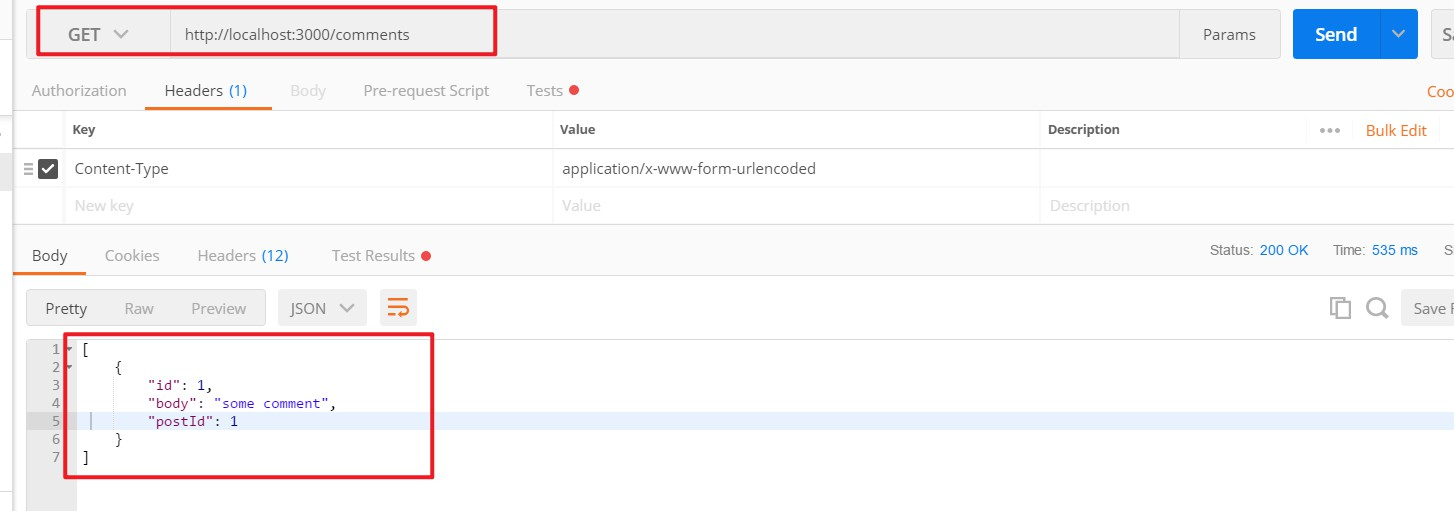
4.1 查询
- GET请求:
http://localhost:3000/comments
4.2 新增
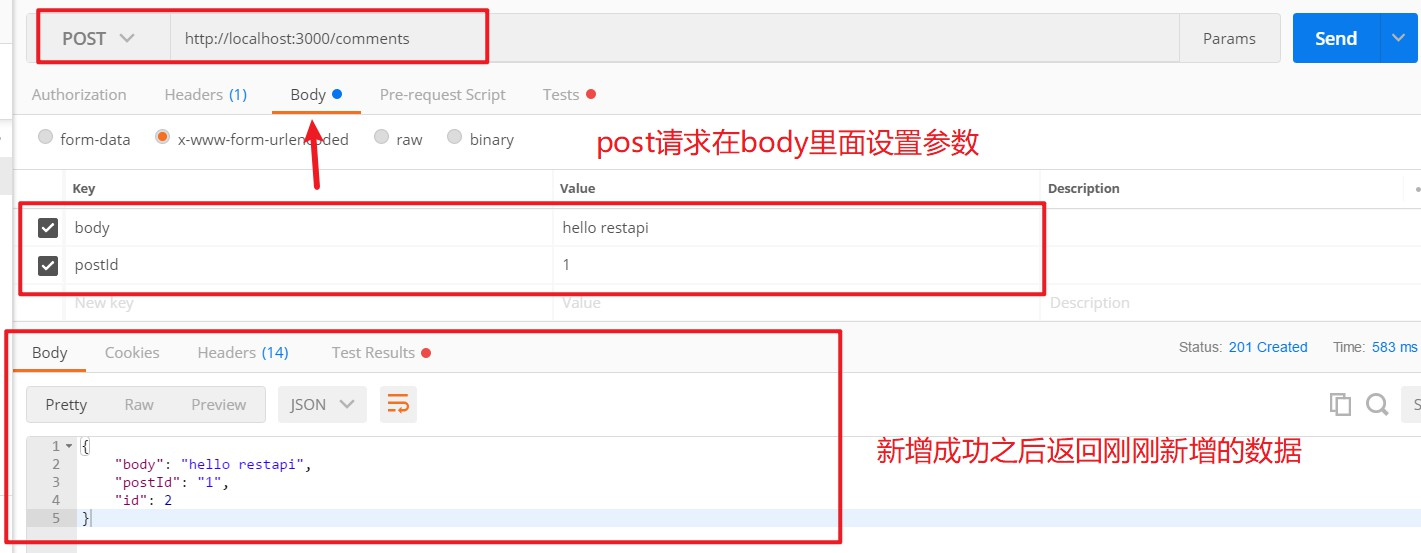
- POST请求:
http://localhost:3000/comments - 参数:
{"body":"hello restapi","postId":1}
4.3 修改
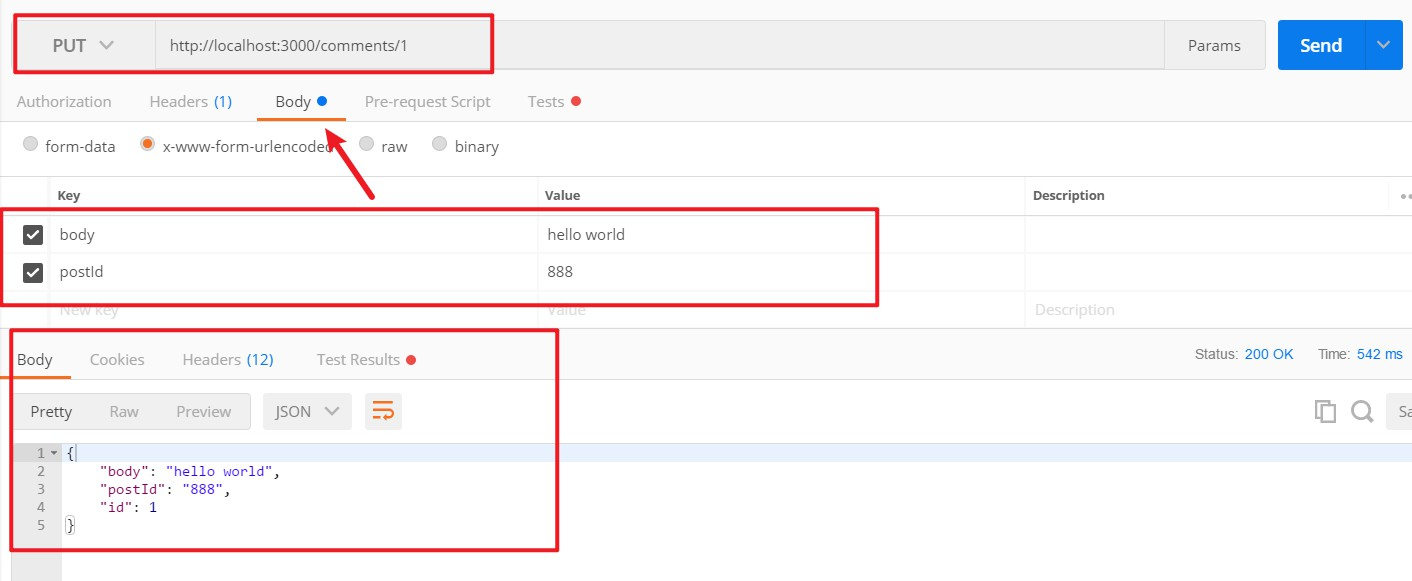
- PUT请求:
http://localhost:3000/comments/1 - 参数:
{"body":"hello world","postId":888}
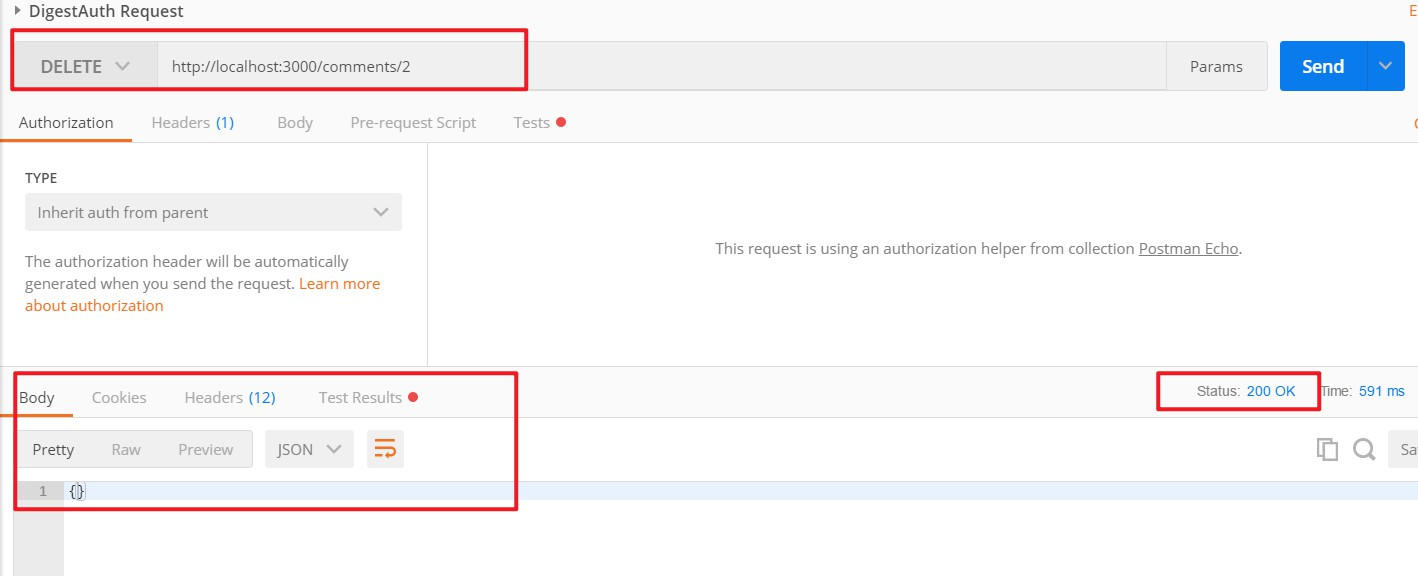
4.4 删除
- DELETE请求:
http://localhost:3000/comments/2
4.5 使用ajax发送增删改查请求
我们还可以通过jQuery的ajax来发送操作数据的请求
 //新增
$.ajax({
    type: 'POST',
    url: 'http://localhost:3000/comments',
    data:{
        body:'hello world',
        postId:888
    },
    success: function (data) {
        console.log(data)
    }
})

//查询
$.ajax({
    type: 'GET',
    url: 'http://localhost:3000/comments',
    success: function (data) {
        console.log(data)
    }
})

//修改
$.ajax({
    type: 'PUT',
    url: 'http://localhost:3000/comments/1',
    data:{
        body:'hello world',
        postId:888
    },
    success: function (data) {
        console.log(data)
    }
})

//删除
$.ajax({
    type: 'DELETE',
    url: 'http://localhost:3000/comments/1',
    success: function (data) {
        console.log(data)
    }
})
五. 过滤
我们可以通过在URL后面加上参数,来达到过滤数据的目的
例如:
http://localhost:3000/comments/1:查询id为1的数据,返回一个对象http://localhost:3000/comments?name=zhangsan:返回一个数组,name值都为zhangsan
六. 注意
如果需要使用 json-server 模拟多层路由嵌套,无法通过 db.json中数据的多层嵌套,达到模拟多层路由嵌套的目的。
也就是说,路由只能匹配到 db.json这个json最外层的key值。而里层的key值,都不会被路由匹配