

原因解决方案部署在项目中配置缺点
最近在公司写一些job,公司使用的是spring boot提供的注解形式实现的。
这样在自测的时候很麻烦,而且测试提测的时候需要修改cron表达式->提交git->jenkins打包重启
这样在自测的时候很麻烦,而且测试提测的时候需要修改cron表达式->提交git->jenkins打包重启
查阅资料后决定选用任务调度平台,有很多优秀的任务调度平台,选择xxl-job是因为文档清晰、使用简单、基于远程RPC调用、官方提供spring boot例子。
首先需要执行官网提供的sql
使用docker下载镜像 这里最新版本是2.0.2
使用docker下载镜像 这里最新版本是2.0.2
docker
pull
xuxueli
/xxl-job-admin
:2.0.2
然后运行docker镜像 注意修改参数
docker
run -e PARAMS
="--spring.datasource.url=jdbc:mysql://数据库地址:3306/xxl-job?Unicode=true&characterEncoding=UTF-8 --spring.datasource.password=数据库密码 --spring.mail.host=smtp.163.com --spring.mail.username=邮箱名 --spring.mail.password=邮箱密码 --xxl.job.login.password=登录密码"
-p 8080:8080 -v /tmp:/data/applogs --name xxl-job-admin --privileged=true -d xuxueli/xxl-job-admin:2.0.2注意一些参数如邮箱可以省略
这里配置使用官网示例中的spring boot配置
@Configuration
public class XxlJobConfig { private Logger logger = LoggerFactory.getLogger(XxlJobConfig.class
); @Value
("${xxl.job.admin.addresses}"
) private String
adminAddresses; @Value
("${xxl.job.executor.appname}"
) private String
appName; @Value
("${xxl.job.executor.ip}"
) private String
ip; @Value
("${xxl.job.executor.port}"
) private int
port; @Value
("${xxl.job.accessToken}"
) private String
accessToken; @Value
("${xxl.job.executor.logpath}"
) private String
logPath; @Value
("${xxl.job.executor.logretentiondays}"
) private int
logRetentionDays; @Bean
(initMethod = "start"
, destroyMethod = "destroy"
) public XxlJobSpringExecutor xxlJobExecutor() { logger.info(">>>>>>>>>>> xxl-job config init."
); XxlJobSpringExecutor xxlJobSpringExecutor = new
XxlJobSpringExecutor(); xxlJobSpringExecutor.setAdminAddresses(adminAddresses); xxlJobSpringExecutor.setAppName(appName); xxlJobSpringExecutor.setIp(ip); xxlJobSpringExecutor.setPort(port); xxlJobSpringExecutor.setAccessToken(accessToken); xxlJobSpringExecutor.setLogPath(logPath); xxlJobSpringExecutor.setLogRetentionDays(logRetentionDays); return
xxlJobSpringExecutor; }}官网给出的执行器配置说明
#
## 调度中心部署跟地址 [选填]:如调度中心集群部署存在多个地址则用逗号分隔。执行器将会使用该地址进行"执行器心跳注册"和"任务结果回调";为空则关闭自动注册;xxl.job.admin.addresses=http://127.0.0.1:8080/xxl-job-admin#
## 执行器AppName [选填]:执行器心跳注册分组依据;为空则关闭自动注册xxl.job.executor.appname=xxl-job-executor-sample#
## 执行器IP [选填]:默认为空表示自动获取IP,多网卡时可手动设置指定IP,该IP不会绑定Host仅作为通讯实用;地址信息用于 "执行器注册" 和 "调度中心请求并触发任务";xxl.job.executor.ip=#
## 执行器端口号 [选填]:小于等于0则自动获取;默认端口为9999,单机部署多个执行器时,注意要配置不同执行器端口;xxl.job.executor.port=9999#
## 执行器通讯TOKEN [选填]:非空时启用;xxl.job.accessToken=#
## 执行器运行日志文件存储磁盘路径 [选填] :需要对该路径拥有读写权限;为空则使用默认路径;xxl.job.executor.logpath=/data/applogs/xxl-job/jobhandler#
## 执行器日志保存天数 [选填] :值大于3时生效,启用执行器Log文件定期清理功能,否则不生效;xxl.job.executor.logretentiondays=-1执行器官方给出了不少执行器,但是要在原有项目上改造需要自己写执行器,当然可以使用一个任务写一个执行器,这样执行器就会很多,很难以维护。所以这里采用反射的方式
首先是全类名执行器使用反射的方式
首先是全类名执行器使用反射的方式
@Component
@JobHandler
(value = "BeanByClassHandler"
)public class BeanByClassHandler extends IJobHandler { @Autowired
private
ApplicationContext
applicationContext; //根据完整类名 通过反射执行指定方法
@Override
public ReturnT
<String
> execute(String
param) throws
Exception
{ XxlJobLogger
.log(param); if
(param == null
|| param.equals(""
)) { return
new
ReturnT
<>(ReturnT
.FAIL_CODE
, "参数不能为空!"
); } String
[] split = param.split(","
); if
(split == null
|| split.length < 2) { return
new
ReturnT
<>(ReturnT
.FAIL_CODE
, "参数格式错误,应为 完整类名,方法名"
); } Class
taskBeanClass = null
; try
{ taskBeanClass = Class
.forName(split[0]); } catch
(Exception
e) { return
new
ReturnT
<>(ReturnT
.FAIL_CODE
, "类"
+ split[0] + "不存在"
); } Method
method = null
; try
{ method = taskBeanClass.getMethod(split[1]); } catch
(Exception
e) { return
new
ReturnT
<>(ReturnT
.FAIL_CODE
, "方法"
+ split[1] + "不存在"
); } Object
o = applicationContext.getBean(taskBeanClass); if
(o == null
) { return
new
ReturnT
<>(ReturnT
.FAIL_CODE
, "在Application中类不存在"
); } try
{ method.invoke(o); } catch
(Exception
e) { return
new
ReturnT
<>(ReturnT
.FAIL_CODE
, "方法执行失败"
); } return
new
ReturnT
<>(ReturnT
.SUCCESS_CODE
, "执行成功"
); }}这样全类名很长所以可以使用spring管理beanName获得实例进行反射
@Component
@JobHandler
(value = "BeanByNameHandler"
)public class BeanByNameHandler extends IJobHandler { @Autowired
private
ApplicationContext
applicationContext; //根据spring管理的bean name获取指定类
@Override
public ReturnT
<String
> execute(String
param) throws
Exception
{ XxlJobLogger
.log(param); if
(param == null
|| param.equals(""
)) { return
new
ReturnT
<>(ReturnT
.FAIL_CODE
, "参数不能为空!"
); } String
[] split = param.split(","
); if
(split == null
|| split.length < 2) { return
new
ReturnT
<>(ReturnT
.FAIL_CODE
, "参数格式错误,应为bean名称,方法名"
); } Object
o = applicationContext.getBean(split[0]); if
(o == null
){ return
new
ReturnT
<>(ReturnT
.FAIL_CODE
,"类在applicationContext中不存在"
); } Method
method; try
{ method = o.getClass().getMethod(split[1]); }catch
(Exception
e){ return
new
ReturnT
<>(ReturnT
.FAIL_CODE
,"方法"
+split[1]+"不存在"
); } try
{ method.invoke(o); }catch
(Exception
e){ return
new
ReturnT
<>(ReturnT
.FAIL_CODE
,"调用方法失败"
); } return
new
ReturnT
<>(ReturnT
.SUCCESS_CODE
,"调用job成功"
); }}调用在web界面新建任务 参数为 全类名,方法名即可。如下图所示
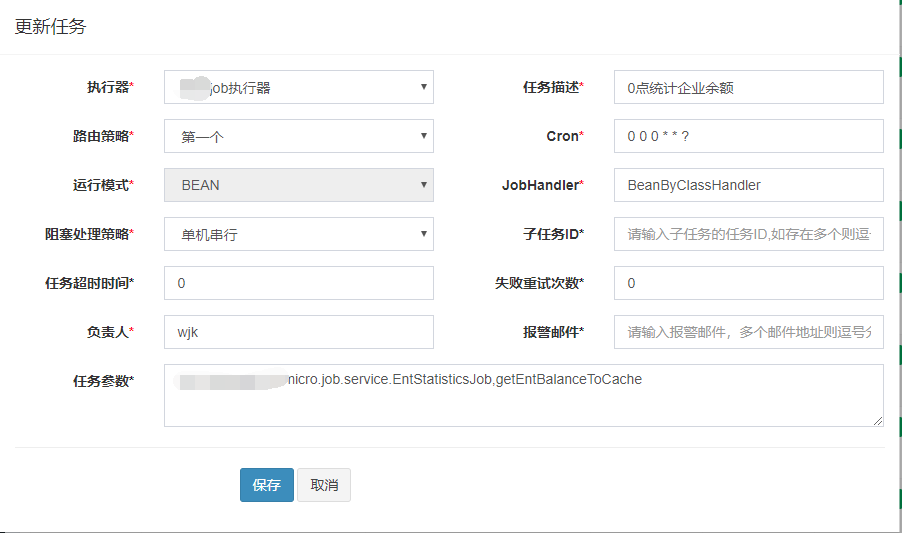
当然也可以执行shell脚本

当然也可以执行shell脚本
- xxl-job只支持mysql数据库,公司使用的Oracle 所以docker需要运行一个mysql数据库
- xxl-job截至2.0.2版本没有提供多用户及权限管理
