vue全家桶做单页面,使用webpack进行模块化打包。以下对使用的知识点进行总结,先来看几个页面图
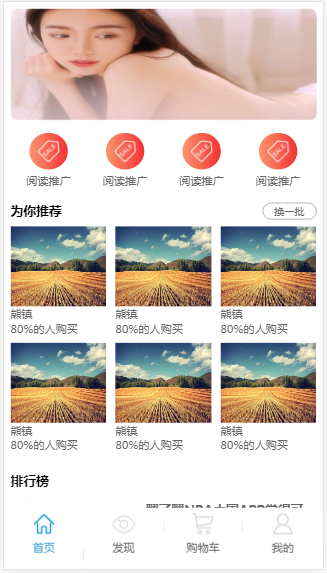
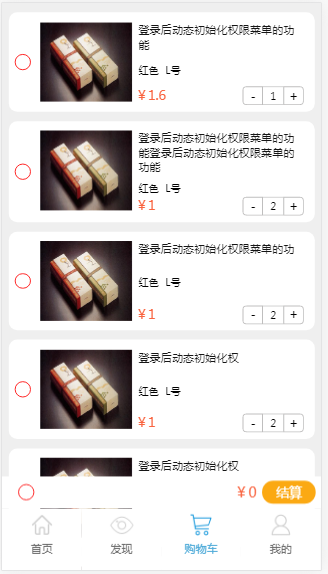
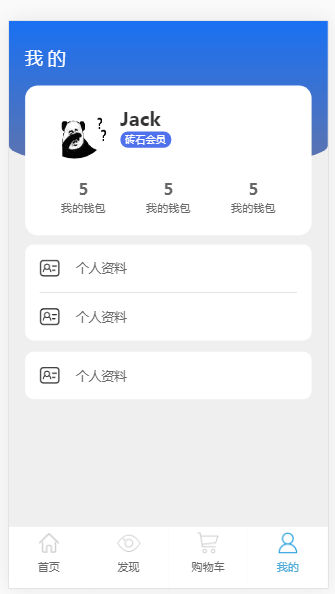
页面的整体的布局采用 flex 弹性伸缩和 rem 适配的方式。
底部的按钮使用 fixed(绝对定位) 固定,使用 vue-router 切换页面,使用 router-link 的linkActiveClass 属性设置css样式, 路由加载使用 @babel/plugin-syntax-dynamic-import 作为插件,采用 import () => {路径} 的异步方式
const router = new Router({
    linkActiveClass: 'is_select',
    linkExactActiveClass: '',
    mode:'history',
    routes:[........],
    scrollBehavior(to, from, savedPosition){
      return new Promise((resolve, reject) => {
         resolve({x:0,y:0});
        });
    }});


<template>
 <div class="bottom">
    <div class="bnav">
     <router-link to="/news">
          <i class="home"></i>
            <span>首页</span>
     </router-link>
     <router-link to="/recom">
          <i class="find"></i>
          <span>发现</span>
      </router-link>
      <router-link to="/cart">
           <i class="cart"></i>
           <span>购物车</span>
      </router-link>
      <router-link to="/mine">
          <i class="mine"></i>
          <span>我的</span>
       </router-link>
 </div>
</div>
</template>
<style lang="scss">
.bottom{
    position: fixed;       、
    bottom: -3px;
    left: 0;
    width: 100%;
    .bnav{
        display: flex;
        justify-content: space-around;
         a{
             height: 2rem;
             width: 25%;
             background: #fff;
             text-align: center;
             display: flex;
             flex-direction: column;
            i{
                display: block;
                height: 1rem;
                width: 30%;
                margin: 0 auto;
            }
            .home{
                background: url('/src/images/home.png')
                no-repeat center center;
                background-size: contain;
             }
          .find{
                background: url('/src/images/find.png') no-repeat center center;
                  background-size: contain;
            }
            .cart{
                 background: url('/src/images/cart.png') no-repeat center center;
                    background-size: contain;
                }
            .mine{
                background: url('/src/images/mine.png') no-repeat center center;
                 background-size: contain;
            }
             }
            .is_select{
              color: #4ba9d8;
                .home{
                      background: url('/src/images/shome.png') no-repeat center center;
                   background-size: contain;
                }
                .find{
                  background: url('/src/images/sfind.png') no-repeat center center;
                      background-size: contain;
                }
                 .cart{
                     background: url('/src/images/scart.png') no-repeat center center;
                     background-size: contain;
                 }
                .mine{
                     background: url('/src/images/smine.png') no-repeat center center;
                    background-size: contain;
                    }
                 }
              }
        }
</style>
购物车使用vuex做状态管理,包含state,getter, mutations 等部分
import Vue from 'vue';import Vuex from 'vuex';Vue.use(Vuex);
const store = new Vuex.Store({
            state:{
                count:1,
                goods:[
                    { id:'1', productName: '苹果', price:'1.6元/斤', total:30, checked:false },
                    {id:'2',productName: '梨',price:'1元/斤',total:20,checked:false }
                    ],
                cart:[
                    {id:'1',productName: '登录后动态初始化权限菜单的功能',price:1.6,  num:1, checked:false },
                    {id:'2',productName: '登录后动态初始化权限菜单的功能登录后动态初始化权限菜单的功能', price:1, num:2, checked:false }
                 ]},
                getters:{
                    getGoods: function(state){ return state.cart;  },
                    totalPrice: function(state){
                        let price = 0;
                        state.cart.forEach((item, index, arr) => {
                            if(item.checked){
                                 price += item.price * item.num;
                                 }
                         });
                         //console.log(Math.round(price*100)/100);
                         return Math.round(price*100)/100;
                          } },
                 mutations:{
                     decrement(state, data){
                         const res = state.cart.find((item) => {
                                 if(item.id == data.id)
                                    return item;
                                    });
                         if(res.num<=1){
                                alert('宝贝不能减少!');
                                return ;
                                 }
                        res.num--;
                        },
                    increment(state, data){
                            const res = state.cart.find((item)=>{
                                if(item.id == data.id){
                                    return item;
                                }
                             });
                        res.num++;
                        //console.log(res);
                    },
                    changeCheck(state, data){
                        console.log(data);
                        const res = state.cart.find((item) => {
                        if(item.id == data['0'].id)
                                return item;
                        });
                        res.checked = true;
                        },
                    changeSelect(state, selectType){
                         state.cart.map((item, index, arr) => {
                                item.checked = selectType;
                            })
                            },
                     getSelect(state){
                           return state.cart.every((item, index, array) => {
                                    return item.checked == true;
                            });
                            }
                    }});
            export default store;

//cart.vue
import {mapGetters, mapState, mapMutations} from 'vuex';

methods:{
    ...mapMutations(['changeCheck','decrement','increment','changeSelect','getSelect'])
}
computed: {
     ...mapState(['count']),
     ...mapGetters(['getGoods', 'totalPrice'),
       allSelect:{
            get:function(){
                return this.$store.state.cart.every((item, index, array) => {
                  return item.checked == true;
                });
            },
            set:function(val){
                 return this.$store.state.cart.map((item, index, array) => {
                      return item.checked = val;
            });
        }
    }
 }
插件swiper做轮播管理
import Swiper from 'swiper';import 'swiper/dist/css/swiper.min.css';

mounted() {
    setTimeout(()=>{
        var mySwiper = new Swiper('.swiper-container', {
              autoplay: true,//可选选项,自动滑动
                 loop: true
        })},100);
      }
以上就是主要的页面用到的主要点,具体代码看 github