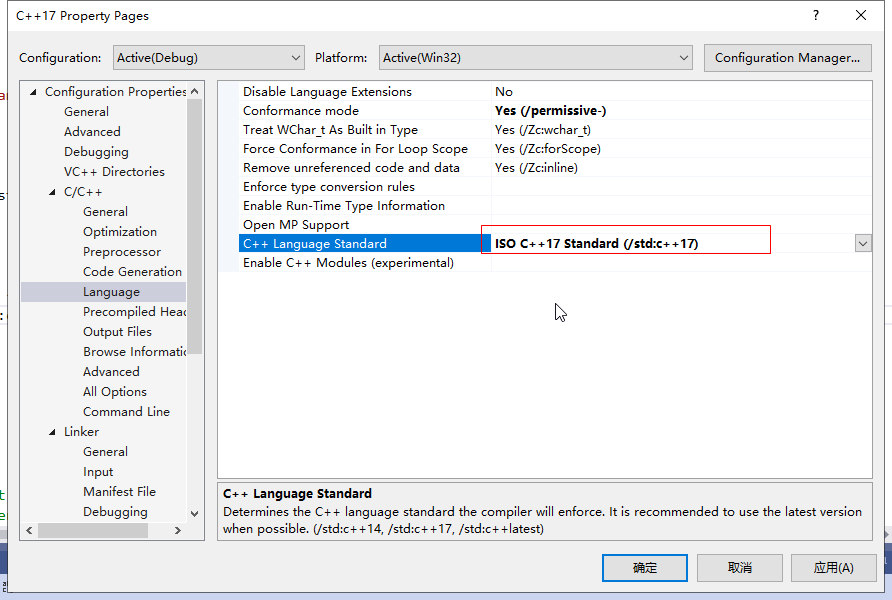
- 在 VS2019 中通过 如下步骤打开 C++17 的支持:
- Open the project's Property Pages dialog box. For details, see Set C++ compiler and build properties in Visual Studio.
- Select Configuration Properties, C/C++, Language.
- In C++ Language Standard, choose the language standard to support from the dropdown control, then choose OK or Apply to save your changes.
struct MyType {
std::string name;
int type;
};
std::vector<MyType> getMyTypes() {
return std::vector<MyType> { {"name1", 1}, { "name2", 2 }, { "name3", 3 }};
}
void dumpTypesCpp11() {
std::cout << __FUNCTION__ << std::endl;
for (const auto& v : getMyTypes()) {
std::cout << v.name << ": " << v.type << std::endl;
}
}
void dumpTypesCpp17() {
std::cout << __FUNCTION__ << std::endl;
for (const auto& [name, type] : getMyTypes()) {
std::cout << name << ": " << type << std::endl;
}
}
int main()
{
dumpTypesCpp11();
dumpTypesCpp17();
}