原文地址:mp.weixin.qq.com/s?__biz=Mzg…
Masonry是一个轻量级的布局框架。通过链式调用的方式来描述布局,是排版代码更加简洁易读。masonry支持iOS和Mac OS X。
为什么不使用NSLayoutConstraints呢?
在底层,自动布局是一种强大且灵活的布局试图的方式。但是,通过代码创建约束是冗长,且不具有描述性。看下面的例子:
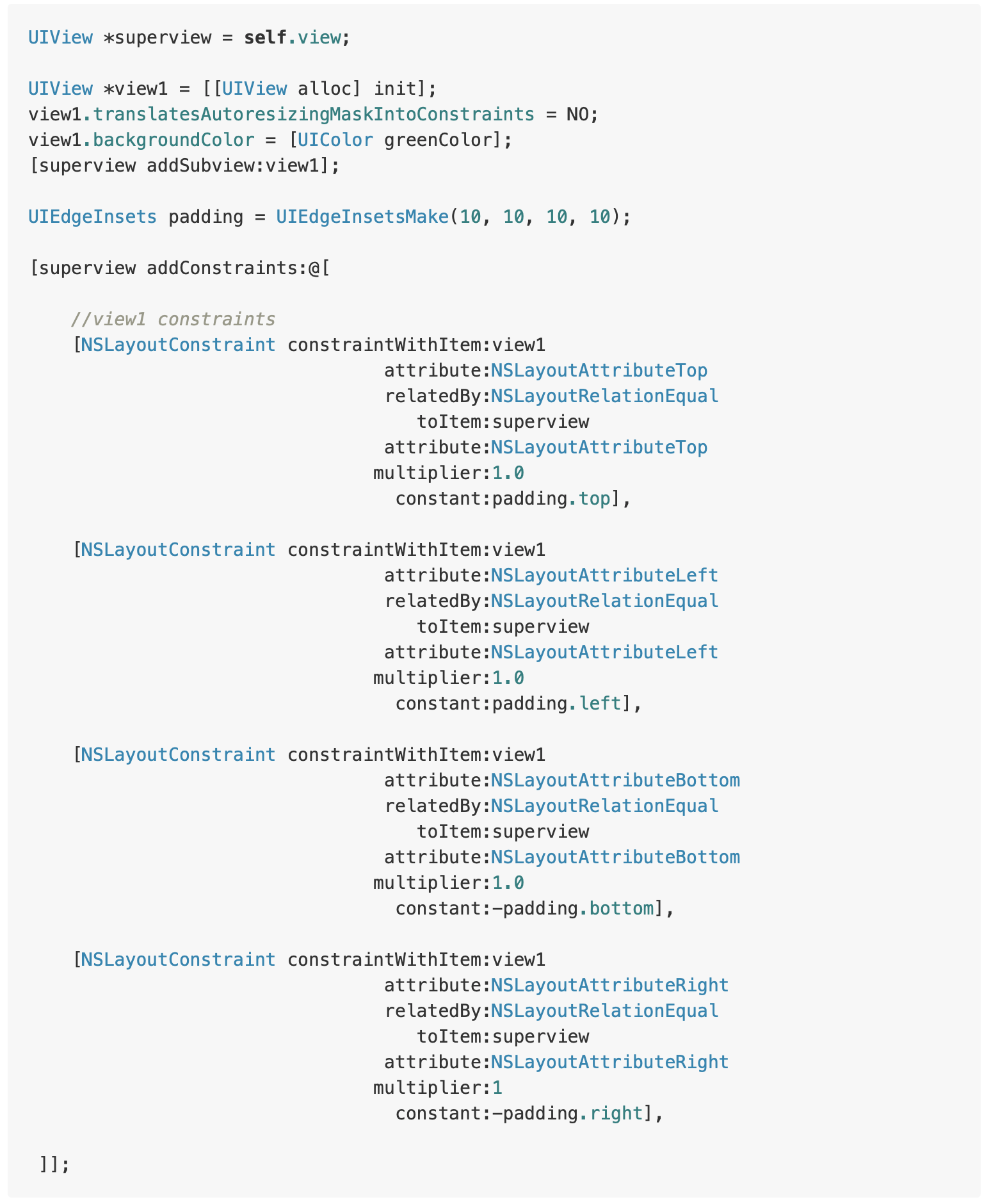
由这个简单的例子可以看出,使用NSLayoutConstraints会使代码冗余且不易读。另一个选择是使用VFL,它一点儿不冗余,然而ASCII类型语法有其自身的缺陷,并且也难以刻画,如:NSLayoutConstraint constraintsWithVisualFormat:返回一个数组。
准备认识一下Maker吧!
使用MASConstraintMaker实现和上面例子一样的约束:
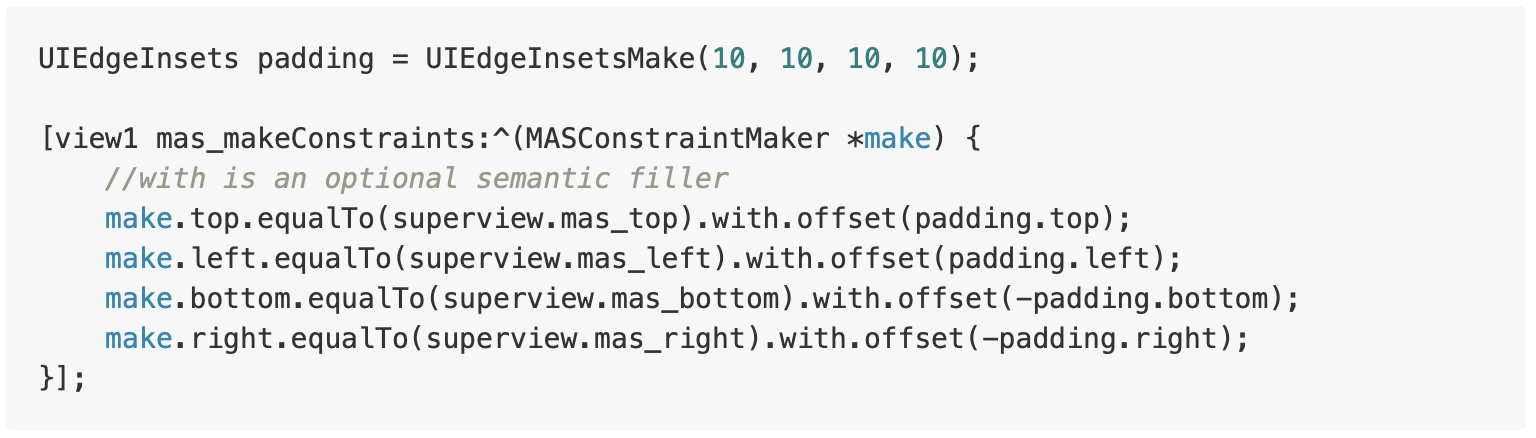

开始Masonry学习吧!
- equalTo:同NSLayoutRelationEqual
- lessThanOrEqualTo:同NSLayoutRelationLessThanOrEqual
- greaterThanOrEqualTo:NSLayoutRelationGreaterThanOrEqual
这三个约束等式接受一个参数,可以是下面的任一个:
1、MASViewAttribute

| MASViewAttribute | NSLayoutAttribute |
|---|---|
| view.mas_left | NSLayoutAttributeLeft |
| view.mas_right | NSLayoutAttributeRight |
| view.mas_top | NSLayoutAttributeTop |
| view.mas_bottom | NSLayoutAttributeBottom |
| view.mas_leading | NSLayoutAttributeLeading |
| view.mas_trailing | NSLayoutAttributeTrailing |
| view.mas_width | NSLayoutAttributeWidth |
| view.mas_height | NSLayoutAttributeHeight |
| view.mas_centerX | NSLayoutAttributeCenterX |
| view.mas_centerY | NSLayoutAttributeCenterY |
| view.mas_baseline | NSLayoutAttributeBaseLine |
2、UIView/NSView
如果view.left大于等于label.left,则实现如下:

3、NSNumber 自动布局允许宽、高设置为常量值。如果设置视图的宽度介于指定范围,实现如下:
//width >= 200 && width <= 400
make.width.greaterThanOrEqualTo(@200);
make.width.lessThanOrEqualTo(@400);
然而自动布局不允许为对齐属性(如:left、right、centerY等)设置常量值。因此,如果为这个对象传递一个NSNumber对象,Masonry会自动将其转换成相对于父视图的约束关系:

除了使用NSNumber外,你还可以使用基本类型,结构体等来构建约束,如:


优先级
.priority:允许你指定一个确切的优先级。
.priorityHigh:同UILayoutPriorityDefaultHigh。
.priorityMedium:介于高和低之间的优先级。
.priorityLow:同UILayoutPriorityDefaultLow。
优先级可以追加到约束链的末尾,如:
make.left.greaterThanOrEqualTo(label.mas_left).with.priorityLow();

make.top.equalTo(label.mas_top).with.priority(600);
组合约束
Masonry提供了一些便利的方法,允许你在同一时间创建多个约束。这通过MASCompositeConstraints来实现。
- edges
// make top, left, bottom, right equal view2
make.edges.equalTo(view2);

// make top = superview.top + 5, left = superview.left + 10,
// bottom = superview.bottom - 15, right = superview.right - 20
make.edges.equalTo(superview).insets(UIEdgeInsetsMake(5, 10, 15, 20))
- size
// make width and height greater than or equal to titleLabel
make.size.greaterThanOrEqualTo(titleLabel)

// make width = superview.width + 100, height = superview.height - 50
make.size.equalTo(superview).sizeOffset(CGSizeMake(100, -50))
- center
// make centerX and centerY = button1
make.center.equalTo(button1)

// make centerX = superview.centerX - 5, centerY = superview.centerY + 10
make.center.equalTo(superview).centerOffset(CGPointMake(-5, 10))
为了提高可读性,你可以将视图的属性链接起来:
// All edges but the top should equal those of the superview
make.left.right.and.bottom.equalTo(superview);
make.top.equalTo(otherView);
坚持下去
有时候你需要修改现有的约束,以便激活或删除/修改约束。在Masonry中,有几个不不同的方法来更新约束:
1、引用
通过将约束表达式的结果赋给局部变量或类属性,可以保留特定约束的引用。还可以通过将它们存储在数组中引用多个约束。
// in public/private interface
@property (nonatomic, strong) MASConstraint *topConstraint;

...

// when making constraints
[view1 mas_makeConstraints:^(MASConstraintMaker *make) {
    self.topConstraint = make.top.equalTo(superview.mas_top).with.offset(padding.top);
    make.left.equalTo(superview.mas_left).with.offset(padding.left);
}];

...
// then later you can call
[self.topConstraint uninstall];
2、mas_updateConstraints
如果你只是更新的约束可以使用便捷方法mas_updateconstraints来代替mas_makeconstraints,如:
// this is Apple's recommended place for adding/updating constraints
// this method can get called multiple times in response to setNeedsUpdateConstraints
// which can be called by UIKit internally or in your code if you need to trigger an
update to your constraints
- (void)updateConstraints {
    [self.growingButton mas_updateConstraints:^(MASConstraintMaker *make) {
        make.center.equalTo(self);
        make.width.equalTo(@(self.buttonSize.width)).priorityLow();
        make.height.equalTo(@(self.buttonSize.height)).priorityLow();
        make.width.lessThanOrEqualTo(self);
        make.height.lessThanOrEqualTo(self);
    }];

    //according to apple super should be called at end of method
    [super updateConstraints];
}
3、mas_remakeConstraints
mas_updateConstraints对于更新一系列约束是有用的,但是除了更新常量之外都会让然精疲力尽。这样mas_remakeConstraints就出现了。
mas_remakeConstraints和mas_updateConstraint是相似的,但是不像mas_updateConstraint更新常量值,而是移除所有的约束然后在重装一遍。这允许您提供不同的约束,而不必保留对要移除约束的引用。
- (void)changeButtonPosition {
    [self.button mas_remakeConstraints:^(MASConstraintMaker *make) {
        make.size.equalTo(self.buttonSize);

        if (topLeft) {
        	make.top.and.left.offset(10);
        } else {
        	make.bottom.and.right.offset(-10);
        }
    }];
}
应该在哪儿创建约束?
@implementation DIYCustomView

- (id)init {
    self = [super init];
    if (!self) return nil;

    // --- Create your views here ---
    self.button = [[UIButton alloc] init];

    return self;
}

// tell UIKit that you are using AutoLayout
+ (BOOL)requiresConstraintBasedLayout {
    return YES;
}

// this is Apple's recommended place for adding/updating constraints
- (void)updateConstraints {

    // --- remake/update constraints here
    [self.button remakeConstraints:^(MASConstraintMaker *make) {
        make.width.equalTo(@(self.buttonSize.width));
        make.height.equalTo(@(self.buttonSize.height));
    }];

    //according to apple super should be called at end of method
    [super updateConstraints];
}

- (void)didTapButton:(UIButton *)button {
    // --- Do your changes ie change variables that affect your layout etc ---
    self.buttonSize = CGSize(200, 200);

    // tell constraints they need updating
    [self setNeedsUpdateConstraints];
}

@end
扫一扫关注公众号,获取更多iOS相关内容: