

版本
kubernetes:1.13.x
rook:1.1
mysql:5.7
参考
time.geekbang.org/column/arti…
集群的状态
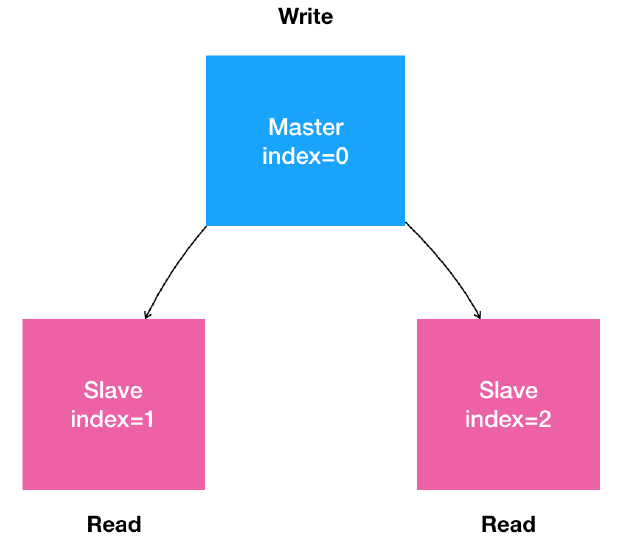
- 是一个主从复制的mysql集群
- 有1个节点,多个从节点
- 从节点能水平扩展
- 所有的写操作,只能在主节点执行
- 读操作可以在所有节点执行
部署rook
我们使用rook作为mysql存储
#下载rook
[root@host1 ~]#git clone https://github.com/rook/rook.git
[root@host1 ~]# cd cd rook-master/cluster/examples/kubernetes/ceph/
[root@host1 ceph]# kubectl create -f common.yaml
[root@host1 ceph]kubectl create -f operator.yaml
[root@host1 ceph]kubectl create -f cluster.yaml
等一分钟左右
[root@host1 ceph]kubectl creat -f operator.yaml
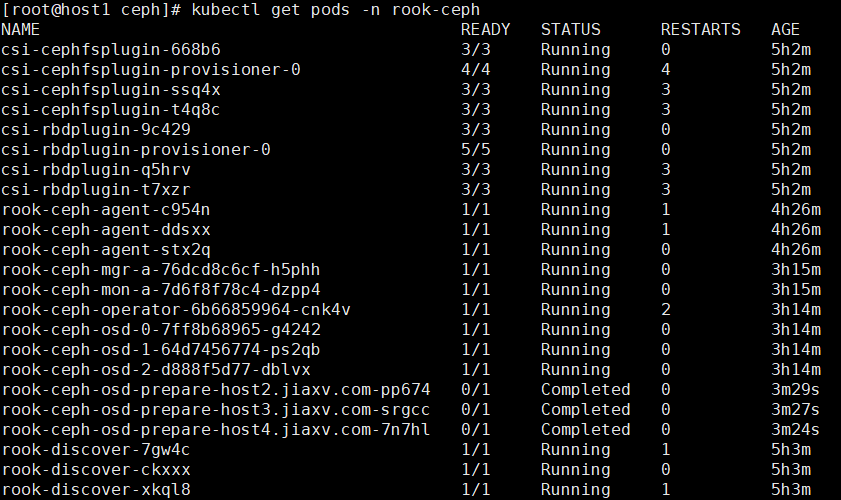
注意是否有osd这几行,处于Complate状态是正常的。
如果有问题的话参考:rook.io/docs/rook/v…
apiVersion: ceph.rook.io/v1
kind: CephBlockPool
metadata:
  name: replicapool
  namespace: rook-ceph
spec:
  failureDomain: host
  replicated:
    size: 3
---
apiVersion: storage.k8s.io/v1
kind: StorageClass
metadata:
   name: rook-ceph-block
provisioner: ceph.rook.io/block
parameters:
  blockPool: replicapool
  # The value of "clusterNamespace" MUST be the same as the one in which your rook cluster exist
  clusterNamespace: rook-ceph
  # Specify the filesystem type of the volume. If not specified, it will use `ext4`.
  fstype: xfs
# Optional, default reclaimPolicy is "Delete". Other options are: "Retain", "Recycle" as documented in https://kubernetes.io/docs/concepts/storage/storage-classes/
reclaimPolicy: Retain
# Optional, if you want to add dynamic resize for PVC. Works for Kubernetes 1.14+
# For now only ext3, ext4, xfs resize support provided, like in Kubernetes itself.
allowVolumeExpansion: true
在官方API文档上说明,要使用Flex驱动创建卷的话,要设置operator.yaml中ROOK_ENABLE_FLEX_DRIVER=true
[root@host1 ceph]# kubectl edit deployment -n rook-ceph
[root@host1 flex]# kubectl create storageclass.yaml
部署Mysql
ConfigMap
apiVersion: v1
kind: ConfigMap
metadata:
  name: mysql
  labels:
    app: mysql
data:
  master.cnf: |
    # Apply this config only on the master.
    [mysqld]
    log-bin
  slave.cnf: |
    # Apply this config only on slaves.
    [mysqld]
    super-read-only
    skip-grant-tables
kubectl create -f mysql-configmap.yaml
Service
# Headless service for stable DNS entries of StatefulSet members.
apiVersion: v1
kind: Service
metadata:
  name: mysql
  labels:
    app: mysql
spec:
  ports:
  - name: mysql
    port: 3306
  clusterIP: None
  selector:
    app: mysql
---
# Client service for connecting to any MySQL instance for reads.
# For writes, you must instead connect to the master: mysql-0.mysql.
apiVersion: v1
kind: Service
metadata:
  name: mysql-read
  labels:
    app: mysql
spec:
 selector:
  app: mysql
 type: NodePort
 ports:
  - port: 3306
    targetPort: 3306
    nodePort: 30002
    protocol: TCP
---
apiVersion: v1
kind: Service
metadata:
  name: mysql-master
  labels:
   app: mysql
spec:
  selector:
    app: mysql
  type: NodePort
  ports:
   - port: 3306
     targetPort: 3306
     nodePort: 30001
     protocol: TCP
kubectl create -f mysql-serive.yaml
StatefulSet
apiVersion: apps/v1
kind: StatefulSet
metadata:
  name: mysql
spec:
  selector:
    matchLabels:
      app: mysql
  serviceName: mysql
  replicas: 2
  template:
    metadata:
      labels:
        app: mysql
    spec:
      initContainers:
      - name: init-mysql
        image: mysql:5.7
        command:
        - bash
        - "-c"
        - |
          set -ex
          # hostname==Pod name,从Pod的序号,生成server-id
          [[ `hostname` =~ -([0-9]+)$ ]] || exit 1
          ordinal=${BASH_REMATCH[1]}
          echo [mysqld] > /mnt/conf.d/server-id.cnf
          # 由于server-id=0有特殊含义,所以我们给id+100避开
          echo server-id=$((100 + $ordinal)) >> /mnt/conf.d/server-id.cnf
          # 如果Pod的序号是0,说明是Master节点,就把master.cnf拷贝到/mnt/conf.d目录下
          # 否则为Slace节点,将slave.cnf拷贝到/mnt/conf.d目录下
          if [[ $ordinal -eq 0 ]]; then
            cp /mnt/config-map/master.cnf /mnt/conf.d/
          else
            cp /mnt/config-map/slave.cnf /mnt/conf.d/
          fi
        volumeMounts:
        - name: conf
          mountPath: /mnt/conf.d
        - name: config-map
          mountPath: /mnt/config-map
      - name: clone-mysql
        image: ist0ne/xtrabackup
        command:
        - bash
        - "-c"
        - |
          set -ex
          # 拷贝操作只需要在第一次启动时进行,如果数据已经存在的话,就跳过
          [[ -d /var/lib/mysql/mysql ]] && exit 0
          # 序号为0的Master不需要做这个操作,跳过
          [[ `hostname` =~ -([0-9]+)$ ]] || exit 1
          ordinal=${BASH_REMATCH[1]}
          [[ $ordinal -eq 0 ]] && exit 0
          # 使用ncat指令,远程地从前一个节点拷贝数据到本地
          ncat --recv-only mysql-$(($ordinal-1)).mysql 3307 | xbstream -x -C /var/lib/mysql
          # 执行--prepare,这样拷贝来地数据就可以用作恢复了
          xtrabackup --prepare --target-dir=/var/lib/mysql
        volumeMounts:
        - name: data
          mountPath: /var/lib/mysql
          subPath: mysql
        - name: conf
          mountPath: /etc/mysql/conf.d
      containers:
      - name: mysql
        image: mysql:5.7
        env:
        - name: MYSQL_ROOT_PASSWORD
          value: "isch1110"
        ports:
        - name: mysql
          containerPort: 3306
        volumeMounts:
        - name: data
          mountPath: /var/lib/mysql
          subPath: mysql
        - name: conf
          mountPath: /etc/mysql/conf.d
        resources:
          requests:
            cpu: 500m
            memory: 1Gi
        livenessProbe:
          exec:
            command: ["mysqladmin", "ping"]
          initialDelaySeconds: 30
          periodSeconds: 10
          timeoutSeconds: 5
        readinessProbe:
          exec:
            # Check we can execute queries over TCP (skip-networking is off).
            command: ["mysql", "-h", "127.0.0.1", "-u","root","-pisch1110","-e", "SELECT 1"]
          initialDelaySeconds: 5
          periodSeconds: 2
          timeoutSeconds: 1
      - name: xtrabackup
        image: ist0ne/xtrabackup
        ports:
        - name: xtrabackup
          containerPort: 3307
        command:
        - bash
        - "-c"
        - |
          set -ex
          cd /var/lib/mysql

          # Determine binlog position of cloned data, if any.
          if [[ -f xtrabackup_slave_info && "x$(<xtrabackup_slave_info)" != "x" ]]; then
            # XtraBackup already generated a partial "CHANGE MASTER TO" query
            # because we're cloning from an existing slave. (Need to remove the tailing semicolon!)
            cat xtrabackup_slave_info | sed -E 's/;$//g' > change_master_to.sql.in
            # Ignore xtrabackup_binlog_info in this case (it's useless).
            rm -f xtrabackup_slave_info xtrabackup_binlog_info
          elif [[ -f xtrabackup_binlog_info ]]; then
            # We're cloning directly from master. Parse binlog position.
            [[ `cat xtrabackup_binlog_info` =~ ^(.*?)[[:space:]]+(.*?)$ ]] || exit 1
            rm -f xtrabackup_binlog_info xtrabackup_slave_info
            echo "CHANGE MASTER TO MASTER_LOG_FILE='${BASH_REMATCH[1]}',\
                  MASTER_LOG_POS=${BASH_REMATCH[2]}" > change_master_to.sql.in
          fi

          # Check if we need to complete a clone by starting replication.
          if [[ -f change_master_to.sql.in ]]; then
            echo "Waiting for mysqld to be ready (accepting connections)"
            until mysql -h 127.0.0.1 -u root -pisch1110 -e "SELECT 1"; do sleep 1; done

            echo "Initializing replication from clone position"
            mysql -h 127.0.0.1 -u root -pisch1110 \
                  -e "$(<change_master_to.sql.in), \
                          MASTER_HOST='mysql-0.mysql', \
                          MASTER_USER='root', \
                          MASTER_PASSWORD='isch1110'', \
                          MASTER_CONNECT_RETRY=10; \
                        START SLAVE;" || exit 1
            # In case of container restart, attempt this at-most-once.
            mv change_master_to.sql.in change_master_to.sql.orig
          fi

          # Start a server to send backups when requested by peers.
          exec ncat --listen --keep-open --send-only --max-conns=1 3307 -c \
            "xtrabackup --backup --slave-info --stream=xbstream --host=127.0.0.1 --user=root --password=isch1110"
        volumeMounts:
        - name: data
          mountPath: /var/lib/mysql
          subPath: mysql
        - name: conf
          mountPath: /etc/mysql/conf.d
        resources:
          requests:
            cpu: 100m
            memory: 100Mi
      volumes:
      - name: conf
        emptyDir: {}
      - name: config-map
        configMap:
          name: mysql
  volumeClaimTemplates:
  - metadata:
      name: data
    spec:
      storageClassName: rook-ceph-block
      accessModes: ["ReadWriteOnce"]
      resources:
        requests:
          storage: 10Gi
kubectl create -f mysql-statefulset.yaml
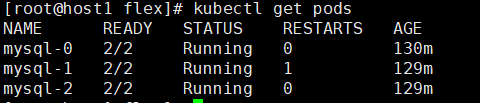
测试:
kubectl run mysql-client --image=mysql:5.7 -i --rm --restart=Never --\
  mysql -h mysql-0.mysql <<EOF
CREATE DATABASE test;
CREATE TABLE test.messages (message VARCHAR(250));
INSERT INTO test.messages VALUES ('hello');
EOF
kubectl run mysql-client --image=mysql:5.7 -i -t --rm --restart=Never --\
  mysql -h mysql-read -e "SELECT * FROM test.messages"
应该获得如下输出:
Waiting for pod default/mysql-client to be running, status is Pending, pod ready: false
+---------+
| message |
+---------+
| hello   |
+---------+
pod "mysql-client" deleted
