

一、
struts2 概述
Struts2 是一种基于 MVC (表现层、业务层、持久层)
模式的轻量级
Web 框架,它自问世以来,就受到了广大 Web 开发者的 关注,并广泛应用于各种企业系统的开发中二、
struts2 的入门
案例
第一步:拷贝
struts2 必备 jar 包到 web 工程的 lib 目录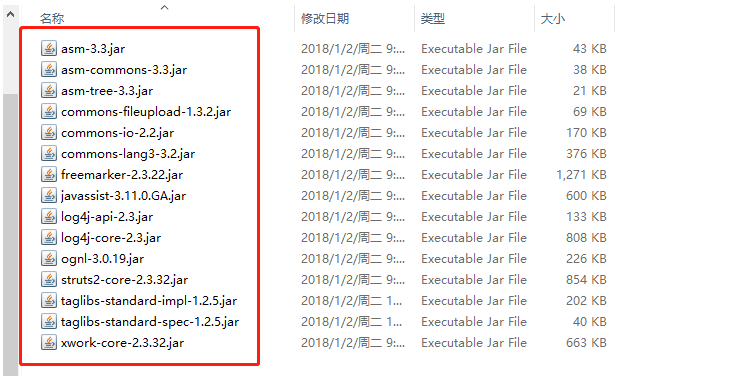
第二步:在类的根路径下创建一个名称为
struts.xml 的文件,并导入约束和配置(详细如下)<?xml version= encoding=?>
"1.0"
"UTF-8"
<!-- 导入约束:
约束的位置:在
struts2 的核心 jar 包中 struts2-core-2.3.24.jar 中包含一个名称为:
struts-2.3.
dtd
的约束文件
-->
<!DOCTYPE struts PUBLIC "-//Apache Software Foundation//DTD Struts Configuration 2.3//EN"
"struts-2.3.dtd" >
<struts>
<!-- 请求路径和执行方法的关系
package标签:主要的作用是用于分模块
name:唯一标识符,同一个项目,package的名字不可以相同
extends:继承,基于继承其他包的功能。struts-default是框架内置的package。
如果不继承会导致,内置的功能组件不能使用
-->
<package name= extends=>
"default"
"struts-default"
<!--
action标签:请求路径和执行方法的关系
name:用于指定请求路径()
url
class:指定业务控制器的类名
method:指定执行的方法
-->
<action name= class= method=>
"hello_say"
"com.itheima.action.HelloWorldAction"
"say"
<!-- 视图映射字符串和视图路径的关系 -->
<!--
result:用于配置返回
name:指定视图对应的映射字符串
标签内容:视图路径
-->
<result name=>/hello.jsp</result>
"hello"
</action>
</package>
</struts>
第三步:在
web.xml 配置 struts2 的核心控制器(一个过滤器)<?xml version= encoding=?>
"1.0"
"UTF-8"
<web-app xmlns:xsi=xmlns=xsi:schemaLocation= id= version=>
"http://www.w3.org/2001/XMLSchema-instance"
"http://java.sun.com/xml/ns/javaee"
"http://java.sun.com/xml/ns/javaee java.sun.com/xml/ns/java…"
"WebApp_ID"
"3.0"
<display-name>-annotation</display-name>
crm
<!-- 配置 struts2 的核心控制器:一个过滤器 -->
<filter>
<filter-name>struts2</filter-name>
<filter-class>org.apache.struts2.dispatcher.ng.filter.StrutsPrepareAndExecuteFilter</filter-class>
</filter>
<filter-mapping>
<filter-name>struts2</filter-name>
<url-pattern>/*</url-pattern>
</filter-mapping>
<welcome-file-list>
<welcome-file>index.html</welcome-file>
<welcome-file>index.htm</welcome-file>
<welcome-file>index.jsp</welcome-file>
<welcome-file>default.html</welcome-file>
<welcome-file>default.htm</welcome-file>
<welcome-file>default.jsp</welcome-file>
</welcome-file-list>
</web-app>
第四步:
编写
index.jsp页面(href是指定请求路径,和struts.xml的
action name一致)<%@ page language= contentType=
"java"
"text/html; charset=UTF-8"
pageEncoding=%>
"UTF-8"
<!DOCTYPE html PUBLIC "-//W3C//DTD HTML 4.01 Transitional//EN" "http://www.w3.org/TR/html4/loose.dtd">
<html>
<head>
<meta http-equiv= content=>
"Content-Type"
"text/html; charset=UTF-8"
<title>Insert title here</title>
</head>
<body>
<a href=${pageContext.request.contextPath }>say</a>
"
/hello_say"
</body>
</html>
第五步:编写
HelloWorldAction
.java
文件(类路径和名、方法名、返回值和
Structs.xml
配置的一致)
package
public
class
public
System..println();
out
this
System..println("HelloAction 中的 sayHello 方法执行了。。。。");
out
return
}
}
第六步:
编写
hello.jsp页面<%@ page language= contentType=
"java"
"text/html; charset=UTF-8"
pageEncoding=%>
"UTF-8"
<!DOCTYPE html PUBLIC "-//W3C//DTD HTML 4.01 Transitional//EN" "http://www.w3.org/TR/html4/loose.dtd">
<html>
<head>
<meta http-equiv= content=>
"Content-Type"
"text/html; charset=UTF-8"
<title>Insert title here</title>
</head>
<body>
你好世界!!
</body>
</html>
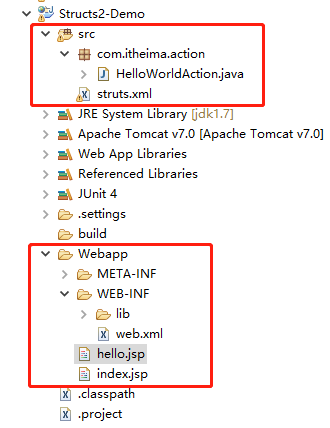
项目目录结构如下:
第七步:
把项目部署到
Tomcat,启动Tomcat,访问index.jsp,点击say,将返回访问hello.jsp页面

