vue2.0高德地图使用
最近公司一个需求,给我们的教室标注位置。要求如下: 1、当有位置时打开地图标注位置; 2、没位置时可搜索位置和点击地图任意地点选中位置。 先贴上最终效果吧
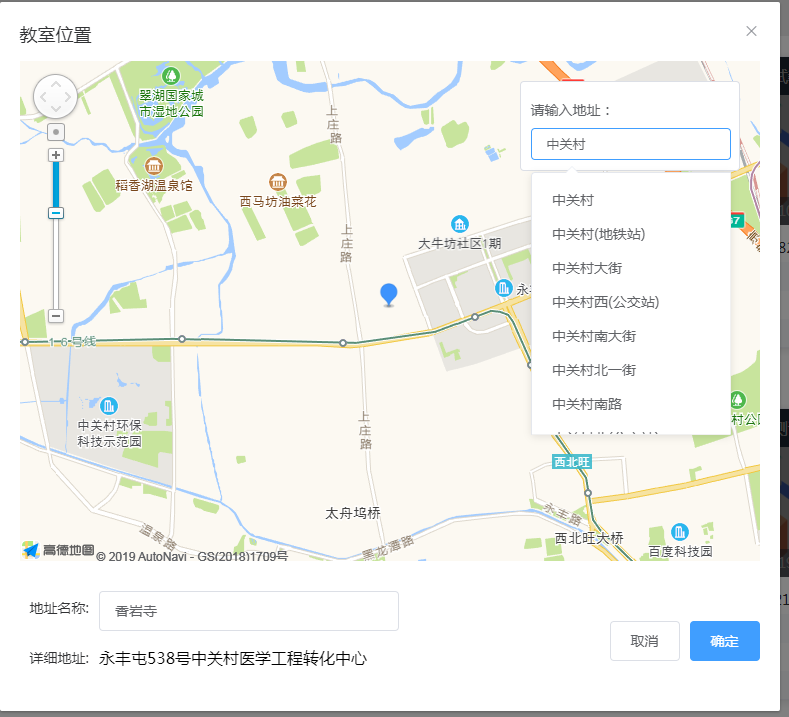
实现功能:
- 先安装地图组件 npm install vue-amap
- main.js引用,代码如下
Vue.use(VueAMap);
VueAMap.initAMapApiLoader({
    key:"自己申请高德的key,挺简单的,我们是PC端,所以说web服务的",
    plugin:[
    'AMap.Autocomplete',
    'AMap.PlaceSearch',
    'AMap.Scale',
    'AMap.OverView',
    'AMap.ToolBar',
    'AMap.MapType',
    'AMap.PolyEditor',
    'AMap.CircleEditor',
    ],   //插件
    v:"1.4.4"  //版本号,默认高德sdk版本为1.4.4,可自行修改
})
Vue.prototype.VueAMap = VueAMap;
3.新建一个地图组件 map.vue 代码如下:
	<div class="room-map-box">
		<div class="map" id="room-map">
	        <el-amap vid="amapDemo" class="amap-demo">
	        </el-amap>
	    </div>
	    <div class="map-search-box">
	    	<p>请输入地址:</p>
	    	<el-autocomplete
		      class="inline-input"
		      v-model="searchMapText"
		      :fetch-suggestions="queryLocationSearch"
		      :trigger-on-focus="false"
		      @select="handleLocationSelect"
		      style="width:200px;"
		      size="small"
		    ></el-autocomplete>
	    </div>
	</div>
</template>

<script>
	export default {
		name: 'classroom',
		data() {
			return {
			    zoom:13,
                center:'',                      //地图坐标的经纬度,[116.188472(经),40.0701(纬)]
                searchMapText:'',               //搜索框的值
                restaurants: [],                //这个值是elementui el-autocomplete组件用到的值,配合地址名称搜索
                locationList:[],
				roomMap:'',                     //地图
			    marker:'',                      //蓝点坐标
			    msgData:this.msg,               //向父组件传的参数
			}
	    },
	    props:['msg'],                  //当教室已存在地址时,调用组件需要从父组件传入地图坐标数据
		watch:{							//检测父组件变化
			msg(val,oldval){
				this.msgData = val
				if(this.msgData.coordinate){
					this.center = (this.msgData.coordinate).split(',')
					this.createMap()
				}
			},
			deep: true
		},
	    methods: {
			//生成地图函数
			createMap() {
			    //判断父组件传给子组件的坐标参数是什么类型,其实可以在父组件优化了,懒得整了,反正是要数组格式[经,纬]
				if(this.msgData.coordinate){
					if(typeof(this.msgData.coordinate) == 'string'){
						this.center = (this.msgData.coordinate).split(',')
					}else{
						this.center = this.msgData.coordinate
					}

				}
				this.destroyMap()       //为啥要销毁地图嘞,因为我这边是教室列表,点击一个教室生成地图后在点击另一个教室生成地图不会重置坐标
				var that = this
				var addressText = ''
				var addressName = ''
	    		this.roomMap = new AMap.Map('room-map',{
	    			resizeEnable: true,
	    			center:that.center,
	    			zoom:that.zoom,
	    			isHotspot:true,
	    		});
	    		var toolBar = new AMap.ToolBar({
			        visible: true
			    })

			    this.roomMap.addControl(toolBar);
			    toolBar.show();
	    		this.roomMap.on("complete", function(){
			       that.setMarker()
			    });
			    var isOver = false
			    this.roomMap.on('click', function(e) {                  //点击地图上任意一点拿到地图上这个点的坐标
			    	that.searchMapText = ''
		    		var str = e.lnglat.lng+','+e.lnglat.lat
		    		that.center = str.split(',')
		    		that.getXYDetail(that.center.join(','))
			    });
			},
			//销毁地图
			destroyMap() {
		      this.roomMap && this.roomMap.destroy();
		    },
			setMarker() {           //这就是设置蓝点的函数
				this.clearMarker()
				var that = this
		        this.marker = new AMap.Marker({
		            icon: "//a.amap.com/jsapi_demos/static/demo-center/icons/poi-marker-default.png",
		            position: that.center,
		            offset: new AMap.Pixel(-11, -28)

		        });
		        this.roomMap.add(this.marker);
		   	},
	   		clearMarker() {                     //只能有一个蓝点,此函数去掉你想点多少个就生成多少个
		        if (this.marker) {
		            this.marker.setMap(null);
		            this.marker = null;
		        }
		    },
			//地址输入匹配
			queryLocationSearch(queryString, cb) {
		        this.locationList = []
		        var that = this
		        this.$http.jsonp('https://restapi.amap.com/v3/place/text?key=自己申请高德的key&keywords='+this.searchMapText,{
			        params:{}
			    }).then(function(res){
			    	for(var i=0;i<res.data.pois.length;i++){
			    		that.locationList.push({'value':res.data.pois[i].name,address:res.data.pois[i].location,id:res.data.pois[i].id})
			    	}
			    	cb(that.locationList);
			    })
		    },
		    //通过坐标获取地图详细信息
		    getXYDetail(center) {
		    	var that = this
		    	this.$http.jsonp('https://restapi.amap.com/v3/geocode/regeo?key=自己申请高德的key&s=rsv3&&extensions=all&location='+center,{
		    		params:{}
		    	}).then(function(res){
		    		that.msgData.coordinate = center
		    		if(res.data.regeocode.formatted_address.length > 0){
		    			that.msgData.address = res.data.regeocode.formatted_address
		    		}else{
		    			that.msgData.address = '未知地区'
		    		}
	        		if(res.data.regeocode.aois.length > 0){
	        			that.msgData.name = res.data.regeocode.aois[0].name
	        		}else{
	        			that.msgData.name = '未知地区'
	        		}
	        		that.setMarker()
	       			that.$emit('func',that.msgData)             //向父组件发送数据

		    	})
		    },
		    loadAll() {
        		return this.locationList
        	},
			handleLocationSelect(item) {
		        this.center = item.address.split(',')
		        this.createMap()
		        this.setMarker()
		        this.msgData.coordinate = item.address.split(',')
		        var placeSearch = new AMap.PlaceSearch();  //构造地点查询类
		    	var status = 'complete'
		    	var that = this
		    	placeSearch.getDetails(item.id, function(status, result){           //这个是根据选中地址的id来获取地址详细信息,其实和根据坐标获取地址详细信息没差别,就是知道还有这个方法
		    		that.msgData.name = result.poiList.pois[0].name
		    		that.msgData.address = result.poiList.pois[0].address
		    		that.$emit('func',that.msgData)
		    		that.createMap()
		    	})

		    },
	    },
	    mounted: function(){
	   		this.restaurants = this.loadAll();
	   		this.createMap()
	    }
	}
</script>

<style>
	.room-map-box{
		position:relative;
		height:500px;
	}
	.map-search-box{
		position:absolute;
		right:20px;
		top:20px;
		padding:10px;
		width:220px;
		background:#fff;
		-webkit-border-radius: 4px;
		-moz-border-radius: 4px;
		border-radius: 4px;
		border: 1px solid #dcdfe6;
	}
	.map-search-box p{
		height:36px;
		line-height:36px;
	}
	#room-map{
		width:740px;
		height:500px;
	}
</style>
4.父组件调用
<roomMap  :msg="msg" @func="getMsgDataFun"></roomMap>

import roomMap from './map'
export default {
	components:{
		roomMap
	},
	data() {
		return {
		    msg:{},					//父组件向子组件传值
		}
	},
	methods:{
	    //获取地图组件传过来的数据
    	getMsgDataFun(data){
    		this.msg = data
    		this.getMsgData = data
    		this.getMsgData = JSON.parse(JSON.stringify(this.getMsgData))
    		console.log(this.getMsgData)
    	},
	}
}
---- 打印出来的 this.getMsgData
{
    address:"北京市海淀区中关村街道中关村科贸电子城",
    coordinate:"116.317551,39.98335",
    location:"4号线/大兴线",
    name:"中关村科贸电子城"
}
大功告成
再说一句:有点小问题,搜索地址时候只输入一个字两个字搜不到,用的api上的链接是这种情况,谁有好的方法请留个言。。。