安装
cnpm i -g sass
编译
sass input.scss:output.css
实时编译
sass input.scss:output.css --watch
监视目录
sass --watch app/sass:public/stylesheets
嵌套属性
变量$
变量仅在它定义的选择器嵌套层级的范围内可用(可以理解为块级作用域)。
定义变量的时候可以后面带上!global标志,在这种情况下,变量在任何地方可见(可以理解为全局变量)。
父选择器&
&将替换为呈现在CSS文件中的父选择器
& 必须出现在的选择器的开头位置(也就是作为选择器的第一个字符)
示例代码如下
html
<!DOCTYPE html>
<html>
<head>
<meta http-equiv="Content-Type" content="text/html; charset=utf-8" />
<link href="../output.css" rel="stylesheet" type="text/css" />
</head>
<body>
<div class="container">
	阴影
	<div class="container-c">子元素</div>
</div>
</body>
</html>
sass
body{

	.container{
		  $width: 400px !global;

		width: $width;
		height: 400px;
		text-align: center;
		margin: 0 auto;
		background: #FF0000;

		&:hover{
			width: 402px;
			height: 402px;
			text-align: center;
			margin: 0 auto;
			background: red;
			box-shadow: gray 10px 10px 10px;
			opacity: 0.8;
			font: {
				size: 50px;
				family:"宋体" ;

			};
		}
		&-c{
			width: 100px;
			height: 100px;
			background: #00FFFF;
		}
	}

}
编译后的css文件output.css
 @charset "UTF-8";
body .container {
  width: 400px;
  height: 400px;
  text-align: center;
  margin: 0 auto;
  background: #FF0000;
}
body .container:hover {
  width: 402px;
  height: 402px;
  text-align: center;
  margin: 0 auto;
  background: red;
  box-shadow: gray 10px 10px 10px;
  opacity: 0.8;
  font-size: 50px;
  font-family: "宋体";
}
body .container-c {
  width: 100px;
  height: 100px;
  background: #00FFFF;
}

/*# sourceMappingURL=output.css.map */
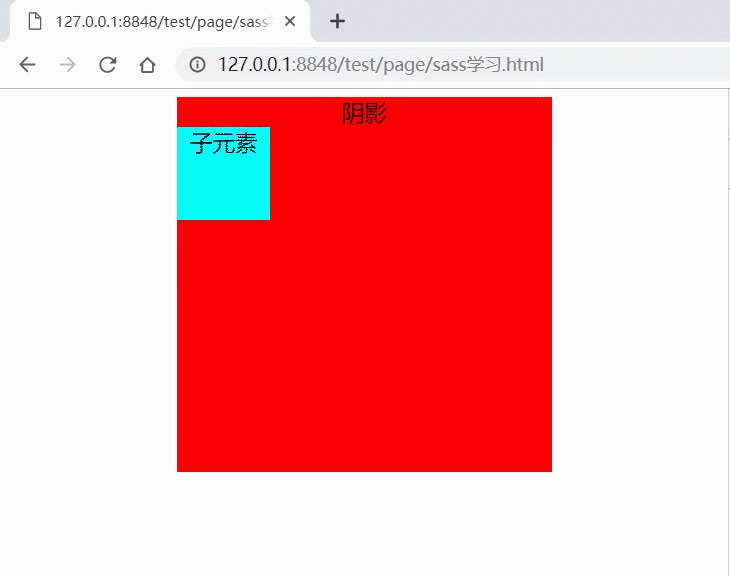
运行结果