从上往下
数据从根往下传数据,常规做法是一层层往下,当深度变大,数据的传输变的困难,flutter提供InheritedWidget用于子节点向祖先节点获取数据的机制,如下例子:
class FrogColor extends InheritedWidget {
  const FrogColor({Key key, @required this.color, @required Widget child})
      : assert(color != null),
        assert(child != null),
        super(key: key, child: child);

  final Color color;

  static FrogColor of(BuildContext context) {
    return context.inheritFromWidgetOfExactType(FrogColor);
  }

  @override
  bool updateShouldNotify(FrogColor oldWidget) {
    return color != oldWidget.color;
  }
}
child及其以下的节点可以通过调用下面的接口读取color数据,FrogColor.of(context).color。
使用:
class DataFlowTestWidget extends StatefulWidget {
  @override
  _DataFlowTestWidgetState createState() => _DataFlowTestWidgetState();
}

class _DataFlowTestWidgetState extends State<DataFlowTestWidget> {
  Color color = Colors.red;

  @override
  Widget build(BuildContext context) {
    return Container(
      child: Column(
        children: <Widget>[
          Center(
            child: FrogColor(color: color, child: TextWidget()),
          ),
          RaisedButton(
            onPressed: () {
              setState(() {
                color = Colors.blue;
              });
            },
            child: Text('change'),
          )
        ],
      ),
    );
  }
}

class TextWidget extends StatelessWidget {
  @override
  Widget build(BuildContext context) {
    return Text(
      'Data Flow',
      style: TextStyle(color: FrogColor.of(context).color),
    );
  }
}
context.inheritFromWidgetOfExactType(FrogColor)其实是通过context/element往上遍历树,查找到第一个FrogColor的祖先节点,取该节点的Widget对象。
子Widget使用了祖先Widget的数据,那么在祖先Widget的数据变化时,子Widget将会跟着变化。
系统中有不少Widget就是这样的,比如MediaQuery,可以看下其定义,如下:
class MediaQuery extends InheritedWidget{
    final MediaQueryData data;
    ...
}
从下往上
子节点状态变更,向上上报通过发送通知的方式
- 定义通知类,继承至Notification
- 父节点使用NotificationListener进行监听捕获通知
- 子节点有数据变更调用下面接口进行上报Notification(data).dispatch(context)
例子:
class DataFlowTestWidget extends StatefulWidget {
  @override
  _DataFlowTestWidgetState createState() => _DataFlowTestWidgetState();
}

class _DataFlowTestWidgetState extends State<DataFlowTestWidget> {
  Color color = Colors.red;

  @override
  Widget build(BuildContext context) {
    return Container(
      child: Column(
        children: <Widget>[
          Center(
            child: FrogColor(color: color, child: TextWidget()),
          ),
          RaisedButton(
            onPressed: () {
              setState(() {
                color = Colors.blue;
              });
            },
            child: Text('change'),
          ),
          NotificationListener(
            child: NotificationChildWidget(),
            onNotification: (notification) {
              if (notification is MyNotification) {
                setState(() {
                  color = Colors.amberAccent;
                });
              }
              return true;//返回true表示不再向上传递该Notification了;false会继续向上传递Notification
            },
          )
        ],
      ),
    );
  }
}

class NotificationChildWidget extends StatelessWidget {
  @override
  Widget build(BuildContext context) {
    return RaisedButton(
      onPressed: () {
        MyNotification().dispatch(context);
      },
      child: Text('send notification'),
    );
  }
}

class MyNotification extends Notification {}
整个的效果如下:
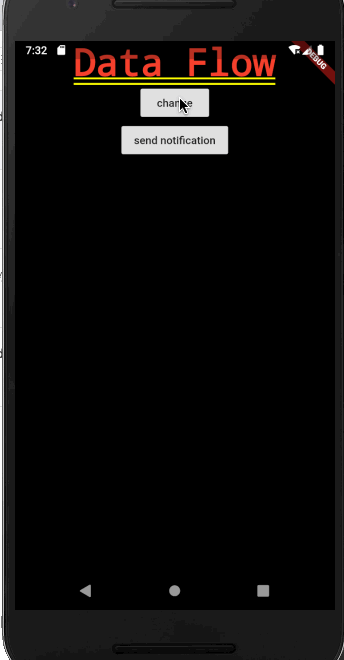
可以看到,这样既可以从下向上传输数据,也可以从上向下传输数据。
参考
关注我的技术公众号,不定期会有技术文章推送,不敢说优质,但至少是我自己的学习心得。微信扫一扫下方二维码即可关注: