Spring boot提供了AbstractRoutingDataSource 根据用户定义的规则选择当前的数据源,这样我们可以在执行查询之前,设置使用的数据源。实现可动态路由的数据源,在每次数据库查询操作前执行。它的抽象方法 determineCurrentLookupKey() 决定使用哪个数据源,这里使用aop实现。
1、数据准备,两个数据库,分别为 “springboot”、“springboot_1”
测试表book
CREATE TABLE `book` (
  `id` int(11) NOT NULL,
  `book_name` varchar(100) DEFAULT NULL,
  PRIMARY KEY (`id`),
  KEY `book_index` (`id`,`book_name`)
) ENGINE=MyISAM DEFAULT CHARSET=utf8
测试数据
INSERT INTO springboot.book(id, book_name) VALUES (1, '测试,来自主库');
INSERT INTO springboot_1.book(id, book_name) VALUES (1, '测试,来自从库');
2、pom.xml
<dependency>
    <groupId>com.alibaba</groupId>
    <artifactId>druid-spring-boot-starter</artifactId>
    <version>1.1.10</version>
</dependency>
3、application.yml 配置多个数据源
spring:
  #数据库配置
  datasource:
    #    type: com.alibaba.druid.pool.DruidDataSource
    driver-class-name: com.mysql.jdbc.Driver

    druid:
      master:
        jdbc-url: jdbc:mysql://192.0.0.210:3306/springboot?useSSL=true&useUnicode=true&characterEncoding=utf8&rewriteBatchedStatements=true
        username: root
        password: 123456

      slave:
        jdbc-url: jdbc:mysql://192.0.0.210:3306/springboot_1?useSSL=true&useUnicode=true&characterEncoding=utf8&rewriteBatchedStatements=true
        username: root
        password: 123456


      maxActive: 20
      initialSize: 1
      maxWait: 60000
      minIdle: 1
      timeBetweenEvictionRunsMillis: 60000
      minEvictableIdleTimeMillis: 300000
      validationQuery: select 'x'
      testWhileIdle: true
      testOnBorrow: false
      testOnReturn: false
      poolPreparedStatements: true
      maxOpenPreparedStatements: 20
4、自定义注解类
@Target({ElementType.METHOD,ElementType.TYPE})
@Retention(RetentionPolicy.RUNTIME)
@Documented
public @interface MoreDataSource {
    public static String master = "master";
    public static String slave = "slave";

    String name() default MoreDataSource.slave;
}
5、新建DynamicDataSource类,扩展Spring的AbstractRoutingDataSource抽象类,重写 determineCurrentLookupKey() 方法
public class DynamicDataSource extends AbstractRoutingDataSource {

    @Override
    protected Object determineCurrentLookupKey() {
        #在第6步创建
        String key = DataSourceHolder.getDataSourceKey();
        if (StringUtils.isBlank(key)) {
            return MoreDataSource.master;
        }
        return key;
    }
}
6、新建DataSourceHolder类,一个拥有ThreadLocal变量的类,用来存取数据源名称
public class DataSourceHolder {
    private static final ThreadLocal<String> dataSources = new ThreadLocal<>();

    public static void setDataSourceKey(String customType) {
        dataSources.set(customType);
    }

    public static String getDataSourceKey() {
        return (String) dataSources.get();
    }

    public static void clearDataSourceKey() {
        dataSources.remove();
    }
}
7、新建多数据源配置类DataSourceConfig
@Configuration
public class DataSourceConfig {
    @Bean
    @Primary
    public DataSource dataSource() {
        DynamicDataSource resolver = new DynamicDataSource();
        Map<Object, Object> dataSources = Maps.newHashMap();
        dataSources.put(MoreDataSource.master, masterDataSource());
        dataSources.put(MoreDataSource.slave, slaveDataSource());
        resolver.setTargetDataSources(dataSources);
        return resolver;
    }

    @Bean
    @ConfigurationProperties(prefix="spring.datasource.druid.master")
    public DataSource masterDataSource() {
        return DataSourceBuilder.create().build();
    }

    @Bean
    @ConfigurationProperties(prefix="spring.datasource.druid.slave")
    public DataSource slaveDataSource() {
        return DataSourceBuilder.create().build();
    }

}
8、新建切面类DataSourceAspect
@Aspect
@Component
public class DataSourceAspect {
    @Pointcut("@annotation(com.test.annotation.MoreDataSource)")
    public void aspect() {
    }

    @Before("aspect()")
    public void doBefore(JoinPoint point) throws Throwable {
        final MethodSignature methodSignature = (MethodSignature) point.getSignature();
        Method method = methodSignature.getMethod();
        MoreDataSource mzDataSource = method.getAnnotation(MoreDataSource.class);
        if (method.getDeclaringClass().isInterface()) {
            method = point.getTarget().getClass().getMethod(method.getName(), method.getParameterTypes());
        }
        mzDataSource = method.getAnnotation(MoreDataSource.class);
        if (null != mzDataSource) {
            DataSourceHolder.setDataSourceKey(mzDataSource.name());
        }

        System.out.println("数据源切换:" + DataSourceHolder.getDataSourceKey());
    }

    @After("aspect()")
    public void doAfter() {
        DataSourceHolder.clearDataSourceKey();
    }
}
9、修改启动类,因为数据源是自己生成的,所以要去掉原先springboot启动时候自动装配的数据源配置
加上注解
@Import({DataSourceConfig.class})
10、测试
controller
    @RequestMapping(value="/list/{id}")
    @ResponseBody
    public Book list(@PathVariable(value = "id") Integer id){
        Book book = bookService.findById(id);
        return book;
    }

    @RequestMapping(value="/list2/{id}")
    @ResponseBody
    @MoreDataSource
    public Book list2(@PathVariable(value = "id") Integer id){
        Book book = bookService.findById(id);
        return book;
    }
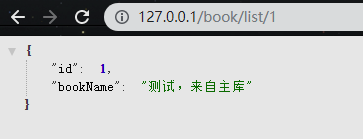
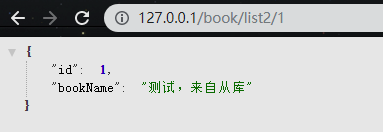
测试没有问题,可以动态的根据注解切换数据源,在结合之前的主从数据库配置就可以进一步的实现读写分离。