搭建自己的技术博客系列(六)酷炫主题icarus常用配置整合版,快速搞定博客首页40/100发布文章a724888
_config.xml
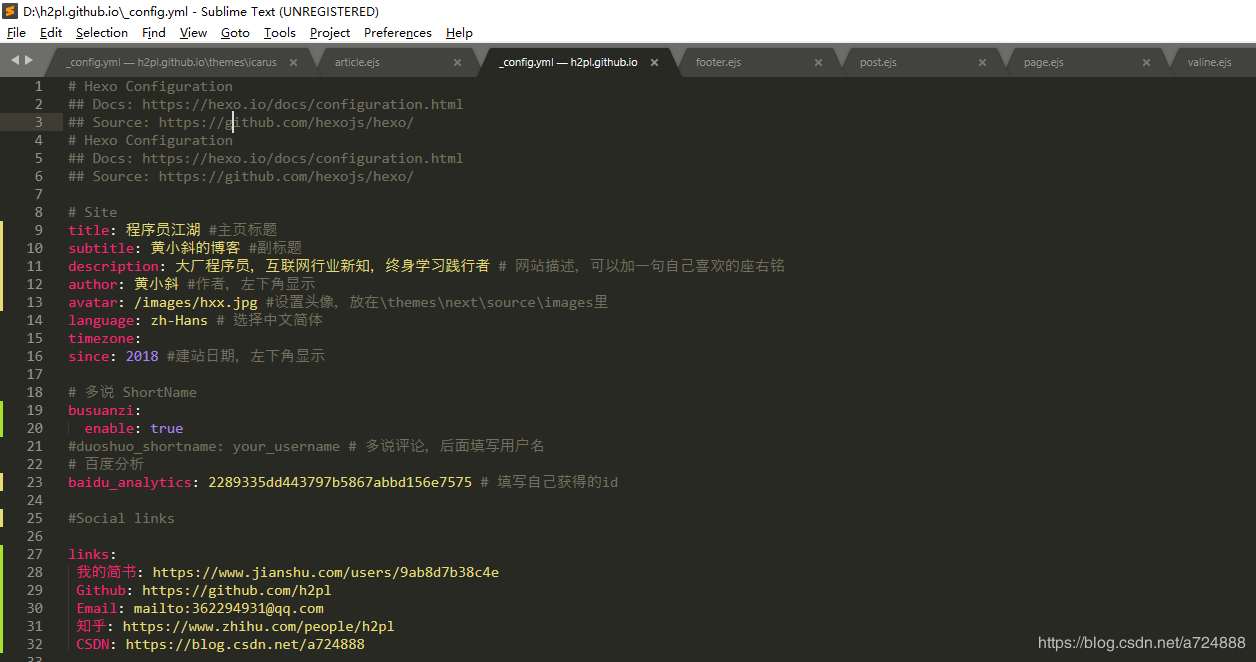
这里首先要知道在 Hexo 中有两份主要的配置文件,其名称都是 _config.yml,它们均是用于站点配置使用的。其中,一份位于站点根目录下(比如我的:D:h2pl.github.io_config.yml),主要包含 Hexo 本身整站的配置;另一份位于主题目录(D:hexothemesicaurs_config.yml)下,这份配置由主题作者提供,主要用于配置主题相关的选项。为了描述方便,在以下说明中,将前者称为站点配置文件, 后者称为主题配置文件。下面我们先来看看站点配置文件的配置修改。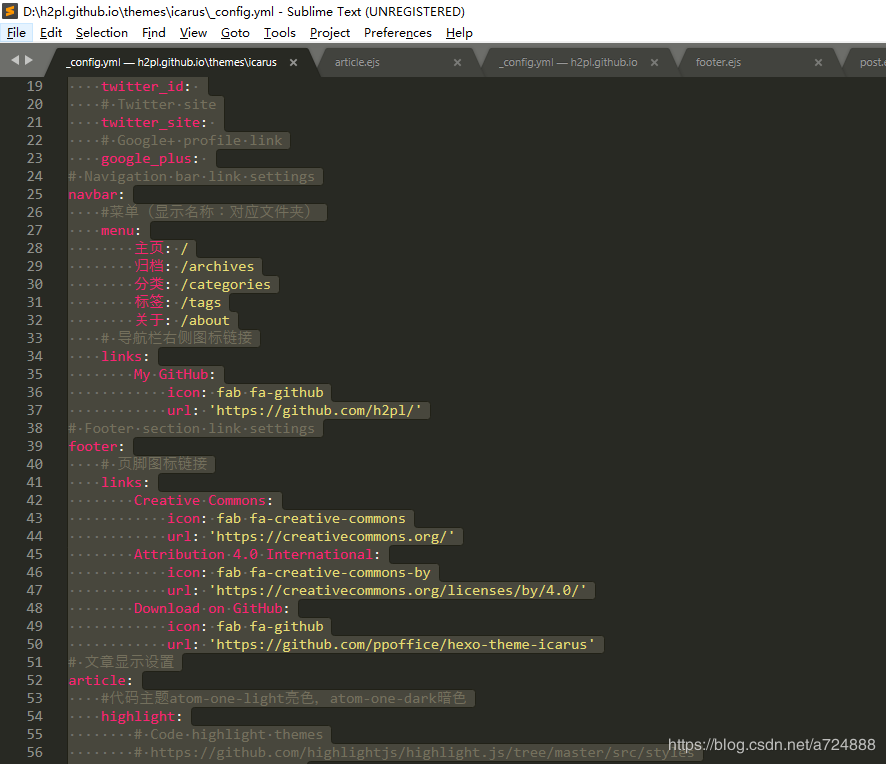
    # Hexo Configuration
    ## Docs: https://hexo.io/docs/configuration.html
    ## Source: https://github.com/hexojs/hexo/
    # Hexo Configuration
    ## Docs: https://hexo.io/docs/configuration.html
    ## Source: https://github.com/hexojs/hexo/
# Site
title: 程序员江湖 #主页标题
subtitle: 黄小斜的博客 #副标题
description: 大厂程序员,互联网行业新知,终身学习践行者 # 网站描述,可以加一句自己喜欢的座右铭
author: 黄小斜 #作者,左下角显示
avatar: /images/hxx.jpg #设置头像,放在\themes\next\source\images里
language: zh-Hans # 选择中文简体
timezone:
since: 2018 #建站日期,左下角显示 # 多说 ShortName
busuanzi:
enable: true
#duoshuo_shortname: your_username # 多说评论,后面填写用户名
# 百度分析
baidu_analytics: 2289335dd443797b5867abbd156e7575 # 填写自己获得的id #Social links links:
我的简书: https://www.jianshu.com/users/9ab8d7b38c4e
Github: https://github.com/h2pl
Email: mailto:362294931@qq.com
知乎: https://www.zhihu.com/people/h2pl
CSDN: https://blog.csdn.net/a724888 # URL
## If your site is put in a subdirectory, set url as 'http://yoursite.com/child' and root as '/child/'
url: http://h2pl.github.io/ #填自己的github pages网址
root: /
permalink: :year/:month/:day/:title/
permalink_defaults:
# 本地搜索
search:
path: search.xml
field: post # Directory
source_dir: source
public_dir: public
tag_dir: tags
archive_dir: archives
category_dir: categories
code_dir: downloads/code
i18n_dir: :lang
skip_render: # Writing
new_post_name: :title.md # File name of new posts
default_layout: post
titlecase: false # Transform title into titlecase
external_link: true # Open external links in new tab
filename_case: 0
render_drafts: false
post_asset_folder: false
relative_link: false
future: true
# 语法高亮
highlight:
enable: true
line_number: true
auto_detect: true
tab_replace: # Category & Tag
default_category: uncategorized
category_map:
tag_map: # Date / Time format
## Hexo uses Moment.js to parse and display date
## You can customize the date format as defined in
## http://momentjs.com/docs/#/displaying/format/
date_format: YYYY-MM-DD
time_format: HH:mm:ss # Pagination
## Set per_page to 0 to disable pagination
per_page: 10
pagination_dir: page # Extensions
## Plugins: https://hexo.io/plugins/
## Themes: https://hexo.io/themes/
# 百度网站地图
plugins:
#busuanzi:
# enable: true
baidusitemap: # 需要安装插件 npm install hexo-generator-baidu-sitemap@0.1.1 --save
path: baidusitemap.xml # 主题切换
theme: icarus
# RSS订阅
feed:
type: atom
path: atom.xml
limit: 0 # ---------------下面选项需要对应插件的支持---------------
# npm install hexo-generator-index --save
# npm install hexo-generator-archive --save
# npm install hexo-generator-category --save
# npm install hexo-generator-tag --save index_generator:
per_page: 10 ##首页默认10篇文章标题 如果值为0不分页 archive_generator:
per_page: 20 ##归档页面默认20篇文章标题
yearly: true ##生成年视图
monthly: true ##生成月视图 tag_generator:
per_page: 10 ##标签分类页面默认10篇文章 category_generator:
per_page: 10 ###分类页面默认10篇文章 # Deployment
## Docs: https://hexo.io/docs/deployment.html
deploy:
- type: git
# 填上你自己的仓库名,注意后面有`.git`
repository: git@github.com:h2pl/h2pl.github.io.git
branch: master
- type: git
repo: git@github.com:h2pl/h2pl.github.io.git
branch: src
extend_dirs: /
ignore_hidden: false
ignore_pattern:
public: .
icarus的主题配置文件.config_xml
    # Version of the Icarus theme that is currently used
    version: 2.6.0
    # 你的网站图标,可以搜索在线图标制作,并将其放在images文件夹中
    favicon: /images/favicon.svg
    # Additional HTML meta tags in an array.
    meta:
    # Path or URL to RSS atom.xml
    rss: /atom.xml
    # 显示在导航栏左侧的网站logo,同样可以自己制作
    logo: /images/hxx.jpg
    # Open Graph metadata
    # https://hexo.io/docs/helpers.html#open-graph
    open_graph:
        # Facebook App ID
        fb_app_id:
        # Facebook Admin ID
        fb_admins:
        # Twitter ID
        twitter_id:
        # Twitter site
        twitter_site:
        # Google+ profile link
        google_plus:
    # Navigation bar link settings
    navbar:
        #菜单(显示名称:对应文件夹)
        menu:
            主页: /
            归档: /archives
            分类: /categories
            标签: /tags
            关于: /about
        # 导航栏右侧图标链接
        links:
            My GitHub:
                icon: fab fa-github
                url: 'https://github.com/h2pl/'
    # Footer section link settings
    footer:
        # 页脚图标链接
        links:
            Creative Commons:
                icon: fab fa-creative-commons
                url: 'https://creativecommons.org/'
            Attribution 4.0 International:
                icon: fab fa-creative-commons-by
                url: 'https://creativecommons.org/licenses/by/4.0/'
            Download on GitHub:
                icon: fab fa-github
                url: 'https://github.com/ppoffice/hexo-theme-icarus'
    # 文章显示设置
    article:
        #代码主题atom-one-light亮色,atom-one-dark暗色
        highlight:
            # Code highlight themes
            # https://github.com/highlightjs/highlight.js/tree/master/src/styles
            theme: atom-one-dark
            # Show code copying button
            clipboard: true
            # Default folding status of the code blocks. Can be "", "folded", "unfolded"
            fold: unfolded
        # 是否显示文章主图
        thumbnail: true
        # 是否显示估算阅读时间
        readtime: true
    # 搜索插件设置
    # https://ppoffice.github.io/hexo-theme-icarus/categories/Plugins/Search
    search:
        # Name of the search plugin
        type: insight
    # 评论插件设置
    # https://ppoffice.github.io/hexo-theme-icarus/categories/Plugins/Comment
    comment:
        #可选valine,disqus(科学上网)等
        # Name of the comment plugin
        avatar: retro # Gravatar style : mm/identicon/monsterid/wavatar/retro/hide
        placeholder: 要不要说点啥... # Comment Box placeholder
        type: valine
        shortname: 黄小斜
    # 打赏功能
    # https://ppoffice.github.io/hexo-theme-icarus/categories/Donation/
    donate:
        -
            # 阿里巴巴支付宝
            type: alipay
            # 二维码图片
            qrcode: '/images/hxx.jpg'
        -
            # 微信
            type: wechat
            # 二维码图片
            qrcode: '/images/hxx.jpg'
# 分享插件设置
# https://ppoffice.github.io/hexo-theme-icarus/categories/Plugins/Share
share:
# Share plugin name
type: sharejs
# Sidebar settings.
# Please be noted that a sidebar is only visible when it has at least one widget
sidebar:
# 左侧边栏设置
left:
# 是否不随页面滚动
# https://ppoffice.github.io/hexo-theme-icarus/Configuration/Theme/make-a-sidebar-sticky-when-page-scrolls/
sticky: false
# right sidebar settings
right:
# 是否不随页面滚动
# https://ppoffice.github.io/hexo-theme-icarus/Configuration/Theme/make-a-sidebar-sticky-when-page-scrolls/
sticky: false
# 边栏小部件设置
# https://ppoffice.github.io/hexo-theme-icarus/categories/Widgets/
widgets:
-
# Widget name
type: profile
# Where should the widget be placed, left or right
position: left
# Author name to be shown in the profile widget
author: 黄小斜
# Title of the author to be shown in the profile widget
author_title: 蚂蚁金服Java工程师
# Author's current location to be shown in the profile widget
location: 浙江 杭州
# Path or URL to the avatar to be shown in the profile widget
avatar: /images/gzh.jpg
# Email address for the Gravatar to be shown in the profile widget
gravatar:
# Whether to show avatar image rounded or square
avatar_rounded: false
# 关注我的链接,可设为你的GitHub主页
follow_link: 'https://github.com/h2pl/'
# 个人介绍部件底部图标社交链接
social_links:
Github:
icon: fab fa-github
url: 'https://github.com/h2pl'
RSS:
icon: fas fa-rss
url: /
-
# Widget name
type: toc
# Where should the widget be placed, left or right
position: left
-
# Widget name
type: links
# Where should the widget be placed, left or right
position: left
# Links to be shown in the links widget
links:
CSDN: 'https://blog.csdn.net/a724888'
知乎: 'https://www.zhihu.com/people/h2pl/activities'
简书: 'https://www.zhihu.com/people/h2pl/activities'
-
# Widget name
type: category
# Where should the widget be placed, left or right
position: left
-
# Widget name
type: tagcloud
# Where should the widget be placed, left or right
position: left
-
# Widget name
type: recent_posts
# Where should the widget be placed, left or right
position: right
-
# Widget name
type: archive
# Where should the widget be placed, left or right
position: right
-
# Widget name
type: tag
# Where should the widget be placed, left or right
position: right
# Other plugin settings
plugins:
# Enable page animations
animejs: true
# Enable the lightGallery and Justified Gallery plugins
# https://ppoffice.github.io/hexo-theme-icarus/Plugins/General/gallery-plugin/
gallery: true
# Enable the Outdated Browser plugin
# http://outdatedbrowser.com/
outdated-browser: true
# Enable the MathJax plugin
# https://ppoffice.github.io/hexo-theme-icarus/Plugins/General/mathjax-plugin/
mathjax: true
# Show the back to top button on mobile devices
back-to-top: true
# Google Analytics plugin settings
# https://ppoffice.github.io/hexo-theme-icarus/Plugins/General/site-analytics-plugin/#Google-Analytics
google-analytics:
# Google Analytics tracking id
tracking_id:
# Baidu Analytics plugin settings
# https://ppoffice.github.io/hexo-theme-icarus/Plugins/General/site-analytics-plugin/#Baidu-Analytics
baidu-analytics:
# Baidu Analytics tracking id
tracking_id: 2289335dd443797b5867abbd156e7575
# Hotjar user feedback plugin
# https://ppoffice.github.io/hexo-theme-icarus/Plugins/General/site-analytics-plugin/#Hotjar
hotjar:
# Hotjar site id
site_id:
# Show a loading progress bar at top of the page
progressbar: true
# BuSuanZi site/page view counter
# https://busuanzi.ibruce.info
busuanzi: true
busuanzi:
enable: true
# CDN provider settings
# https://ppoffice.github.io/hexo-theme-icarus/Configuration/Theme/speed-up-your-site-with-custom-cdn/
# Show PV/UV of the website/page with busuanzi.
# Get more information on http://ibruce.info/2015/04/04/busuanzi/
busuanzi_count:
# count values only if the other configs are false
enable: true
# custom uv span for the whole site
site_uv: true
site_uv_header: 访客数
site_uv_footer: 人
# custom pv span for the whole site
site_pv: true
site_pv_header: 总访问量
site_pv_footer: 次
# custom pv span for one page only
page_pv: true
page_pv_header: <i class="fa fa-file-o"></i> 阅读数
page_pv_footer:
    providers:
        # Name or URL of the JavaScript and/or stylesheet CDN provider
        cdn: jsdelivr
        # Name or URL of the webfont CDN provider
        fontcdn: google
        # Name or URL of the webfont Icon CDN provider
        iconcdn: fontawesome
效果预览
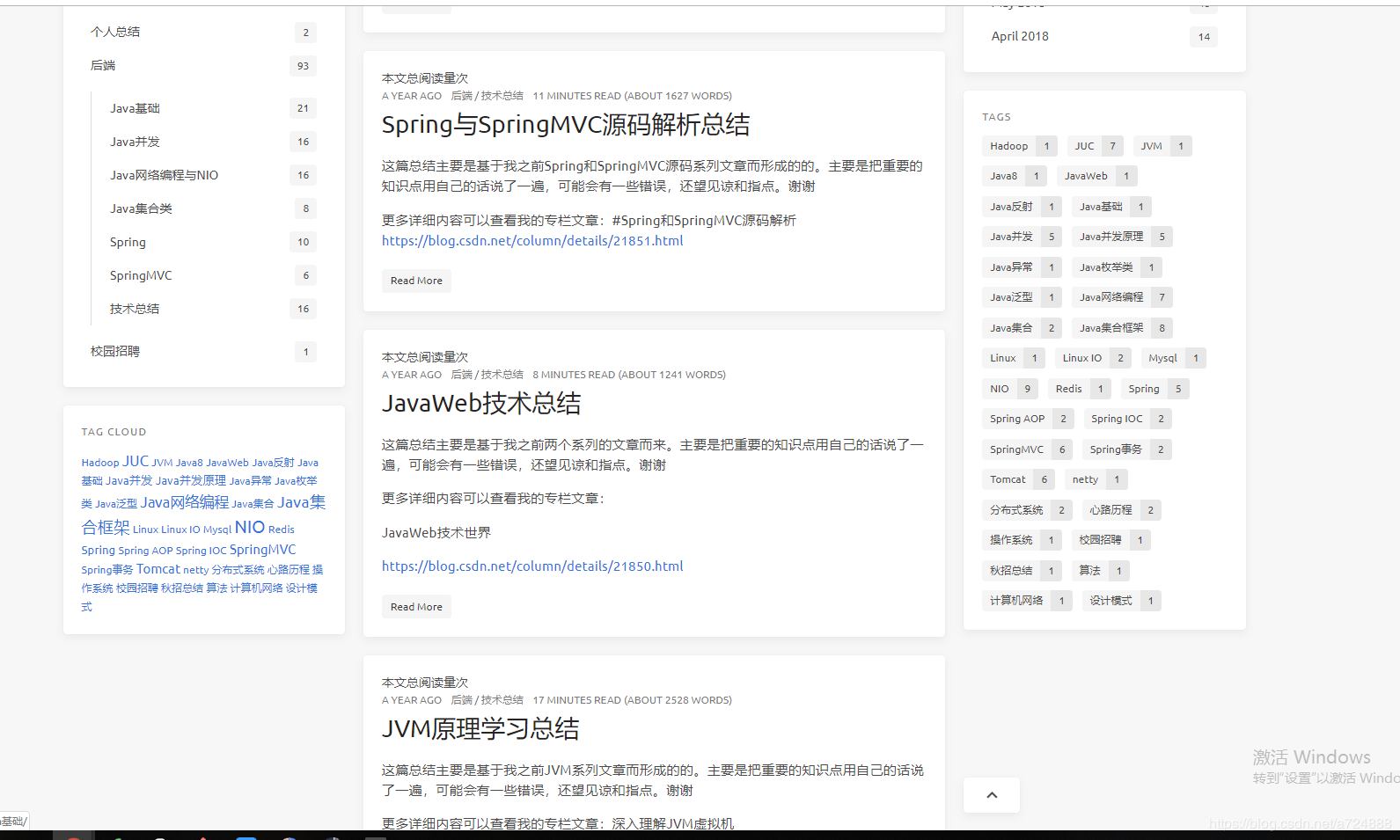
这就是目前我的博客主页:how2playlife.com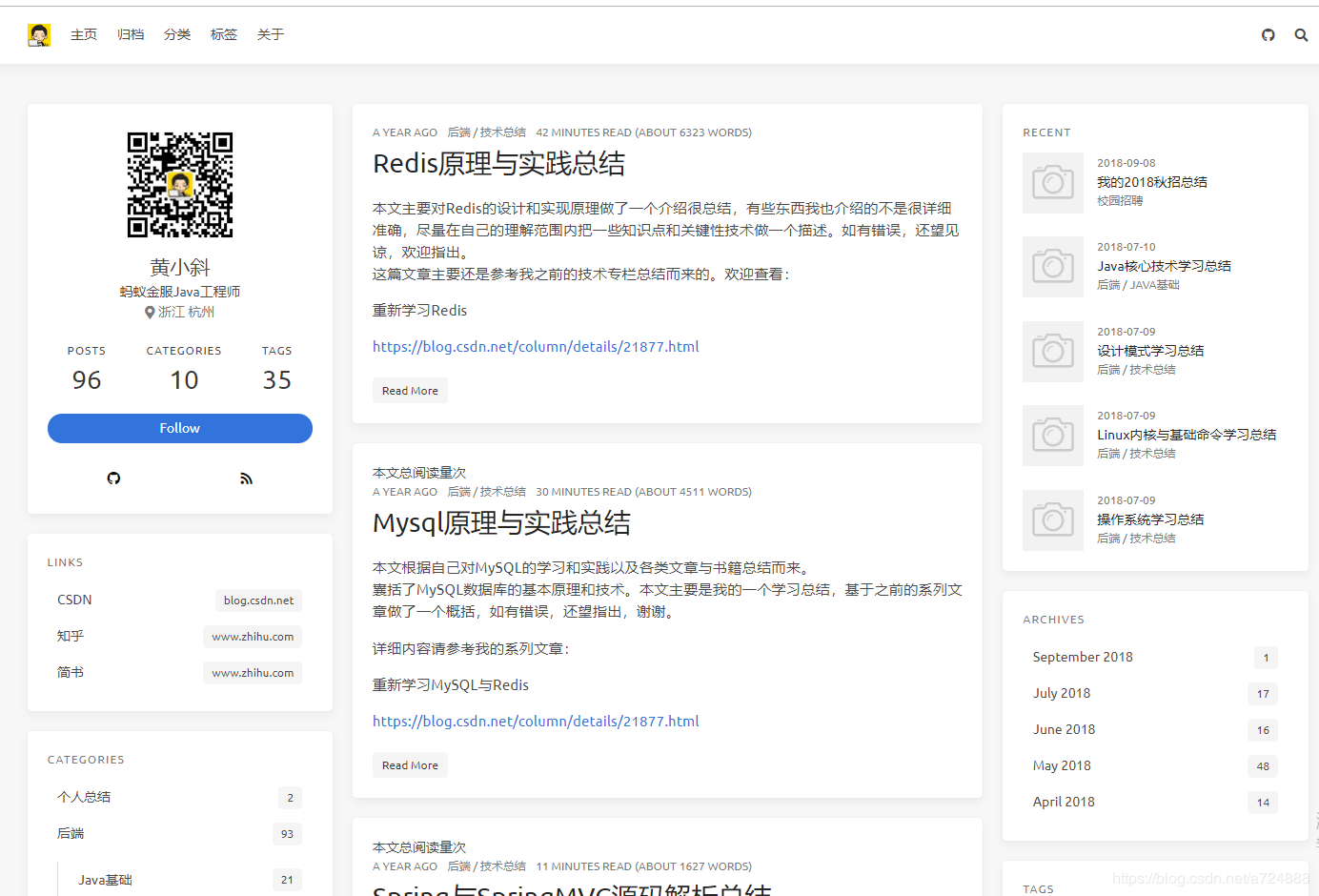
 _config.xml这里首先要知道在 Hexo 中有两份主要的配置文件,其名称都是 config.yml,它们均是用于站点配置使用的。其中,一份位于站点根目录下(比如我的:D:h2pl.github.ioconfig.yml),主要包含 Hexo 本身整站的配置;另一份位于主题目录(D:hexothemesicaurs_config.yml)下,这份配置由主题作者提供,主要用于配置主题相关的选项。为了描述方便,在以下说明中,将前者称为站点配置文件, 后者称为主题配置文件。下面我们先来看看站点配置文件的配置修改。在这里插入图片描述
Hexo Configuration
Docs: https://hexo.io/docs/configuration.html
Source: https://github.com/hexojs/hexo/
Hexo Configuration
Docs: https://hexo.io/docs/configuration.html
Source: https://github.com/hexojs/hexo/
Site
title: 程序员江湖 #主页标题subtitle: 黄小斜的博客 #副标题description: 大厂程序员,互联网行业新知,终身学习践行者 # 网站描述,可以加一句自己喜欢的座右铭author: 黄小斜 #作者,左下角显示avatar: /images/hxx.jpg #设置头像,放在themesnextsourceimages里language: zh-Hans # 选择中文简体timezone:since: 2018 #建站日期,左下角显示
多说 ShortName
busuanzi:enable: true
多说评论,后面填写用户名百度分析
baidu_analytics: 2289335dd443797b5867abbd156e7575 # 填写自己获得的id
Social links
links:我的简书: https://www.jianshu.com/users/9ab8d7b38c4eGithub: https://github.com/h2plEmail: mailto:362294931@qq.com知乎: https://www.zhihu.com/people/h2plCSDN: https://blog.csdn.net/a724888
URL
If your site is put in a subdirectory, set url as 'http://yoursite.com/child' and root as '/child/'
url: http://h2pl.github.io/ #填自己的github pages网址root: /permalink: :year/:month/:day/:title/permalink_defaults:
本地搜索
search:path: search.xmlfield: post
Directory
source_dir: sourcepublic_dir: publictag_dir: tagsarchive_dir: archivescategory_dir: categoriescode_dir: downloads/codei18n_dir: :langskip_render:
Writing
newpostname: :title.md # File name of new postsdefault_layout: posttitlecase: false # Transform title into titlecaseexternal_link: true # Open external links in new tabfilename_case: 0render_drafts: falsepostassetfolder: falserelative_link: falsefuture: true
语法高亮
highlight:enable: trueline_number: trueauto_detect: truetab_replace:
Category & Tag
default_category: uncategorizedcategory_map:tag_map:
Date / Time format
Hexo uses Moment.js to parse and display date
You can customize the date format as defined in
/displaying/format/date_format: YYYY-MM-DDtime_format: HH:mm:ss
Pagination
Set per_page to 0 to disable pagination
per_page: 10pagination_dir: page
Extensions
Plugins: https://hexo.io/plugins/
Themes: https://hexo.io/themes/
百度网站地图
plugins:
busuanzi:
enable: true
baidusitemap: # 需要安装插件 npm install hexo-generator-baidu-sitemap@0.1.1 --savepath: baidusitemap.xml
主题切换
theme: icarus
RSS订阅
feed:type: atompath: atom.xmllimit: 0
---------------下面选项需要对应插件的支持---------------
npm install hexo-generator-index --save
npm install hexo-generator-archive --save
npm install hexo-generator-category --save
npm install hexo-generator-tag --save
index_generator:per_page: 10 ##首页默认10篇文章标题 如果值为0不分页
archive_generator:per_page: 20 ##归档页面默认20篇文章标题yearly: true ##生成年视图monthly: true ##生成月视图
tag_generator:per_page: 10 ##标签分类页面默认10篇文章
category_generator:per_page: 10 ###分类页面默认10篇文章
Deployment
Docs: https://hexo.io/docs/deployment.html
deploy:
- type: git
填上你自己的仓库名,注意后面有.git
repository: git@github.com:h2pl/h2pl.github.io.gitbranch: master
- type: git
repo: git@github.com:h2pl/h2pl.github.io.git
branch: src
extend_dirs: /
ignore_hidden: false
ignore_pattern:
public: .
icarus的主题配置文件.config_xml
在这里插入图片描述
Version of the Icarus theme that is currently used
version: 2.6.0
你的网站图标,可以搜索在线图标制作,并将其放在images文件夹中
favicon: /images/favicon.svg
Additional HTML meta tags in an array.
meta:
Path or URL to RSS atom.xml
rss: /atom.xml
显示在导航栏左侧的网站logo,同样可以自己制作
logo: /images/hxx.jpg
Open Graph metadata
open-graphopen_graph:
Facebook App ID
fbappid:
Facebook Admin ID
fb_admins:
Twitter ID
twitter_id:
Twitter site
twitter_site:
Google+ profile link
google_plus:
Navigation bar link settings
navbar:
菜单(显示名称:对应文件夹)
menu:主页: /归档: /archives分类: /categories标签: /tags关于: /about
导航栏右侧图标链接
links:My GitHub:icon: fab fa-githuburl: 'https://github.com/h2pl/'
Footer section link settings
footer:
页脚图标链接
links:Creative Commons:icon: fab fa-creative-commonsurl: 'https://creativecommons.org/'Attribution 4.0 International:icon: fab fa-creative-commons-byurl: 'https://creativecommons.org/licenses/by/4.0/'Download on GitHub:icon: fab fa-githuburl: 'https://github.com/ppoffice/hexo-theme-icarus'
文章显示设置
article:
代码主题atom-one-light亮色,atom-one-dark暗色
highlight:
Code highlight themes
https://github.com/highlightjs/highlight.js/tree/master/src/styles
theme: atom-one-dark
Show code copying button
clipboard: true
Default folding status of the code blocks. Can be "", "folded", "unfolded"
fold: unfolded
是否显示文章主图
thumbnail: true
是否显示估算阅读时间
readtime: true
搜索插件设置
https://ppoffice.github.io/hexo-theme-icarus/categories/Plugins/Search
search:
Name of the search plugin
type: insight
评论插件设置
https://ppoffice.github.io/hexo-theme-icarus/categories/Plugins/Comment
comment:
可选valine,disqus(科学上网)等
Name of the comment plugin
avatar: retro # Gravatar style : mm/identicon/monsterid/wavatar/retro/hideplaceholder: 要不要说点啥... # Comment Box placeholdertype: valineshortname: 黄小斜
打赏功能
https://ppoffice.github.io/hexo-theme-icarus/categories/Donation/
donate:-
阿里巴巴支付宝
type: alipay
二维码图片
qrcode: '/images/hxx.jpg'-
微信
type: wechat
二维码图片
qrcode: '/images/hxx.jpg'
分享插件设置
https://ppoffice.github.io/hexo-theme-icarus/categories/Plugins/Share
share:
Share plugin name
type: sharejs
Sidebar settings.
Please be noted that a sidebar is only visible when it has at least one widget
sidebar:
左侧边栏设置
left:
是否不随页面滚动
https://ppoffice.github.io/hexo-theme-icarus/Configuration/Theme/make-a-sidebar-sticky-when-page-scrolls/
sticky: false
right sidebar settings
right:
是否不随页面滚动
https://ppoffice.github.io/hexo-theme-icarus/Configuration/Theme/make-a-sidebar-sticky-when-page-scrolls/
sticky: false
边栏小部件设置
https://ppoffice.github.io/hexo-theme-icarus/categories/Widgets/
widgets:-
Widget name
type: profile
Where should the widget be placed, left or right
position: left
Author name to be shown in the profile widget
author: 黄小斜
Title of the author to be shown in the profile widget
author_title: 蚂蚁金服Java工程师
Author's current location to be shown in the profile widget
location: 浙江 杭州
Path or URL to the avatar to be shown in the profile widget
avatar: /images/gzh.jpg
Email address for the Gravatar to be shown in the profile widget
gravatar:
Whether to show avatar image rounded or square
avatar_rounded: false
关注我的链接,可设为你的GitHub主页
follow_link: 'https://github.com/h2pl/'
个人介绍部件底部图标社交链接
social_links:Github:icon: fab fa-githuburl: 'https://github.com/h2pl'RSS:icon: fas fa-rssurl: /-
Widget name
type: toc
Where should the widget be placed, left or right
position: left-
Widget name
type: links
Where should the widget be placed, left or right
position: left
Links to be shown in the links widget
links:CSDN: 'https://blog.csdn.net/a724888'知乎: 'https://www.zhihu.com/people/h2pl/activities'简书: 'https://www.zhihu.com/people/h2pl/activities'-
Widget name
type: category
Where should the widget be placed, left or right
position: left-
Widget name
type: tagcloud
Where should the widget be placed, left or right
position: left-
Widget name
type: recent_posts
Where should the widget be placed, left or right
position: right-
Widget name
type: archive
Where should the widget be placed, left or right
position: right-
Widget name
type: tag
Where should the widget be placed, left or right
position: right
Other plugin settings
plugins:
Enable page animations
animejs: true
Enable the lightGallery and Justified Gallery plugins
https://ppoffice.github.io/hexo-theme-icarus/Plugins/General/gallery-plugin/
gallery: true
Enable the Outdated Browser plugin
http://outdatedbrowser.com/
outdated-browser: true
Enable the MathJax plugin
https://ppoffice.github.io/hexo-theme-icarus/Plugins/General/mathjax-plugin/
mathjax: true
Show the back to top button on mobile devices
back-to-top: true
Google Analytics plugin settings
Google-Analyticsgoogle-analytics:
Google Analytics tracking id
tracking_id:
Baidu Analytics plugin settings
Baidu-Analyticsbaidu-analytics:
Baidu Analytics tracking id
tracking_id: 2289335dd443797b5867abbd156e7575
Hotjar user feedback plugin
Hotjarhotjar:
Hotjar site id
site_id:
Show a loading progress bar at top of the page
progressbar: true
BuSuanZi site/page view counter
https://busuanzi.ibruce.info
busuanzi: truebusuanzi:enable: true
CDN provider settings
https://ppoffice.github.io/hexo-theme-icarus/Configuration/Theme/speed-up-your-site-with-custom-cdn/
Show PV/UV of the website/page with busuanzi.
Get more information on http://ibruce.info/2015/04/04/busuanzi/
busuanzi_count:
count values only if the other configs are false
enable: true
custom uv span for the whole site
site_uv: truesiteuvheader: 访客数siteuvfooter: 人
custom pv span for the whole site
site_pv: truesitepvheader: 总访问量sitepvfooter: 次
custom pv span for one page only
page_pv: truepagepvheader: 阅读数pagepvfooter:
providers:
Name or URL of the JavaScript and/or stylesheet CDN provider
cdn: jsdelivr
Name or URL of the webfont CDN provider
fontcdn: google
Name or URL of the webfont Icon CDN provider
iconcdn: fontawesome效果预览这就是目前我的博客主页:how2playlife.com在这里插入图片描述在这里插入图片描述在这里插入图片描述