一、零碎基础知识
1、网络地址
- ipv4 → 2^8*2^8*2^8*2^8-1 = 2^32 - 1 = 4G → 0~255 → 有限
- ipv6 → 长度128是ipv4的4倍
2、请求结构
| 请求方法 | 空格 | URL | 空格 | 协议版本 | 回车符 | 换行符 |
|---|---|---|---|---|---|---|
| 头部字段名称 | :(冒号) | 值 | ← | ← | 回车符 | 换行符 |
| .... | ← | ← | ← | ← | ← | ← |
| 头部字段名称 | :(冒号) | 值 | ← | ← | 回车符 | 换行符 |
| 空行(回车符 或 换行符) | ← | ← | ← | ← | ← | ← |
| 请求包体 | 请求包体 | 请求包体 | 请求包体 | 请求包体 | 请求包体 | 请求包体 |
注:
第1行: 请求行
第2~4行: 请求头部
第6行: 请求包体(一般常见的例子就是parameters)
http:请求行+请求头+请求体
3、传输过程
- 通过域名换取ip地址(dns解析)
- 建立连接 - 三次握手(tcp)
- head头部数据→空行→body数据
- 断开连接 - 四次挥手
4、tcp
- 三次握手
- A : seq = x
- A → B
- B :ack = x + 1(确认) ; seq = y
- B → A
- A : ack = y + 1(确认)
- A → B(传数据)
- 四次挥手
-
A (fin_wait_1等待) → B : fin = x
-
B (close_wait) → A (fin_wait_2) : ack = x + 1
问:B 向 A发送后需要什么条件才又向A发送?需查资料
答:此时虽然要断开,但是有可能在返回数据的过程中,所以需要一个等待的时机去断开
-
B (last_ack) → A (closed) : fin = y
-
A → B (closed) : ack = y + 1
- 为什么握手要3次,挥手要4次?
5、OSI七层
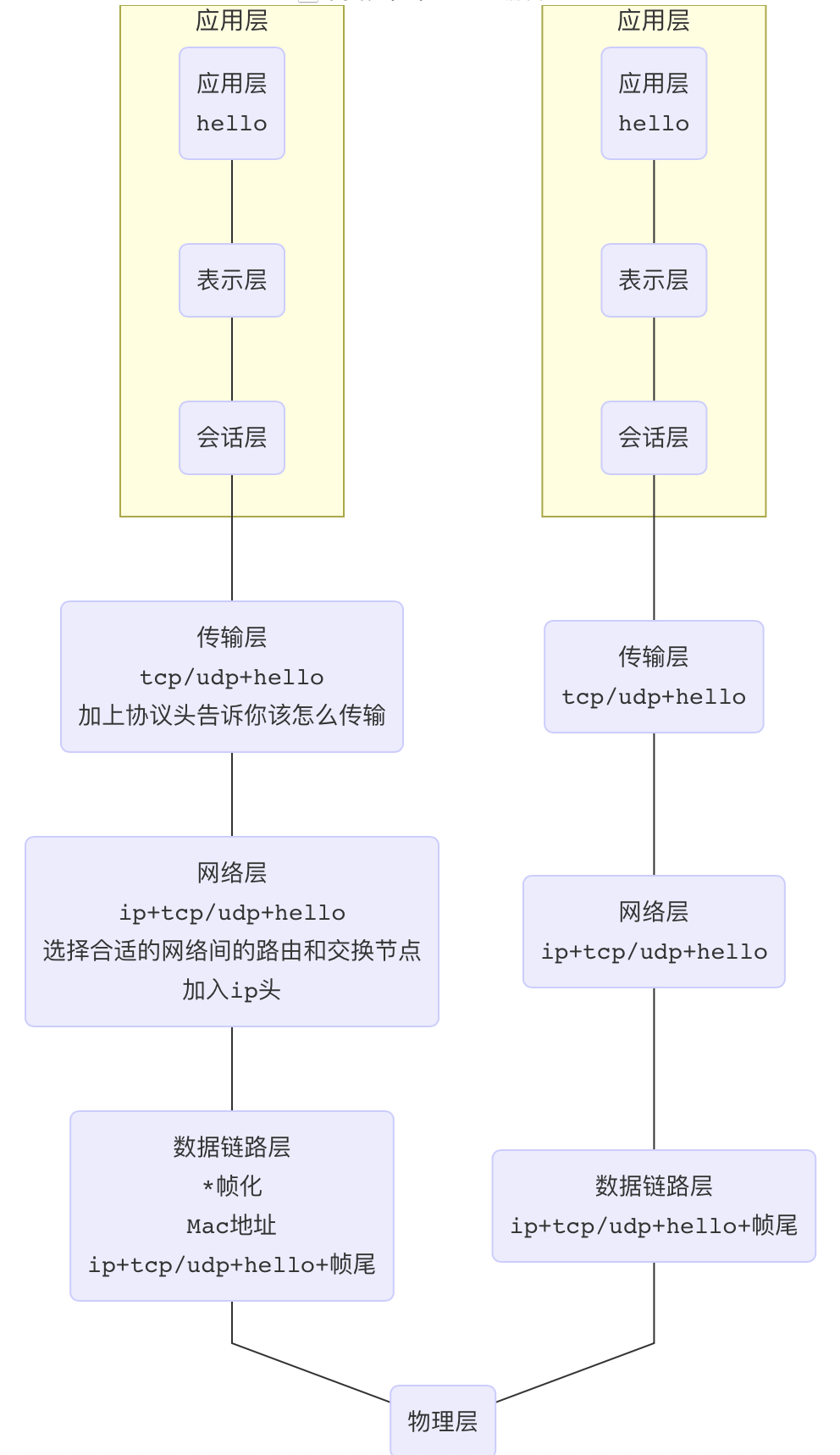
数据会分段传输,每段MTU最大1500字节,最小576字节左右,其中tcp有20字节左右,MSS(536字节左右)
数据段一般46~1500字节不等
二、网络下载实践
1、概览
目标--控制网络下载:
- 暂停、继续、取消
- 断点续传
- 后台、程序死亡
2、NSURLSession
- 基础下载与断点续传
//入口函数
- (void)downFile:(NSString*)fileUrl isBreakpoint:(BOOL)breakpoint
{

    if (!fileUrl || fileUrl.length == 0 || ![self checkIsUrlAtString:fileUrl])
    {
        NSLog(@"fileUrl 无效");
        return ;
    }
   // NSURLSession
    NSURL *url = [[NSURL alloc] initWithString:fileUrl];
    if (!self.session)
    {
        // 网络会话session会有一个个的任务task,每个task都有taskid
      	// backgroundSessionConfigurationWithIdentifier会支持后台下载
        NSURLSessionConfiguration *config = [NSURLSessionConfiguration backgroundSessionConfigurationWithIdentifier:[self currentDateStr]];
      //config为网络会话的配置,
        config.allowsCellularAccess = YES;//蜂窝网络
        config.timeoutIntervalForRequest = 30;//超时
      	//创建session
        self.session = [NSURLSession sessionWithConfiguration:config delegate:self delegateQueue:[NSOperationQueue mainQueue]];
    }

  	/*
  	if (!breakpoint)//是否支持断点续传
    {
        self.downloadTask = [self.session downloadTaskWithURL:url];
    }
    else
    {
        [self downloadWithResumeData];
    }
    */

    NSFileManager *fileManager = NSFileManager.defaultManager;
    // 是否支持断点续传应以是否存在 沙盒文件 为标准
    if (![fileManager fileExistsAtPath:[self getTmpFileUrl]])
    {
        self.downloadTask = [self.session downloadTaskWithURL:url];
    }
  	else
    {
        [self downloadWithResumeData];
    }

    // 开始建立连接 - 三次握手 - 重要
    [self.downloadTask resume];
    [self saveTmpFile];//预防app被kill的操作的代码
}

#pragma mark - NSURLSessionDelegate
//每次传一个包 调用一次该函数 512M
-(void)URLSession:(nonnull NSURLSession *)session downloadTask:(nonnull NSURLSessionDownloadTask *)downloadTask didWriteData:(int64_t)bytesWritten totalBytesWritten:(int64_t)totalBytesWritten totalBytesExpectedToWrite:(int64_t)totalBytesExpectedToWrite
{
    //tmp
    float downPro   = 1.0 * totalBytesWritten/totalBytesExpectedToWrite;
    // 该处使用了代理,也可使用block
    // manager中代理用于具体事务的处理
  	// manager将delegate和task绑定
  	// 注意不要用manager处理普通事务
    if(self.myDeleate && [self.myDeleate respondsToSelector:@selector(backDownprogress:tag:)])
        [self.myDeleate backDownprogress:downPro tag:self.tag];
}

//下载失败调用
-(void)URLSession:(nonnull NSURLSession *)session task:(nonnull NSURLSessionTask *)task didCompleteWithError:(nullable NSError *)error
{

    // 根据不同错误反馈不同 -- 错误码层(识别错误码)
    // 200-299皆为成功
    // 没有错误 → 序列化层 -- 能否支持http / json
    if(error && self.myDeleate && [self.myDeleate respondsToSelector:@selector(downError:tag:)] && error.code != -999)
        [self.myDeleate downError:error tag:self.tag];
}

#pragma mark - private

//暂停下载
-(void)suspendDownload
{
    // 播放/暂停/断点
    if (self.mIsSuspend)
    {
        [self.downloadTask resume];
    }
  	else
    {
        [self.downloadTask suspend];
    }
    self.mIsSuspend = !self.mIsSuspend;
}

//取消下载
-(void)cancelDownload
{
  	// -999:用户取消
  	/* 一般取消下载:
  	[self.downloadTask cancel];
  	*/

  	// 断点续传需要在取消下载流程中做的操作
  	// 该block会返回目前已下载的data
    [self.downloadTask cancelByProducingResumeData:^(NSData * _Nullable resumeData) {
        //self.resumeData = resumeData; //放在内存里(此处伪代码会循环引用!)
        [resumeData writeToFile:[self getTmpFileUrl] atomically:YES];//写入沙盒
        self.downloadTask = nil;
    }];
}

//断点下载  ---  取消了但是不删除已下载的数据,下次接着下载
-(void)downloadWithResumeData
{
    if (!self.session)
    {
      	//若没有session则不能续传
        return;
    }
    // 首先拿直线下载好的部分(沙盒、内存)
  	// defaultManager是类属性,有单例的特性
  	// @property (class, readonly, strong) NSFileManager *defaultManager;
    NSFileManager *fileManager = NSFileManager.defaultManager;
  	// 从沙盒中获取data
  	// 可改为.plist文件,断点续传有两种方法,还可以根据请求头来判别
    NSData        *dowloadData = [fileManager contentsAtPath:[self getTmpFileUrl]];
    // dowloadData = self.resumeData;// 从内存中取data
  	//在原来data基础上进行继续下载
    self.downloadTask  = [self.session downloadTaskWithResumeData:dowloadData];
    self.resumeData = nil; // 清除内存
}
- 预防app被kill的操作
//提前保存临时文件 预防下载中杀掉app --- 比较笨的方法
//开启定时器
-(void)saveTmpFile
{
    [NSTimer scheduledTimerWithTimeInterval:1 target:self selector:@selector(downloadTmpFile) userInfo:nil repeats:YES];
}
//杀掉app后 不至于下载的部分文件全部丢失
- (void)downloadTmpFile
{
    if (self.mIsSuspend)
    {
        return;
    }

    [self.downloadTask cancelByProducingResumeData:^(NSData * _Nullable resumeData) {
        [resumeData writeToFile:[self getTmpFileUrl] atomically:YES];
        self.downloadTask = nil;
        self.downloadTask = [self.session downloadTaskWithResumeData:resumeData];
        [self.downloadTask resume];
    }];
}
				/*
      	- (void)applicationDidEnterBackground:(UIApplication *)application
				{
    				// 实现如下代码,才能使程序处于后台时被杀死,调用applicationWillTerminate:方法
    				[[UIApplication sharedApplication]beginBackgroundTaskWithExpirationHandler:
    				^(){}];
				}
      	*/
三、框架思维
最重要