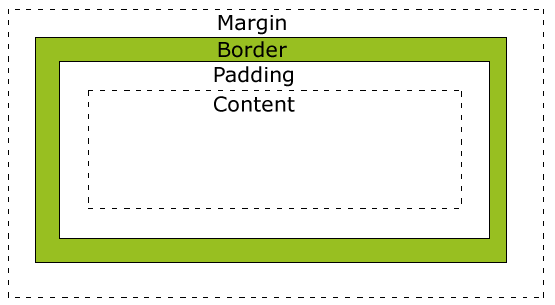
盒子模型(Box Model)
- Margin(外边距) - 清除边框外的区域,外边距是透明的。
- Border(边框) - 围绕在内边距和内容外的边框。
- Padding(内边距) - 清除内容周围的区域,内边距是透明的。
- Content(内容) - 盒子的内容,显示文本和图像。
设置盒子模型使用box-sizing
<style>
.a{
    box-sizing:border-box;//怪异(IE)盒模型
}
.b{
    box-sizing:content-box;//标准(W3C)盒模型
}
</style>
标准盒模型与怪异盒模型的差异在于width的计算方法
标准盒模型 : width=Content
怪异盒模型 : width=Content+Padding+Border
举个栗子
.Box {
        height: 100px;
        width: 80%;
        background: #000000;
        border: 1px solid #000000;
        position: absolute;
        top: 50%;
        left: 50%;
        transform: translate(-50%, -50%);
    }

    .border-box {
        width: 50%;
        height: 100%;
        float: left;
        background: #ffffff;
        box-sizing: content-box;
    }

    .Box1 {
        width: 50%;
        height: 100%;
        float: left;
        background: blue;
    }
这里设置了标准盒模型

如果设置边框或内边距的话问题就来了
    .border-box {
        width: 50%;
        height: 100%;
        float: left;
        background: #ffffff;
        box-sizing: content-box;
        border-right:30px solid #f72727;
    }

现在看看怪异盒模型
    .border-box {
        width: 50%;
        height: 100%;
        float: left;
        background: #ffffff;
        box-sizing: border-box;
        border-right:100px solid #f72727;
    }

这里设置100px的边框明显一些。
这里可以看出左边的width比右边的width的小了许多,应为怪异盒模型的width包含content和border。