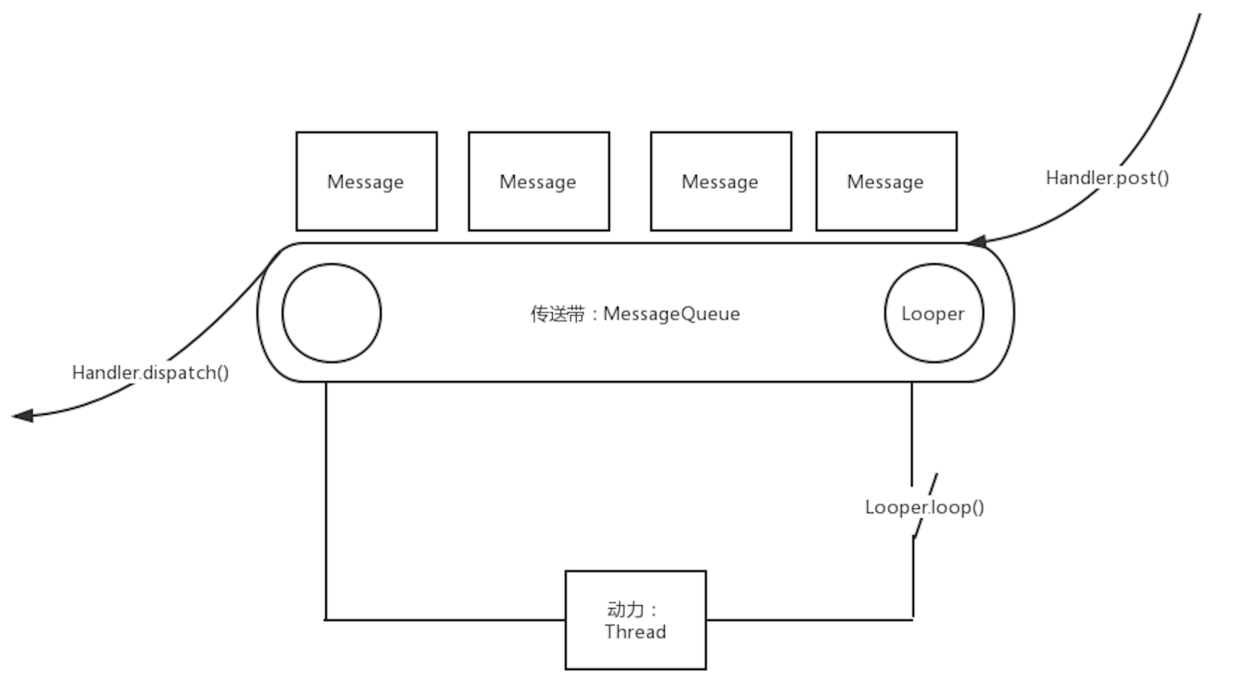
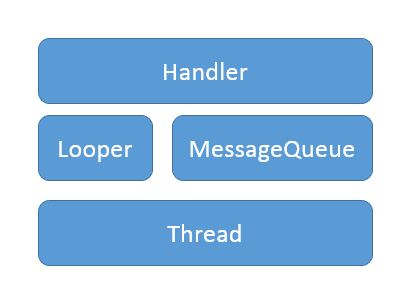
Handler是Android中引入的一种让开发者参与处理线程中消息循环的机制,Message是Handler向开发者提供的相关类,Handler的内部实现与Thread,MessageQueue和Looper有密切的关系。
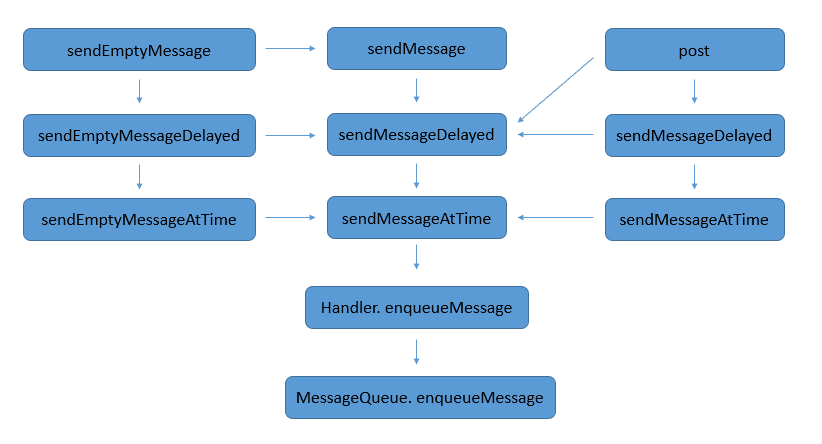
Handler post方法执行过程
public final boolean post(Runnable r)
{
  return  sendMessageDelayed(getPostMessage(r), 0);
}
public final boolean sendMessageDelayed(Message msg, long delayMillis)
{
  if (delayMillis < 0) {
    delayMillis = 0;
  }
  return sendMessageAtTime(msg, SystemClock.uptimeMillis() + delayMillis);
}
public boolean sendMessageAtTime(Message msg, long uptimeMillis) {
  MessageQueue queue = mQueue;
  if (queue == null) {
    RuntimeException e = new RuntimeException(
      this + " sendMessageAtTime() called with no mQueue");
    Log.w("Looper", e.getMessage(), e);
    return false;
  }
  return enqueueMessage(queue, msg, uptimeMillis);
}
private boolean enqueueMessage(MessageQueue queue, Message msg, long uptimeMillis) {
  msg.target = this;
  if (mAsynchronous) {
    msg.setAsynchronous(true);
  }
  return queue.enqueueMessage(msg, uptimeMillis);
}
boolean enqueueMessage(Message msg, long when) {
  if (msg.target == null) {
    throw new IllegalArgumentException ("Message must have a target.");
  }
  if (msg.isInUse()) {
    throw new IllegalStateException (msg + " This message is already in use.");
  }

  synchronized(this) {
    if (mQuitting) {
      IllegalStateException e = new IllegalStateException(
        msg.target + " sending message to a Handler on a dead thread"
      );
      Log.w(TAG, e.getMessage(), e);
      msg.recycle();
      return false;
    }

    msg.markInUse();
    msg.when = when;
    // mMessages是消息队列的头
    Message p = mMessages;
    boolean needWake;
    if (p == null || when == 0 || when < p.when) {
      // 新建头对象,如果队列被阻塞则唤醒队列
      msg.next = p;
      mMessages = msg;
      needWake = mBlocked;
    } else {
      // 插入队列中间。通常我们不必唤醒事件队列,除非队列头部有障碍,并且消
      // 息是队列中最早的异步消息。
      needWake = mBlocked && p.target == null && msg.isAsynchronous();
      Message prev;
      for (;;) {
        prev = p;
        p = p.next;
        if (p == null || when < p.when) {
          break;
        }
        if (needWake && p.isAsynchronous()) {
          needWake = false;
        }
      }
      msg.next = p; // 不变: p == prev.next
      prev.next = msg;
    }

    // 我们可以假设mPtr!= 0,因为mQuitting = false。
    if (needWake) {
      nativeWake(mPtr);
    }
  }
  return true;
}
主线程消费Message过程
public static void main(String[] args) {
//创建Looper和MessageQueue对象,用于处理主线程的消息
 Looper.prepareMainLooper();

 ...

 Looper.loop(); //消息循环运行
 throw new RuntimeException("Main thread loop unexpectedly exited");
}
线程默认没有Looper的,如果需要使用Handler就必须为线程创建Looper,首先我们要调用Looper的prepare方法,然后调用Looper的Loop方法。我们经常提到的主线程,也叫UI线程,它就是ActivityThread,ActivityThread被创建时就会初始化Looper和MessageQueue,这也是在主线程中默认可以使用Handler的原因。承载ActivityThread的主线程就是由Zygote fork而创建的进程。 在子线程中,如果手动为其创建了Looper,那么在所有的事情完成以后应该调用quit方法来终止消息循环,否则这个子线程就会一直处于等待(阻塞)状态,而如果退出Looper以后,这个线程就会立刻(执行所有方法并)终止,因此建议不需要的时候终止Looper。
// Looper对象通过ThreadLocal和线程关联在一起
static final ThreadLocal<Looper> sThreadLocal = new ThreadLocal<Looper>();

public static void prepare() {
  prepare(true);
}

private static void prepare(boolean quitAllowed) {
  if (sThreadLocal.get() != null) {
    throw new RuntimeException ("Only one Looper may be created per thread");
  }
  sThreadLocal.set(new Looper(quitAllowed));
}

private Looper(boolean quitAllowed) {
  mQueue = new MessageQueue(quitAllowed);
  mThread = Thread.currentThread();
}
// Looper.loop()应该在该Looper所绑定的线程中执行。
public static void loop() {
  final Looper me = myLooper();
  if (me == null) {
    throw new RuntimeException ("No Looper; Looper.prepare() wasn't called on this thread.");
  }
  // me是当前线程关联的Looper,me.mQueue是当前线程关联的MessageQueue
  final MessageQueue queue = me.mQueue;

  ...

  // for循环没有设置循环终止的条件,所以这个for循环是个死循环。
  for (;;) {
    // 我们通过消息队列MessageQueue的next方法从消息队列中取出一条消息,
    // 如果此时消息队列中有Message,那么next方法会立即返回该Message,
    // 如果此时消息队列中没有Message,那么next方法就会阻塞式地等待获取
    // Message。
    Message msg = queue.next();
    if (msg == null) {
      // 没有消息表明消息队列正在退出。
      return;
    }

    ...

    try {
      // msg的target属性是Handler,该代码的意思是让Message所关联的Handler
      // 通过dispatchMessage方法让Handler处理该Message
      msg.target.dispatchMessage(msg);
      dispatchEnd = needEndTime ? SystemClock.uptimeMillis() : 0;
    } finally {
      if (traceTag != 0) {
        Trace.traceEnd(traceTag);
      }
    }

    ...

    // 将消费过的message对象进行回收
    msg.recycleUnchecked();
  }
}
主线程的死循环一直运行是不是特别消耗CPU资源呢? 其实不然,这里就涉及到Linux pipe/epoll机制,简单说就是在主线程的MessageQueue没有消息时,便阻塞在loop的queue.next()中的nativePollOnce()方法里,此时主线程会释放CPU资源进入休眠状态,直到下个消息到达或者有事务发生,通过往pipe管道写端写入数据来唤醒主线程工作。这里采用的epoll机制,是一种IO多路复用机制,可以同时监控多个描述符,当某个描述符就绪(读或写就绪),则立刻通知相应程序进行读或写操作,本质同步I/O,即读写是阻塞的。 所以说,主线程大多数时候都是处于休眠状态,并不会消耗大量CPU资源。
Message next() {
  // 如果消息循环已经退出并被丢弃,则返回此处。如果应用程序尝试在不支持的
  // 退出后重新启动循环,则会发生这种情况。
  final long ptr = mPtr;
  if (ptr == 0) {
    return null;
  }
  for (;;) {
    synchronized(this) {
      Message prevMsg = null;
      Message msg = mMessages;
      if (msg != null && msg.target == null) {
        // 被屏障挡住了。查找队列中的下一个异步消息。
        // sync barrier是通过MessageQueue中的postSyncBarrier(long
        // when)、removeSyncBarrier(int token)调用来实现添加、删除的
        do {
          prevMsg = msg;
          msg = msg.next;
        } while (msg != null && !msg.isAsynchronous());
      }
      if (msg != null) {
        if (now < msg.when) {
          // 下一条消息尚未就绪。设置超时以在准备就绪时唤醒。
          nextPollTimeoutMillis = (int) Math . min (msg.when - now, Integer.MAX_VALUE);
        } else {
          // Got a message.
          mBlocked = false;
          if (prevMsg != null) {
            prevMsg.next = msg.next;
          } else {
            mMessages = msg.next;
          }
          msg.next = null;
          if (DEBUG) Log.v(TAG, "Returning message: " + msg);
          msg.markInUse();
          return msg;
        }
      } else {
        // 没有更多消息
        nextPollTimeoutMillis = -1;
      }
      // 现在处理退出消息已处理所有待处理消息。
      if (mQuitting) {
        dispose();
        return null;
      }

   ...

   }
}
public void dispatchMessage(Message msg) {
  // 判断msg.callback是否存在,msg.callback是Runnable类型
  if (msg.callback != null) {
    handleCallback(msg);
  } else {
    // 判断mCallback是否存在,mCallback是Callback类型
    if (mCallback != null) {
      if (mCallback.handleMessage(msg)) {
        return;
      }
    }
    // 调用重新的handleMessage方法
    handleMessage(msg);
  }
}

public interface Callback {
  public boolean handleMessage(Message msg);
}

private static void handleCallback(Message message) {
  message.callback.run();
}
Message
// 判断来源
public int what;
// 传递Int类型参数
public int arg1;
// 传递Int类型参数
public int arg2;
// 传递Object类型参数
public Object obj;
// 是否使用标识位
int flags;
// 入队时间
long when;
// 数据
Bundle data;
// Handler.dispatchMessage
Handler target;
// Handler.dispatchMessage
Runnable callback;
// 指向下一个Message
Message next;
// 返回一个空Message对象,可以复用之前的
public static Message obtain() {
  synchronized(sPoolSync) {
    if (sPool != null) {
      Message m = sPool;
      sPool = m.next;
      m.next = null;
      m.flags = 0; // 清除被使用标志
      sPoolSize--;
      return m;
    }
  }
  return new Message ();
}

// 回收Message对象用于复用
public void recycle() {
  if (isInUse()) {
    if (gCheckRecycle) {
      throw new IllegalStateException("This message cannot be recycled because it "
          + "is still in use.");
    }
    return;
  }
  recycleUnchecked();
}

void recycleUnchecked() {
  flags = FLAG_IN_USE;
  what = 0;
  arg1 = 0;
  arg2 = 0;
  obj = null;
  replyTo = null;
  sendingUid = -1;
  when = 0;
  target = null;
  callback = null;
  data = null;

  synchronized (sPoolSync) {
    if (sPoolSize < MAX_POOL_SIZE) {
      next = sPool;
      sPool = this;
      sPoolSize++;
    }
  }
}
Handler
Handler具有多个构造函数
public Handler() {
  this(null, false);
}

public Handler(Callback callback) {
  this(callback, false);
}

public Handler(Looper looper) {
  this(looper, null, false);
}

public Handler(Looper looper, Callback callback) {
  this(looper, callback, false);
}

@UnsupportedAppUsage
public Handler(boolean async) {
  this(null, async);
}

public Handler(Callback callback, boolean async) {
  if (FIND_POTENTIAL_LEAKS) {
    final Class<? extends Handler> klass = getClass();
    if ((klass.isAnonymousClass() || klass.isMemberClass() || klass.isLocalClass()) &&
      (klass.getModifiers() & Modifier.STATIC) == 0) {
      Log.w(TAG, "The following Handler class should be static or leaks might occur: " +
          klass.getCanonicalName());
    }
  }

  mLooper = Looper.myLooper();
  if (mLooper == null) {
    throw new RuntimeException(
        "Can't create handler inside thread " + Thread.currentThread()
            + " that has not called Looper.prepare()");
  }
  mQueue = mLooper.mQueue;
  mCallback = callback;
  mAsynchronous = async;
}

@UnsupportedAppUsage
public Handler(Looper looper, Callback callback, boolean async) {
  mLooper = looper;
  mQueue = looper.mQueue;
  mCallback = callback;
  mAsynchronous = async;
}
总结