长期更新,不喜勿喷~
本文的目的是记录在学习 Fluter 中碰到的那些有代表性的,能帮助大家学习 Flutter 页面搭建的例子,因为采集自别人,所以要是有侵权等问题,请联系删除。
目前例子:
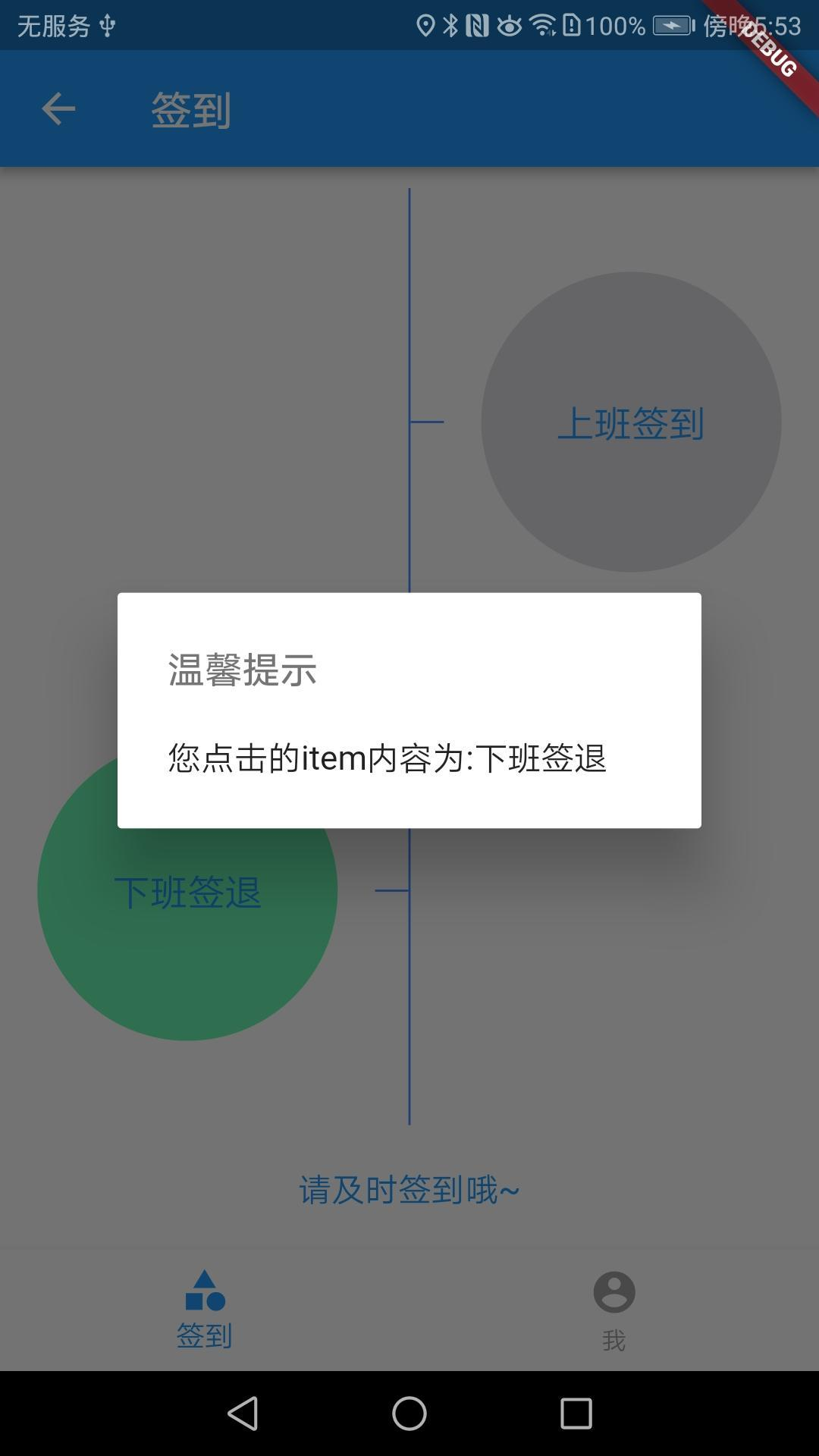
签到界面
签到界面
class ItemSignPage extends StatelessWidget {
  @override
  Widget build(BuildContext context) {
    return new Container(
      child: new Column(
        children: <Widget>[
          new Container(
            height: 10.0,
          ),
          new Flexible(
            child: new Container(
              child: new Row(children: <Widget>[
                new Flexible(
                  child: new Container(),
                  flex: 1,
                ),
                new Container(
                  width: 16.0,
                  height: 1.0,
                ),
                new Container(
                  width: 1.0,
                  color: Colors.blueAccent,
                ),
                new Container(
                  width: 16.0,
                  height: 1.0,
                  color: Colors.blueAccent,
                ),
                new Flexible(
                  child: new Container(
                    child: buildListData(
                        context, Color.fromARGB(40, 50, 40, 80), '上班签到'),
                  ),
                  flex: 1,
                ),
              ]),
            ),
            flex: 1,
          ),
          new Flexible(
            child: new Container(
              child: new Row(children: <Widget>[
                new Flexible(
                  child: new Container(
                    child: buildListData(context, Colors.greenAccent, '下班签退'),
                  ),
                  flex: 1,
                ),
                new Container(
                  width: 16.0,
                  height: 1.0,
                  color: Colors.blueAccent,
                ),
                new Container(
                  width: 1.0,
                  color: Colors.blueAccent,
                ),
                new Container(
                  width: 16.0,
                  height: 1.0,
                ),
                new Flexible(
                  child: new Container(),
                  flex: 1,
                ),
              ]),
            ),
            flex: 1,
          ),
          new Container(
            height: 60.0,
            child: new Center(
              child: new Text(
                '请及时签到哦~',
                style: new TextStyle(color: Colors.blue, fontSize: 16.0),
              ),
            ),
          ),
        ],
      ),
    );
  }

  Widget buildListData(BuildContext context, Color color, String text) {
    return new Center(
      child: new GestureDetector(
        child: new CircleAvatar(
          backgroundColor: color,
          radius: 72.0,
          child: new Text(
            text,
            style: new TextStyle(color: Colors.blue, fontSize: 18.0),
          ),
        ),
        onTap: () {
          showDialog(
            context: context,
            builder: (BuildContext context) {
              return new AlertDialog(
                title: new Text(
                  '温馨提示',
                  style: new TextStyle(
                    color: Colors.black54,
                    fontSize: 18.0,
                  ),
                ),
                content: new Text('您点击的item内容为:$text'),
              );
            },
          );
        },
      ),
    );
  }
}**