

有一天ui 姐姐想画一个双层的波浪用于项目,大概是这样的效果

分析:
看起来有点炫酷,第一次做还有点分不清楚门道。连续几天,我都在思考它的原理,有空闲就两只手来回,模拟荡漾得出几点特征:
- 1.双层波浪,相反的方向运行,中间是静态的不考虑。
- 2.看着像一层层波浪,上下移动,向x轴方向移动,偶尔还变个速导致忽快忽慢,都是错觉。
- 3.波浪是不均匀的,非得贝塞尔曲线来做不可。
解释第2点,上下移动,向左移动,忽快忽慢的误导性很大,这是个巨坑。注意最下面那层波浪,把它的波浪想像成固定一个整体,不上下移动,眼睛一直跟随一个波段,盯住它,你会发现,它就是一个整体在匀速向左移动,曲线只是在x轴平移,不断重复,第2点的错觉是波段的波峰,波谷,波长不一致导致的变速感。没有上下移动。
如何实现: 1.path画一条固定的贝塞尔曲线,曲线的数据找 ui小姐姐要大概是这样子的:
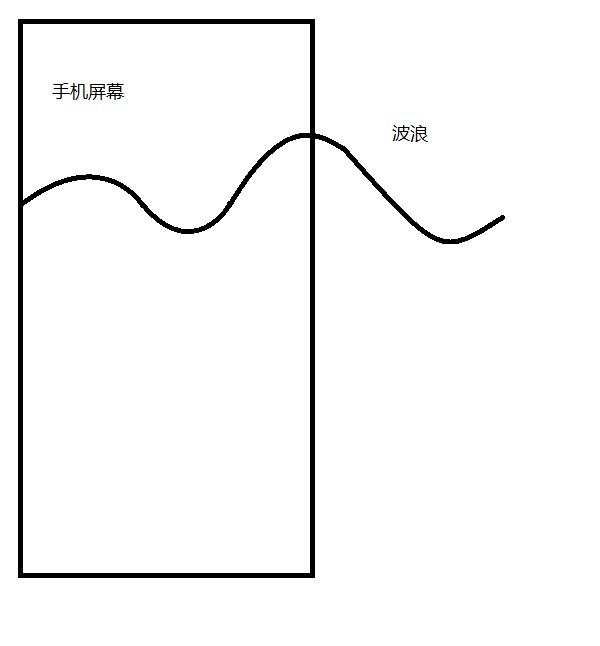
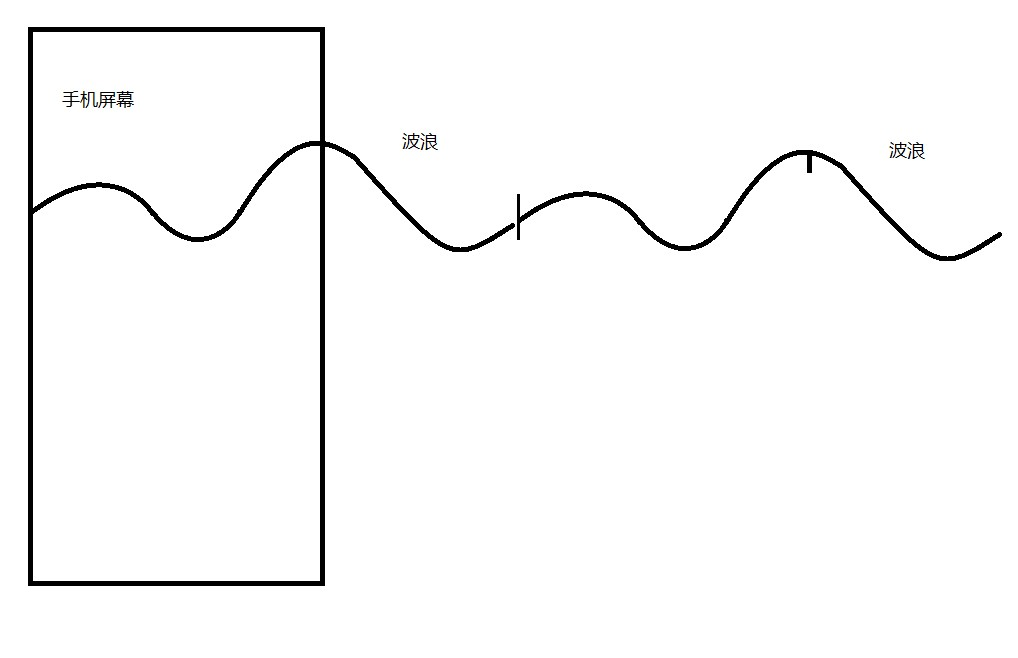
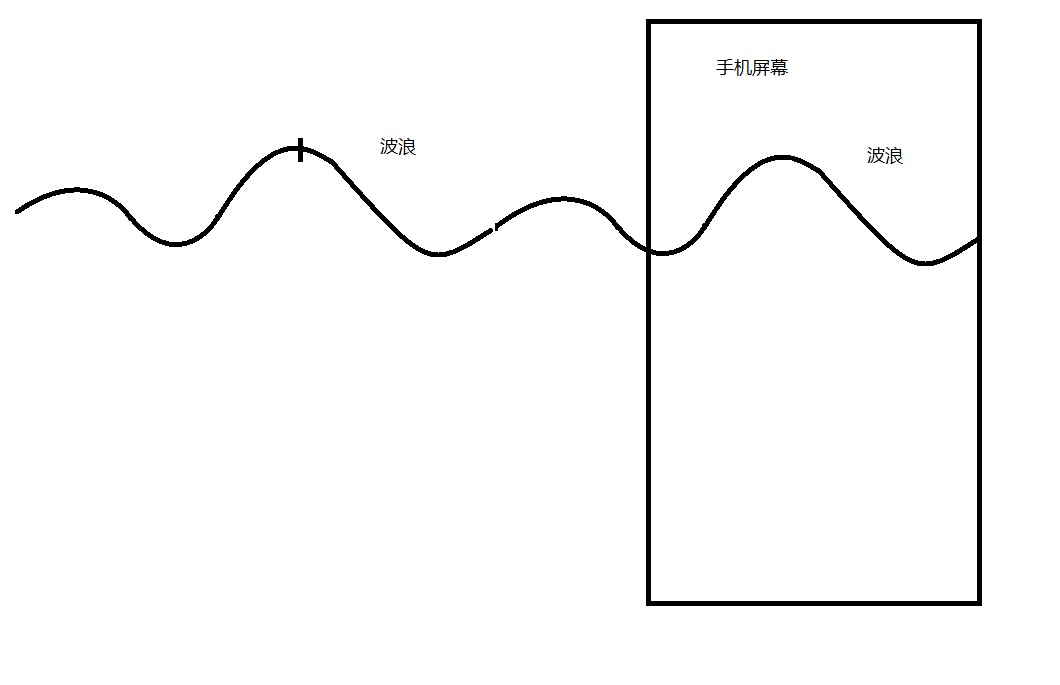

上手
第一个问题:如何画一条曲线,可以首尾拼接起来保持平滑?
- 画一个多点相连平滑曲线,android 上解决不了(最多两个控制点,不能再多了),但是数学可以。 安排:www.jianshu.com/p/98088ff77…
- 结尾处,单独处理,用一条一个控制点的一阶贝赛尔连接。 上图:
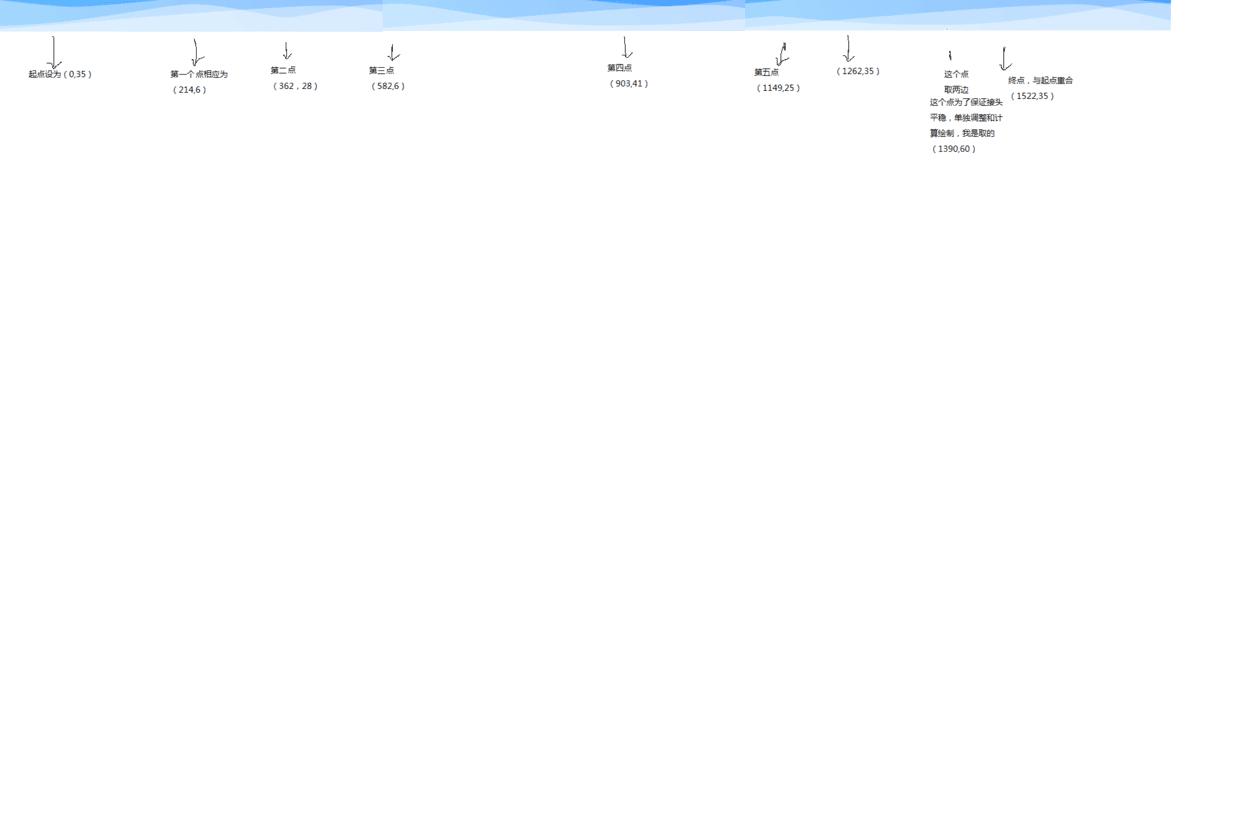
最后效果:
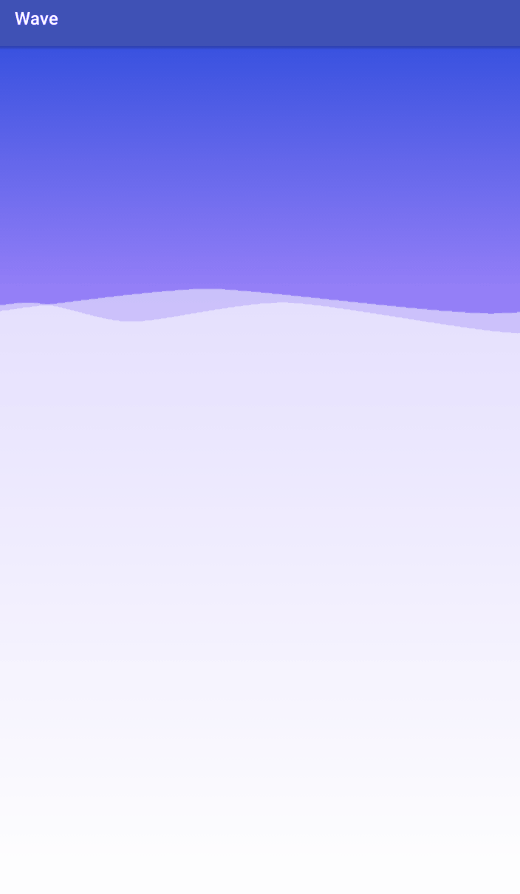
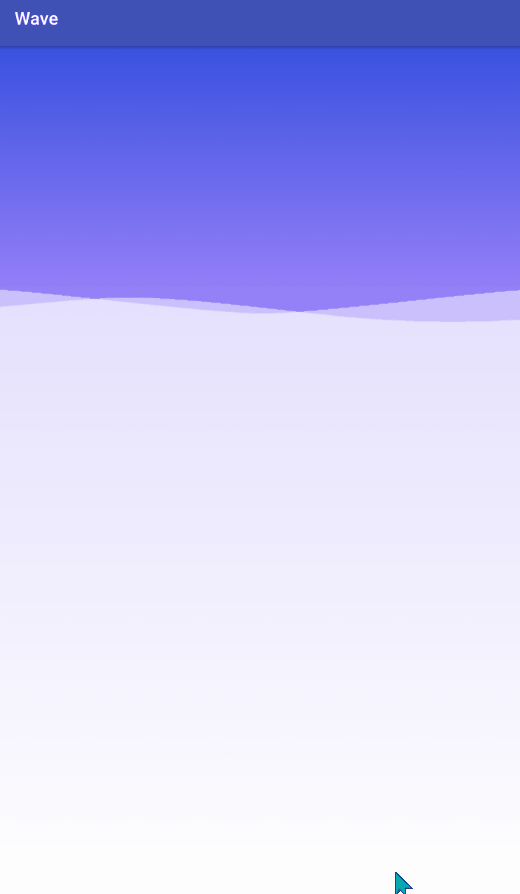
但是为什么要画不均匀的波浪呢?
上代码:
wave 类
package com.example.a14143.wave;

import android.graphics.Canvas;
import android.graphics.Paint;
import android.graphics.Path;
import android.graphics.RectF;
import android.util.Log;

/**
 * @author DrChen
 * @Date 2019/4/21.
 * qq:1414355045
 * 保存波浪的所有信息
 * 和绘制
 */
public class Wave {

    /**
     * 单个波浪宽
     */
    private float waveWith;
    /**
     * 绘制的方向
     */
    boolean isLeft = true;
    /**
     * 单个循环一半长度占屏幕宽度的百分比(浪的长度等于一个循环的1/2)
     */
    private float waveWithF;
    /**
     * 绘制的区域
     */
    private RectF rectF;

    /**
     * 当前移动位置计次
     */
    private int currentMoveX;

    /**
     * 每次移动的距离
     */
    private int moveX;
    /**
     * 移动前的点位
     */
    private float[][] wavePoints;

    private boolean isDebug = false;
    /**
     * 切率
     */
    private float lineSmoothness = 0.12f;

    public Path path = new Path();


    private int mHeight;


    /**
     *
     * @param isLeft 向左向右
     * @param rectF  绘制区域
     * @param points
     */
    public Wave(  boolean isLeft, RectF rectF,float lineSmoothness,int mHeight,int moveX,float[]... points) {

        this.isLeft = isLeft;
        this.mHeight = mHeight;
        if(lineSmoothness>0) this.lineSmoothness = lineSmoothness;
        setRectF(rectF);
        setPoints(points);
        //每次移动的距离
        if (isLeft) {
            this.moveX = - moveX;

        } else {
           this. moveX = moveX;
        }


        measurePath();
    }


    private void setRectF(RectF rectF) {
        this.rectF = rectF;
    }

    /**
     * 传入数据只有控制点,没有贝赛尔的起点,通过控制点计算各个点位
     */
    private void setPoints(float[]... points) {


        if (points.length < 4 ) {
            throw new RuntimeException("所有点不能小于4个");  //直接手动抛出异常
        }
        if (rectF == null) {
            throw new RuntimeException("没有绘制区域就没有绘制");
        }


        if (wavePoints == null) {
            wavePoints = new float[points.length][6];
        }

        waveWithF = points[points.length-1][0];
        waveWith = rectF.width()* waveWithF;
        // 下面是利用各个点连成一条平滑的曲线
        float prePreviousPointX = Float.NaN;
        float prePreviousPointY = Float.NaN;
        float previousPointX = Float.NaN;
        float previousPointY = Float.NaN;
        float currentPointX = Float.NaN;
        float currentPointY = Float.NaN;
        float nextPointX;
        float nextPointY;

        int lineSize = points.length;
        for (int i = 0; i < points.length; i++) {
            if (Float.isNaN(currentPointX)) {

                currentPointX = points[i][0];
                currentPointY = points[i][1];
            }
            if (Float.isNaN(previousPointX)) {
                //是否是第一个点
                if (i > 0) {
                    previousPointX = points[i - 1][0];
                    previousPointY = points[i - 1][1];
                } else {
                    //是的话就用当前点表示上一个点
                    previousPointX = currentPointX;
                    previousPointY = currentPointY;
                }
            }

            if (Float.isNaN(prePreviousPointX)) {
                //是否是前两个点
                if (i > 1) {

                    prePreviousPointX = points[i][0];
                    prePreviousPointY = points[i][1];
                } else {
                    //是的话就用当前点表示上上个点
                    prePreviousPointX = previousPointX;
                    prePreviousPointY = previousPointY;
                }
            }

            // 判断是不是最后一个点了
            if (i < lineSize - 1) {

                nextPointX = points[i + 1][0];
                nextPointY = points[i + 1][1];
            } else {
                //是的话就用当前点表示下一个点
                nextPointX = currentPointX;
                nextPointY = currentPointY;
            }

            if (i == 0||i>=points.length-2) {//起点和最后面接头的地方,为了保证平滑单独处理
                // 将Path移动到开始点
                wavePoints[i][0] = currentPointX*rectF.width();
                wavePoints[i][1] = currentPointY*rectF.height()+rectF.top;


            } else {
                // 求出控制点坐标
                final float firstDiffX = (currentPointX - prePreviousPointX);
                final float firstDiffY = (currentPointY - prePreviousPointY);
                final float secondDiffX = (nextPointX - previousPointX);
                final float secondDiffY = (nextPointY - previousPointY);
                final float firstControlPointX = previousPointX + (lineSmoothness * firstDiffX);
                final float firstControlPointY = previousPointY + (lineSmoothness * firstDiffY);
                final float secondControlPointX = currentPointX - (lineSmoothness * secondDiffX);
                final float secondControlPointY = currentPointY - (lineSmoothness * secondDiffY);

                wavePoints[i][0] = firstControlPointX*rectF.width();
                wavePoints[i][1] = firstControlPointY*rectF.height()+rectF.top;
                wavePoints[i][2] = secondControlPointX*rectF.width();
                wavePoints[i][3] = secondControlPointY*rectF.height()+rectF.top;
                wavePoints[i][4] = currentPointX*rectF.width();
                wavePoints[i][5] = currentPointY*rectF.height()+rectF.top;

            }

            // 更新值,
            prePreviousPointX = previousPointX;
            prePreviousPointY = previousPointY;
            previousPointX = currentPointX;
            previousPointY = currentPointY;
            currentPointX = nextPointX;
            currentPointY = nextPointY;
        }


    }

    /**
     * 测试时需要
     */
    public void testMoveTo(float moveX) {

        for (int i = 0; i < wavePoints.length; i++) {
            wavePoints[i][0] += moveX * waveWith;
            wavePoints[i][2] += moveX * waveWith;
            wavePoints[i][4] += moveX * waveWith;
        }
    }

    /**
     * 刷新每次移动的点位
     */
    public void measureMoveTo() {
       if(isLeft){
           if(waveWith + currentMoveX < Math.abs(moveX)){
               currentMoveX = 0;
           }else {
               currentMoveX+=moveX;
           }
       }else {
           if(waveWith - currentMoveX< moveX){
               currentMoveX = 0;
           }else {
               currentMoveX+= moveX;
           }

       }

    }


    /**
     *
     *  绘制path
     */
    private void measurePath() {

        path.reset();
        if(isLeft){
            path.moveTo(wavePoints[0][0], mHeight);
            path.lineTo(wavePoints[0][0], wavePoints[0][1]);

            for (int i = 1; i < wavePoints.length-2  ; i ++) {

                path.cubicTo(wavePoints[i][0], wavePoints[i][1],
                        wavePoints[i][2], wavePoints[i][3],
                        wavePoints[i][4], wavePoints[i ][5]);
            }
            //最后面接头处理
            path.quadTo(wavePoints[wavePoints.length-2][0],wavePoints[wavePoints.length-2][1],
                    wavePoints[wavePoints.length-1][0],wavePoints[wavePoints.length-1][1]
            );
            for (int i = 1; i < wavePoints.length-2  ; i ++) {

                path.cubicTo(wavePoints[i][0]+waveWith, wavePoints[i][1],
                        wavePoints[i][2]+waveWith, wavePoints[i][3],
                        wavePoints[i][4]+waveWith, wavePoints[i ][5]);
            }
            path.lineTo(waveWith + wavePoints[wavePoints.length-1][0], mHeight);
            path.close();

        }else {
            path.moveTo(wavePoints[0][0]-waveWith, mHeight);
            path.lineTo(wavePoints[0][0]-waveWith, wavePoints[0][1]);

            for (int i = 1; i < wavePoints.length-2  ; i ++) {

                path.cubicTo(wavePoints[i][0]-waveWith, wavePoints[i][1],
                        wavePoints[i][2]-waveWith, wavePoints[i][3],
                        wavePoints[i][4]-waveWith, wavePoints[i ][5]);
            }
            //最后面接头处理
            path.quadTo(wavePoints[wavePoints.length-2][0]-waveWith,wavePoints[wavePoints.length-2][1],
                    wavePoints[wavePoints.length-1][0]-waveWith,wavePoints[wavePoints.length-1][1]
            );
            for (int i = 1; i < wavePoints.length-2  ; i ++) {

                path.cubicTo(wavePoints[i][0], wavePoints[i][1],
                        wavePoints[i][2], wavePoints[i][3],
                        wavePoints[i][4], wavePoints[i ][5]);
            }
            path.lineTo( wavePoints[wavePoints.length-1][0], mHeight);
            path.close();
            }

    }

    public void draw(Canvas canvas, Paint paint) {
        canvas.save();
        canvas.translate(currentMoveX,0);
        canvas.drawPath(path,paint);
        measureMoveTo();
        canvas.restore();

    }
}
View 类
package com.example.a14143.wave;


import android.content.Context;
import android.graphics.Canvas;
import android.graphics.Color;
import android.graphics.LinearGradient;
import android.graphics.Paint;
import android.graphics.Path;
import android.graphics.RectF;
import android.graphics.Shader;
import android.support.annotation.Nullable;
import android.util.AttributeSet;
import android.util.Log;
import android.view.View;

/**
 * @author DrChen
 * @Date 2019/4/16 0016.
 * qq:1414355045
 * 三段渐变波纹
 */
public class WaveView extends View {
    /**
     * 三段渐变的中点
     */
    private final float gradient_height_mid = 0.28f;

    private final float top_wave_top = 0.28f;
    private final float top_wave_bottom = top_wave_top + 0.06f;
    private final float bottom_wave_bottom = top_wave_bottom ;
    private final float bottom_wave_top = top_wave_bottom - 0.05f;


    /**
     * 这个是背景的渐变色和波浪的颜色
     */
    private int topColor, midColor, bottomColor, waveColor;
    /**
     * 控件的宽高
     */
    private int mHeight, mWidth;
    /**
     * 渐变画笔
     */
    private Paint gradientPaint;
    /**
     * 波浪的画笔
     */
    private Paint wavePaint;
    /**
     * 绘制波浪式辅助的画笔(可以去掉)
     */
    private Paint testPaint;
    /**
     * 是否开启辅助的画笔
     */
    private boolean isDebug = false;
    /**
     * view 是否被删除
     */
    private boolean onPause = false;

    /**
     * 整个视图的背景是三种颜色的渐变,蓝到紫的区域
     */
    private RectF gradient_bottom;
    /**
     * 紫到白的区域
     */
    private RectF gradient_top;

    /**
     * 波浪绘制区域
     */
    private RectF bottom_wave_RectF;
    private RectF top_wave_RectF;


    private LinearGradient oneGradient;
    private LinearGradient twoGradient;

    private Wave bottomWave;
    private Path bottomPath = new Path();
    private Wave topWave;
    private Path topPath = new Path();


    public WaveView(Context context) {
        this(context, null);
    }

    public WaveView(Context context, @Nullable AttributeSet attrs) {
        this(context, attrs, -1);
    }

    public WaveView(Context context, @Nullable AttributeSet attrs, int defStyleAttr) {
        super(context, attrs, defStyleAttr);

        topColor = Color.parseColor("#3851DF");
        midColor = Color.parseColor("#937EF7");
        bottomColor = Color.parseColor("#FFFFFF");
        waveColor = Color.parseColor("#80FFFFFF");
        if (gradientPaint == null) {
            gradientPaint = new Paint();
        }
        gradientPaint.setStyle(Paint.Style.FILL);
        if (gradient_bottom == null) gradient_bottom = new RectF();
        if (gradient_top == null) gradient_top = new RectF();
        if (bottom_wave_RectF == null) bottom_wave_RectF = new RectF();
        if (top_wave_RectF == null) top_wave_RectF = new RectF();

        if (wavePaint == null) wavePaint = new Paint();
        wavePaint.setColor(waveColor);
        wavePaint.setStyle(Paint.Style.FILL);
        wavePaint.setAntiAlias(true);


        if (testPaint == null) {
            testPaint = new Paint();
        }
        testPaint.setColor(Color.BLACK);
        testPaint.setStrokeWidth(2);
        testPaint.setStyle(Paint.Style.STROKE);


    }

    public void onResume() {
        onPause = false;
        invalidate();
    }

    public void onPause() {
        onPause = true;
    }

    @Override
    protected void onSizeChanged(int w, int h, int oldw, int oldh) {
        super.onSizeChanged(w, h, oldw, oldh);
        mWidth = w;
        mHeight = h;
        gradient_bottom.right = mWidth;
        gradient_bottom.bottom = mHeight * gradient_height_mid;
        gradient_top.top = mHeight * gradient_height_mid;
        gradient_top.bottom = mHeight;
        gradient_top.right = mWidth;

        bottom_wave_RectF.top = mHeight * bottom_wave_top;
        bottom_wave_RectF.right = mWidth;
        bottom_wave_RectF.bottom = mHeight * bottom_wave_bottom;
        top_wave_RectF.top = mHeight * top_wave_top;
        top_wave_RectF.right = mWidth;
        top_wave_RectF.bottom = mHeight * top_wave_bottom;


        if (bottomWave == null) {
            //我的数据屏幕宽度是750,浪高50, 每个点位后面要加f 不然算出来的数据会全错,因为会丢失小数点
            bottomWave = new Wave( true, bottom_wave_RectF,0.12f,mHeight,dip2px(5,getContext()),
                    new float[]{0 / 750f, 35 / 50f},
                    new float[]{214 / 750f, 6 / 50f},
                    new float[]{362 / 750f, 28 / 50f},
                    new float[]{582 / 750f, 6 / 50f},
                    new float[]{903 / 750f, 41 / 50f},
                    new float[]{1149 / 750f, 25 / 50f},
                    new float[]{1262/750f,35/50f},
                    new float[]{1390/750f,60/50f},//最后这个点可以适当调整,保证平滑
            new float[]{1522/750f,35/50f}
            );

        }

        if(topWave==null){
            //我的数据屏幕宽度是750,浪高50, 每个点位后面要加f 不然算出来的数据会全错,因为会丢失小数点
            topWave = new Wave(false, top_wave_RectF,0.1f,mHeight,dip2px(2,getContext()),
                    new float[]{0 / 750f, 28 / 78f},
                    new float[]{262 / 750f, 0 / 78f},
                    new float[]{657 / 750f, 37 / 78f},
                    new float[]{1052 / 750f, 0 / 78f},
                    new float[]{1314 / 750f, 28 / 78f},
                    new float[]{1520 / 750f, 60 / 78f},
                    new float[]{1709/750f,28/78f}

            );

        }


    }
    /**
     * dp转px
     * @param dip       dp
     * @param context   上下文
     * @return
     */
    public static int dip2px(float dip, Context context) { float density = context.getResources().getDisplayMetrics().density;
        int px = (int) (dip * density + 0.5f);// 4.9->4, 4.1->4, 四舍五入
        return px;
    }

    @Override
    protected void onDraw(Canvas canvas) {
//        super.onDraw(canvas);


        //绘制背景三段渐变
        drawBackdrop(canvas);
        if (isDebug) {
            canvas.drawRect(bottom_wave_RectF, testPaint);
        }
//        topWave.testMoveTo(0.4f);
//        bottomWave.testMoveTo(0.6f);


        topWave.draw(canvas,wavePaint);
        bottomWave.draw(canvas,wavePaint);


        if (onPause) {
            return;
        }
      postInvalidateDelayed(10);


    }


    @Override
    protected void onDetachedFromWindow() {
        onPause = true;
        super.onDetachedFromWindow();

    }

    /**
     * 绘制三段渐变背景
     *
     * @param canvas
     */
    private void drawBackdrop(Canvas canvas) {
        if (oneGradient == null)
            oneGradient = new LinearGradient(gradient_bottom.centerX(), gradient_bottom.top, gradient_bottom.centerX(), gradient_bottom.bottom, topColor, midColor, Shader.TileMode.MIRROR);
        if (twoGradient == null)
            twoGradient = new LinearGradient(gradient_top.centerX(), gradient_top.top, gradient_top.centerX(), gradient_top.bottom, midColor, bottomColor, Shader.TileMode.MIRROR);
        gradientPaint.setShader(oneGradient);
        canvas.drawRect(gradient_bottom, gradientPaint);
        gradientPaint.setShader(twoGradient);
        canvas.drawRect(gradient_top, gradientPaint);
    }


}
最后调用:
package com.example.a14143.wave;

import android.support.v7.app.AppCompatActivity;
import android.os.Bundle;

public class MainActivity extends AppCompatActivity {
WaveView waveView;
    @Override
    protected void onCreate(Bundle savedInstanceState) {
        super.onCreate(savedInstanceState);
        setContentView(R.layout.activity_main);
    waveView = findViewById(R.id.waveView);


    }

    @Override
    protected void onResume() {
        super.onResume();
    waveView.onResume();
    }

    @Override
    protected void onPause() {
        super.onPause();
    waveView.onPause();
    }
}
改进
他运行的话,我调用软键盘,会有卡顿的感觉,由于的他是在后面运行的,跟前面的ui 线程没有什么关系,用surfaceView 对单独开个线程绘制比较好,
/**
 * @author DrChen
 * @Date 2019/9/9 0009.
 * qq:1414355045
 */
public class MyWaveView extends SurfaceView implements SurfaceHolder.Callback, Runnable {

    /**
     * 三段渐变的中点
     */
    private final float gradient_height_mid = 0.28f;
    private final float top_wave_top = 0.28f;
    private final float top_wave_bottom = top_wave_top + 0.06f;
    private final float bottom_wave_bottom = top_wave_bottom;
    private final float bottom_wave_top = top_wave_bottom - 0.05f;
    private SurfaceHolder mHolder;
    /**
     * 与surfaceHolder 绑定的Canvas
     */
    private Canvas mCanvas;
    /**
     * 用于绘制线程
     */
    private Thread t;
    /**
     * 线程的控制开关
     */
    private boolean isRunning;
    /**
     * 这个是背景的渐变色和波浪的颜色
     */
    private int topColor, midColor, bottomColor, waveColor;
    /**
     * 控件的宽高
     */
    private int mHeight, mWidth;
    /**
     * 渐变画笔
     */
    private Paint gradientPaint;
    /**
     * 波浪的画笔
     */
    private Paint wavePaint;
    /**
     * 绘制波浪式辅助的画笔(可以去掉)
     */
    private Paint testPaint;
    /**
     * 是否开启辅助的画笔
     */
    private boolean isDebug = false;


    /**
     * 整个视图的背景是三种颜色的渐变,蓝到紫的区域
     */
    private RectF gradient_bottom;
    /**
     * 紫到白的区域
     */
    private RectF gradient_top;

    /**
     * 波浪绘制区域
     */
    private RectF bottom_wave_RectF;
    private RectF top_wave_RectF;


    private LinearGradient oneGradient;
    private LinearGradient twoGradient;

    private Wave bottomWave;
    private Wave topWave;

    public MyWaveView(Context context) {
        this(context, null);
    }

    public MyWaveView(Context context, AttributeSet attrs) {
        super(context, attrs);

        mHolder = getHolder();
        mHolder.addCallback(this);

        // setZOrderOnTop(true);// 设置画布 背景透明
         mHolder.setFormat(PixelFormat.TRANSLUCENT);

        //设置可获得焦点
        setFocusable(true);
        setFocusableInTouchMode(true);
        //设置常亮
        this.setKeepScreenOn(true);

        topColor = Color.parseColor("#3851DF");
        midColor = Color.parseColor("#937EF7");
        bottomColor = Color.parseColor("#FFFFFF");
        waveColor = Color.parseColor("#80FFFFFF");
        if (gradientPaint == null) {
            gradientPaint = new Paint();
        }
        gradientPaint.setStyle(Paint.Style.FILL);
        if (gradient_bottom == null) gradient_bottom = new RectF();
        if (gradient_top == null) gradient_top = new RectF();
        if (bottom_wave_RectF == null) bottom_wave_RectF = new RectF();
        if (top_wave_RectF == null) top_wave_RectF = new RectF();

        if (wavePaint == null) wavePaint = new Paint();
        wavePaint.setColor(waveColor);
        wavePaint.setStyle(Paint.Style.FILL);
        wavePaint.setAntiAlias(true);
        //防抖动
        wavePaint.setDither(true);


        if (testPaint == null) {
            testPaint = new Paint();
        }
        testPaint.setColor(Color.BLACK);
        testPaint.setStrokeWidth(2);
        testPaint.setStyle(Paint.Style.STROKE);

    }


    @Override
    protected void onSizeChanged(int w, int h, int oldw, int oldh) {
        super.onSizeChanged(w, h, oldw, oldh);
        mWidth = w;
        mHeight = h;
        gradient_bottom.right = mWidth;
        gradient_bottom.bottom = mHeight * gradient_height_mid;
        gradient_top.top = mHeight * gradient_height_mid;
        gradient_top.bottom = mHeight;
        gradient_top.right = mWidth;

        bottom_wave_RectF.top = mHeight * bottom_wave_top;
        bottom_wave_RectF.right = mWidth;
        bottom_wave_RectF.bottom = mHeight * bottom_wave_bottom;
        top_wave_RectF.top = mHeight * top_wave_top;
        top_wave_RectF.right = mWidth;
        top_wave_RectF.bottom = mHeight * top_wave_bottom;


        if (bottomWave == null) {
            //我的数据屏幕宽度是750,浪高50, 每个点位后面要加f 不然算出来的数据会全错,因为会丢失小数点
            bottomWave = new Wave(true, bottom_wave_RectF, 0.2f, mHeight, dip2px(6, getContext()),
                    new float[]{0 / 750f, 35 / 50f},
                    new float[]{214 / 750f, 6 / 50f},
                    new float[]{362 / 750f, 28 / 50f},
                    new float[]{582 / 750f, 6 / 50f},
                    new float[]{903 / 750f, 41 / 50f},
                    new float[]{1149 / 750f, 25 / 50f},
                    new float[]{1262 / 750f, 35 / 50f},
                    new float[]{1390 / 750f, 60 / 50f},//最后这个点可以适当调整,保证平滑
                    new float[]{1522 / 750f, 35 / 50f}
//                    new float[]{0 / 750f, 28 / 78f},
//                    new float[]{262 / 750f, 0 / 78f},
//                    new float[]{657 / 750f, 37 / 78f},
//                    new float[]{1052 / 750f, 0 / 78f},
//                    new float[]{1314 / 750f, 28 / 78f},
//                    new float[]{1520 / 750f, 60 / 78f},
//                    new float[]{1709/750f,28/78f}
            );

        }

        if (topWave == null) {
            //我的数据屏幕宽度是750,浪高50, 每个点位后面要加f 不然算出来的数据会全错,因为会丢失小数点
            topWave = new Wave(false, top_wave_RectF, 0.15f, mHeight, dip2px(6, getContext()),
                    new float[]{0 / 750f, 28 / 78f},
                    new float[]{262 / 750f, 0 / 78f},
                    new float[]{657 / 750f, 37 / 78f},
                    new float[]{1052 / 750f, 0 / 78f},
                    new float[]{1314 / 750f, 28 / 78f},
                    new float[]{1520 / 750f, 60 / 78f},
                    new float[]{1709 / 750f, 28 / 78f}

            );

        }


    }

    /**
     * dp转px
     *
     * @param dip     dp
     * @param context 上下文
     * @return
     */
    public static int dip2px(float dip, Context context) {
        float density = context.getResources().getDisplayMetrics().density;
        int px = (int) (dip * density + 0.5f);// 4.9->4, 4.1->4, 四舍五入
        return px;
    }


    /**每30帧刷新一次屏幕**/
    public static final int TIME_IN_FRAME = 30;
    @Override
    public void run() {
        while (isRunning) {

            /**取得更新之前的时间**/
            long startTime = System.currentTimeMillis();

            /**在这里加上线程安全锁**/
            synchronized (mHolder) {
                /**拿到当前画布 然后锁定**/
                mCanvas =mHolder.lockCanvas();
                draw();
                /**绘制结束后解锁显示在屏幕上**/
                mHolder.unlockCanvasAndPost(mCanvas);
            }

            /**取得更新结束的时间**/
            long endTime = System.currentTimeMillis();

            /**计算出一次更新的毫秒数**/
            int diffTime  = (int)(endTime - startTime);

            /**确保每次更新时间为30帧**/
            while(diffTime <=TIME_IN_FRAME) {
                diffTime = (int)(System.currentTimeMillis() - startTime);
                /**线程等待**/
                Thread.yield();
            }

        }
    }

    private void draw() {

            if (mCanvas != null) {
                mCanvas.drawColor(Color.TRANSPARENT, PorterDuff.Mode.CLEAR);

                //绘制背景三段渐变
                drawBackdrop(mCanvas);
                if (isDebug) {
                    mCanvas.drawRect(bottom_wave_RectF, testPaint);
                }


                topWave.draw(mCanvas, wavePaint);
                bottomWave.draw(mCanvas, wavePaint);
            }

    }

    /**
     * 绘制三段渐变背景
     *
     * @param canvas
     */
    private void drawBackdrop(Canvas canvas) {
        if (oneGradient == null)
            oneGradient = new LinearGradient(gradient_bottom.centerX(), gradient_bottom.top, gradient_bottom.centerX(), gradient_bottom.bottom, topColor, midColor, Shader.TileMode.MIRROR);
        if (twoGradient == null)
            twoGradient = new LinearGradient(gradient_top.centerX(), gradient_top.top, gradient_top.centerX(), gradient_top.bottom, midColor, bottomColor, Shader.TileMode.MIRROR);
        gradientPaint.setShader(oneGradient);
        canvas.drawRect(gradient_bottom, gradientPaint);
        gradientPaint.setShader(twoGradient);
        canvas.drawRect(gradient_top, gradientPaint);
    }

    @Override
    public void surfaceCreated(SurfaceHolder holder) {
        // 开启线程
        isRunning = true;
        t = new Thread(this);
        t.start();
    }

    @Override
    public void surfaceChanged(SurfaceHolder holder, int format, int width, int height) {

    }

    @Override
    public void surfaceDestroyed(SurfaceHolder holder) {
        // 通知关闭线程
        isRunning = false;
    }
}
改造完了之后,如何ui 能懂你意思,还是建议切图(自己写path 取坐标真的太难了): www.cnblogs.com/itcqx/p/555…
参考资源:
鸿洋转盘 | blog.csdn.net/lmj62356579…
30毫秒刷新一次 | blog.csdn.net/android_cmo…
surface清屏 | blog.csdn.net/BruceDuBruc…
github的链接: github.com/drchengit/W…
我是drchen,一个温润的男子,版权所有,未经允许不得抄袭。
