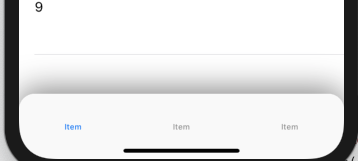
private let tabbarBackgroundView = UIView()
    override func viewDidLoad() {
        super.viewDidLoad()

        tabbarBackgroundView.layer.cornerRadius = 20
        tabbarBackgroundView.backgroundColor = .white
        tabbarBackgroundView.layer.shadowColor = UIColor.black.cgColor
        tabbarBackgroundView.layer.shadowOffset = CGSize(width: 0, height: -5)
        tabbarBackgroundView.layer.shadowRadius = 20
        tabbarBackgroundView.clipsToBounds = false
        tabbarBackgroundView.layer.shadowOpacity = 0.5
        view.addSubview(tabbarBackgroundView)

        view.bringSubviewToFront(tabBar)

        tabBar.layer.cornerRadius = 20
        tabBar.layer.masksToBounds = true


    }


    override func viewDidLayoutSubviews() {
        super.viewDidLayoutSubviews()
        tabbarBackgroundView.frame = tabBar.frame
    }