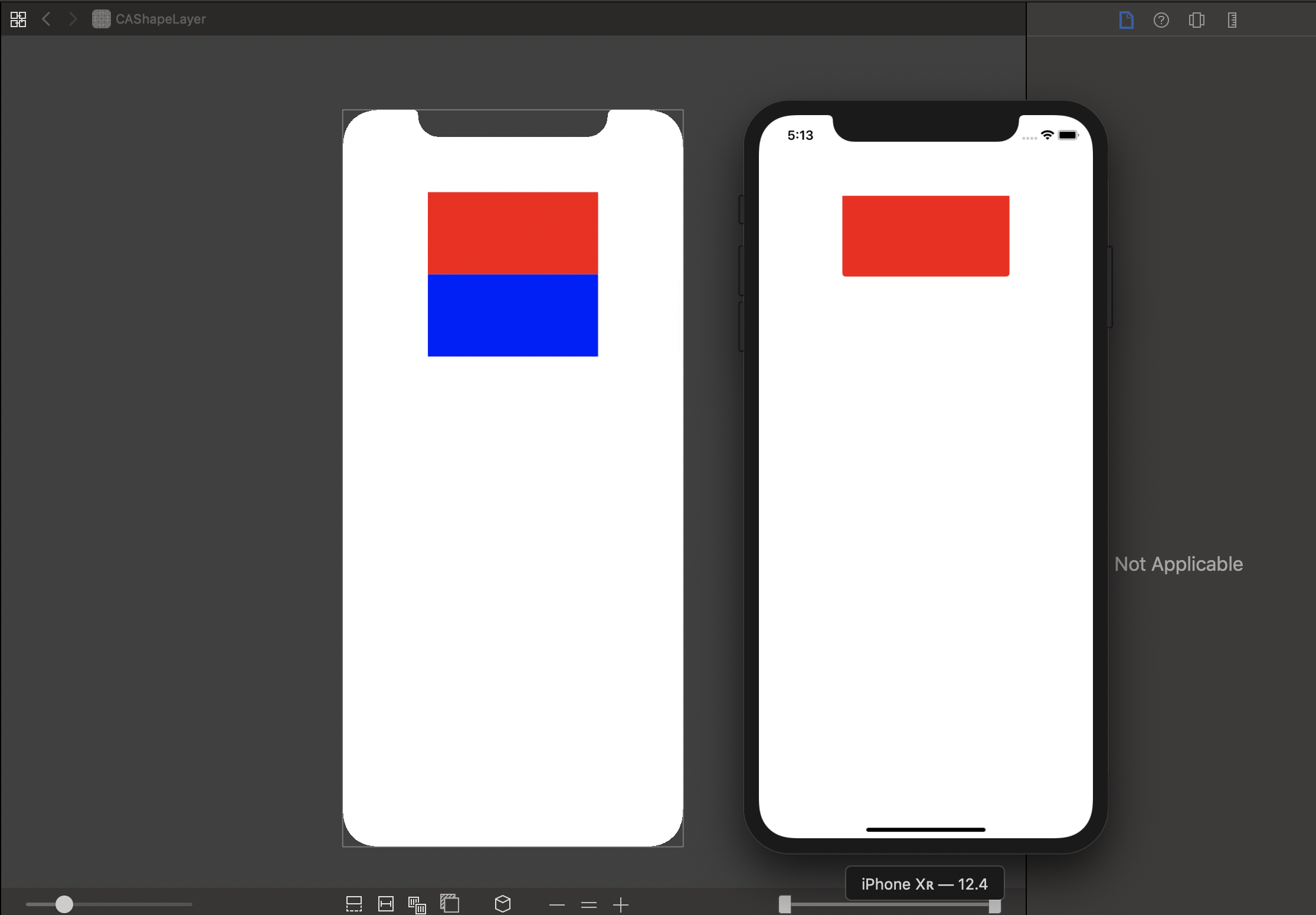
使用Debug View Hierarchy调试界面时,模拟器和视图调试器中的界面不符的情况1
1.使用CAShapeLayer和UIBezierPath设置圆角
优点:可以设置边框的四个角中任意角的圆角
缺点:在复杂界面影响性能;UIView在使用这种方式设置圆角的时候,frame高度变长时,会遮挡加长部分的界面
2.圆角设置分类代码UIView+Corner
// 无边框-全角-宏统一size
- (void)setAllCornerRadiusWithCommonSizeNoBorder {
    [self setRadiusWithCornerSize:GT_COMMON_CORNER_SIZE
                          corners:UIRectCornerBottomLeft | UIRectCornerTopLeft | UIRectCornerTopRight | UIRectCornerBottomRight];
}

// 无边框-圆角(左右上角)
- (void)setTopCornerRadiusWithSize:(CGSize)cornerSize {
    [self setRadiusWithCornerSize:cornerSize corners:UIRectCornerTopLeft | UIRectCornerTopRight];
}

// 无边框-圆角(左右下角)
- (void)setBottomCornerRadiusWithSize:(CGSize)cornerSize {
    [self setRadiusWithCornerSize:cornerSize corners:UIRectCornerBottomLeft | UIRectCornerBottomRight];
}

// 无边框
- (void)setRadiusWithCornerSize:(CGSize)cornerSize corners:(UIRectCorner)rectCorner {
    [self setRadiusWithCornerSize:cornerSize
                          corners:rectCorner
                       needBorder:NO
                      borderColor:nil
                      borderWidth:0
                           bounds:self.bounds];
}

// 有边框-左右下角
- (void)setBorderBottomCornerRadiusWithSize:(CGSize)cornerSize borderColor:(UIColor *)color borderWidth:(CGFloat)width {
    [self setRadiusWithCornerSize:cornerSize
                          corners:UIRectCornerBottomLeft | UIRectCornerBottomRight
                      borderColor:color borderWidth:width];
}

// 有边框-全角-宏统一
- (void)setAllCornerRadiusWithCommon {
    [self setRadiusWithCornerSize:GT_COMMON_CORNER_SIZE
                          corners:UIRectCornerBottomLeft | UIRectCornerTopLeft | UIRectCornerTopRight | UIRectCornerBottomRight
                      borderColor:GT_COMMON_BORDER_COLOR borderWidth:GT_COMMON_BORDER_WIDTH];
}

// 有边框-圆角(左上下角)
- (CAShapeLayer *)setLeftCornerRadiusWithSize:(CGSize)cornerSize borderColor:(UIColor *)borderColor borderWidth:(CGFloat)borderWidth {
    return [self setRadiusWithCornerSize:cornerSize corners:UIRectCornerBottomLeft | UIRectCornerTopLeft needBorder:YES borderColor:borderColor borderWidth:borderWidth bounds:self.bounds];
}

// 有边框-圆角(右上下角)
- (CAShapeLayer *)setRightCornerRadiusWithSize:(CGSize)cornerSize borderColor:(UIColor *)borderColor borderWidth:(CGFloat)borderWidth {
    return [self setRadiusWithCornerSize:cornerSize corners:UIRectCornerBottomRight | UIRectCornerTopRight needBorder:YES borderColor:borderColor borderWidth:borderWidth bounds:self.bounds];
}

// 有边框
- (void)setRadiusWithCornerSize:(CGSize)cornerSize corners:(UIRectCorner)rectCorner borderColor:(UIColor *)borderColor borderWidth:(CGFloat)width {
    [self setRadiusWithCornerSize:cornerSize corners:rectCorner needBorder:YES borderColor:borderColor borderWidth:width bounds:self.bounds];
}

/**

 cornerSize     圆角Size
 rectCorner     圆角位置
 hasBorder      是否需要边框
 borderColor    边框颜色
 width          边框宽度
 bounds         设置圆角的视图的bounds
 */
- (CAShapeLayer *)setRadiusWithCornerSize:(CGSize)cornerSize
                        corners:(UIRectCorner)rectCorner
                     needBorder:(BOOL)needBorder
                    borderColor:(UIColor *)borderColor
                    borderWidth:(CGFloat)width
                         bounds:(CGRect)bounds {

    // 画圆角
    UIBezierPath *maskPath = [UIBezierPath bezierPathWithRoundedRect:bounds byRoundingCorners:rectCorner cornerRadii:cornerSize];
    CAShapeLayer *maskLayer = [[CAShapeLayer alloc] init];
    maskLayer.frame = bounds;
    maskLayer.path = maskPath.CGPath;
    self.layer.mask = maskLayer;

    if (!needBorder) {
        // 不需要边框,直接返回
        return nil;
    }

    // 画边框
    CAShapeLayer *lineBorder = [[CAShapeLayer alloc] init];
    lineBorder.frame = bounds;
    [lineBorder setLineWidth:width];
    [lineBorder setStrokeColor:borderColor.CGColor];
    [lineBorder setFillColor:[UIColor clearColor].CGColor];

    // 设置虚线框
//    lineBorder.lineDashPattern = @[@10,@20];//10 - 线段长度 ,20 - 线段与线段间距

    UIBezierPath *path = [UIBezierPath bezierPathWithRoundedRect:lineBorder.frame byRoundingCorners:rectCorner cornerRadii:cornerSize];

    lineBorder.path = path.CGPath;

    [self.layer addSublayer:lineBorder];

    return lineBorder;
}

- (void)bezierPathWithRoundedRect:(CGRect)rect
                          byRoundingCorners:(UIRectCorner)corners
                                cornerRadii:(CGSize)cornerRadii {
    //绘制圆角 要设置的圆角 使用“|”来组合
    UIBezierPath *maskPath = [UIBezierPath bezierPathWithRoundedRect:self.bounds byRoundingCorners:corners cornerRadii:CGSizeMake(20, 20)];
    CAShapeLayer *maskLayer = [[CAShapeLayer alloc] init];
    maskLayer.frame = self.bounds;//设置大小
    maskLayer.path = maskPath.CGPath;//设置图形样子
    self.layer.mask = maskLayer;
}
3.UIView在使用这种方式设置圆角的时候,frame高度变长时,会遮挡加长部分的界面的demo
#import "ViewController.h"
#import "UIView+Corner.h"

@interface ViewController ()

@property (strong, nonatomic) UIView *demoView;

@property (strong, nonatomic) UIView *redView;
@property (strong, nonatomic) UIView *blueView;

@end

@implementation ViewController

- (void)viewDidLoad {
    [super viewDidLoad];
    // Do any additional setup after loading the view.

    [self.view addSubview:self.demoView];
    [self.demoView addSubview:self.redView];

    [self.demoView setBottomCornerRadiusWithSize:CGSizeMake(4, 4)];

    dispatch_after(dispatch_time(DISPATCH_TIME_NOW, (int64_t)(10.0 * NSEC_PER_SEC)), dispatch_get_main_queue(), ^{
        [self.demoView addSubview:self.blueView];
        CGRect frame = self.demoView.frame;
        frame.size.height = 200;
        self.demoView.frame = frame;
    });
}


- (UIView *)demoView {
    if (!_demoView) {
        CGRect frame = [UIScreen mainScreen].bounds;
        _demoView = [[UIView alloc] initWithFrame:CGRectMake(frame.size.width / 4, 100, frame.size.width / 2, 100)];
    }

    return _demoView;
}

- (UIView *)redView {
    if (!_redView) {
        _redView = [[UIView alloc] initWithFrame:CGRectMake(0, 0, CGRectGetWidth(self.demoView.frame), 100)];
        _redView.backgroundColor = [UIColor redColor];
    }

    return _redView;
}

- (UIView *)blueView {
    if (!_blueView) {
        _blueView = [[UIView alloc] initWithFrame:CGRectMake(0, 100, CGRectGetWidth(self.demoView.frame), 100)];
        _blueView.backgroundColor = [UIColor blueColor];
    }

    return _blueView;
}

@end
4.结果演示