

微前端架构是一种类似于微服务的架构,它将微服务的理念应用于浏览器端,即将Web应用从单一的单体应用转变为由多个小型前端应用聚合为一的应用。 现阶段实现微前端的方式大致有以下六种:
- 使用 HTTP 服务器的路由来重定向多个应用
- 在不同的框架之上设计通讯、加载机制,诸如
Mooa和Single-SPA - 通过组合多个独立应用、组件来构建一个单体应用
- iFrame。使用 iFrame 及自定义消息传递机制
- 使用纯
Web Components构建应用 - 结合
Web Components构建
此次实践,采用的是Single-SPA的加载机制,具体如下。
项目架构
整体架构
| 内项目 | 作用 |
|---|---|
| portal | 最上层路由分发框架 |
| menu | 导航栏 |
| cooper | 主体项目 |
| projects | 有自定义西项目 |
| .gitignore | git提交忽略配置 |
| readme.md | 说明文档 |
框架之上的通讯机制
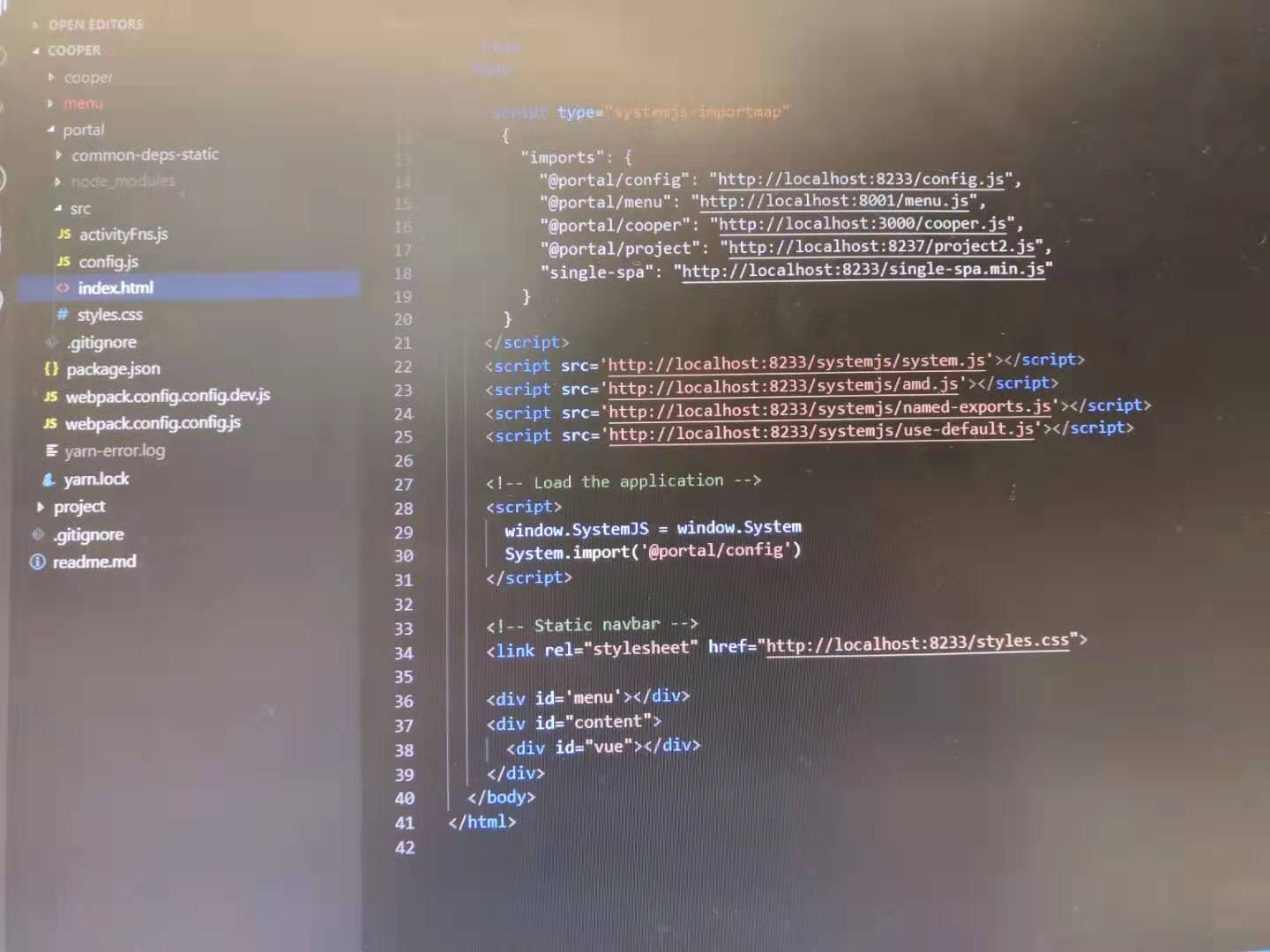
portal: 路由分发机制源头,systemJs 和 single-spa 的使用。
portal项目启动为服务时,port设置成为了8233。
systemJs: 是一个 通用模块加载器,支持AMD、CommonJS、ES6等各种格式的JS模块加载,也是Angular2官推的加载器。所以该微前端实例,支持跨技术(react、angular)模块加载。
single-spa: 是一个可以让使用多个javascript语言框架的构建的应用集成在一起的框架。
<script type="systemjs-importmap">{...}</script>
用来导入可以需要引入的第三方模块,和插件。这里的config.js、single-spa.min.js、styles.css都是以HTTP形式引入,是为了避免后续的路由问题,因为该html将作为模板直接复用。
使用systemjs引入的方式
System.import('@portal/config')
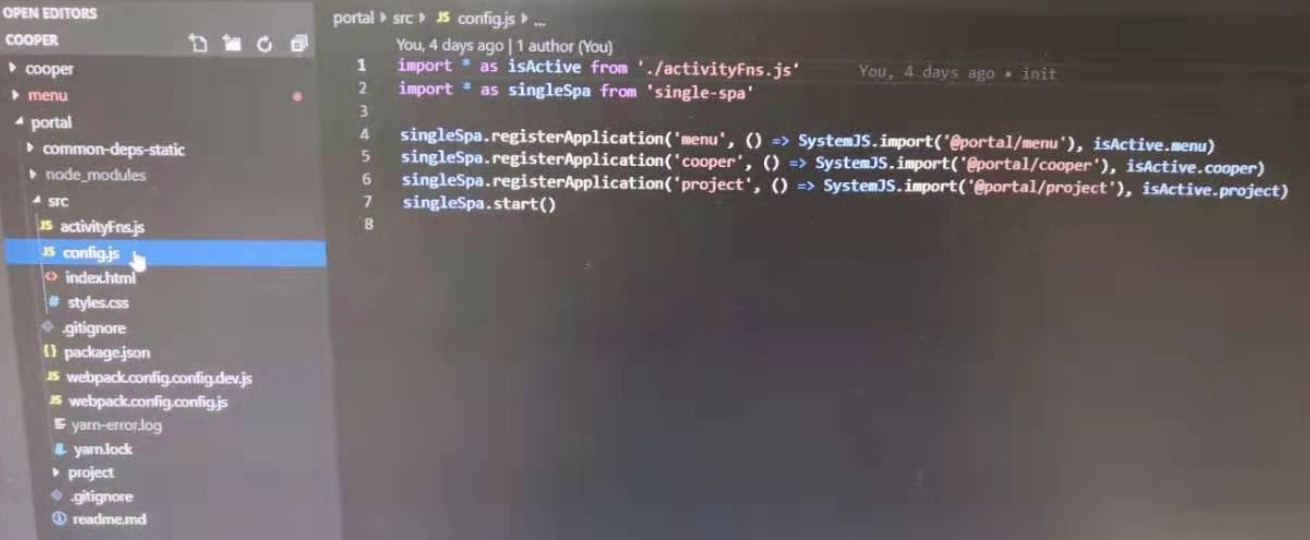
引入single-spa模块
registerApplication(名称,引入路径,是否引入)
singleSpa.start()启用
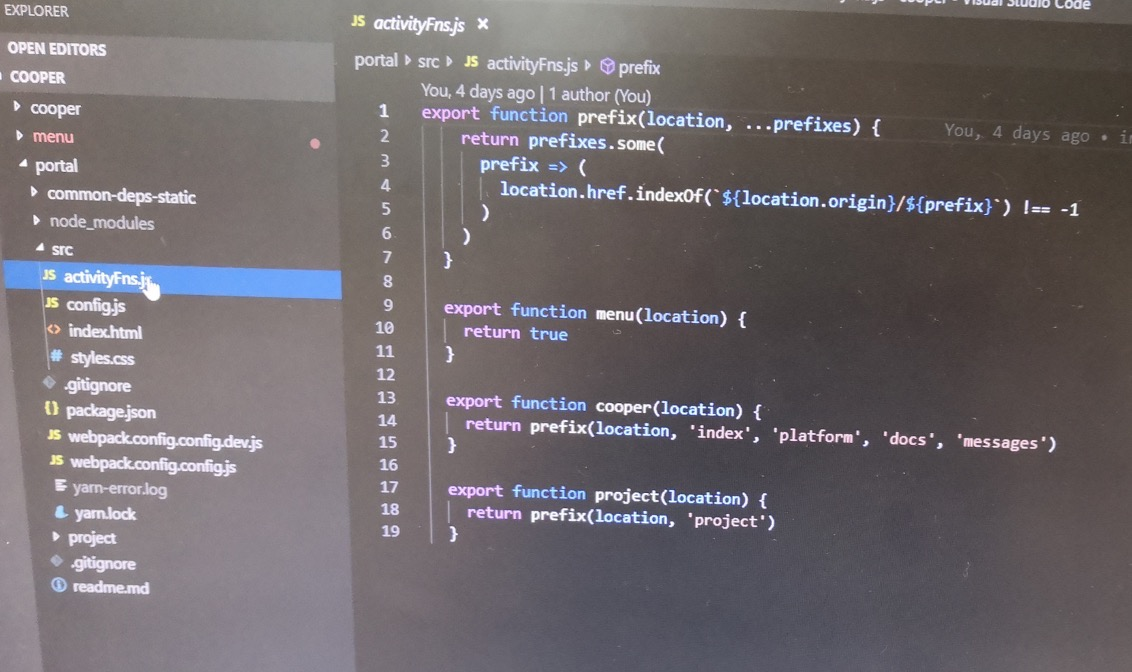
用来判断某一模块是否引入
menu: 页面跳转
因为整个项目都是用vue写的,所以路由跳转这块用的是vue-router。
举例:
<router-link to="/index" />
cooper: 页面响应 ***子项目因为使用vue-cli写的,所以 一定要引入vue-cli-plugin-single-spa插件,否则子项目的single-spa钩子无法正常exports。
vue项目中,先创建router.ts 举例:
import index from 'views/index/index.vue'

export default [{
    path: '/index',
    name: 'index',
    component: index
}, ...]
在app.vue 中
<router-view />
那为什么不同项目之间路由会相应呢?
所有独立项目都是以single-spa的形式打包输出,并引入到portal架构下的,经systemjs引入之后,相当与是在portal下运行的一个项目,http衔接到了localhost:8233下。因此,在独立项目中引用图片、css文件是,也需要已http形式引入。避免合并到portal下后,路劲找不到的问题。
单一应用入口文件配置
cooper/projects/menu: 入口文件配置
因为要打包成single-spa的形式,所以入口文件会有所不同。
入口文件main.ts
import Vue from 'vue'
import singleSpaVue from 'single-spa-vue'
import App from './App.vue'
import store from './store'
import router from './router'

const vueLifecircle = singleSpaVue({
    Vue,
    appOption: {
        el: '#vue',
        render: r => r(App),
        store,
        router
    }
})
App.vue
<template>
    <div id="vue">
        <keep-alive>
            <router-view />
        </keep-alive>
    </div>
</template>
...
webpack配置明细
项目single-spa形式输出配置
以menu为例的独立项目打包配置vue.config.js
const path = require('path')
module.exports = {
    chainWebpack: config => {
        config.entryPoints.clear()
        config.entry('menu').add('./src/main.ts').end()
        config.output.filename('menu.js').library('menu').libraryTarget('amd').end()
        config.devServer.port(8001).headers({
            "Access-Control-Allow-Origin": "*"
        })
    },
    outputDir: path.resolve(__dirname, 'dist/')
}
输出的入口文件是menu.js,以AMD形式打包,原因:single-spa是AMD形式,所以也是在portal项目中会引用amd.js的原因。
portal项目打包配置
webppapck.config.config.js
module.export = {
    entry: './src/config',
    output: {
        filename: 'config.js',
        library: 'config',
        libraryTarget: 'amd',
        path: path.resolve(__dirname, 'build')
    },
    ...
    plugins: [
        CopyWebpackPlugin([
            {form: path.resolve(__dirname, 'src/index.html')},
            {from: path.resolve(__dirname, 'src/style.css')},
            {from: path.resolve(__dirname, 'common-deps-static')}
        ])
    ]
}
打包后项目运行
只需要启动一个服务指向portal,其他子项目均放在portal目录下,以静态js文件形式引入。
子项目状态共享
可以把所有子项目的公共依赖全部提取,统一放到Portal层,已静态文件形式引入。同样,也可以把Vue、VueRouter、Vuex率先在portal层System.import(),并且注册为可用。详细细节后续会再整理一篇文档作为讲解。
