本文使用AIDL实现两个App的通信。 效果如下
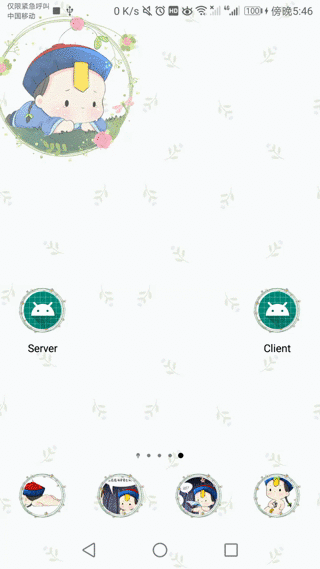
- 打开Server App,点击button显示有两个学生数据。
- 打开Client App,点击button添加三条学生数据。
- 再回到Server App,点击Button就显示有5个学生数据。
Server服务端(Server App)
1. 新建一个AIDL文件
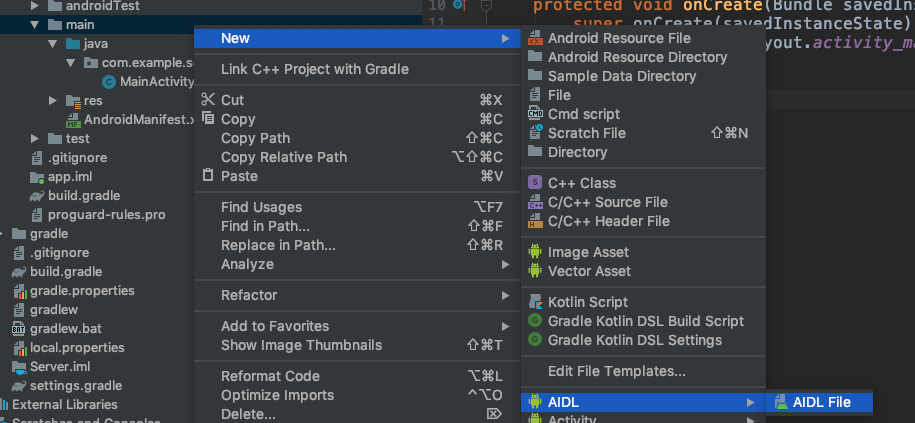
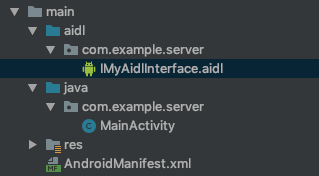
生成的目录结构
2. 在java文件夹下建立服务端被访问的对象Student
//Student.java
public final class Student implements Parcelable {

    public int sno;
    public String name;

    public Student() {
    }

    public static final Parcelable.Creator<Student> CREATOR = new
            Parcelable.Creator<Student>() {

                public Student createFromParcel(Parcel in) {
                    return new Student(in);
                }

                public Student[] newArray(int size) {
                    return new Student[size];
                }

            };

    private Student(Parcel in) {
        readFromParcel(in);
    }

    @Override
    public int describeContents() {
        return 0;
    }

    @Override
    public void writeToParcel(Parcel dest, int flags) {
        dest.writeInt(sno);
        dest.writeString(name);
    }

    public void readFromParcel(Parcel in) {
        sno = in.readInt();
        name = in.readString();
    }

    @Override
    public String toString() {
        return String.format(Locale.CHINESE, "Student:%d——%s", sno, name);
    }

}
3. 在aidl文件夹下新建Student.aidl文件
// Student.aidl
package com.example.server;

parcelable Student;
4. 在第1步建立的aidl文件里声明两个接口
// IMyAidlInterface.aidl
package com.example.server;

import com.example.server.Student;

interface IMyAidlInterface {
    List<Student> getStudents();
    void addStudent(in Student student);
}
5. 建立服务端Service
// MyService.java
public class MyService extends Service {

    private final List<Student> students = new ArrayList<>();

    private final IMyAidlInterface.Stub binder = new IMyAidlInterface.Stub() {
        @Override
        public List<Student> getStudents() throws RemoteException {
            synchronized (students) {
                return students;
            }
        }

        @Override
        public void addStudent(Student student) throws RemoteException {
            synchronized (students) {
                students.add(student);
            }
        }
    };

    @Override
    public void onCreate() {
        super.onCreate();

        synchronized (students) {
            for (int i = 1; i < 3; i++) {
                Student student = new Student();
                student.sno = i;
                student.name = "name_" + i;
                students.add(student);
            }
        }
    }

    @Nullable
    @Override
    public IBinder onBind(Intent intent) {
        return binder;
    }
}
//AndroidManifest里面的Service注册

<service android:name=".MyService"
    android:process=":remote"
    android:exported="true">

    <intent-filter>
        <category android:name="android.intent.category.DEFAULT" />
        <action android:name="com.example.server.MyService" />
    </intent-filter>

</service>
6. 在服务端的MainActivity下打印出Student列表
// MainActivity.java
@Override
protected void onCreate(Bundle savedInstanceState) {
    super.onCreate(savedInstanceState);
    setContentView(R.layout.activity_main);

    final TextView textView = findViewById(R.id.text_view);

    findViewById(R.id.button).setOnClickListener(new View.OnClickListener() {
        @Override
        public void onClick(View v) {
            bindService(new Intent(MainActivity.this, MyService.class), new ServiceConnection() {
                @Override
                public void onServiceConnected(ComponentName name, IBinder service) {
                    IMyAidlInterface myAidlInterface = IMyAidlInterface.Stub.asInterface(service);

                    try {
                        List<Student> students = myAidlInterface.getStudents();
                        StringBuilder stringBuilder = new StringBuilder();
                        for (Student student : students) {
                            stringBuilder.append(student + "\n");
                        }

                        textView.setText(stringBuilder);

                    } catch (RemoteException e) {
                        e.printStackTrace();
                    }
                }

                @Override
                public void onServiceDisconnected(ComponentName name) {

                }
            }, BIND_AUTO_CREATE);
        }
    });
}
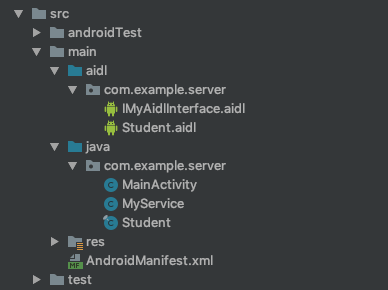
8. 到此时服务端的代码全部完成了。目录结构如下
客户端(Client App)
1. 把服务端的整个aidl文件夹复制到Client的main目录下,然后在java目录下建立一个包名为com.example.server的文件夹,把Student.java复制在该目录下
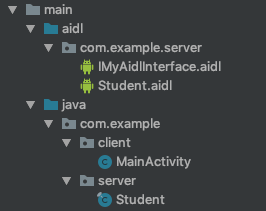
2. MainActivity调用addStudent方法添加Student实例
// MainActivity.java
@Override
protected void onCreate(Bundle savedInstanceState) {
    super.onCreate(savedInstanceState);
    setContentView(R.layout.activity_main);
    findViewById(R.id.button).setOnClickListener(new View.OnClickListener() {
        @Override
        public void onClick(View v) {
            Intent intent = new Intent("com.example.server.MyService");
            intent.setPackage("com.example.server");
            bindService(intent, new ServiceConnection() {
                @Override
                public void onServiceConnected(ComponentName name, IBinder service) {
                    IMyAidlInterface iMyAidlInterface = IMyAidlInterface.Stub.asInterface(service);
                    try {
                        for (int i = 10; i < 13; i++) {
                            Student student = new Student();
                            student.sno = i;
                            student.name = "name_" + i;
                            iMyAidlInterface.addStudent(student);
                        }
                    } catch (RemoteException e) {
                        e.printStackTrace();
                    }
                }
                @Override
                public void onServiceDisconnected(ComponentName name) {
                }
            }, BIND_AUTO_CREATE);
        }
    });
}