vue作为现在最流行的框架之一,对typescript的支持其实并不是非常友好,甚至有一些坑在里面,因此这里记录下常见的坑。 typescript如何搭建vue工程在这里不再赘述,这样的文章多的是,这里推荐一个:TypeScript + 大型项目实战
坑1:template不支持typescript
在创建完工程后,打开src/views/home.vue
<template>
  <div class="home">
    <img alt="Vue logo" src="../assets/logo.png">
    <HelloWorld msg="Welcome to Your Vue.js + TypeScript App"/>
  </div>
</template>
<script lang="ts">
import { Component, Vue } from 'vue-property-decorator';
import HelloWorld from '@/components/HelloWorld.vue'; // @ is an alias to /src
@Component({
  components: {
    HelloWorld,
  },
})
// vue组件类式写法
export default class Home extends Vue {
}
</script>
可以看到vue-property-decorator这个工具把vue组件的写法变成了接近类的写法,因此我们能够在home类下面轻易地使用typescript。但是,能使用typescript的地方仅限于这个标签之间,在template标签内是无法使用typescript的类型判断的,我们对上面的代码稍加修改:
<template>
  <div>
    {{title.push(1)}}
  </div>
</template>
<script lang="ts">
import { Component, Vue } from 'vue-property-decorator';
@Component({})
export default class Home extends Vue {
  public title: string = 'title333';
}
</script>
title是string类型的变量,是无法使用push方法的,但typescript并没有提示错误,打开浏览器访问,会发现控制台报错了:
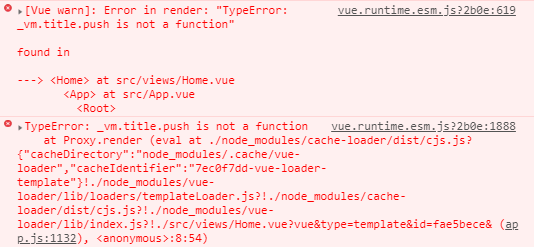
要怎么解决这个问题呢?很简单,使用render函数+jsx!将代码修改成下面的样子:
<script lang="tsx">
import { Component, Vue } from 'vue-property-decorator';
@Component({})
export default class Home extends Vue {
  public title: string = 'title333';
  public render() {
    return <div>
      {this.title.push(1)}
    </div>;
  }
}
</script>
这时再对title属性使用push方法就会报错:
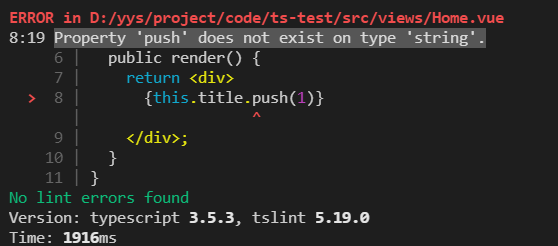
因此我们实现了在模版语法中进行类型检测的做法,render函数是vue中更接近编译器的渲染函数,jsx则是让render函数更接近模板语法,具体使用可以参考vue官方文档。
个人认为typescript+jsx算是标配了,建议每一个在vue工程使用typescript的人都这么做。
坑2: 类式对象内属性必须初始化
typescript规定,在类中的属性必须有初值,因为如果没有赋值,该值可能为undefined。因为这个规定,会导致我们在写Prop的时候出现报错:
import { Component, Vue, Prop } from 'vue-property-decorator';
import 'element-ui/lib/theme-chalk/index.css';
import ElementUI from 'element-ui';
@Component({})
export default class Home extends Vue {
  @Prop({
    type: String,
    default: ''
  }) public name: string;
  // 报错 Property 'name' has no initializer and is not definitely assigned in the constructor.
  public title: string = 'title';
  public created() {
    // this.title = 'title';
  }
  public render() {
    return <div>
      {this.title}
    </div>;
  }
}
如上,即使通过@Prop方法给name属性赋初值也是不能消除错误的,因为该方法是vue赋默认值的方法。最简单的妥协办法当然是强行赋值了:
@Prop({
  type: String,
  default: '',
}) public name: string = '';
或者在constructor里赋初值
constructor() {
  super();
  this.name = '';
}
这个解决方式看起来简单而又圆满,但是因为定义的只是一个简单的string类型,所以赋值一个空字符串就可以解决。但万一遇到复杂的接口类型呢?
import { Component, Vue, Prop } from 'vue-property-decorator';
import 'element-ui/lib/theme-chalk/index.css';
import ElementUI from 'element-ui';
interface Sample {
  p1: string;
  p2: number;
  p3: number[];
}
@Component({})
export default class Home extends Vue {
  @Prop({
    type: Object,
  }) public sample: Sample = {
    p1: '',
    p2: 0,
    p3: []
  };
  public title: string = 'title';
  public created() {
    // this.title = 'title';
  }
  public render() {
    return <div>
      {this.title}
    </div>;
  }
}
在大型系统中,如果每个复杂点的参数都要这么赋初值,能赋到怀疑人生。因此这种情况下需要用到强制解析:
@Prop({
  type: Object,
}) public sample!: Sample;
只需要增加一个感叹号,就可以解决这个问题了!用来表示这个属性一定有值,让typescript不要瞎操心了。还有一个解决方法,可以连感叹号都不用加,就是修改tsconfig.json:
{
  "compilerOptions": {
    // ...
    "strictPropertyInitialization": fasle,
  }
}
让tslint无视这个规则就可以不用赋初值了,但个人不喜欢这种做法,各位可以根据自己的需要酌情选择。