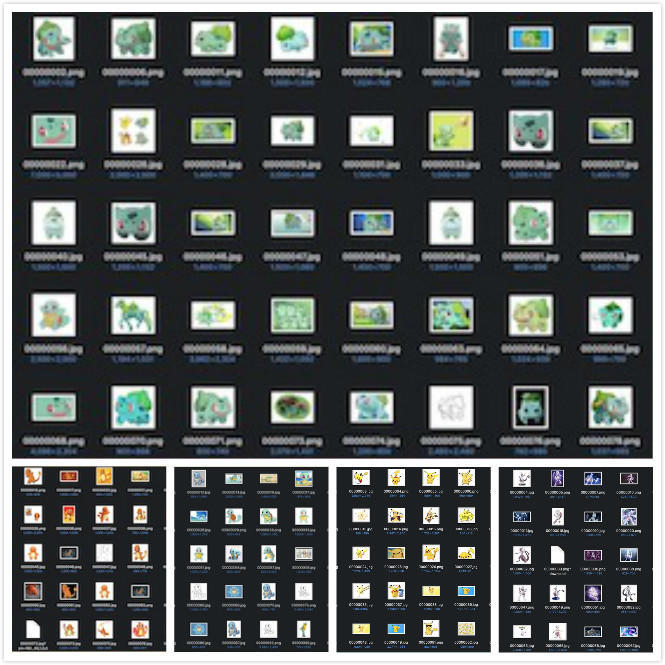
# import the necessary packagesfrom keras.models import Sequential
from keras.layers.normalization import BatchNormalization
from keras.layers.convolutional import Conv2D
from keras.layers.convolutional import MaxPooling2D
from keras.layers.core import Activation
from keras.layers.core import Flatten
from keras.layers.core import Dropout
from keras.layers.core import Dense
from keras import backend as K
classSmallerVGGNet: @staticmethoddefbuild(width, height, depth, classes):# initialize the model along with the input shape to be# "channels last" and the channels dimension itself
model = Sequential()
inputShape = (height, width, depth)
chanDim = -1# if we are using "channels first", update the input shape# and channels dimensionif K.image_data_format() == "channels_first":
inputShape = (depth, height, width)
chanDim = 1# CONV => RELU => POOL
model.add(Conv2D(32, (3, 3), padding="same",
input_shape=inputShape))
model.add(Activation("relu"))
model.add(BatchNormalization(axis=chanDim))
model.add(MaxPooling2D(pool_size=(3, 3)))
model.add(Dropout(0.25))
# (CONV => RELU) * 2 => POOL
model.add(Conv2D(128, (3, 3), padding="same"))
model.add(Activation("relu"))
model.add(BatchNormalization(axis=chanDim))
model.add(Conv2D(128, (3, 3), padding="same"))
model.add(Activation("relu"))
model.add(BatchNormalization(axis=chanDim))
model.add(MaxPooling2D(pool_size=(2, 2)))
model.add(Dropout(0.25))
# first (and only) set of FC => RELU layers
model.add(Flatten())
model.add(Dense(1024))
model.add(Activation("relu"))
model.add(BatchNormalization())
model.add(Dropout(0.5))
# softmax classifier
model.add(Dense(classes))
model.add(Activation("softmax"))
# return the constructed network architecturereturn model
# set the matplotlib backend so figures can be saved in the backgroundimport matplotlib
matplotlib.use("Agg")
# import the necessary packagesfrom keras.preprocessing.image import ImageDataGenerator
from keras.optimizers import Adam
from keras.preprocessing.image import img_to_array
from sklearn.preprocessing import LabelBinarizer
from sklearn.model_selection import train_test_split
from pyimagesearch.smallervggnet import SmallerVGGNet
import matplotlib.pyplot as plt
from imutils import paths
import numpy as np
import argparse
import random
import pickle
import cv2
import os
# construct the argument parse and parse the arguments
ap = argparse.ArgumentParser()
ap.add_argument("-d", "--dataset", required=True,
help="path to input dataset (i.e., directory of images)")
ap.add_argument("-m", "--model", required=True,
help="path to output model")
ap.add_argument("-l", "--labelbin", required=True,
help="path to output label binarizer")
ap.add_argument("-p", "--plot", type=str, default="plot.png",
help="path to output accuracy/loss plot")
args = vars(ap.parse_args())
# initialize the number of epochs to train for, initial learning rate,# batch size, and image dimensions
EPOCHS = 100
INIT_LR = 1e-3
BS = 32
IMAGE_DIMS = (96, 96, 3)
# initialize the data and labels
data = []
labels = []
# grab the image paths and randomly shuffle them
print("[INFO] loading images...")
imagePaths = sorted(list(paths.list_images(args["dataset"])))
random.seed(42)
random.shuffle(imagePaths)
# loop over the input imagesfor imagePath in imagePaths:
# load the image, pre-process it, and store it in the data list
image = cv2.imread(imagePath)
image = cv2.resize(image, (IMAGE_DIMS[1], IMAGE_DIMS[0]))
image = img_to_array(image)
data.append(image)
# extract the class label from the image path and update the# labels list
label = imagePath.split(os.path.sep)[-2]
labels.append(label)
# scale the raw pixel intensities to the range [0, 1]
data = np.array(data, dtype="float") / 255.0
labels = np.array(labels)
print("[INFO] data matrix: {:.2f}MB".format(
data.nbytes / (1024 * 1000.0)))
# binarize the labels
lb = LabelBinarizer()
labels = lb.fit_transform(labels)
# partition the data into training and testing splits using 80% of# the data for training and the remaining 20% for testing
(trainX, testX, trainY, testY) = train_test_split(data,
labels, test_size=0.2, random_state=42)
# construct the image generator for data augmentation
aug = ImageDataGenerator(rotation_range=25, width_shift_range=0.1,
height_shift_range=0.1, shear_range=0.2, zoom_range=0.2,
horizontal_flip=True, fill_mode="nearest")
# initialize the model
print("[INFO] compiling model...")
model = SmallerVGGNet.build(width=IMAGE_DIMS[1], height=IMAGE_DIMS[0],
depth=IMAGE_DIMS[2], classes=len(lb.classes_))
opt = Adam(lr=INIT_LR, decay=INIT_LR / EPOCHS)
model.compile(loss="categorical_crossentropy", optimizer=opt,
metrics=["accuracy"])
# train the network
print("[INFO] training network...")
H = model.fit_generator(
aug.flow(trainX, trainY, batch_size=BS),
validation_data=(testX, testY),
steps_per_epoch=len(trainX) // BS,
epochs=EPOCHS, verbose=1)
# save the model to disk
print("[INFO] serializing network...")
model.save(args["model"])
# save the label binarizer to disk
print("[INFO] serializing label binarizer...")
f = open(args["labelbin"], "wb")
f.write(pickle.dumps(lb))
f.close()
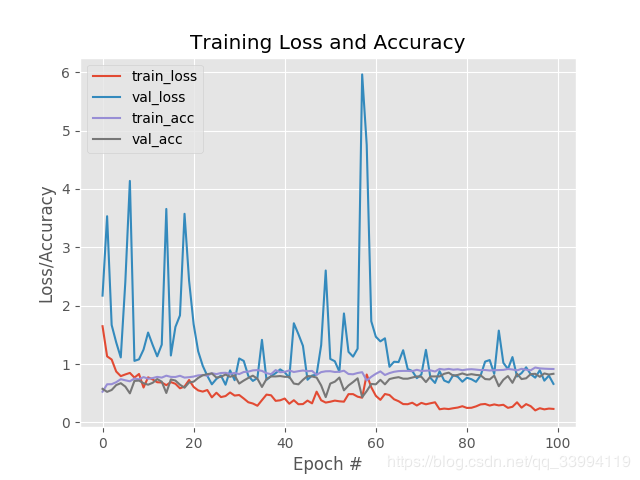
# plot the training loss and accuracy
plt.style.use("ggplot")
plt.figure()
N = EPOCHS
plt.plot(np.arange(0, N), H.history["loss"], label="train_loss")
plt.plot(np.arange(0, N), H.history["val_loss"], label="val_loss")
plt.plot(np.arange(0, N), H.history["acc"], label="train_acc")
plt.plot(np.arange(0, N), H.history["val_acc"], label="val_acc")
plt.title("Training Loss and Accuracy")
plt.xlabel("Epoch #")
plt.ylabel("Loss/Accuracy")
plt.legend(loc="upper left")
plt.savefig(args["plot"])