和其他类型的分享一样,App分享小程序只不过是另外一种分享类型。实现分享有两种方法,第一种使用微信SDK进行分享,第二种使用友盟分享。
如果移动应用和小程序不在同一开发者平台下,需要在微信开放平台绑定小程序,否则分享的时候会提示如下错误:
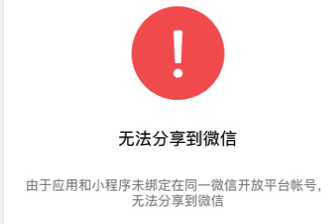
需要在微信开放平台进行绑定,绑定方法如下:

1. 微信SDK分享
微信SDK分享可参考官方文档,首先看代码:
    WXMiniProgramObject *object = [WXMiniProgramObject object];
    object.webpageUrl = @"http://www.qq.com"; //兼容低版本的网页链接

    object.userName = @"gh_xxxxxxxxx"; //小程序原始ID
    object.path = @"pages/home/home"; //跳转的页面路径
    NSData *imageData = [NSData dataWithContentsOfFile:[[NSBundle mainBundle] pathForResource:@"logo" ofType:@"png"]];
    object.hdImageData = imageData; //小程序新版本的预览图二进制数
    object.withShareTicket = YES;

    /*
    正式版: WXMiniProgramTypeRelease;
    测试版: WXMiniProgramTypeTest;
    体验版: WXMiniProgramTypePreview;
    **/
   object.miniProgramType = UShareWXMiniProgramTypeTest; //小程序类型,默认正式版

    WXMediaMessage *message = [WXMediaMessage message];
    message.title = @"小程序标题";
    message.description = @"小程序描述";
    message.thumbData = nil;  //兼容旧版本节点的图片,小于32KB,新版本优先
    //使用WXMiniProgramObject的hdImageData属性
    message.mediaObject = object;

    SendMessageToWXReq *req = [[SendMessageToWXReq alloc] init];
    req.bText = NO;
    req.message = message;
    req.scene = WXSceneSession;  //目前只支持会话
    BOOL isTrue = [WXApi sendReq:req];
    [WXApi sendReq:req];
2. 友盟分享
第二种方式是使用友盟分享微信小程序,代码如下:
- (void)shareMiniProgramToPlatformType:(UMSocialPlatformType)platformType
{
    //创建分享消息对象
    UMSocialMessageObject *messageObject = [UMSocialMessageObject messageObject];
    UMShareMiniProgramObject *shareObject = [UMShareMiniProgramObject shareObjectWithTitle:@"小程序标题" descr:@"小程序内容描述" thumImage:[UIImage imageNamed:@"logo.png"]];
    shareObject.webpageUrl = @"http://www.qq.com";
    shareObject.userName = @"gh_xxxxxxxxx";
    shareObject.path = @"pages/home/home";
    shareObject.hdImageData = [NSData dataWithContentsOfFile:[[NSBundle mainBundle] pathForResource:@"logo" ofType:@"png"]];
    shareObject.miniProgramType = UShareWXMiniProgramTypeTest; // 可选体验版和开发板
    messageObject.shareObject = shareObject;
    //调用分享接口
    [[UMSocialManager defaultManager] shareToPlatform:platformType messageObject:messageObject currentViewController:self completion:^(id data, NSError *error) {
        if (error) {
            UMSocialLogInfo(@"************Share fail with error %@*********",error);
        }else{
            if ([data isKindOfClass:[UMSocialShareResponse class]]) {
                UMSocialShareResponse *resp = data;
                //分享结果消息
                UMSocialLogInfo(@"response message is %@",resp.message);
            }else{
                UMSocialLogInfo(@"response data is %@",data);
            }
        }
    }];
}
注意:
使用两种方式都实现之后,发现微信SDK的path不设置的之后默认跳转小程序首页,友盟分享时不设置path时打不开微信。