移动端ui库
饿了么Mint-UI mint-ui.github.io/#!/zh-cn
main.js 引入
import MintUI from 'mint-ui'
Vue.use(MintUI);
样式引入  import 'mint-ui/lib/style.css'
编写组件,全局组件注册
//main.js
import MyUI from './components/common/MyUI';
Vue.component(MyUI.name,MyUI) //组件名称,
组件对象//MyUI.vue
<template>
 <ul>
        <slot></slot>
 </ul>
</template>
<script>
   export default {
        name: 'my-ul',
    }
</script>
//Home.vue 在这个组件引用全局注册的组件
<my-ul></my-ul>
props 谁用我谁来传时间格式转换需要定义
时间格式的转换
涉及到 `Moment` `fromNow` `format`
命令: npm i moment -S
//main.js
import Moment from 'moment';
Vue.filter('converTime',function(data,formatStr)
{  return Moment(data).format(formatStr)})
//相对时间过滤器
Moment.locale('zh-cn')Vue.filter('relTime',function(time){  //几天前  return Moment(time).fromNow();})
//调用
convertTime('YYYY年MM月DD日')
relTime
格式转换 <p>发表时间:{{news.add_time | convertTime('YYYY年MM月DD日')}}</p>
几天前使用 {{msg.add_time | relTime}}列表页到详情页的传值
1. 去哪儿
<router-link :to="{name: 'NewsDetail',query: {id: news.id}}" //无需设置路由
<router-link :to="{name: 'NewsDetail',params: {id: news.id}}" //需要设置路由的状态
2. 导航
{name: 'NewsDetail',path: '/news/detail/:id',component: Xxx}
3. 详情页接收
created 获取路由参数,发请求获取详情数据 this.$route.params.id请求接口为 newsinfo/:id ,则带值的方式进取详情
//列表
route:{name:'PhotoList',query:{categoryId:0}
//详情
let { categoryId } = this.$route.query;this.$axios.get('getimages/' + categoryId)
往请求的tab数据之前加多一个全部
this.categories.unshift({id: 0 ,title: '全部'})
tab栏切换常见的问题
- 点击tab栏切换,上面的id不变
- 改变上面的id,相应的页面没跟着改变
- 一开始进去加载全部使页面变慢,需要使用懒加载
编程式路由传值更改链接的id
@click="navigateToCateById(category.id)"
methods:{navigateToCateById(id) {
        this.$router.push({
             name:'PhotoList', //文件名
             query:{ categoryId:id }
});},}
beforeRouteUpdate (to, from, next) { //路由更新 // console.log(to); // console.log(from); let { categoryId } = to.query; // 发请求更改页面数据 this.loadImgsById(categoryId); next(); // 在当前路由改变,但是该组件被复用时调用 // 举例来说,对于一个带有动态参数的路径 /foo/:id,在 /foo/1 和 /foo/2 之间跳转的时候, // 由于会渲染同样的 Foo 组件,因此组件实例会被复用。而这个钩子就会在这个情况下被调用。 // 可以访问组件实例 `this` },来自组件的懒加载 <img v-lazy="item"> image[lazy=loading] { width: 40px; height: 300px; margin: auto; } //不是来自第三方的懒加载 install vue-lazyload --save-dev ' import VueLazyload from 'vue-lazyload' Vue.use(VueLazyload) <img v-lazy="emptyGif">
请求数据时,做拦截器,提高加载页面的过渡效果(跳转页面的时候会显示加载中)
//main.js
给vue的原型挂载$axios属性
Vue.prototype.$axios = Axios;
Axios.defaults.baseURL = 'https://www.sinya.online/api/'
//全局接口请求
拦截器
//需要加载中的过渡之类,开始定义拦截器(拿请求体,请求头)//请求发起前
 Axios.interceptors.request.use(function(config) {
   MintUI.Indicator.open({
     text: '加载中...',
     spinnerType: 'fading-circle'
   });
return config;
})//响应回来后
 Axios.interceptors.response.use(function(response) {
   //reponse: { config: {},data:{},headers}
//接收响应头或者响应体中的数据,保存起来,供请求的拦截器使用头信息操作
   MintUI.Indicator.close();   return response; })
页面请求数据的写法 this.$axios.get('getnewslist').then(res => {}).catch(err => {})slot插槽的给到的样式没作用
在接收这个DOM的组件中,能给solt以后的元素设置样式,而没有能给slot设置样式
<solt name="icon"></solt>
<img slot="icon" src="../img/jj.png">
query 和 params
1.  /xxx?id = 1  配置路由规则 path: 'xxx'     组件接收 this.$route.query.id   传递 to:{query:{id:1}}
1.  /xxx/1       配置路由规则 path: 'xxx/:id' 组件接收 this.$route.params.id          {params:{id:1}}
图片预览 vue-preview
https://www.npmjs.com/package/vue-preview
安装  npm i vue-preview -S
使用的时候需要传入w,h,msrc
评论留言页的实现
考虑和注意的问题
- 发送数据给接口时,发送的请求体需要带上`content = ${this.content}`
- 加载更多评论
- 是在原来显示的条数上进行更新赋值还是进行追加
- 请求的页数如何递增请求
- 当少于十条数据我们应该对按钮做什么操作
- 当我们留言后发送成功,是否需要把页数重新赋值为1,显示出我们评论的内容
输入框 需要绑定声明 v-model="content"

发送数据
 this.$axios.post(`postcomment/${this.cid}`,`content = ${this.content}`).then(res => {
    this.init();//页码初始化
    this.loadMsgByPage() //请求数据接口再渲染次数据
}对加载更多进行追加
if (this.page ===1) {
     this.msgs = res.data.message //赋值
} else {
     this.msgs = this.msgs.concat(res.data.message) //追加
}页数递增 `this.page ++;`数据少于十条
 if( res.data.message.length <10 && this.page !=1) {
      this.$toast({
         message: '没有数据', iconClass: 'icon icon-success'
})
// 禁止点击
           this.disabled = true;           return ;}
自定义全局过滤器,字符串过长截取
//控制字数显示过滤器Vue.filter('controllShow',function(str,num){
// 如果当前字符串小于num,返回原来值  if(str.length < num){    return str;  }
//如果当前的字符串大于num,截取0-num-1位
if(str.length > num) {    return str.substr(0,num-1) + '...';  }})
调用
<div class="title">{{goods.title | controllShow(23)}}</div>
合并请求的情况this.$axios.all([imgReq,infoReq])
相关链接: www.cnblogs.com/zhouyangla/…
let imgReq = this.$axios.get(`getthumimages/${this.goodsId}`);
let infoReq = this.$axios.get(`goods/getinfo/${this.goodsId}`);
// 合并请求 $axios.all([]).then(传播响应).catch()
this.$axios.all([imgReq,infoReq])
.then(            this.$axios.spread(                (imgRes,infoRes)=>{                     this.imgs = imgRes.data.message;                     this.info = infoRes.data.message[0];            }) )
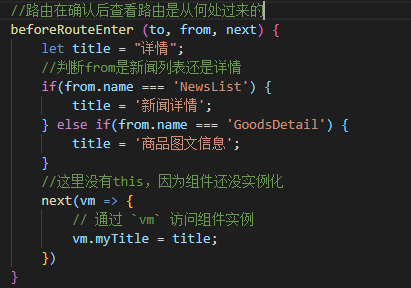
不同的列表页,跳转到同一个详情页,对title的更改(设置路由,确认路由过来后设置)
服务端和客户端读取数据的区别,单页面应用和多页面加载出现的区别,前后端分离真正的原因,此处在第四季vue的第四天商品列表、购物车-02