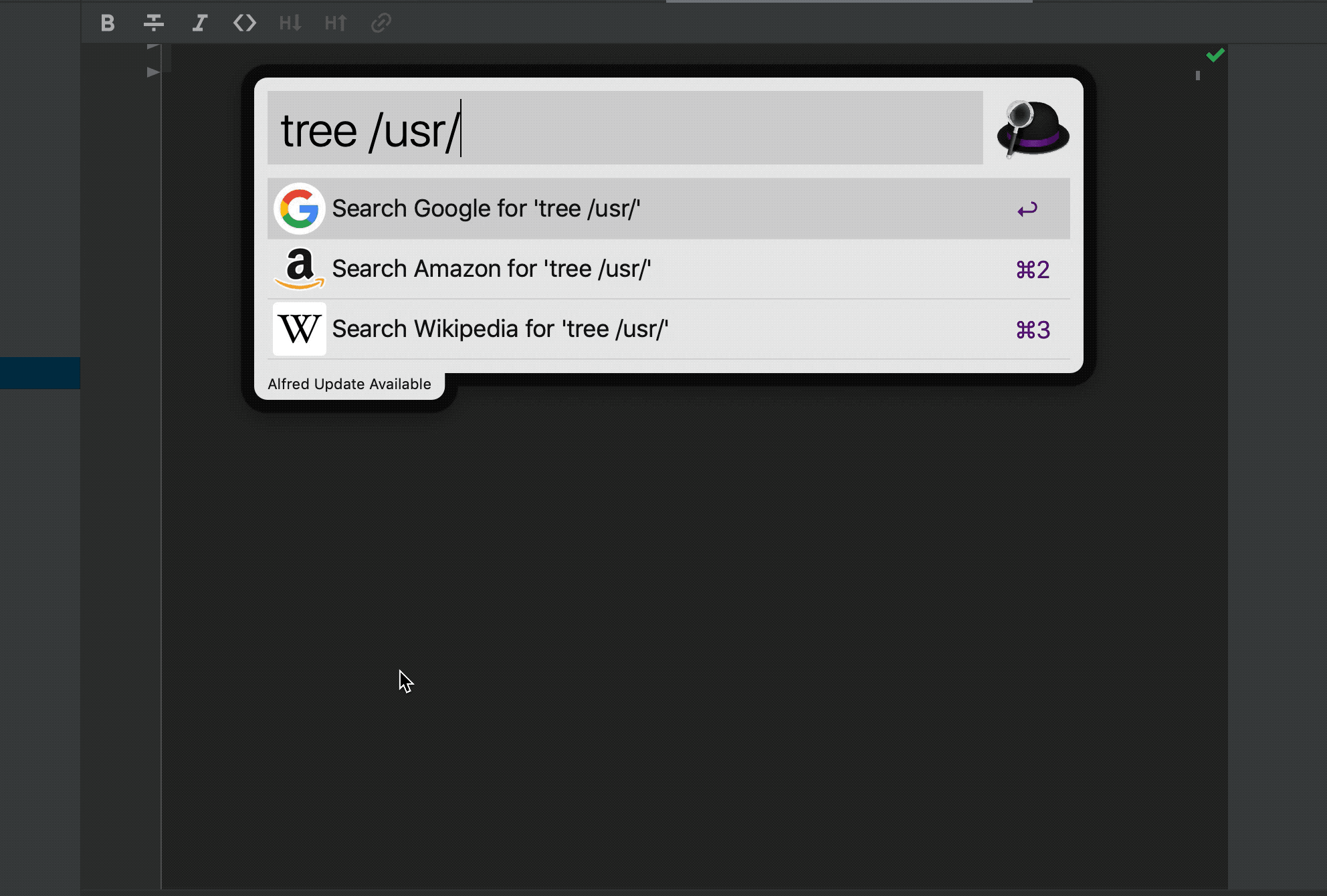
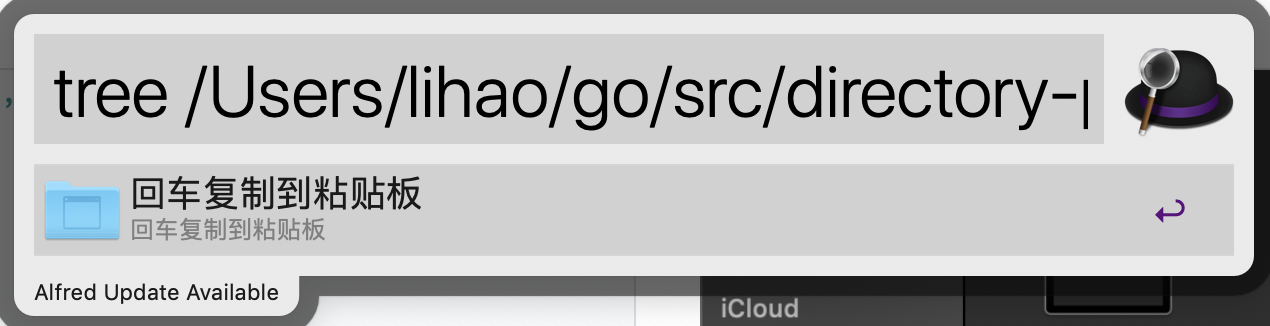
前几天写笔记的时候,想要一个目录树,很无奈手上没有任何工具,只能自己照着目录结构一个一个敲。今天就索性自己动手,用go结合alfred写一个打印目录树到粘贴板的workflow,这是演示图
|────README.md
|────go.mod
|────go.sum
|────tree.go
|────|image
|────────example.gif
|────|response
|────────icon.go
|────────info.go
|────────response.go
|────|workflow
|────────打印目录树.alfredworkflow
要打印目录树,最最基础的就是对目录进行操作,下面开始敲代码吧
递归遍历目录
先看看这个函数的五个参数
- infos:指定目录下的所有子目录对象和文件对象的句柄集合
- lastDirPos:集合中最后一个子目录对象的索引位置
- deep:遍历的深度,关系到打印缩进符号的多少
- currentPath:当前路径
- tree:打印的目录树
func traverse(infos []os.FileInfo, lastDirPos, deep int, currentPath string, tree *string) {
	//打印的前缀
	prefix := "|"
	//当前目录下子目录以及文件的总数
	length := len(infos)
	//首先打印出文件的名称
	for j := lastDirPos + 1; j < length; j++ {
	    // "."开头的文件在MacOS表示隐藏文件,这里我不想打印出来
		if strings.Index(infos[j].Name(), ".") == 0 {
			continue
		}
		//通过打印函数,把打印结果添加到tree变量里
		*tree += printName(infos[j], prefix, deep, FILE)
	}
	//然后打印目录的名称
	for i := 0; i <= lastDirPos; i++ {
	    //同前面的文件打印,过滤掉隐藏目录
		if strings.Index(infos[i].Name(), ".") == 0 {
			continue
		}
		//当前路径+当前目录,构成下一级遍历的路径
		dirPath := currentPath + "/" + infos[i].Name()
		//读取下一级路径中包含的文件和子目录,获得集合
		files, _ := ioutil.ReadDir(dirPath)
		//如果下一级路径中没有文件和子目录,打印次目录名开始下一次循环
		if len(files) == 0 {
			*tree += printName(infos[i], prefix, deep, DIR)
			continue
		}
		//对读出来的集合进行排序操作
		lastDirPosC := sortFile(&files)
		//打印目录名
		*tree += printName(infos[i], prefix, deep, DIR)
		//代码如果走到这里,则说明目录下还有子目录或者文件,进行递归遍历
		traverse(files, lastDirPosC, deep+1, dirPath, tree)
	}
}
这个函数就是用来递归遍历目录的,它有五个参数
- infos:当前目录下的所有子目录对象和文件对象的句柄集合
- lastDirPos:集合中最后一个子目录对象的索引位置
- deep:遍历的深度,关系到打印空格的多少
- currentPath:当前路径
- tree:打印的目录树
该方法的运行过程是
- 打印文件部分,如果有隐藏文件则跳过
- 打印目录部分,若果有隐藏目录则跳过隐藏目录
- 读取子目录下的目录和文件,如果是空目录的话则打印目录名,开始下一次循环
- 对读取出来的数组进行排序,该排序有两个作用
- 把目录与文件分成两部分
- 在目录与文件这两个部分中,照文件名进行排序
- 递归遍历目录
目录与文件分类以及排序
func sortFile(infos *[]os.FileInfo) int {
	lastDirPos := len(*infos) - 1
	adjustPos(*infos, &lastDirPos)
	for i := 0; i < lastDirPos; i++ {
		if !(*infos)[i].IsDir() {
			swap(*infos, i, lastDirPos)
			adjustPos(*infos, &lastDirPos)
		}
	}
	dirSlice := (*infos)[:lastDirPos+1]
	fileSlice := (*infos)[lastDirPos+1:]
	sort.Slice(dirSlice, func(i, j int) bool { return dirSlice[i].Name() < dirSlice[j].Name() })
	sort.Slice(fileSlice, func(i, j int) bool { return fileSlice[i].Name() < fileSlice[j].Name() })
	merge := append(dirSlice, fileSlice...)
	infos = &merge
	return lastDirPos
}
在目录与文件分类逻辑部分,用到两个指针,i和lastDirPos
- i:代表对infos进行从左往右遍历的下标
- lastDirPos:最右边的目录对象所处的下标 排序的过程就是:
- 从左往右进行遍历,找出最左边的第一个文件对象
- 把最左边的第一个文件对象与最右边的目录对象进行交换
- 调整lastDirPos,调用adjustPos函数来保证lastDirPos始终是最右边的目录对象的下标
- 当i和lastDirPos相等的时候,表示当前指针已经移到了最右边的目录对象,这是i本身以及i的左边都是目录,i的右边都是文件对象
- 取出目录对象部分,按照名字进行排序
- 取出文件对象部分,按照名字进行排序
- 将目录对象部分排序后的结果与文件对象部分排序后的结果合并、返回
adjustPos函数
func adjustPos(infos []os.FileInfo, lastDirPos *int) {
	for !infos[*lastDirPos].IsDir() {
		*lastDirPos--
		if *lastDirPos == -1 {
			break
		}
	}
}
该函数就是对infos数组进行从右往左遍历,找到最右边的目录对象
- 如果当前位置的对象仍是文件,则
*lastDirPos--
继续循环,直到对象是目录时终止
- 如果lastDirPos等于-1了,则表示该数组中只有文件对象,直接终止循环
名字打印
我首先定义了两个常量,分别表示目录类型和文件类型
const (
	DIR = iota
	FILE
)
下面看打印函数
func printName(file os.FileInfo, prefix string, deep int, fileType int) string {
	var placeHolder string
	switch fileType {
	case DIR:
		placeHolder = strings.Repeat("────", deep) + "|"
		break
	case FILE:
		placeHolder = strings.Repeat("────", deep)
	}
	return fmt.Sprintln(prefix + placeHolder + file.Name())
}
它有四个参数对象
- file:操作的对象
- prefix:每一行打印的前缀
- deep:当前遍历的深度
- fileType:文件类型,是目录还是文件
其逻辑是这样的:
- 根据文件类型判断是文件还是目录
- 生成placeHolder这个变量,比如"|────────example.gif" ,placeHolder就是"|────────",它会根据深度来决定"───"的重复次数
- 然后输出prefix+placeHolder+文件名
main类
前面几个就是打印目录的核心函数,下面是完整的代码
package main

import (
	"encoding/json"
	"fmt"
	"io/ioutil"
	"os"
	"print/response"
	"sort"
	"strings"
)

const (
	DIR = iota
	FILE
)

func main() {
	args := os.Args
	if args == nil || len(args) < 2 {
		Usage()
		return
	}
	currentPath := args[1]
	files, _ := ioutil.ReadDir(currentPath)
	lastDirPos := sortFile(&files)
	deep := 1
	tree := ""
	traverse(files, lastDirPos, deep, currentPath, &tree)
    fmt.Println(tree)
}

func traverse(infos []os.FileInfo, lastDirPos, deep int, currentPath string, tree *string) {
	prefix := "|"
	length := len(infos)
	for j := lastDirPos + 1; j < length; j++ {
		if strings.Index(infos[j].Name(), ".") == 0 {
			continue
		}
		*tree += printName(infos[j], prefix, deep, FILE)
	}
	for i := 0; i <= lastDirPos; i++ {
		if strings.Index(infos[i].Name(), ".") == 0 {
			continue
		}
		dirPath := currentPath + "/" + infos[i].Name()
		files, _ := ioutil.ReadDir(dirPath)
		if len(files) == 0 {
			*tree += printName(infos[i], prefix, deep, DIR)
			continue
		}
		lastDirPosC := sortFile(&files)
		*tree += printName(infos[i], prefix, deep, DIR)
		traverse(files, lastDirPosC, deep+1, dirPath, tree)
	}
}

func printName(file os.FileInfo, prefix string, deep int, fileType int) string {
	var placeHolder string
	switch fileType {
	case DIR:
		placeHolder = strings.Repeat("────", deep) + "|"
		break
	case FILE:
		placeHolder = strings.Repeat("────", deep)
	}
	return fmt.Sprintln(prefix + placeHolder + file.Name())
}

func sortFile(infos *[]os.FileInfo) int {
	lastDirPos := len(*infos) - 1
	adjustPos(*infos, &lastDirPos)
	for i := 0; i < lastDirPos; i++ {
		if !(*infos)[i].IsDir() {
			swap(*infos, i, lastDirPos)
			adjustPos(*infos, &lastDirPos)
		}
	}
	dirSlice := (*infos)[:lastDirPos+1]
	fileSlice := (*infos)[lastDirPos+1:]
	sort.Slice(dirSlice, func(i, j int) bool { return dirSlice[i].Name() < dirSlice[j].Name() })
	sort.Slice(fileSlice, func(i, j int) bool { return fileSlice[i].Name() < fileSlice[j].Name() })
	merge := append(dirSlice, fileSlice...)
	infos = &merge
	return lastDirPos
}

func swap(infos []os.FileInfo, i, j int) {
	temp := infos[i]
	infos[i] = infos[j]
	infos[j] = temp
}

func adjustPos(infos []os.FileInfo, lastDirPos *int) {
	for !infos[*lastDirPos].IsDir() {
		*lastDirPos--
		if *lastDirPos == -1 {
			break
		}
	}
}

var Usage = func() {
	fmt.Println("input param")
}
到此,就可以直接在命令行中输出一个树形结构的目录,下面介绍如何通过alfred的workflow将结果复制到粘贴板
alfred数据结构
用过alfred的都熟悉这个界面
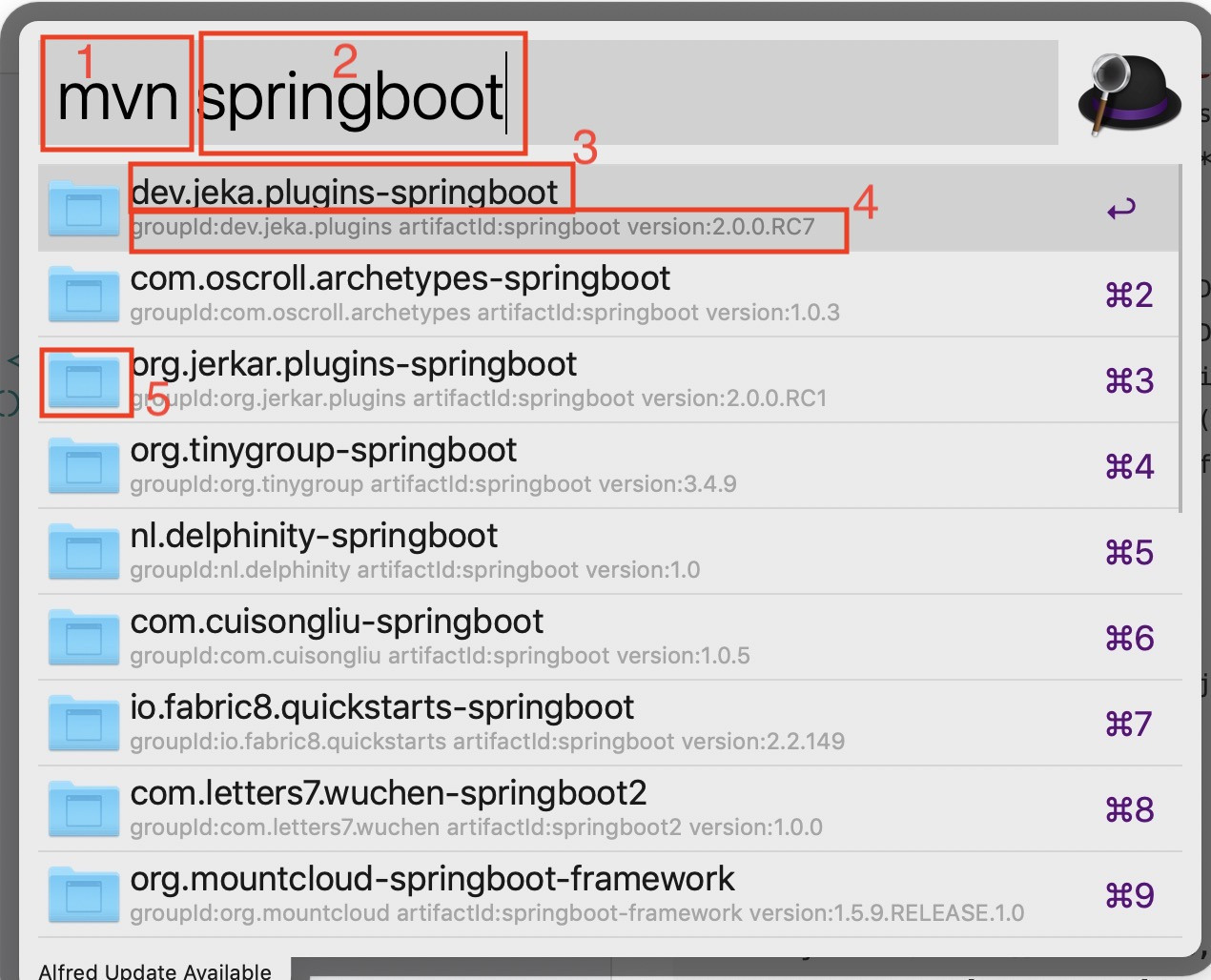
- 1:触发workflow的关键字
- 2:需要处理的参数,在这篇博客里面就是文件的路径
- 3:列表中的某个列表的标题
- 4:列表中的某个列表的副标题
- 5:列表中的某个列表的icon
下面对这五个部分设置进行说明
关键字和参数
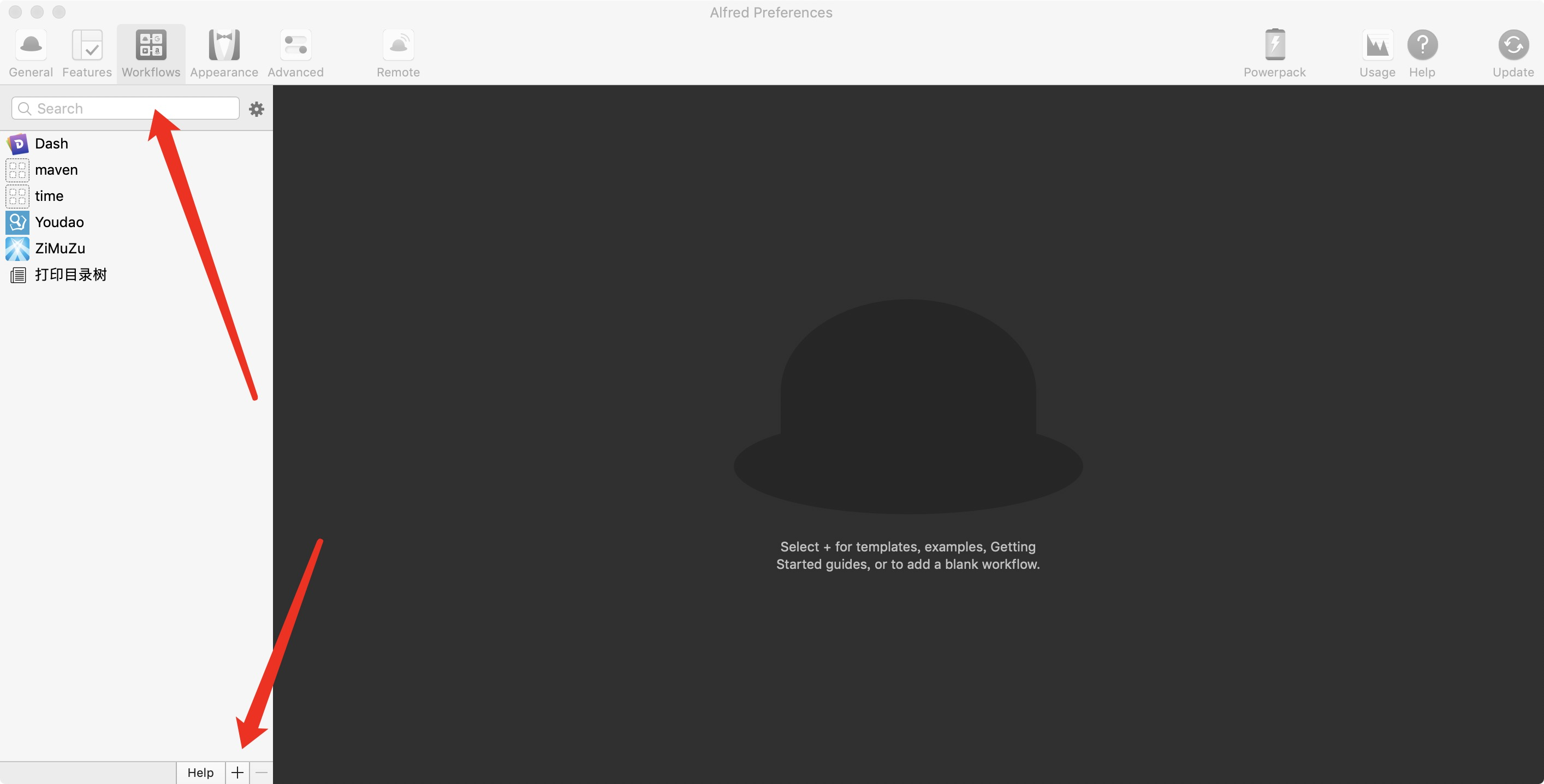
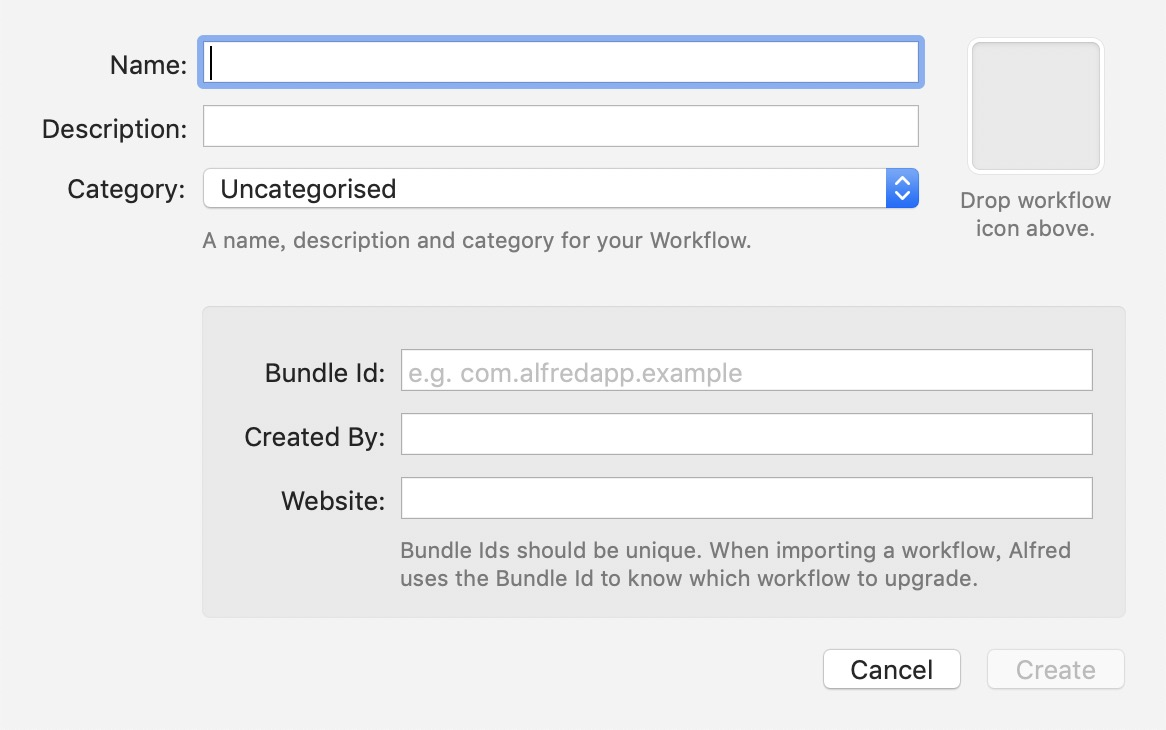
- 打开alfred的偏好设置=>选择workflow=>点击左下角的+=>选择blank workflow=>填入相关信息即创建一个新的workflow
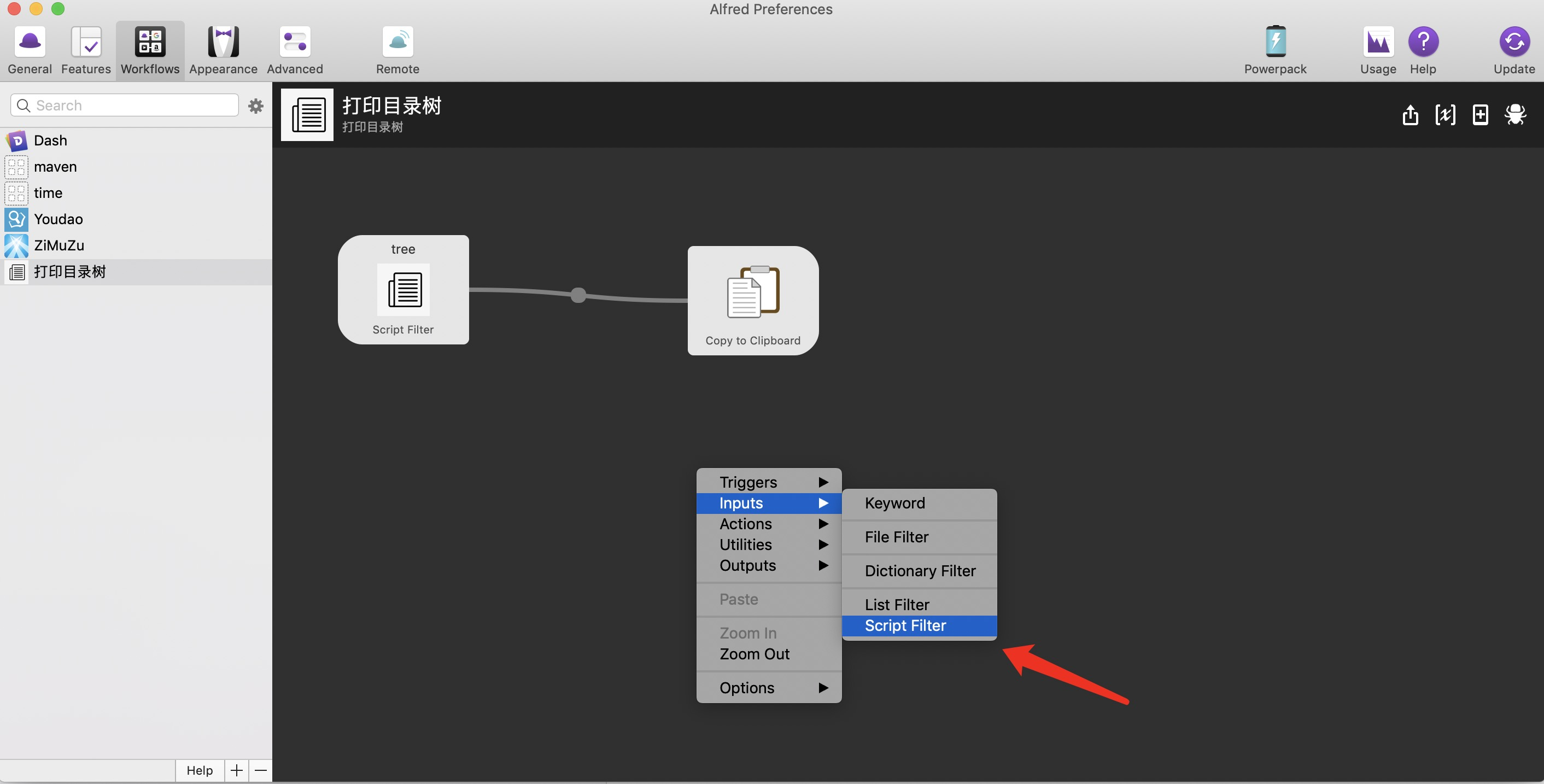
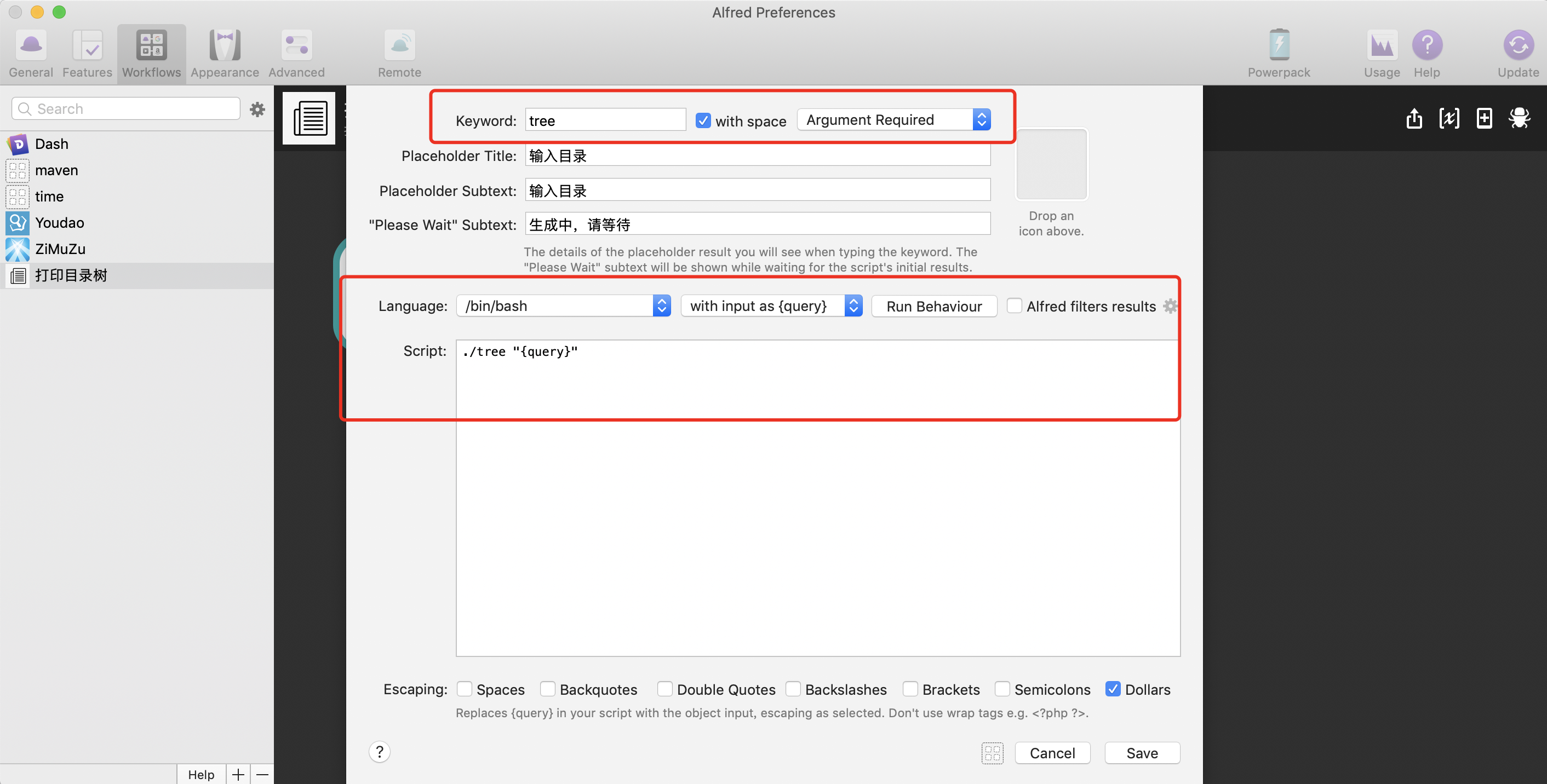
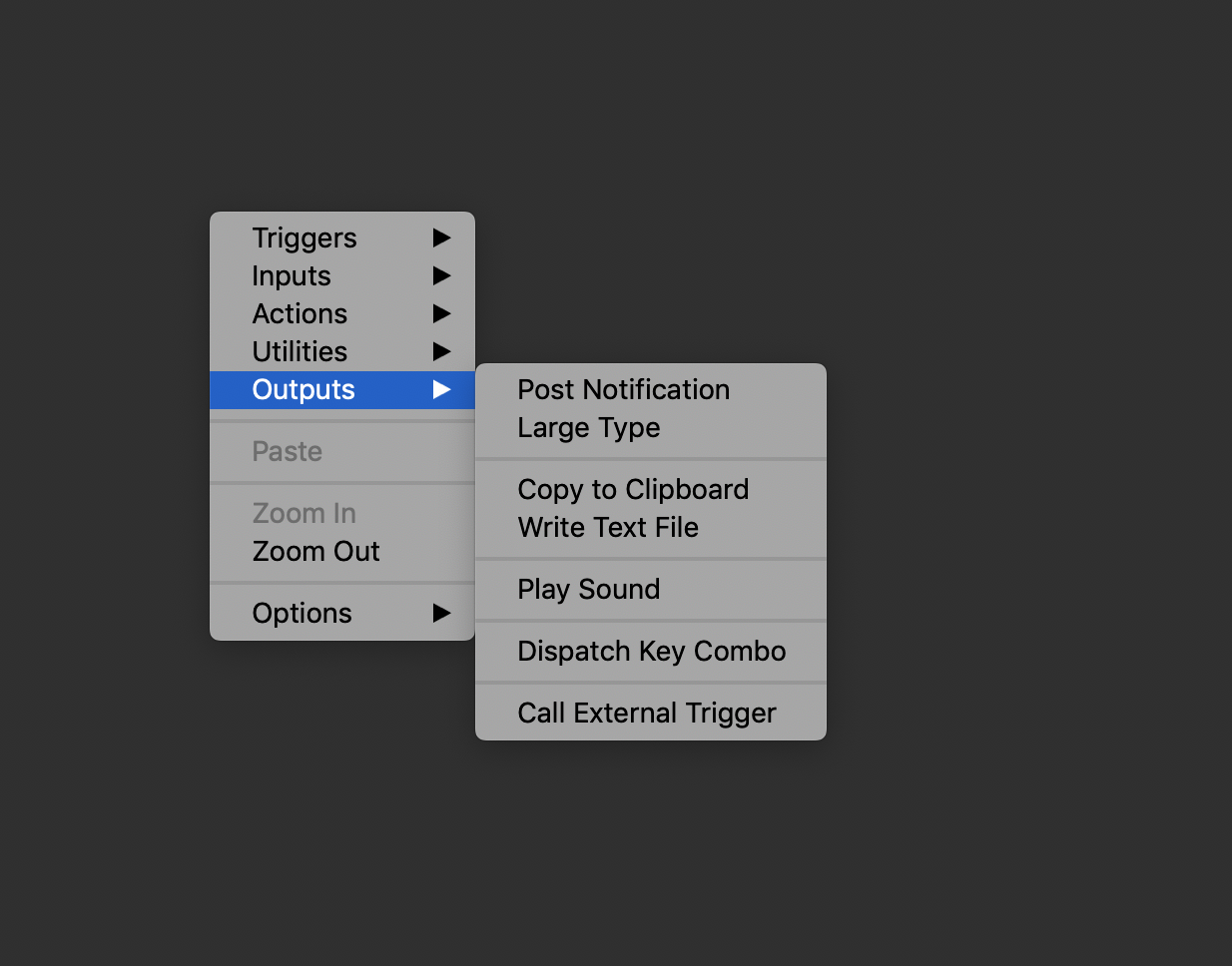
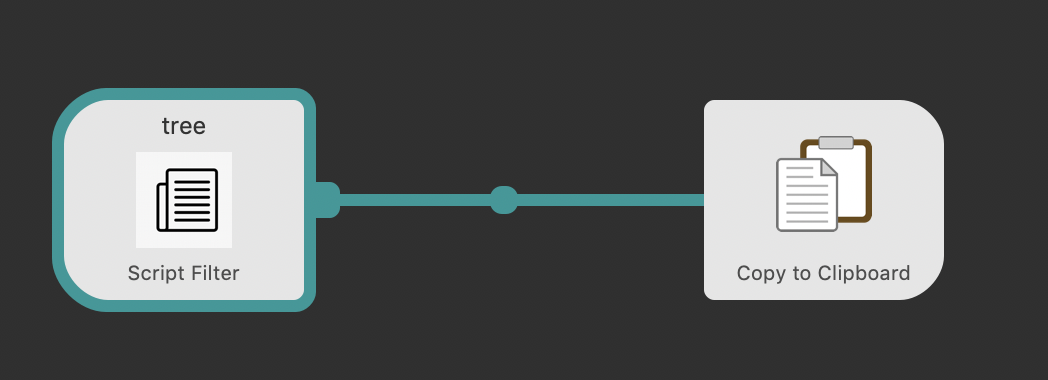
列表展示
列表有如下的数据结构,它以json表示:
{
    "items":[
        {
            "uid":"8A9673FB-8CB1-BD04-AB30-3A8D820E5727",
            "type":"text",
            "title":"回车复制到粘贴板",
            "subtitle":"回车复制到粘贴板",
            "arg":"|────README.md
|────go.mod
|────go.sum
|────tree.go
|────|image
|────────example.gif
|────|response
|────────icon.go
|────────info.go
|────────response.go
|────|workflow
|────────打印目录树.alfredworkflow
",
            "autocomplete":"false",
            "icon":{
                "type":"fileicon",
                "path":"~/Desktop"
            }
        }
    ]
}
items表示的是一个列表数组,列表有如下属性
- uid:唯一id,只要唯一就行
- type:列表类型
- title:列表标题,即前面的方框三
- subtitle:列表副标题,即前面的方框四
- arg:该列表将传递的值,在这个博客中就是树形图目录结构字符串,它将传递给粘贴板
- autocomplete:自动完成,我也不太明白这个字段意思,有知道可以告诉我
- icon:列表的图标,即前面的方框五
因此想要获得items的相关信息,得对前面的go脚本进行修改,下面是修改后的结果
tree.go

package main

import (
	"encoding/json"
	"fmt"
	"io/ioutil"
	"os"
	"print/response"
	"sort"
	"strings"
)

const (
	DIR = iota
	FILE
)

func main() {
	args := os.Args
	if args == nil || len(args) < 2 {
		Usage()
		return
	}
	currentPath := args[1]
	files, _ := ioutil.ReadDir(currentPath)
	lastDirPos := sortFile(&files)
	deep := 1
	tree := ""
	traverse(files, lastDirPos, deep, currentPath, &tree)
	info := response.Info{}
	icon := response.Icon{IType: "fileicon", Path: "~/Desktop"}
	info.SetProperties(response.GetUID(), "text", "回车复制到粘贴板", "回车复制到粘贴板", tree, "false", icon)
	var result response.Response
	var infos []response.Info
	infos = append(infos, info)
	result.Items = infos
	jsonStr, _ := json.Marshal(result)
	fmt.Println(string(jsonStr))
}

func traverse(infos []os.FileInfo, lastDirPos, deep int, currentPath string, tree *string) {
	prefix := "|"
	length := len(infos)
	for j := lastDirPos + 1; j < length; j++ {
		if strings.Index(infos[j].Name(), ".") == 0 {
			continue
		}
		*tree += printName(infos[j], prefix, deep, FILE)
	}
	for i := 0; i <= lastDirPos; i++ {
		if strings.Index(infos[i].Name(), ".") == 0 {
			continue
		}
		dirPath := currentPath + "/" + infos[i].Name()
		files, _ := ioutil.ReadDir(dirPath)
		if len(files) == 0 {
			*tree += printName(infos[i], prefix, deep, DIR)
			continue
		}
		lastDirPosC := sortFile(&files)
		*tree += printName(infos[i], prefix, deep, DIR)
		traverse(files, lastDirPosC, deep+1, dirPath, tree)
	}
}

func printName(file os.FileInfo, prefix string, deep int, fileType int) string {
	var placeHolder string
	switch fileType {
	case DIR:
		placeHolder = strings.Repeat("────", deep) + "|"
		break
	case FILE:
		placeHolder = strings.Repeat("────", deep)
	}
	return fmt.Sprintln(prefix + placeHolder + file.Name())
}

func sortFile(infos *[]os.FileInfo) int {
	lastDirPos := len(*infos) - 1
	adjustPos(*infos, &lastDirPos)
	for i := 0; i < lastDirPos; i++ {
		if !(*infos)[i].IsDir() {
			swap(*infos, i, lastDirPos)
			adjustPos(*infos, &lastDirPos)
		}
	}
	dirSlice := (*infos)[:lastDirPos+1]
	fileSlice := (*infos)[lastDirPos+1:]
	sort.Slice(dirSlice, func(i, j int) bool { return dirSlice[i].Name() < dirSlice[j].Name() })
	sort.Slice(fileSlice, func(i, j int) bool { return fileSlice[i].Name() < fileSlice[j].Name() })
	merge := append(dirSlice, fileSlice...)
	infos = &merge
	return lastDirPos
}

func swap(infos []os.FileInfo, i, j int) {
	temp := infos[i]
	infos[i] = infos[j]
	infos[j] = temp
}

func adjustPos(infos []os.FileInfo, lastDirPos *int) {
	for !infos[*lastDirPos].IsDir() {
		*lastDirPos--
		if *lastDirPos == -1 {
			break
		}
	}
}

var Usage = func() {
	fmt.Println("input param")
}

=====================================
icon.go

package response

type Icon struct {
	IType string `json:"type"`
	Path  string `json:"path"`
}

====================================
info.go
package response

import (
	"crypto/rand"
	"fmt"
)

type Info struct {
	Uid          string `json:"uid"`
	IType        string `json:"type"`
	Title        string `json:"title"`
	Subtitle     string `json:"subtitle"`
	Arg          string `json:"arg"`
	Autocomplete string `json:"autocomplete"`
	Icon         Icon   `json:"icon"`
}

func(i *Info) SetProperties(uid,itype,title,subtitle,arg,autocomplete string,icon Icon){
	i.Uid=uid
	i.IType=itype
	i.Title=title
	i.Subtitle=subtitle
	i.Arg=arg
	i.Autocomplete=autocomplete
	i.Icon=icon
}

func GetUID() string {
	data := make([]byte, 16)
	_, err := rand.Read(data)
	if err != nil {
		panic(err)
	}
	uuid := fmt.Sprintf("%X-%X-%X-%X-%X", data[0:4], data[4:6], data[6:8], data[8:10], data[10:])
	return uuid
}

====================================
response.go
package response

type Response struct {
	Items []Info `json:"items"`
}
====================================
代码目录结构:
|────README.md
|────go.mod
|────go.sum
|────tree.go
|────|response
|────────icon.go
|────────info.go
|────────response.go
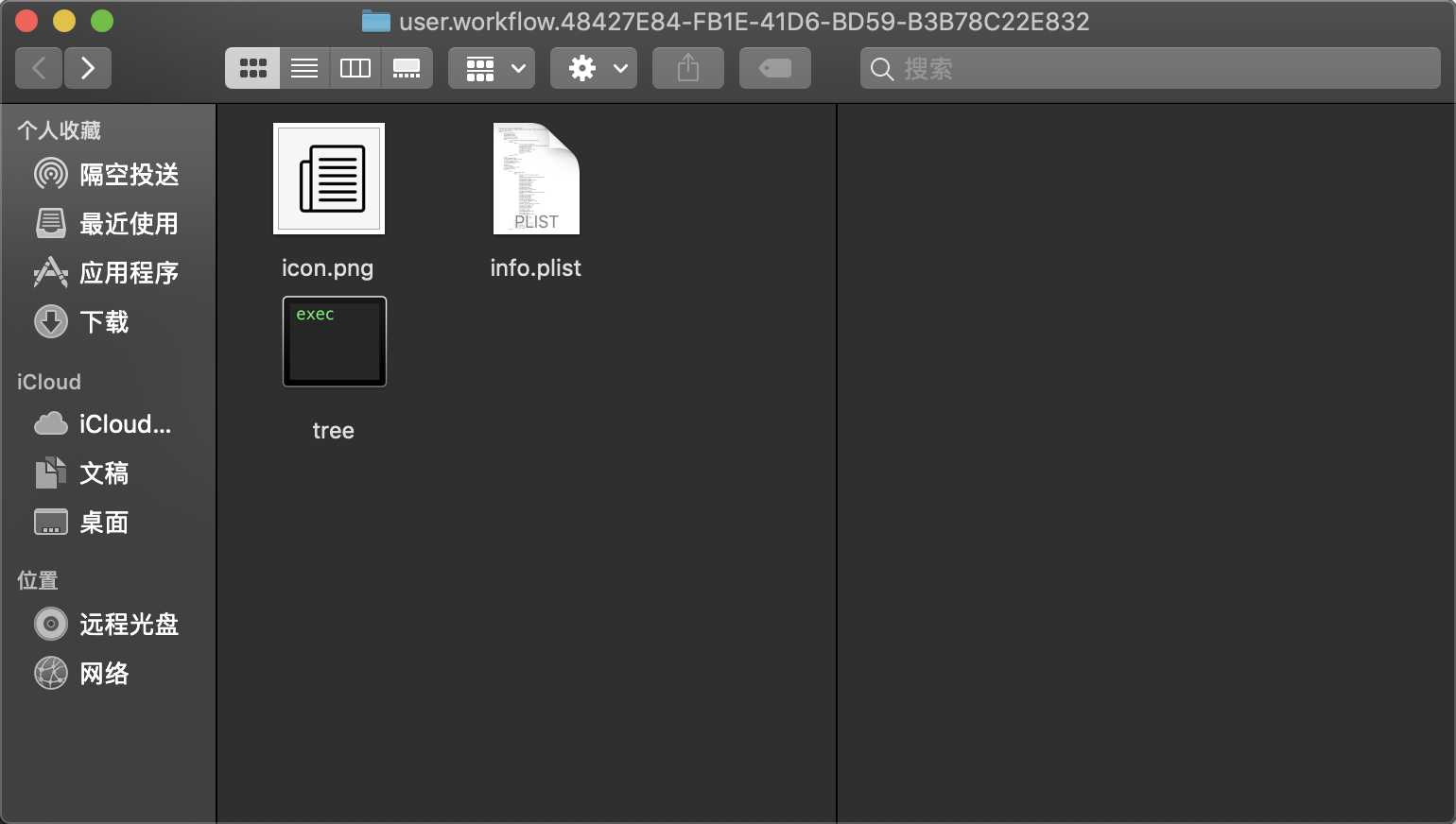
通过go build 或者go install 获得名称为tree的可执行文件 然后按照如下步骤:
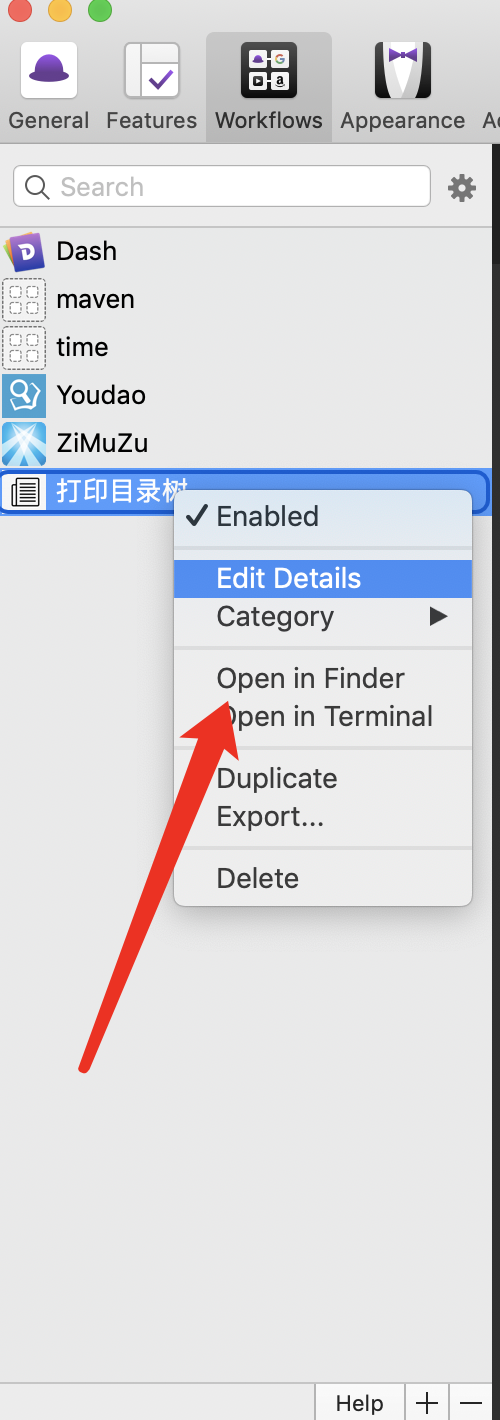
- 打开该workflow所在的目录
|────README.md
|────go.mod
|────go.sum
|────tree.go
|────|image
|────────example.gif
|────|response
|────────icon.go
|────────info.go
|────────response.go
|────|workflow
|────────打印目录树.alfredworkflow
对这里就学会了go和workflow结合打印目录树,附上github地址,给为给个赞吧👍