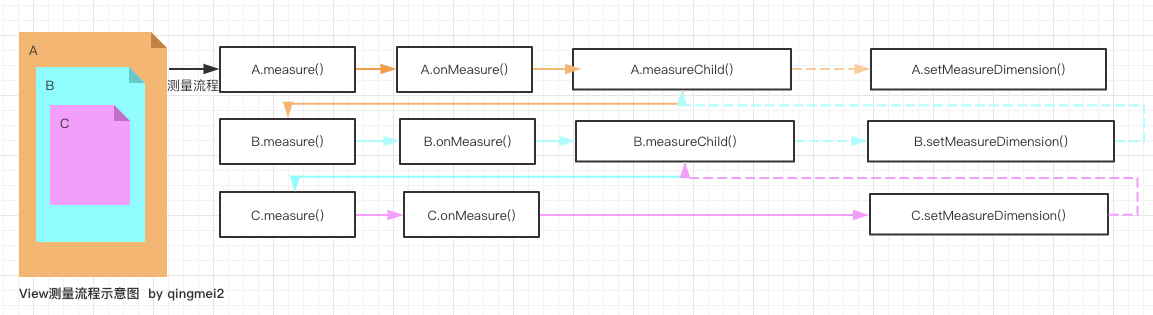
上篇文章分析了View的绘制入口,即ViewRootImpl.requestLayout()方法。 juejin.cn/post/684490…
UI绘制流程,主要包括performMeasure()、performLayout()、performDraw()
测量流程 Measure
入口方法 performMeasure()
/**
 * We have one child
 */
public void setView(View view, WindowManager.LayoutParams attrs, View panelParentView) {
    synchronized (this) {
        if (mView == null) {
            mView = view;
            ......
        }
    }
}
private void performMeasure(int childWidthMeasureSpec, int childHeightMeasureSpec) {
    if (mView == null) {
        return;
    }
    Trace.traceBegin(Trace.TRACE_TAG_VIEW, "measure");
    try {
        // mView即DecorView
        mView.measure(childWidthMeasureSpec, childHeightMeasureSpec);
    } finally {
        Trace.traceEnd(Trace.TRACE_TAG_VIEW);
    }
}
mView即DecorView,所以会执行View.measure()方法。
public class View {
    /**
     * <p>
     * This is called to find out how big a view should be. The parent
     * supplies constraint information in the width and height parameters.
     * </p>
     *
     * <p>
     * The actual measurement work of a view is performed in
     * {@link #onMeasure(int, int)}, called by this method. Therefore, only
     * {@link #onMeasure(int, int)} can and must be overridden by subclasses.
     * </p>
     *
     *
     * @param widthMeasureSpec Horizontal space requirements as imposed by the
     *        parent
     * @param heightMeasureSpec Vertical space requirements as imposed by the
     *        parent
     *
     * @see #onMeasure(int, int)
     */
    public final void measure(int widthMeasureSpec, int heightMeasureSpec) {
        boolean optical = isLayoutModeOptical(this);
        if (optical != isLayoutModeOptical(mParent)) {
            Insets insets = getOpticalInsets();
            int oWidth  = insets.left + insets.right;
            int oHeight = insets.top  + insets.bottom;
            widthMeasureSpec  = MeasureSpec.adjust(widthMeasureSpec,  optical ? -oWidth  : oWidth);
            heightMeasureSpec = MeasureSpec.adjust(heightMeasureSpec, optical ? -oHeight : oHeight);
        }

        // Suppress sign extension for the low bytes
        long key = (long) widthMeasureSpec << 32 | (long) heightMeasureSpec & 0xffffffffL;
        if (mMeasureCache == null) mMeasureCache = new LongSparseLongArray(2);

        final boolean forceLayout = (mPrivateFlags & PFLAG_FORCE_LAYOUT) == PFLAG_FORCE_LAYOUT;

        // Optimize layout by avoiding an extra EXACTLY pass when the view is
        // already measured as the correct size. In API 23 and below, this
        // extra pass is required to make LinearLayout re-distribute weight.
        final boolean specChanged = widthMeasureSpec != mOldWidthMeasureSpec
                || heightMeasureSpec != mOldHeightMeasureSpec;
        final boolean isSpecExactly = MeasureSpec.getMode(widthMeasureSpec) == MeasureSpec.EXACTLY
                && MeasureSpec.getMode(heightMeasureSpec) == MeasureSpec.EXACTLY;
        final boolean matchesSpecSize = getMeasuredWidth() == MeasureSpec.getSize(widthMeasureSpec)
                && getMeasuredHeight() == MeasureSpec.getSize(heightMeasureSpec);
        final boolean needsLayout = specChanged
                && (sAlwaysRemeasureExactly || !isSpecExactly || !matchesSpecSize);

        if (forceLayout || needsLayout) {
            // first clears the measured dimension flag
            mPrivateFlags &= ~PFLAG_MEASURED_DIMENSION_SET;

            resolveRtlPropertiesIfNeeded();

            int cacheIndex = forceLayout ? -1 : mMeasureCache.indexOfKey(key);
            if (cacheIndex < 0 || sIgnoreMeasureCache) {
                // measure ourselves, this should set the measured dimension flag back
                onMeasure(widthMeasureSpec, heightMeasureSpec);
                mPrivateFlags3 &= ~PFLAG3_MEASURE_NEEDED_BEFORE_LAYOUT;
            } else {
                long value = mMeasureCache.valueAt(cacheIndex);
                // Casting a long to int drops the high 32 bits, no mask needed
                setMeasuredDimensionRaw((int) (value >> 32), (int) value);
                mPrivateFlags3 |= PFLAG3_MEASURE_NEEDED_BEFORE_LAYOUT;
            }

            // flag not set, setMeasuredDimension() was not invoked, we raise
            // an exception to warn the developer
            if ((mPrivateFlags & PFLAG_MEASURED_DIMENSION_SET) != PFLAG_MEASURED_DIMENSION_SET) {
                throw new IllegalStateException("View with id " + getId() + ": "
                        + getClass().getName() + "#onMeasure() did not set the"
                        + " measured dimension by calling"
                        + " setMeasuredDimension()");
            }

            mPrivateFlags |= PFLAG_LAYOUT_REQUIRED;
        }

        mOldWidthMeasureSpec = widthMeasureSpec;
        mOldHeightMeasureSpec = heightMeasureSpec;

        mMeasureCache.put(key, ((long) mMeasuredWidth) << 32 |
                (long) mMeasuredHeight & 0xffffffffL); // suppress sign extension
    }

    /**
     * <p>
     * Measure the view and its content to determine the measured width and the
     * measured height. This method is invoked by {@link #measure(int, int)} and
     * should be overridden by subclasses to provide accurate and efficient
     * measurement of their contents.
     * </p>
     *
     * <p>
     * <strong>CONTRACT:</strong> When overriding this method, you
     * <em>must</em> call {@link #setMeasuredDimension(int, int)} to store the
     * measured width and height of this view. Failure to do so will trigger an
     * <code>IllegalStateException</code>, thrown by
     * {@link #measure(int, int)}. Calling the superclass'
     * {@link #onMeasure(int, int)} is a valid use.
     * </p>
     *
     * <p>
     * The base class implementation of measure defaults to the background size,
     * unless a larger size is allowed by the MeasureSpec. Subclasses should
     * override {@link #onMeasure(int, int)} to provide better measurements of
     * their content.
     * </p>
     *
     * <p>
     * If this method is overridden, it is the subclass's responsibility to make
     * sure the measured height and width are at least the view's minimum height
     * and width ({@link #getSuggestedMinimumHeight()} and
     * {@link #getSuggestedMinimumWidth()}).
     * </p>
     *
     * @param widthMeasureSpec horizontal space requirements as imposed by the parent.
     *                         The requirements are encoded with
     *                         {@link android.view.View.MeasureSpec}.
     * @param heightMeasureSpec vertical space requirements as imposed by the parent.
     *                         The requirements are encoded with
     *                         {@link android.view.View.MeasureSpec}.
     *
     * @see #getMeasuredWidth()
     * @see #getMeasuredHeight()
     * @see #setMeasuredDimension(int, int)
     * @see #getSuggestedMinimumHeight()
     * @see #getSuggestedMinimumWidth()
     * @see android.view.View.MeasureSpec#getMode(int)
     * @see android.view.View.MeasureSpec#getSize(int)
     */
    protected void onMeasure(int widthMeasureSpec, int heightMeasureSpec) {
        setMeasuredDimension(getDefaultSize(getSuggestedMinimumWidth(), widthMeasureSpec),
                getDefaultSize(getSuggestedMinimumHeight(), heightMeasureSpec));
    }
}
会再调用View.onMeasure()方法,而DecorView继承FrameLayout,因为measure()方法是final类型,无法重写,而FrameLayout重写了onMeasure()方法,所以会执行FrameLayout.onMeasure()方法。
public class FrameLayout extends ViewGroup {
    @Override
    protected void onMeasure(int widthMeasureSpec, int heightMeasureSpec) {
        int count = getChildCount();

        final boolean measureMatchParentChildren =
                MeasureSpec.getMode(widthMeasureSpec) != MeasureSpec.EXACTLY ||
                MeasureSpec.getMode(heightMeasureSpec) != MeasureSpec.EXACTLY;
        mMatchParentChildren.clear();

        int maxHeight = 0;
        int maxWidth = 0;
        int childState = 0;

        // 遍历child,计算maxWidth和maxHeight
        ......

        // Account for padding too
        maxWidth += getPaddingLeftWithForeground() + getPaddingRightWithForeground();
        maxHeight += getPaddingTopWithForeground() + getPaddingBottomWithForeground();

        // Check against our minimum height and width
        maxHeight = Math.max(maxHeight, getSuggestedMinimumHeight());
        maxWidth = Math.max(maxWidth, getSuggestedMinimumWidth());

        // Check against our foreground is minimum height and width
        final Drawable drawable = getForeground();
        if (drawable != null) {
            maxHeight = Math.max(maxHeight, drawable.getMinimumHeight());
            maxWidth = Math.max(maxWidth, drawable.getMinimumWidth());
        }

        setMeasuredDimension(resolveSizeAndState(maxWidth, widthMeasureSpec, childState),
                resolveSizeAndState(maxHeight, heightMeasureSpec,
                        childState << MEASURED_HEIGHT_STATE_SHIFT));

        count = mMatchParentChildren.size();
        // 遍历child,调用child.measure()方法
        ......
    }
}
自定义ViewGroup重写ViewGroup的onMeasure()步骤
- 遍历child,计算maxWidth和maxHeight
- 调用setMeasuredDimension()设置宽高
- 遍历child,调用child.measure()
在Android中,View测量的宽高是使用MeasureSpec来描述的。
MeasureSpec
由Mode(模式) + Size(大小)两部分组成,是一个32位int值,前2位表示Mode,后30位表示Size。
    /**
     * A MeasureSpec encapsulates the layout requirements passed from parent to child.
     * Each MeasureSpec represents a requirement for either the width or the height.
     * A MeasureSpec is comprised of a size and a mode. There are three possible
     * MeasureSpecs are implemented as ints to reduce object allocation. This class
     * is provided to pack and unpack the <size, mode> tuple into the int.
     */
    public static class MeasureSpec {
        // 移位的位数
        private static final int MODE_SHIFT = 30;
        private static final int MODE_MASK  = 0x3 << MODE_SHIFT;

        /**
         * Measure specification mode: The parent has not imposed any constraint
         * on the child. It can be whatever size it wants.
         */
         // 00左移30位,00 + 00..00
        public static final int UNSPECIFIED = 0 << MODE_SHIFT;

        /**
         * Measure specification mode: The parent has determined an exact size
         * for the child. The child is going to be given those bounds regardless
         * of how big it wants to be.
         */
         // 01左移30位,01 + 00..00
        public static final int EXACTLY     = 1 << MODE_SHIFT;

        /**
         * Measure specification mode: The child can be as large as it wants up
         * to the specified size.
         */
         // 10左移30位,10 + 00..00
        public static final int AT_MOST     = 2 << MODE_SHIFT;

        /**
         * Creates a measure specification based on the supplied size and mode.
         *
         * @param size the size of the measure specification
         * @param mode the mode of the measure specification
         * @return the measure specification based on size and mode
         */
        public static int makeMeasureSpec(@IntRange(from = 0, to = (1 << MeasureSpec.MODE_SHIFT) - 1) int size,
                                          @MeasureSpecMode int mode) {
            if (sUseBrokenMakeMeasureSpec) {
                return size + mode;
            } else {
                return (size & ~MODE_MASK) | (mode & MODE_MASK);
            }
        }

        /**
         * Extracts the mode from the supplied measure specification.
         *
         * @param measureSpec the measure specification to extract the mode from
         * @return {@link android.view.View.MeasureSpec#UNSPECIFIED},
         *         {@link android.view.View.MeasureSpec#AT_MOST} or
         *         {@link android.view.View.MeasureSpec#EXACTLY}
         */
        @MeasureSpecMode
        public static int getMode(int measureSpec) {
            //noinspection ResourceType
            return (measureSpec & MODE_MASK);
        }

        /**
         * Extracts the size from the supplied measure specification.
         *
         * @param measureSpec the measure specification to extract the size from
         * @return the size in pixels defined in the supplied measure specification
         */
        public static int getSize(int measureSpec) {
            return (measureSpec & ~MODE_MASK);
        }
}

MeasureSpec的创建、Mode和Size的获取,都是通过位运算进行的。
View测量时MeasureSpec如何获取的
从ViewRootImpl.performTraversals()调用performMeasure()地方查找
private void performTraversals() {
    ......
    if (!mStopped || mReportNextDraw) {
                boolean focusChangedDueToTouchMode = ensureTouchModeLocally(
                        (relayoutResult&WindowManagerGlobal.RELAYOUT_RES_IN_TOUCH_MODE) != 0);
                if (focusChangedDueToTouchMode || mWidth != host.getMeasuredWidth()
                        || mHeight != host.getMeasuredHeight() || contentInsetsChanged ||
                        updatedConfiguration) {
                    int childWidthMeasureSpec = getRootMeasureSpec(mWidth, lp.width);
                    int childHeightMeasureSpec = getRootMeasureSpec(mHeight, lp.height);

                    if (DEBUG_LAYOUT) Log.v(mTag, "Ooops, something changed!  mWidth="
                            + mWidth + " measuredWidth=" + host.getMeasuredWidth()
                            + " mHeight=" + mHeight
                            + " measuredHeight=" + host.getMeasuredHeight()
                            + " coveredInsetsChanged=" + contentInsetsChanged);

                     // Ask host how big it wants to be
                    performMeasure(childWidthMeasureSpec, childHeightMeasureSpec);

                    // Implementation of weights from WindowManager.LayoutParams
                    // We just grow the dimensions as needed and re-measure if
                    // needs be
                    int width = host.getMeasuredWidth();
                    int height = host.getMeasuredHeight();
                    boolean measureAgain = false;

                    if (lp.horizontalWeight > 0.0f) {
                        width += (int) ((mWidth - width) * lp.horizontalWeight);
                        childWidthMeasureSpec = MeasureSpec.makeMeasureSpec(width,
                                MeasureSpec.EXACTLY);
                        measureAgain = true;
                    }
                    if (lp.verticalWeight > 0.0f) {
                        height += (int) ((mHeight - height) * lp.verticalWeight);
                        childHeightMeasureSpec = MeasureSpec.makeMeasureSpec(height,
                                MeasureSpec.EXACTLY);
                        measureAgain = true;
                    }

                    if (measureAgain) {
                        if (DEBUG_LAYOUT) Log.v(mTag,
                                "And hey let's measure once more: width=" + width
                                + " height=" + height);
                        performMeasure(childWidthMeasureSpec, childHeightMeasureSpec);
                    }

                    layoutRequested = true;
                }
            }
        }
    }
}
通过getRootMeasureSpec(mWidth, lp.width)获取MeasureSpec。
mWidth 即窗口的宽,lp.width即顶层DecorView的LayoutParam属性
   /**
     * Figures out the measure spec for the root view in a window based on it's
     * layout params.
     *
     * @param windowSize
     *            The available width or height of the window
     *
     * @param rootDimension
     *            The layout params for one dimension (width or height) of the
     *            window.
     *
     * @return The measure spec to use to measure the root view.
     */
    private static int getRootMeasureSpec(int windowSize, int rootDimension) {
        int measureSpec;
        switch (rootDimension) {

        case ViewGroup.LayoutParams.MATCH_PARENT:
            // Window can't resize. Force root view to be windowSize.
            measureSpec = MeasureSpec.makeMeasureSpec(windowSize, MeasureSpec.EXACTLY);
            break;
        case ViewGroup.LayoutParams.WRAP_CONTENT:
            // Window can resize. Set max size for root view.
            measureSpec = MeasureSpec.makeMeasureSpec(windowSize, MeasureSpec.AT_MOST);
            break;
        default:
            // Window wants to be an exact size. Force root view to be that size.
            measureSpec = MeasureSpec.makeMeasureSpec(rootDimension, MeasureSpec.EXACTLY);
            break;
        }
        return measureSpec;
    }
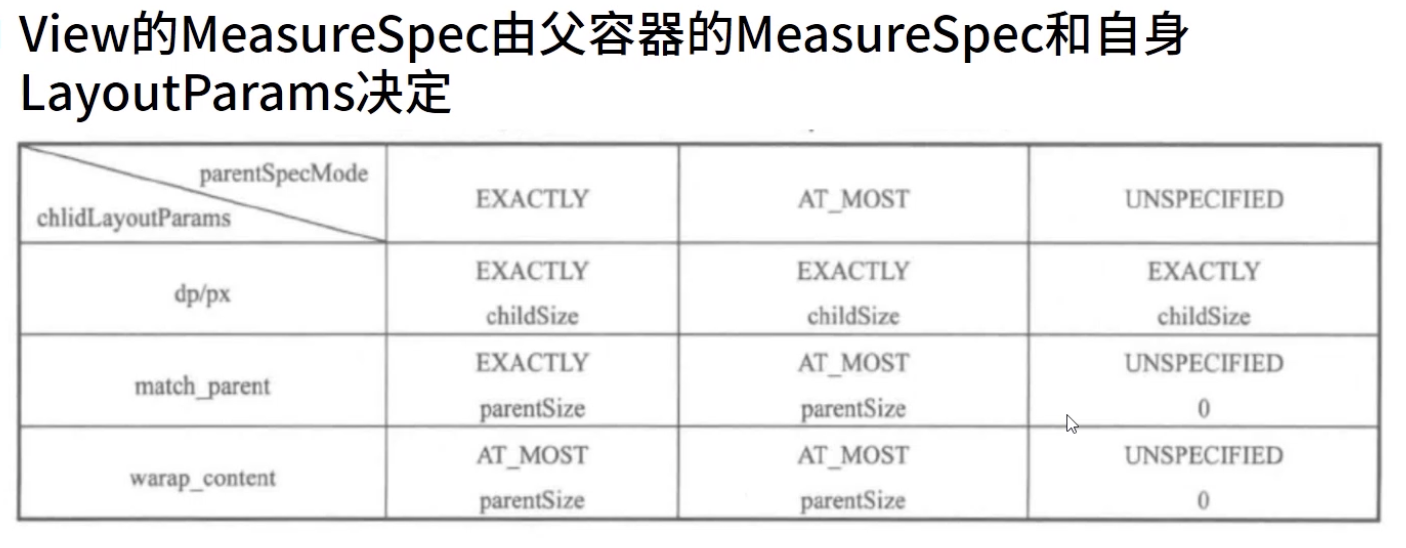
DecorView的MeasureSpec,由窗口大小和自身LayoutParams决定
通过窗口大小和LayoutParams,创建MeasureSpec的规则如下
- LayoutParam.MATCH_PARENT 精确模式,窗口大小
- LayoutParams.WRAP_CONTENT 最大模式,最大为窗口大小
- 固定大小 精确模式,大小为LayoutParams的大小
测量完DecorView的大小,下面就要测量其Child的大小
前面说过,DecorView继承FrameLayout,在onMeasure()方法中遍历调用Child.measure()方法进行测量,那么是如何获取的Child的MeasureSpec的呢?
    @Override
    protected void onMeasure(int widthMeasureSpec, int heightMeasureSpec) {
        int count = getChildCount();

        final boolean measureMatchParentChildren =
                MeasureSpec.getMode(widthMeasureSpec) != MeasureSpec.EXACTLY ||
                MeasureSpec.getMode(heightMeasureSpec) != MeasureSpec.EXACTLY;
        mMatchParentChildren.clear();

        int maxHeight = 0;
        int maxWidth = 0;
        int childState = 0;

        for (int i = 0; i < count; i++) {
            final View child = getChildAt(i);
            if (mMeasureAllChildren || child.getVisibility() != GONE) {
                measureChildWithMargins(child, widthMeasureSpec, 0, heightMeasureSpec, 0);
                final LayoutParams lp = (LayoutParams) child.getLayoutParams();
                maxWidth = Math.max(maxWidth,
                        child.getMeasuredWidth() + lp.leftMargin + lp.rightMargin);
                maxHeight = Math.max(maxHeight,
                        child.getMeasuredHeight() + lp.topMargin + lp.bottomMargin);
                childState = combineMeasuredStates(childState, child.getMeasuredState());
                if (measureMatchParentChildren) {
                    if (lp.width == LayoutParams.MATCH_PARENT ||
                            lp.height == LayoutParams.MATCH_PARENT) {
                        mMatchParentChildren.add(child);
                    }
                }
            }
        }
        ......
    }
调用measureChildWidthMargins(),再调用getChildMeasureSpec()来获取Child的MeasureSpec。
    /**
     * Does the hard part of measureChildren: figuring out the MeasureSpec to
     * pass to a particular child. This method figures out the right MeasureSpec
     * for one dimension (height or width) of one child view.
     *
     * The goal is to combine information from our MeasureSpec with the
     * LayoutParams of the child to get the best possible results. For example,
     * if the this view knows its size (because its MeasureSpec has a mode of
     * EXACTLY), and the child has indicated in its LayoutParams that it wants
     * to be the same size as the parent, the parent should ask the child to
     * layout given an exact size.
     *
     * @param spec The requirements for this view
     * @param padding The padding of this view for the current dimension and
     *        margins, if applicable
     * @param childDimension How big the child wants to be in the current
     *        dimension
     * @return a MeasureSpec integer for the child
     */
    public static int getChildMeasureSpec(int spec, int padding, int childDimension) {
        int specMode = MeasureSpec.getMode(spec);
        int specSize = MeasureSpec.getSize(spec);

        int size = Math.max(0, specSize - padding);

        int resultSize = 0;
        int resultMode = 0;

        switch (specMode) {
        // Parent has imposed an exact size on us
        case MeasureSpec.EXACTLY:
            if (childDimension >= 0) {
                resultSize = childDimension;
                resultMode = MeasureSpec.EXACTLY;
            } else if (childDimension == LayoutParams.MATCH_PARENT) {
                // Child wants to be our size. So be it.
                resultSize = size;
                resultMode = MeasureSpec.EXACTLY;
            } else if (childDimension == LayoutParams.WRAP_CONTENT) {
                // Child wants to determine its own size. It can't be
                // bigger than us.
                resultSize = size;
                resultMode = MeasureSpec.AT_MOST;
            }
            break;

        // Parent has imposed a maximum size on us
        case MeasureSpec.AT_MOST:
            if (childDimension >= 0) {
                // Child wants a specific size... so be it
                resultSize = childDimension;
                resultMode = MeasureSpec.EXACTLY;
            } else if (childDimension == LayoutParams.MATCH_PARENT) {
                // Child wants to be our size, but our size is not fixed.
                // Constrain child to not be bigger than us.
                resultSize = size;
                resultMode = MeasureSpec.AT_MOST;
            } else if (childDimension == LayoutParams.WRAP_CONTENT) {
                // Child wants to determine its own size. It can't be
                // bigger than us.
                resultSize = size;
                resultMode = MeasureSpec.AT_MOST;
            }
            break;

        // Parent asked to see how big we want to be
        case MeasureSpec.UNSPECIFIED:
            if (childDimension >= 0) {
                // Child wants a specific size... let him have it
                resultSize = childDimension;
                resultMode = MeasureSpec.EXACTLY;
            } else if (childDimension == LayoutParams.MATCH_PARENT) {
                // Child wants to be our size... find out how big it should
                // be
                resultSize = View.sUseZeroUnspecifiedMeasureSpec ? 0 : size;
                resultMode = MeasureSpec.UNSPECIFIED;
            } else if (childDimension == LayoutParams.WRAP_CONTENT) {
                // Child wants to determine its own size.... find out how
                // big it should be
                resultSize = View.sUseZeroUnspecifiedMeasureSpec ? 0 : size;
                resultMode = MeasureSpec.UNSPECIFIED;
            }
            break;
        }
        //noinspection ResourceType
        return MeasureSpec.makeMeasureSpec(resultSize, resultMode);
    }
ViewGroup measure --> onMeasure(测量子控件的宽高)--> setMeasuredDimension -->setMeasuredDimensionRaw(保存自己的宽高)
View measure --> onMeasure --> setMeasuredDimension -->setMeasuredDimensionRaw(保存自己的宽高)
自定义View如果不重写onMeasure()方法,会是什么效果
如果不重写,则默认执行View的onMeasure()方法
protected void onMeasure(int widthMeasureSpec, int heightMeasureSpec) {
        setMeasuredDimension(getDefaultSize(getSuggestedMinimumWidth(), widthMeasureSpec),
                getDefaultSize(getSuggestedMinimumHeight(), heightMeasureSpec));
    }
}
会通过getDefaultSize()获取默认的MeasureSpec
    /**
     * Utility to return a default size. Uses the supplied size if the
     * MeasureSpec imposed no constraints. Will get larger if allowed
     * by the MeasureSpec.
     *
     * @param size Default size for this view
     * @param measureSpec Constraints imposed by the parent
     * @return The size this view should be.
     */
    public static int getDefaultSize(int size, int measureSpec) {
        int result = size;
        int specMode = MeasureSpec.getMode(measureSpec);
        int specSize = MeasureSpec.getSize(measureSpec);

        switch (specMode) {
        case MeasureSpec.UNSPECIFIED:
            result = size;
            break;
        case MeasureSpec.AT_MOST:
        case MeasureSpec.EXACTLY:
            result = specSize;
            break;
        }
        return result;
    }
可见,AT_MOST和EXACTLY都设置成了父容器的大小。
结论,无论自定义View不重写onMeasure()设置MeasureSpec,那么无论该View的LayoutPrams是MATCH_PARENT或WRAP_CONTENT,都会设置成父容器的剩余大小。
Measure递归流程 图片来源