先上效果图:
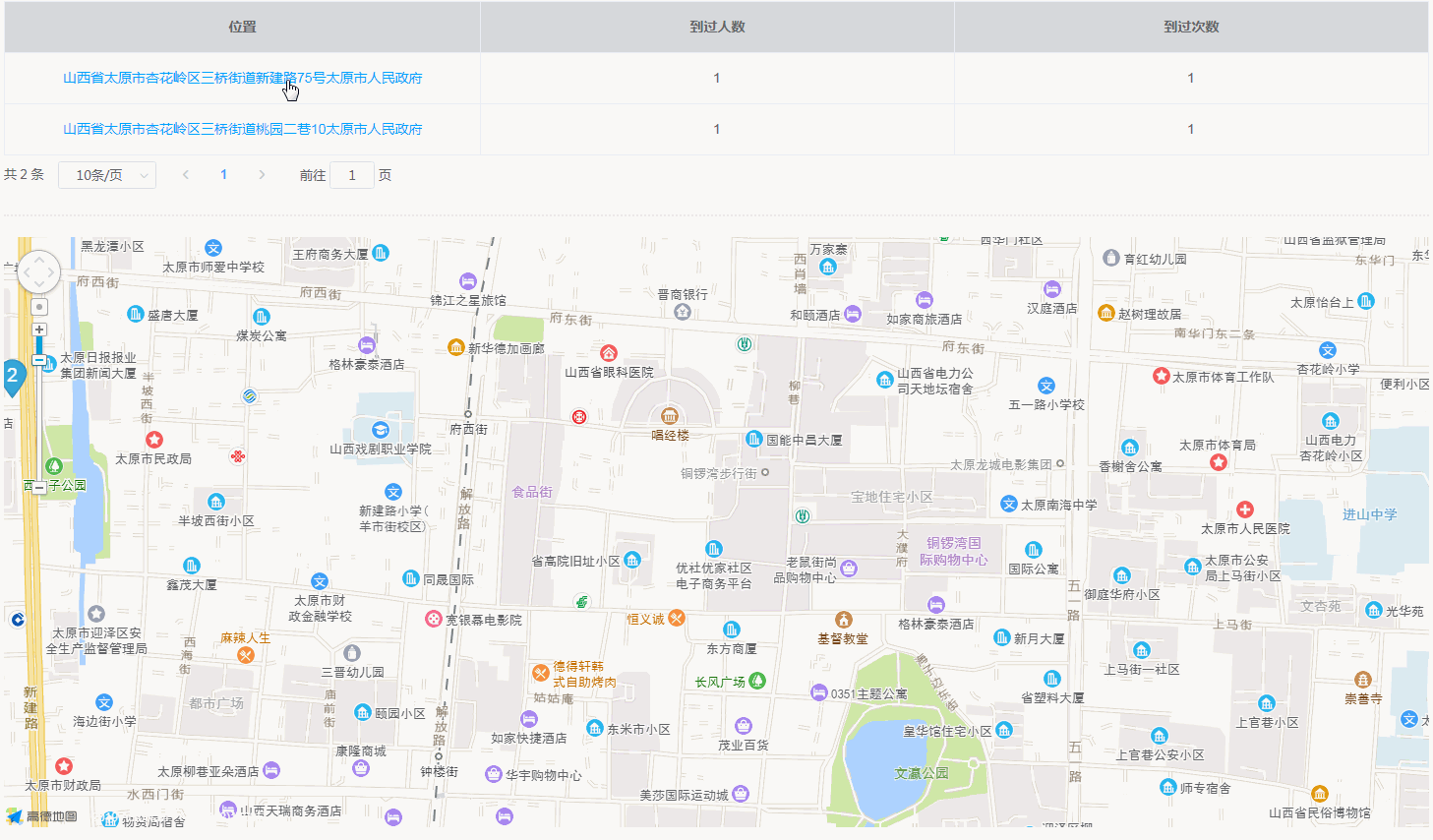
后台那边会给我返回需要展示的地点的信息,包括地名和经纬度。我的任务就是需要把这些地点都显示到地图上,然后点击表格里的地名,地图会相对应放大定位到该地点为中心的位置。然后地图是可以通过滚轮放大缩小滴。废话不多说,来看看要怎么整。
1.引入高德cdn。
我是通过异步加载js的方式去引入的,没有使用依赖包。在你自己的工具类目录下,创建js异步加载文件。 我放在了assets目录下。
/* AMap.js
 * 异步加载的高德地图插件
 */
 export default function MapLoader() {
    if (window.AMap) { // 已经加载成功,不重复加载
        return new Promise((resolve) => {
            resolve(window.AMap)
        })
    }
    const loadMaps = new Promise((resolve, reject) => {
        let mapsScript = document.createElement("script")
        mapsScript.type = "text/javascript"
        mapsScript.src = "//webapi.amap.com/maps?v=1.4.6&key=xxx&callback=init" // key的值记得修改补充一下
        mapsScript.onerror = reject('fail') // 引入失败
        mapScript.onload = () => {
            resolve(AMap)
        }
        document.head.appendChild(mapsScript)
    })
    const loadMapsUI = new Promise((resolve, reject) => {
        let uiScript = document.createElement("script")
        uiScript.type = "text/javascript"
        uiScript.src = "//webapi.amap.com/ui/1.0/main-async.js"
        uiScript.onerror = reject('fail') // 引入失败
        uiScript.onload = () => {
          resolve('success')
        }
        document.head.appendChild(uiScript)
    })
    return Promise.all([loadMaps, loadMapsUI]).then((res) => {
        return res[0]
    }).catch(e => {
        console.log(e)
    })
    // promise.all中的then的成功回调返回res是一个数组,分别代表loadMaps和loadMapsUI的结果,这里只返回p1的结果(map对象)就ok
}
2. 层级地图组件
高德地图引入后,就可以开始我们的表演了,定义一个地图组件,哪里需要用到就引入组件就可。这项目里我用了elementUI。
<!-- Amap.vue层级地图组件 -->
<template>
    <div v-loading="mapLoading" class="amap-container">
        <div ref="amapContent" style="min-width: 310px; height: 600px; margin: 0 auto"></div>
    </div>
</template>
<script>
import MapLoader from '@/assets/AMap/AMap.js'
export default {
    props: {
        markers: { // 地图上的坐标点
            type: Array,
            default: () => {
                return []
            }
        },
        center: { // 地图中心坐标
            type: String,
            default: ''
        },
        containerIdName: { // 定义的地图容器的id名字
            type: String,
            default: ''
        }
    },
    data() {
        return {
           map: null, // 定义地图实例
           mapLoading: false
        }
    },
    watch: {
        // 如果地图中心坐标点发生改变,重新定位
        center(newData, oldData) {
            if (newData !== oldData) {
                document.getElementById(this.containerName).scrollIntoView()
                this.map.setZoomAndCenter(18, newData)
            }
        },
        // 如果地图标记点发生改变,重绘地图
        markers(newData, oldData) {
            if (newData !== oldData) {
                this.createMap()
            }
        }
    },
    mounted() {
        this.createMap()
    },
    methods: {
        async createMap() {
            // 初始化Map
            await MapLoader().then(async AMap => {
                console.log('地图加载成功')
                 // 初始化地图
                await (this.map = new AMap.Map(this.containerName, {
                    center: this.center,
                    resizeEnable: true,
                    zoom: 15
                 }))
                if (!window.AMapUI) { // 如果还没有初始化
                    await initAMapUI() // 这里调用initAMapUI初始化
                }
                await this.addMarkers() // 增加点坐标
                this.mapLoading = false
            }).catch(err => {
                console.log('地图加载失败', err)
                this.$message({
                    message: '地图加载失败',
                    type: 'error',
                    duration: 3000
                 })
            })
            // 加载工具栏
            await AMap.plugin(['AMap.ToolBar'], () => {
                const toolbar = new AMap.ToolBar()
                this.map.addControl(toolbar)
            })
        },
        // 初始化标注点
        addMarkers() {
            AMapUI.loadUI(['overlay/SimpleMarker'], SimpleMarker => {
                this.markers.forEach((item, index) => {
                  new SimpleMarker({
                    // 设置节点属性
                    iconLabel: {
                      // 普通文本
                      innerHTML: `${index + 1}`,
                      // 设置样式
                      style: {
                        color: '#fff',
                        fontSize: '120%',
                        marginTop: '2px'
                      }
                    },
                    iconStyle: 'blue',
                    map: this.map,
                    position: [item.lon, item.lat] // 标注点的经纬度
                  })
                })
            })
        }
    }
}
</script>
3. 在页面中运用地图组件
<template>
    <div v-loading="loading" class="page">
        <el-table :data="tableData.data" border >
            <template v-for="(item,index) in tableData.header">
              <el-table-column
                v-if="index == 'addressDetail'"
                :key="index"
                :label="item"
                align="center"
                min-width="110px"
              >
                <template slot-scope="scope">
                  <a
                    style="color:#00a4ff"
                    @click="changeCenter(scope.$index)"
                  >{{ scope.row.addressDetail }}</a>
                </template>
              </el-table-column>
              <el-table-column
                v-else
                :key="index"
                :label="item"
                :min-width="index == 'count' ? 50 : 110"
                :prop="index"
                align="center"
                show-overflow-tooltip
              />
            </template>
        </el-table>
        <pagination v-if="tableData.data" :pager="pager" @search="getAddressData"/>
        <amap
            v-if="tableData.data"
            :center="mapCenter"
            :markers="mapMarkers"
            container-id-name="amapLL"
            style="margin: 20px 0 40px"
          />
    </div>
</template>
<script>
import amap from '@/components/AMap/Amap'
import pagination from '@/components/Pagination/Pagination'
export default {
    components: {
        pagination,
        amap
    },
    data() {
        return {
            // 分页跟表格
            pager: {
                pageSize: 10,
                currentPage: 1,
                totalPage: 1
            },
            loading: false,
            // 返回的数据
            tableData: [],
            mapCenter: [],
            mapMarkers: []
        }
    },
    mounted() {
        this.getAddressData()
    },
    methods: {
        // 获取页面数据,请求后台接口,这里先定义假数据
        getAddressData() {
            this.loading = true
            const resData = {
                data: {
                    list: [
                        {
                            addressDetail: "吉林省长春市宽城区站前街道西广南区",
                            resortCount: "3",
                            resortSum: "22"
                        },
                        {
                            addressDetail: "吉林省长春市宽城区站前街道嫩江路282号西广南区",
                            resortCount: "55",
                            resortSum: "22"
                        }
                    ],
                    pageNum: 0,
                    pageSize: 0,
                    total: 0
                },
                header: {
                    addressDetail: "位置",
                    resortCount: "到过人数",
                    resortSum: "到过次数"
                },
                map: [
                    {
                        count: 1,
                        lat: "43.901522",
                        location: "[125.320801,43.901522]",
                        lon: "125.320801"
                    },
                    {
                        count: 1,
                        lat: "43.90155327690972",
                        location: "[125.32062065972222,43.90155327690972]",
                        lon: "125.32062065972222"
                    }
                ]
            }
            this.tableData.header = resData.header
            this.tableData.data = resData.list
            this.pager.totalPage = resData.data.total
            this.mapMarkers = resData.map
            // 第一个位置信息作为地图中心点
            this.mapCenter = this.mapMarkers.length ? [this.mapMarkers[0].lon,this.mapMarkers[0].lat] : []
        },
        // 定位点击的地址
        changeCenter(index) {
            const mapIndex = index + (this.pager.currentPage - 1) * this.pager.pageSize
            this.mapCenter = [
                this.mapMarkers[mapIndex].lon,
                this.mapMarkers[mapIndex].lat
            ]
        }
    }
}
</script>
这样就实现了以表格展示列表数据,点击地点名称地图组件定位到相对应位置的功能,希望能帮到你~