花了半天时间用React,Redux和Material-UI撸了个简单的评论组件,也是为了加深对redux的理解,所以总结于此。
整个评论组件又分为三个组件,评论发送组件和评论流组件,以及最外层的父组件
//CommentField.js

import React from 'react'import { connect } from 'react-redux'import TextField from '@material-ui/core/TextField'import PostIcon from '@material-ui/icons/SendSharp'import Button from '@material-ui/core/Button'import { postComment } from './commentsmiddleware'

export class CommentField extends React.Component{  constructor(props) {    super(props)    this.state = {      value: ''    }  }  _handlePostComment = () => {    // console.log(this.state.value)    if(this.state.value !== ''){      this.props.postComment(this.state.value)      this.setState({        value: ''      })    }  }  render() {    return(      <div>        <TextField          id='multiline-comments'          multiline          label='Comment'          rows='8'          margin='normal'          variant='outlined'          type='text'          fullWidth={true}          value={this.state.value}          onChange={(e) => this.setState({value: e.target.value})}        />        <Button variant='contained' color='secondary' onClick={this._handlePostComment}>          Post          <PostIcon style={{marginLeft: '10'}}/>        </Button>      </div>    )  }}
//CommentFlow.js
import React from 'react'import { connect } from 'react-redux'import IconButton from '@material-ui/core/IconButton';import ThumbUpIcon from '@material-ui/icons/ThumbUpRounded'import Paper from '@material-ui/core/Paper';import Badge from '@material-ui/core/Badge';import Typography from '@material-ui/core/Typography';import { fetchData, update } from './commentsmiddleware'export class CommentFlow extends React.Component{ constructor(props) { super(props) } componentDidMount() { this.props.fetchData() } _thumbUpHandle(user){ this.props.update(user) } render() { return( <div className='comment-flow-container'> { this.props.comments.map((item, index) => { let id= item.id return ( <Paper key={id} style={{marginTop: 20}}> <div className='title-bar'> <Typography variant='h6' component='h6'> {item.nickname} </Typography> <Typography variant='h6' component='h6'> {item.date} </Typography> </div> <div> <Typography component='p'> {item.content} </Typography> </div> <div className='like-bar'> <IconButton aria-label='thumb-up' onClick={() => this._thumbUpHandle(item)}> <Badge badgeContent={item.thumbupcount >= 100 ? 99+'+' : item.thumbupcount} color='secondary'> <ThumbUpIcon/> </Badge> </IconButton> </div> </Paper> ) }) } </div> ) }}
//Comments.js

import React from 'react'import CommentField  from './CommentField'import CommentFlow  from './CommentFlow'import './comments.css'export class CommentComponet extends React.Component{  constructor(props){    super(props)  }  render(){    return(      <div className='container'>        <CommentField/>        <CommentFlow/>      </div>    )  }}
数据这块,我用json-server事先写入了一部分数据,评论对象里包含id,用户名,日期,内容和点赞数这些属性
{
    "comments": [
     {      "id": 1,      "nickname": "Red",      "date": "2019-08-15 17:14",      "content": "Hello",      "thumbupcount": 18     },     {      "id": 2,      "nickname": "Red",      "date": "2019-08-15 17:15",      "content": "thanks",      "thumbupcount": 6     },     {      "id": 3,      "nickname": "Red",      "date": "2019-08-15 17:16",      "content": "嘿嘿嘿",      "thumbupcount": 11     }     ]
}
action有五种,分别是获取server评论数据的LOAD_COMMENTS,网络请求成功的SUCCESS,请求失败的FAILED,点赞当前评论的THUMB_UP,以及发送一篇评论POST_COMMENT
//actions.js

const LOAD_COMMENTS = 'LOAD_COMMENTS'const SUCCESS = 'SUCCESS'const FAILED = 'FAILED'const THUMB_UP = 'THUMB_UP'const POST_COMMENT = 'POST_COMMENT'export const load = () => ({  type: LOAD_COMMENTS})export const scuccess = (res) => ({  type: SUCCESS,  res})export const failed = (err) => ({  type: FAILED,  err})export const thumbup = (acomment) => ({  type: THUMB_UP,  acomment})export const newcomment = (anewcomment) => ({  type: POST_COMMENT,  anewcomment})
此外,我还用到了中间件,目的是在acton和reducer之间实现网络请求,将返回的数据再dispatch给reducer处理,包括请求评论数据,点赞评论和发送评论
//middleware.js

/** * 中间件 * 用来处理网络请求过程中的状态 */import { load, newcomment, thumbup, scuccess, failed} from './actions'export const fetchData = () => {  return async (dispatch) => {    dispatch(load)    try {      let response = await fetch(`http://localhost:3001/comments`)      let resTxt = await response.text()      let resJson = await JSON.parse(resTxt)      dispatch(scuccess(resJson))    } catch (error) {      dispatch(failed(error))    }  }}/** * 更新点赞数 * 更新成功后dispatch给thumbup action */export const update = (acomment) => {  return async (dispatch) => {    let acommentId = acomment.id    let count = acomment.thumbupcount + 1    let updatecomment = {      "id": acommentId,      "nickname": acomment.nickname,      "date": acomment.date,      "content": acomment.content,      "thumbupcount": count    }    try{      await fetch(`http://localhost:3001/comments/${acommentId}`,{        method: 'PUT',        headers: {          "Content-Type": "application/json"        },        body: JSON.stringify(updatecomment)      })      dispatch(thumbup(updatecomment))    }catch(error){      dispatch(failed(error))    }  }}/** * 发送一篇评论 * @param {*} content  */export const postComment = (content) => {  return async (dispatch) => {    let date = new Date(Date.now())    let newComment = {      "id": Math.random(),      "nickname": "Red",      "date": date.getFullYear() + '-' + (date.getMonth()+1 < 10 ? '0'+(date.getMonth()+1) : date.getMonth()+1) + '-' +         date.getDate() + ' ' + date.getHours() + ':' + date.getMinutes(),      "content": content,      "thumbupcount": 0    }    try {      await fetch(`http://localhost:3001/comments`,{        method: 'POST',        headers: {          "Content-Type": "application/json"        },        body: JSON.stringify(newComment)      })      dispatch(newcomment(newComment))    } catch (error) {      dispatch(failed(error))    }  }}
再来就是reducer,分别处理上述五个acton
//reducer.js

const initialState = {  comments: [],  success: false,  failed: ''}export const result = (state=initialState, action) => {  switch (action.type) {    case 'LOAD_COMMENTS':      console.log('loading comments...')      return {        ...state,        success: false,        failed: ''      }    case 'SUCCESS':      return {        ...state,        comments: state.comments.concat(action.res),        success: true,        failed: ''      }    case 'FAILED':      return {        ...state,        success: false,        failed: action.err      }    case 'THUMB_UP':      let updateComment = state.comments.map(obj => {        return obj.id === action.acomment.id ? action.acomment : obj      })      return {        ...state,        comments: updateComment,         success: true,        failed: ''      }    case 'POST_COMMENT':      return {        ...state,        comments: state.comments.concat(action.anewcomment),        success: true,        failed: ''      }    default:      return state  }}
对于THUMB_UP这个action,reducer的处理逻辑是要判断当前点击的是那条评论,即该条评论的id是否与传递过来的comment对象的id相同,若相同才更新数据。因为评论流就是一个list,里面的所有对象都会有一个独一无二id(通过Math.random()生成),react内部就是通过判断这些id来实现re-render的。
然后,就是映射状态(state)和事件分发(dispatch)给props,再通过react-redux提供的connect组件封装这两个函数再导出组件
//CommentFlow.js

const mapStateToProps = (state) => {  return {    comments: state.result.comments,    success: state.result.success,    failed: state.result.failed,  }}//分发给中间件函数处理const mapDispatchToProps = (dispatch) => {  return {    fetchData: () => dispatch(fetchData()),    update: (acomment) => dispatch(update(acomment))  }}export default connect(mapStateToProps, mapDispatchToProps)(CommentFlow)
//CommentField.jsconst mapDispatchToProps = (dispatch) => { return { postComment: (val) => dispatch(postComment(val)) }}export default connect(mapDispatchToProps)(CommentField)
最后就是再index.js里引入store和中间件了
//index.js

import React from 'react';import ReactDOM from 'react-dom';import './index.css';import { Provider } from 'react-redux'import { createStore, applyMiddleware, combineReducers } from 'redux'import thunk from 'redux-thunk'import reducer from './reducer'import { result } from './commentsreducer'import { CommentComponet } from './Comments'const rootReducer = combineReducers({result})const store = createStore(rootReducer, applyMiddleware(thunk))const App = () => (  <Provider store={store}>    <CommentComponet />  </Provider>)ReactDOM.render(  <App/>,  document.getElementById('root'));
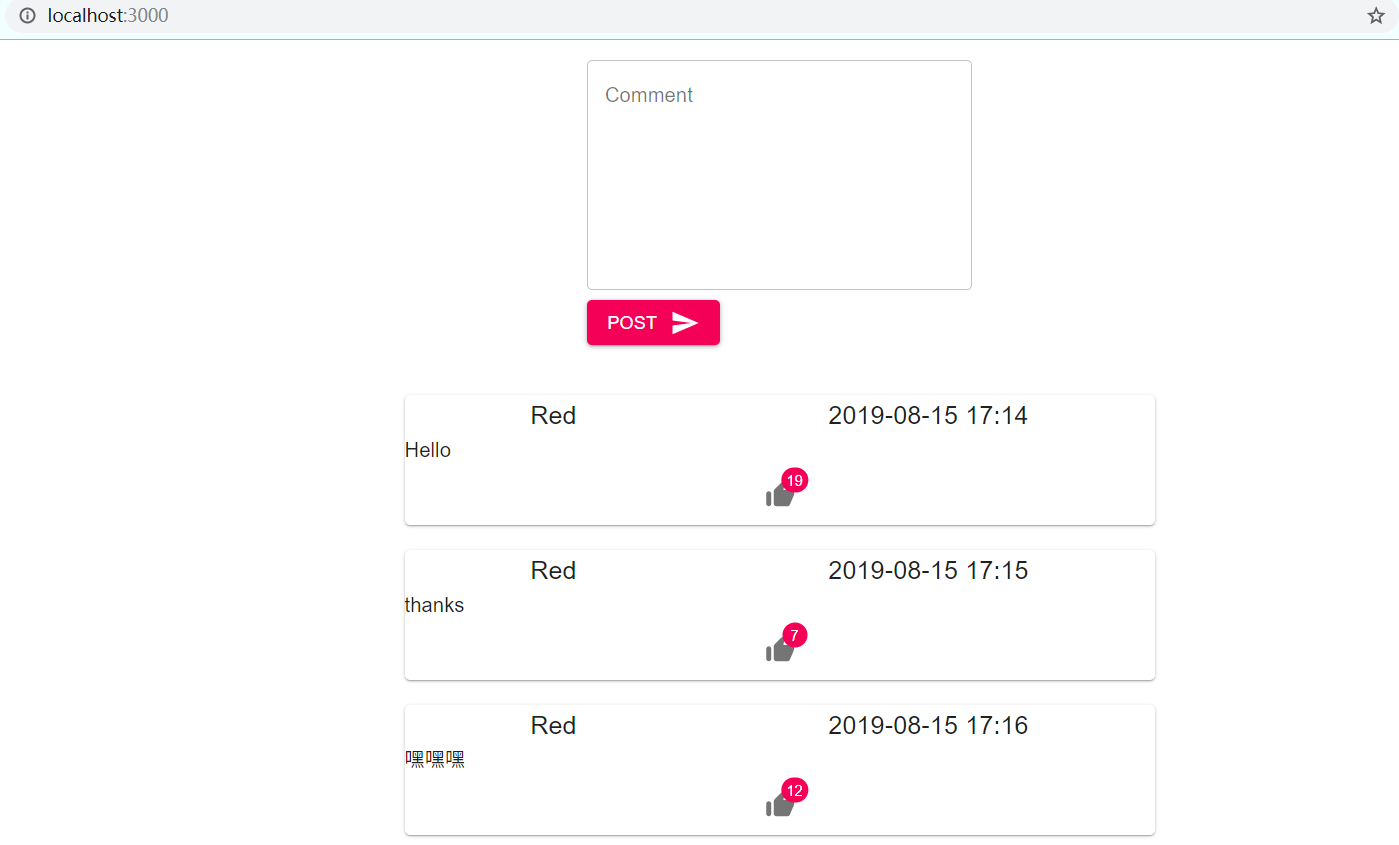
运行出来的效果是这样
回头来梳理一下其中的不足:
1. 没有做到容器组件和展示组件的分离
2. 对state的定义不够准确,以comment作为一个state,其余两个success和failed都没用上,说白了就是对state的颗粒度划分的不清晰。comment对象既包含了评论内容、时间这些基本信息,同时还有点赞数这样的记录信息,如何合理的定义state也是开发过程中需要细致考量的。
Redux的出现使得React如虎添翼,并不是在于它有多强大,而是因为”单向数据流“的思想,把复杂的东西给简单化了,对于开发人员而言,最忌讳的就是在一个点上钻牛角,如果理解并运用Redux的这种思想到实际项目中时,往往会事倍功半,减轻了开发人员的思考压力。