

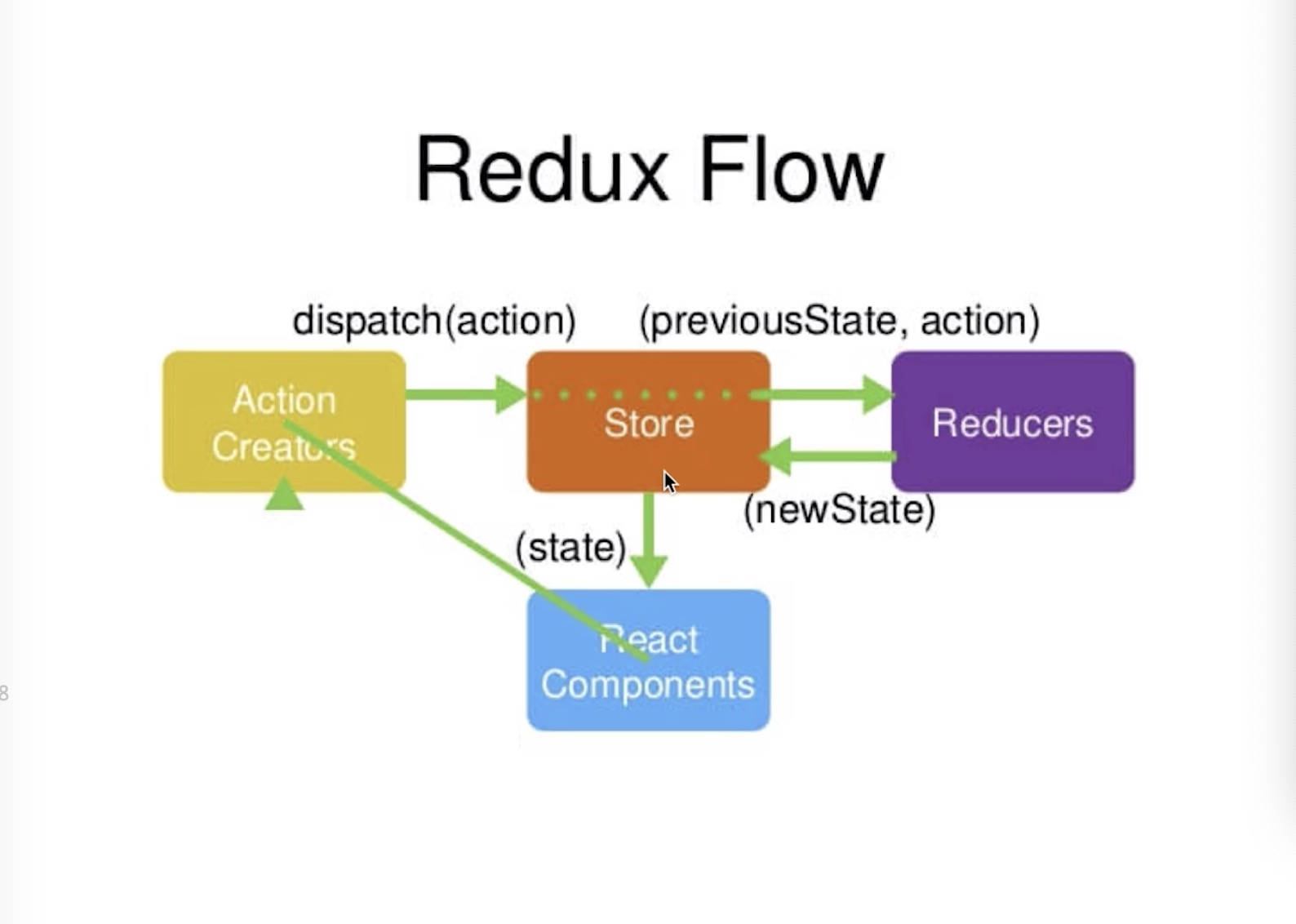
步骤
-
定义一个方法
-
2.1方法内写入action,定义action类型,把action发给store(dispatch方法)
handleButton() {
    const action = {
      type: 'add_todo_item'
    }
    store.dispatch(action)
  }
2.2在constructor中绑定一下this
 constructor(props) {
    super(props)
    //state获取store里的数据
    this.state = store.getState()
    //绑定this
    this.handleButton = this.handleButton.bind(this)
    console.log(this.state);
  }
- store根据reducers匹配规则(匹配类型),并作处理返回新的newStore数据
//reducer 可以接受state,但是绝不可能修改state
if (action.type === 'add_todo_item') {
    const newState = JSON.parse(JSON.stringify(state))
    //自定义需求
    newState.list.push(newState.inputValue)
    newState.inputValue = ''
    //返回最新store数据
    return newState
  }
- store数据变化后,监听返回数据的变化,
 constructor(props) {
    super(props)
    this.state = store.getState()
    this.handleButton = this.handleButton.bind(this)
    console.log(this.state);
    //监听返回数据变化
    store.subscribe(this.handleStoreChange)
  }
- 数据变化后再次调用方法获取新的store数据
handleStoreChange() {
    this.setState(store.getState())
  }
定义actionTypes(拆分)
- 在store文件中创建actionTypes.js文件,
- actionTypes.js文件中定义types
export const CHANGE_INPUT_VALUE = 'change_input_value'
export const ADD_TODO_ITEM = 'add_todo_item'
export const REMOVE_INPUT_VALUE = 'remove_input_value'
- 在store的index.js文件与组建文件中引入actionTypes.js,并替换type名
import { CHANGE_INPUT_VALUE, ADD_TODO_ITEM, REMOVE_INPUT_VALUE } from './store/actionTypes'
使用actionCreators统一创建action(联系上面actionTypes)
- 在store文件中创建actionCreators.js文件
import { CHANGE_INPUT_VALUE, ADD_TODO_ITEM, REMOVE_INPUT_VALUE } from './actionTypes'
export const getInputChangeAction = (value) => ({
  type: CHANGE_INPUT_VALUE,
  value
})
- 在组件文件中引入actionCreators.js导出的方法
import { getInputChangeAction } from './store/actionCreators'
//重新定义action
handleInputChange(e) {
    const action = getInputChangeAction(e.target.value)
    store.dispatch(action)
  }
UI组件与容器组件
- ui组件:负责渲染(导出为一个单独组件并引入进容器组件)
- 容器组件:负责数据逻辑
