作者:jartto
http://jartto.wang/2019/07/09/git-stats/
当我们维护一个开源项目的时候,你肯定想知道哪些人比较活跃,哪些人贡献比较多。这时候就需要一个简单易用的工具,下面我来介绍几款。
一、场景
目前大部分的项目可能都会用到 Git 来做代码管理,那么我们在不断的修改项目的过程中,可能会关注如下几个问题:
每个参与者贡献代码量,按劳分配某些资源🙈;
参与者的代码增删量,提交次数等;
统计活跃度;
那么,如何来对代码量做统计呢?
二、常规操作
一般情况,我们可以直接通过 Git log 来统计,如:
1.统计个人代码量:
git log --author="jartto" --pretty=tformat: --numstat | awk '{ add += $1; subs += $2; loc += $1 - $2 } END { printf "added lines: %s, removed lines: %s, total lines: %sn", add, subs, loc }' -
2.贡献值统计:
git log --pretty='%aN' | sort -u | wc -l3.查看排名前 5 的贡献者:
git log --pretty='%aN' | sort | uniq -c | sort -k1 -n -r | head -n 5更多 log 操作可以请移步:
https://segmentfault.com/a/1190000008542123
这时候,你可能在想:有没有省时省力的方式呢,顺便帮我生成报告。答案是肯定的,是时候请出我们的 git_stats 了。
三、使用 git_stats
1.首先,我们需要全局安装 git_stats
sudo gem install git_stats2.接下来,运行
git_stats generate3.打开 git_stats 目录
cd git_stats && open index.html四、演示
1.概览
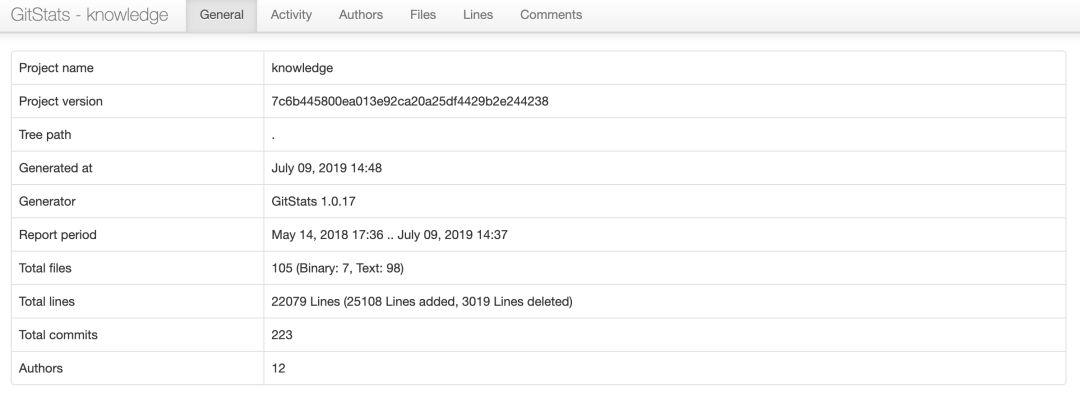
2.Dashboard 可视化
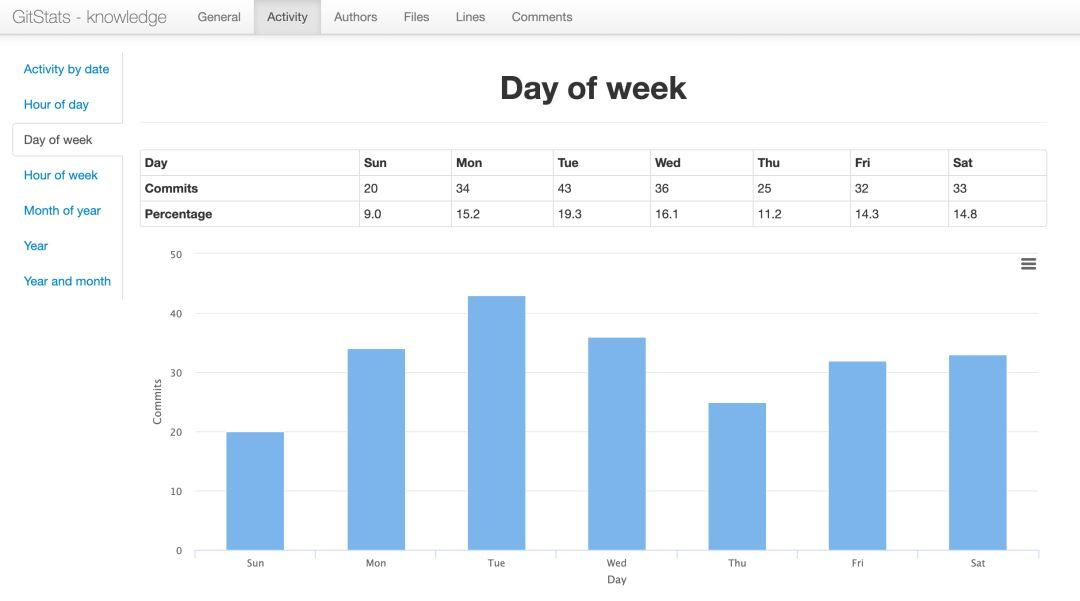
如果你对 git_stats 生成的一大堆文件不满意,我们还有一种方式可以「无侵入」,同时显得更加「高冷」。
五、补充:cloc
cloc 最优秀的地方就是「简洁粗暴」,我们来尝试一下。
1.尝试一下 cloc,首先,全局安装:
npm install -g cloc2.简单用例
cloc [options] <file(s)/dir(s)/git hash(es)>
    Count physical lines of source code and comments in the given files
    (may be archives such as compressed tarballs or zip files) and/or
    recursively below the given directories or git commit hashes.
    Example:    cloc src/ include/ main.c

cloc [options] --diff <set1>  <set2>
    Compute differences of physical lines of source code and comments
    between any pairwise combination of directory names, archive
    files or git commit hashes.
    Example:    cloc --diff Python-3.5.tar.xz python-3.6/
3.使用
Usage: cloc [options] <file(s)/dir(s)/git hash(es)> | <set 1> <set 2> | <report files>进入项目,执行:
cloc .稍等片刻,就会有一个输出结果:
-----------------------------------------------------------------------------------
Language                         files          blank        comment           code
-----------------------------------------------------------------------------------
JavaScript                       10319         172724         254924         951843
HTML                               679         120179           3665         224595
JSON                              1714            256              0         182127
Markdown                          1400          63461              2         171768
C++                                 69           3538           3197          20331
Python                              51           4292           7801          19137
C/C++ Header                       117           3628           2033          18942
CSS                                113           2011            823          16594
XML                                 32           4427           1300          11277
Sass                                65            282            414           4255
Stylus                              60            539            593           3215
YAML                               189            324            413           3039
D                                   57              0              0           3003
EJS                                113             43              8           2160
reStructuredText                    18            681             51           2122
Bourne Shell                        20            394            398           1875
SVG                                  5              0              1           1646
LESS                                13             26             33           1343
make                                42            378            245           1310
TypeScript                          17            276            584           1161
Perl                                 1             87            170            582
DTD                                  1            179            177            514
m4                                   2             40              2            266
Lisp                                 3             42             38            264
Bourne Again Shell                   8             43             24            161
C                                    4             40             37            149
Ruby                                 6             24              5            140
JSON5                                2              0              0            123
CoffeeScript                         3             18             28             99
Handlebars                           4             18              0             96
Smarty                               6             17             30             91
Windows Resource File                1              1              1             33
DOS Batch                            5              2              0             16
IDL                                  1              1              0             11
zsh                                  1              4             13              7
-----------------------------------------------------------------------------------
cloc --help六、总结
上文介绍了三种 Git 代码统计方式:
通过 Git log 统计,稍微会麻烦一些,需要有一些 awk 知识的储备;
使用插件 git_stats 来生成可视化报告,对用户友好。美中不足就是会在当前项目增加很多 html 统计可视化文件;
命令行工具 cloc,简单易用,无侵入,使用门槛低;
综上所述,我们可以按照自己的使用场景来灵活的选用不同方式。
七、参考文档
https://segmentfault.com/a/1190000008542123
https://www.zhihu.com/question/22004842/answer/177254508
推荐阅读(点击即可跳转阅读)
2. 面试题内容聚合
3. 设计模式内容聚合
4. Mybatis内容聚合
5. 多线程内容聚合