- Apache Maven Resources Plugin
The Resources Plugin handles the copying of project resources to the output directory. There are two different kinds of resources: main resources and test resources. The difference is that the main resources are the resources associated to the main source code while the test resources are associated to the test source code.
Resources插件处理将项目资源复制到输出目录。有两种不同的资源:主资源和测试资源。不同之处在于,主资源是与主源代码关联的资源,而测试资源是与测试源代码关联的资源。因此,这允许为主要源代码及其单元测试分离资源。
该插件的作用 主要是处理将 主程序与 测试程序所需的源文件复制到输出编译文件夹中。
- 使用场景
- 1)指定源文件编译的字符编码
- a.第一种方式在properites设置
    <project ...>
     ...
     <properties>
       <project.build.sourceEncoding>UTF-8</project.build.sourceEncoding>
       ...
     </properties>
     ..
    </project>
- b.在构建路径中指定
<build>
    <plugins>
      <plugin>
        <groupId>org.apache.maven.plugins</groupId>
        <artifactId>maven-resources-plugin</artifactId>
        <version>3.1.0</version>
        <configuration>
          ...
          <encoding>UTF-8</encoding>
          ...
        </configuration>
      </plugin>
    </plugins>
    ...
  </build>
-
- 指定自定义的resources 路径 By default, Maven will look for your project’s resources under src/main/resources.
However, all your resources may not be in src/main/resources. Thus, you’d have to specify those directories by adding the following to your POM.
<build>
   ...
   <resources>
     <resource>
       <directory>[your folder here]</directory>
     </resource>
   </resources>
   ...
 </build>
-
- 是否启动筛选
Variables can be included in your resources. These variables, denoted by the ${…} delimiters, can come from the system properties, your project properties, from your filter resources and from the command line.
- 是否启动筛选
变量可以包含在您的资源中。 这些变量由$ {…}分隔符表示,可以来自系统属性,项目属性,过滤器资源和命令行。


这里显示${name}在编译后的 hello.txt里还是 原文输出

而开启了filter过滤后则会取resources下 属性为name的value
为了不改变pom原有的属性,你可以在 里面设置你的k-v 如 you.name=world,在 编译打包的时候同样可以获取到值
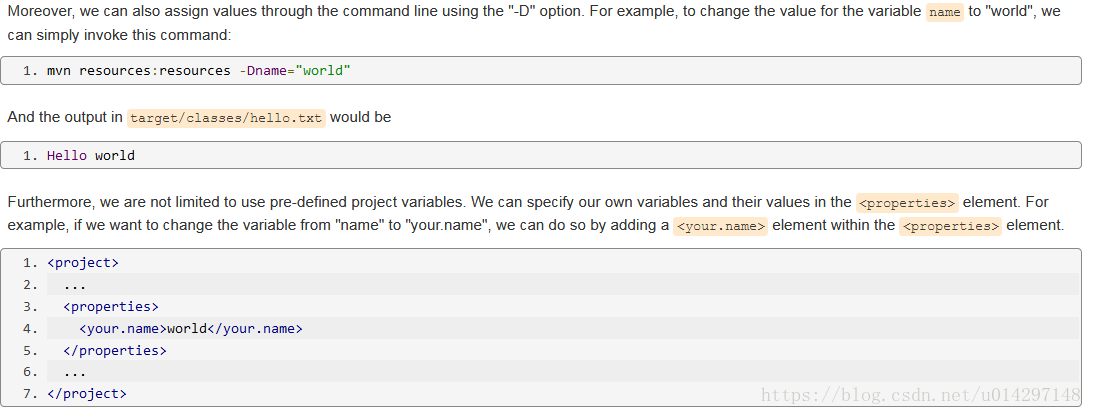
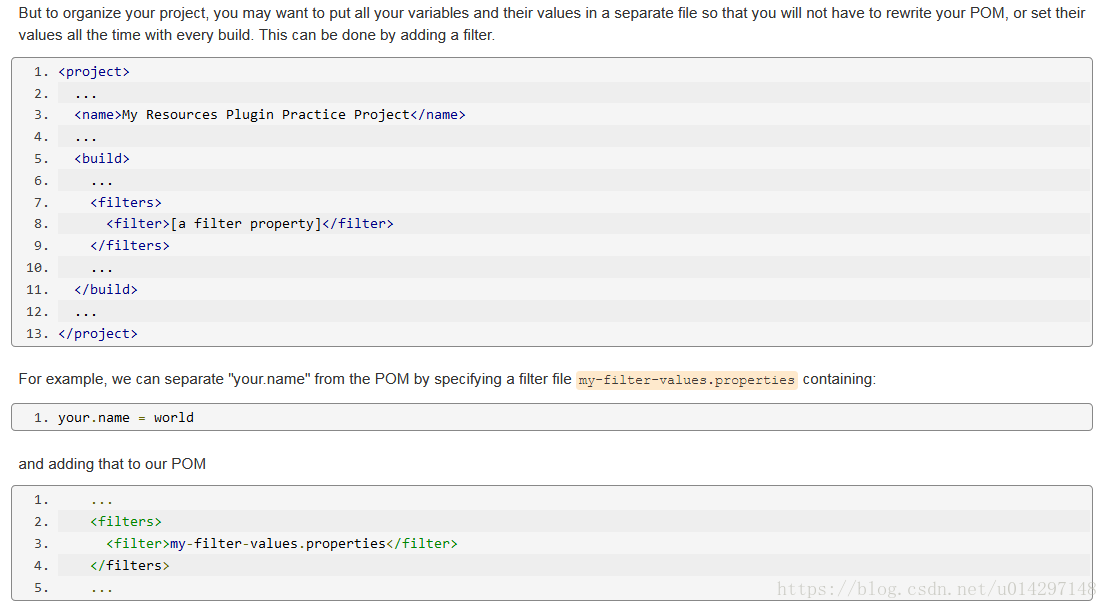

不要过滤像图像这样的二进制内容的文件! 这很可能会导致输出损坏。所以可以将这两种文件分别放在一个过滤的文件和一个不过滤的文件件内
- 使用示例
在eureka的构建时候有一个info的页面需要一个项目的构建信息我们可以在 yml 配置文件中配置
info:
  app.name: javxuan-app
  company.name: javxuan.group.com
  build.artifactId: $project.artifactId$
  build.version: $project.version$
<build>
        <finalName>microservicecloud</finalName>
//表示在
<resources>
    <resource>
            <directory>src/main/resources</directory>
                <filtering>true</filtering>
    </resource>
</resources>
<plugins>
    <plugin>
        <groupId>org.apache.maven.plugins</groupId>
        <artifactId>maven-resources-plugin</artifactId>
            <configuration>
            <delimiters>
            //表示取resources中以$*$的信息
            <delimit>$</delimit>
            </delimiters>
            </configuration>
        </plugin>
    </plugins>
</build>
- 你可以指定和排除参与构建的resoures


<build>
   <finalName>${project.artifactId}</finalName>
   <filters>
      <filter>src/main/filters/${env}.properties</filter>
      <filter>src/main/resources/replace_js.properties</filter>
      <filter>src/main/resources/replace_css.properties</filter>
   </filters>
   <resources>
      <resource>
         <directory>src/main/resources</directory>
         <filtering>true</filtering>
      </resource>
   </resources>
   <plugins>
      <!-- resource插件 -->
      <plugin>
         <groupId>org.apache.maven.plugins</groupId>
         <artifactId>maven-resources-plugin</artifactId>
         <version>2.6</version>
         <configuration>
            <encoding>UTF-8</encoding>
            <nonFilteredFileExtensions>
               <nonFilteredFileExtension>dat</nonFilteredFileExtension>
               <nonFilteredFileExtension>pfx</nonFilteredFileExtension>
               <nonFilteredFileExtension>cer</nonFilteredFileExtension>
               <nonFilteredFileExtension>key</nonFilteredFileExtension>
               <nonFilteredFileExtension>mp3</nonFilteredFileExtension>
               <nonFilteredFileExtension>mp4</nonFilteredFileExtension>
            </nonFilteredFileExtensions>
         </configuration>
      </plugin>
      <plugin>
               <groupId>org.apache.maven.plugins</groupId>
               <artifactId>maven-war-plugin</artifactId>
               <version>2.6</version>
               <configuration>
                   <webResources>
                       <resource>
                           <directory>src/main/webapp</directory>
                           <filtering>true</filtering>
                           <excludes>
                               <exclude>WEB-INF/**</exclude>
                               <exclude>favicon.ico</exclude>
                               <exclude>healthCheck.jsp</exclude>
                               <exclude>html5/sales/dbholiday/res/*.mp3</exclude>
                           </excludes>
                       </resource>
                   </webResources>
               </configuration>
           </plugin>
      <plugin>
         <groupId>org.apache.tomcat.maven</groupId>
         <artifactId>tomcat7-maven-plugin</artifactId>
         <version>2.1</version>
         <configuration>
            <port>8099</port>
            <path>/carwap</path>
         </configuration>
      </plugin>
   </plugins>
</build>
- 存在问题
- 1)替换失败解决

<plugin>
     <groupId>org.apache.maven.plugins</groupId>
     <artifactId>maven-resources-plugin</artifactId>
     <version>2.5</version>
     <configuration>
       <useDefaultDelimiters>false</useDefaultDelimiters>
         <delimiters>
            <delimiter>${*}</delimiter>
        </delimiters>
       <encoding>UTF-8</encoding>
    </configuration>
</plugin>