ElasticSearch介绍(百度出来的)
ElasticSearch是一个基于Lucene的搜索服务器。它提供了一个分布式多用户能力的全文搜索引擎,基于RESTful web接口.Elasticsearch是用Java语言开发的,并作为Apache许可条款下的开放源码发布,是一种流行的企业级搜索引擎.ElasticSearch用于云计算中,能够达到实时搜索,稳定,可靠,快速,安装使用方便。官方客户端在Java,.NET(C#),PHP,Python,Apache Groovy,Ruby和许多其他语言中都是可用的。根据DB-Engines的排名显示,Elasticsearch是最受欢迎的企业搜索引擎,其次是Apache Solr,也是基于Lucene。
ElasticSearch安装(win10环境)
下载地址https://www.elastic.co/cn/downloads/elasticsearch (ZIP包)
解压ZIP,修改config目录下配置文件elasticsearch.yml
# ======================== Elasticsearch Configuration =========================
#
# NOTE: Elasticsearch comes with reasonable defaults for most settings.
#       Before you set out to tweak and tune the configuration, make sure you
#       understand what are you trying to accomplish and the consequences.
#
# The primary way of configuring a node is via this file. This template lists
# the most important settings you may want to configure for a production cluster.
#
# Please consult the documentation for further information on configuration options:
# https://www.elastic.co/guide/en/elasticsearch/reference/index.html
#
# ---------------------------------- Cluster -----------------------------------
#
# Use a descriptive name for your cluster:
#
cluster.name: my-application
#
# ------------------------------------ Node ------------------------------------
#
# Use a descriptive name for the node:
#
node.name: master
#
# Add custom attributes to the node:
#
#node.attr.rack: r1
#
# ----------------------------------- Paths ------------------------------------
#
# Path to directory where to store the data (separate multiple locations by comma):
#
#path.data: /path/to/data
#
# Path to log files:
#
#path.logs: /path/to/logs
#
# ----------------------------------- Memory -----------------------------------
#
# Lock the memory on startup:
#
#bootstrap.memory_lock: true
#
# Make sure that the heap size is set to about half the memory available
# on the system and that the owner of the process is allowed to use this
# limit.
#
# Elasticsearch performs poorly when the system is swapping the memory.
#
# ---------------------------------- Network -----------------------------------
#
# Set the bind address to a specific IP (IPv4 or IPv6):
#
network.host: 0.0.0.0
#
# Set a custom port for HTTP:
#
http.port: 9200
#
# For more information, consult the network module documentation.
#
# --------------------------------- Discovery ----------------------------------
#
# Pass an initial list of hosts to perform discovery when new node is started:
# The default list of hosts is ["127.0.0.1", "[::1]"]
#
discovery.zen.ping.unicast.hosts: ["0.0.0.0"]
#
# Prevent the "split brain" by configuring the majority of nodes (total number of master-eligible nodes / 2 + 1):
#
#discovery.zen.minimum_master_nodes: 3
#
# For more information, consult the zen discovery module documentation.
#
# ---------------------------------- Gateway -----------------------------------
#
# Block initial recovery after a full cluster restart until N nodes are started:
#
#gateway.recover_after_nodes: 3
#
# For more information, consult the gateway module documentation.
#
# ---------------------------------- Various -----------------------------------
#
# Require explicit names when deleting indices:
#
#action.destructive_requires_name: true
http.cors.enabled: true
http.cors.allow-origin: "*"
node.master: true
node.data: true
启动bin目录下elasticsearch.bat
浏览器输入http://localhost:9200/ ,显示如下证明安装成功
 {
  "name" : "master",
  "cluster_name" : "my-application",
  "version" : {
    "number" : "2.4.0",
    "build_hash" : "ce9f0c7394dee074091dd1bc4e9469251181fc55",
    "build_timestamp" : "2016-08-29T09:14:17Z",
    "build_snapshot" : false,
    "lucene_version" : "5.5.2"
  },
  "tagline" : "You Know, for Search"
}
ElasticSearch集群搭建(win10环境,本地电脑多个实例)
将解压后的压缩包复制多份,修改配置文件。
ElasticSearch-head-master安装
下载ZIP文件,github.com/mobz/elasti…
安装node,由于head插件本质上还是一个nodejs的工程,因此需要安装node,使用npm来安装依赖的包。
安装grunt,grunt是一个很方便的构建工具,可以进行打包压缩、测试、执行等等的工作,5.0里的head插件就是通过grunt启动的。因此需要安装一下grunt
修改elasticsearch-head-master源码
修改服务器监听地址(Gruntfile.js)

connect: {
    server: {
        options: {
            port: 9100,
            hostname: '*',
            base: '.',
            keepalive: true
        }
    }
}

增加这一行:增加hostname属性,设置为*
先启动elasticsearch,进入elasticsearch-head-master,执行npm install (可能phantomjs耗时较长,最后启动nodejs: grunt server
浏览器输入localhost:9100
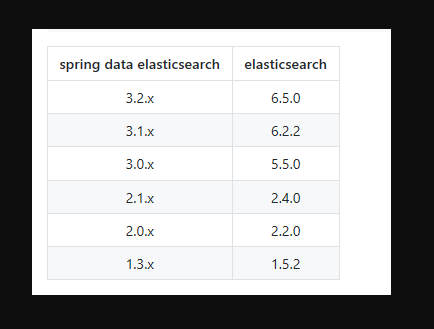
Springboot集成elasticsearch(注意版本、注意版本、注意版本)
spring data elasticsearch 和 elasticsearch版本一定要对应
代码实现
application.properties
spring.data.elasticsearch.cluster-name=my-application
spring.data.elasticsearch.repositories.enabled=true
spring.data.elasticsearch.cluster-nodes=127.0.0.1:9300
server.port=1111
pom
<?xml version="1.0" encoding="UTF-8"?>
<project xmlns="http://maven.apache.org/POM/4.0.0" xmlns:xsi="http://www.w3.org/2001/XMLSchema-instance"
         xsi:schemaLocation="http://maven.apache.org/POM/4.0.0 http://maven.apache.org/xsd/maven-4.0.0.xsd">
    <modelVersion>4.0.0</modelVersion>
    <parent>
        <groupId>org.springframework.boot</groupId>
        <artifactId>spring-boot-starter-parent</artifactId>
        <version>1.5.9.RELEASE</version>
        <relativePath/> <!-- lookup parent from repository -->
    </parent>
    <groupId>com.gssx</groupId>
    <artifactId>baas</artifactId>
    <version>0.0.1-SNAPSHOT</version>
    <name>baas</name>
    <description>cobaas平台</description>

    <properties>
        <java.version>1.8</java.version>
    </properties>

    <dependencies>

        <dependency>
            <groupId>org.springframework.boot</groupId>
            <artifactId>spring-boot-starter-test</artifactId>
            <scope>test</scope>
        </dependency>
        <dependency>
            <groupId>org.springframework.boot</groupId>
            <artifactId>spring-boot-starter-web</artifactId>
        </dependency>
        <dependency>
            <groupId>org.projectlombok</groupId>
            <artifactId>lombok</artifactId>
            <version>1.16.6</version>
        </dependency>
        <dependency>
            <groupId>org.springframework.boot</groupId>
            <artifactId>spring-boot-starter-data-elasticsearch</artifactId>
        </dependency>
        <dependency>
            <groupId>com.vladsch.flexmark</groupId>
            <artifactId>flexmark-util</artifactId>
            <version>0.18.4</version>
        </dependency>
        <dependency>
            <groupId>org.springframework.boot</groupId>
            <artifactId>spring-boot-autoconfigure</artifactId>
            <version>1.5.9.RELEASE</version>
        </dependency>
        <dependency>
            <groupId>com.fasterxml.jackson.core</groupId>
            <artifactId>jackson-core</artifactId>
            <version>2.9.6</version>
        </dependency>
        <dependency>
            <groupId>com.fasterxml.jackson.core</groupId>
            <artifactId>jackson-annotations</artifactId>
            <version>2.9.6</version>
        </dependency>
        <dependency>
            <groupId>com.fasterxml.jackson.core</groupId>
            <artifactId>jackson-databind</artifactId>
            <version>2.9.6</version>

        </dependency>


    </dependencies>


    <build>
        <plugins>
            <plugin>
                <groupId>org.springframework.boot</groupId>
                <artifactId>spring-boot-maven-plugin</artifactId>
            </plugin>
        </plugins>

    </build>

</project>
实体
@Document(indexName="bank3",type="account3")
public class EsBlog implements Serializable {
    @Id
    private Long id;
    private String firstname;
    private String lastname;


    public void setFirstname(String firstname) {
        this.firstname = firstname;
    }

    public String getFirstname() {
        return firstname;
    }

    public String getLastname() {
        return lastname;
    }

    public void setLastname(String lastname) {
        this.lastname = lastname;
    }


    public Long getId() {
        return id;
    }

    public void setId(Long id) {
        this.id = id;
    }
}
controller
 @Autowired
    private BlogSearchService blogSearchService;

    @RequestMapping(value = "/query")
    public List<EsBlog> query(@RequestParam String q) {
        List<EsBlog> search = blogSearchService.search(q, q);
        return search;
    }

    @RequestMapping(value = "/save")
    public void save(@RequestBody EsBlog esBlog) {
        blogSearchService.save(esBlog);
    }

    @RequestMapping(value = "/update")
    public void updata(@RequestBody EsBlog esBlog) {
        blogSearchService.update(esBlog);
    }


    @RequestMapping(value = "/delete")
    public void delete(@RequestParam Integer id) {
        blogSearchService.delete(id);
    }
BlogSearchService
void save (EsBlog eb);

    List<EsBlog> search(String firstname, String lastname);

    void update(EsBlog esBlog);

    void delete(Integer id);
BlogSearchServiceImpl
@Service
public class BlogSearchServiceImpl implements BlogSearchService {
    @Autowired
    private BlogRepository blogRepository;

    @Override
    public void save(EsBlog poem) {
        blogRepository.save(poem);
    }

    @Override
    public List<EsBlog> search(String firstname, String lastname) {
        return blogRepository.findByFirstnameLikeOrLastnameLike(firstname, lastname);
    }

    @Override
    public void update(EsBlog esBlog) {
        EsBlog esBlog1 = blogRepository.queryEsblogById(esBlog.getId());
        System.out.println(esBlog1.getFirstname() + "==" + esBlog1.getLastname());
        esBlog1.setLastname(esBlog.getLastname());
        blogRepository.save(esBlog1);
    }

    @Override
    public void delete(Integer id) {
        EsBlog esBlog1 = blogRepository.queryEsblogById(Long.valueOf(id));
        blogRepository.delete(esBlog1);
    }


}
BlogRepository
public interface BlogRepository extends ElasticsearchRepository<EsBlog, Long> {
    List<EsBlog> findByFirstnameLikeOrLastnameLike(String firstname, String lastname);

    EsBlog queryEsblogById(Long id);
}
结语
本地搭建的一个demo,大佬勿喷。