

Hadoop 命令行设置属性的格式为,要实现命令行设置,类要继承 Configured 并实现 Tool 接口:
$ hadoop jar <jarFile> [mainClass] [option] [args...]
例子如下:
$ hadoop jar example.jar wordcount -D mapreduce.job.reduces=1 -D mapreduce.job.ubertask.enable=true /input /output
注意:命令行的配置不要输入错误,hadoop 不会检查。
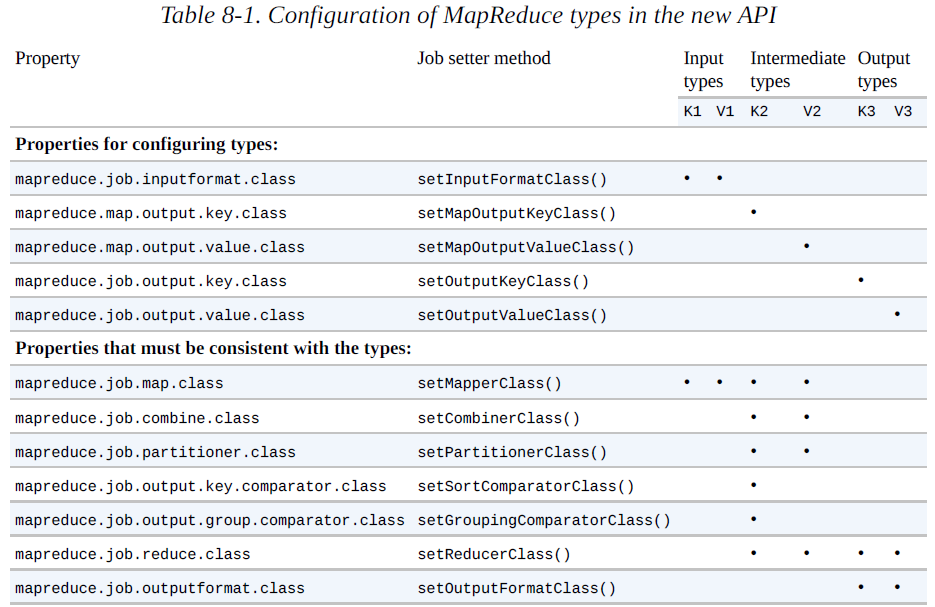
MapReduce job 属性设置
调试相关
mapreduce.task.files.preserve.failedtasks = true # 保存失败的任务文件
mapreduce.task.files.preserve.filepattern = [与任务 ID 匹配的正则表达式] # 保存成功任务的中间文件
yarn.nodemanager.delete.debug-delay-sec # 等待删除本地尝试文件(如启动任务容器的 JVM 脚本)的时间
mapreduce.cluster.local.dir/usercache/user/appcache/application-ID/output/task-attemp-ID # task attemp 的目录位置
mapreduce.task.profile = true # 启用控制分析过程

mapreduce.client.progressmonitor.pollinterval # MR 作业期间,客户端轮询 application master 以接受最新状态
mapreduce.job.end-notification.url # application master 可以通过设置,发送 HTTP 作业通知
stream.non.zero.exit.is.failure # Streaming 任务被标记为失败的退出代码默认为非 0,默认为 true
mapreduce.task.timeout # 超时未接收到 task 信息,task 被杀死,该配置以 Job 或集群为基础

mapreduce.map.maxattempts # map 任务运行 task 失败次数超过阈值,不再重试,默认为 4
mapreduce.reduce.maxattempts # reduce 任务,同上

mapreduce.map.failures.maxpercent, mapreduce.reduce.failures.maxpercent # 允许任务失败的最大百分比,保证少数任务失败仍能继续运行作业
mapreduce.am.max-attempts # 运行 YARN 应用程序 MapReduce application master 最多失败尝试次数,默认为 2。满足下方配置,该配置生效
yarn.resourcemanager.am.max-attempts # YARN 对集群上 YARN application master 最大尝试次数也有限制 ,默认为 2

# map 和 reduce 输出结果 key-value 的分隔符设置(默认是 Tab)
stream.num.map.output.key.fields
stream.num.reduce.output.key.fields

- 分布式缓存大小设置 `yarn.nodemanager.localizer.cache.targer-size-mb`,默认为 10GB。

- 可以使用 noatime 选项挂载磁盘,该选项意味执行读操作时,所读文件的最近访问时间并不刷新,从而显著提升性能。


# 在默认情况下,每个 map 任务和 reduce 任务都分配到 1024MB 的内存和一个虚拟的内核,这些值可以在每个作业的基础上进行配置,分别通过 4 个属性来设置:
mapreduce.map.memory.mb
mapreduce.reduce.memory.mb
mapreduce.map.cpu.vcores
mapreduce.reduce.cpu.vcoresp.memory.mb
- 命令行编辑配置,通过 JobConf
% hadoop jar hadoop-examples.jar v4.MaxTemperatureDriver \
    -conf conf/hadoop-cluster.xml \
    -D mapreduce.task.profile=true \
    input/ncdc/all max-temp
调优
- 增加辅助 I/O 操作的缓冲区大小,属性
io.file.buffer.size设置,128KB 更常用; - 增大 HDFS 块大小以降低 namenode 内存压力,
dfs.blocksize设置; - 预留空间给非 datanode 使用,设置
dfs.datanode.du.reserved; - 回收站保留文件时间,
fs.trash.interval,回收站是用户级特性,只有 dfs shell 直接删除的文件才会被放入,程序删除的文件不会放入(或者使用 Trash 类,调用 moveToTrash() 方法); - 慢启动 reduce,增加
mapreduce.job.reduce.slowstart.completedmaps; - 启用 shrot-circuit local read,将
dfs.client.read.shortcircuit设为 true。
-
设置属性
hadoop.security.authentication为 kerberos,启用 Kerberos 认证。默认值 simple 代表使用操作系统用户名称决定登录者身份。
hadoop.security.authorization属性设置为 true,启用服务级别授权。 -
创建检查点:时间
dfs.namnode.checkpoint.period和文件数量dfs.namenode.checkpoint.txns
频率:dfs.namenode.checkpoint.check.period
Uber 属性
| Property | Default value | Description |
|---|---|---|
mapreduce.job.ubertask.enable |
false | uber 模式是否开启 |
mapreduce.job.ubertask.maxmaps |
9 | The number of mappers for a job must be less than or equal to this value for the job to be uberized. |
mapreduce.job.ubertask.maxreduces |
1 | The number of reducers for a job must be less than or equal to this value for the job to be uberized. |
mapreduce.job.ubertask.maxbytes |
Default block size | The total input size of a job must be less than or equal to this value for the job to be uberized. |
配置要求
# 开关
mapreduce.job.ubertask.enable=true

# 作业规模条件
mapreduce.job.ubertask.maxmaps
mapreduce.job.ubertask.maxreduces

# 资源需求条件:
    # map 或 reduce 的内存需求不大于 app master 的内存需求
    mapreduce.map.memory.mb(默认 0)| mapreduce.reduce.memory.mb(默认 0) <= yarn.app.mapreduce.am.resource.mb(默认 1024)

    # map 或 reduce 的 CPU 需求不大于 app master 的 CPU 需求
    mapreduce.map.cpu.vcores(默认 1)| mapreduce.reduce.cpu.vcores(默认 1) <= yarn.app.mapreduce.am.resource.cpu-vcores(默认 1)
# 非 Chain 作业
# map 或 reduce 类不能继承 ChainMapper 或 ChainReducer
CDH 执行 uber 模式出错
Error: org.apache.hadoop.util.NativeCodeLoader.buildSupportsSnappy()Z
排错
- 可能是 Snappy 未加载,因此检查 native,查到结果为 Snappy 加载为 true;
注意,uber 任务默认开启 map 输出压缩,且使用 Snappy 压缩
# hadoop checknative -a
- 环境变量属性错误
| key | value |
|---|---|
yarn.app.mapreduce.am.admin.user.env |
LD_LIBRARY_PATH=$HADOOP_COMMON_HOME/lib/native:$JAVA_LIBRARY_PATH |
mapreduce.admin.user.env |
LD_LIBRARY_PATH=$HADOOP_COMMON_HOME/lib/native:$JAVA_LIBRARY_PATH |
- 最后设置 uber 任务不压缩或者 map 输出压缩不使用 Snappy(在下例中使用的 DefaultCodec,即 DEFLATE 压缩)
mapreduce.map.output.compress=false
# 或
mapreduce.map.output.compress.codec=org.apache.hadoop.io.compress.DefaultCodec
HDFS 配置
使用 Hadoop WebHDFS 接口:
dfs.webhdfs.enable设置为 true;- 通过 REST API 访问:
$ curl -i [-L] "http://<HOST>:<PORT>/webhdfs/v1/<PATH>?[user.name=<USER>&]op=..."
使用 NFS
可通过使用 NFS 将 HDFS 视为常规的 Linux 文件系统,详见 HDFS NFS Gateway
其他
mapreduce.framework.name属性设置运行 MapReduce 作业的框架,有local classic yarn三个值
