这里列举一下本工程配置的步骤,有兴趣可以了解。
-
README模板选择
-
LICENSE模板选择
项目初始化
-
初始化project
# 初始化仓库 git init # 初始化package信息 npm init -
.gitignore -
.editorconfig -
.browserlistrc目标环境 在线生成及查看浏览器覆盖情况
Babel安装和配置
Babel的相关文档链接
安装
- 安装Babel
npm i --save-dev @babel/core @babel/cli @babel/preset-env @babel/preset-typescript
- 安装proposal
npm i --save-dev @babel/plugin-proposal-class-properties @babel/plugin-proposal-object-rest-spread
- 安装polyfill
@babel/polyfill在babel v7.4.0之后为deprecated
# 如果需要polyfill
# 注意:core-js版本, babel 7.4.0之后@babel/polyfill过时,默认依赖core-js@2版本,也可以指定3
npm i @babel/polyfill core-js
// 如果之前在entry这么引入polyfill
// before
import "@babel/polyfill";

// 现在替换为这种方式(core-js@3)
import "core-js/stable";
import "regenerator-runtime/runtime";
Babel配置
仅供参考,你可以自己自定义
// babel.config.js
// targets推荐使用.browserslistrc替换
const presets = [
  [
    '@babel/preset-env',
    {
      useBuiltIns: 'usage',
      corejs: 3,
    },
  ],
  [
    '@babel/preset-typescript',
  ],
];

const plugins = [
  '@babel/plugin-proposal-class-properties',
  '@babel/plugin-proposal-object-rest-spread',
];
module.exports = {
  presets,
  plugins,
  exclude: [
    'src/**/*.spec.(js|ts)',
    'src/**/*.test.(js|ts)',
  ],
  comments: false,
};
eslint配置
安装eslint并初始化
因为TypeScript官方团队选择支持eslint,所以以后还是选择eslint玩吧。
# 安装
npm i -D eslint

# 生成默认的配置,因为格式化是ts,默认先不选代码风格
npx eslint --init
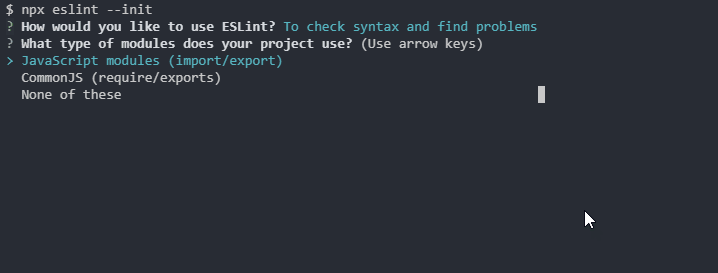
安装TypeScript解析器和插件
typescript-eslint 因为eslint的解析器不认识TypeScript,所以这里需要替换掉默认的parser
# @typescript-eslint/parser
npm i --save-dev typescript @typescript-eslint/parser
代码风格(typescript-eslint + Prettier + airbnb)
@typescript-eslint/eslint-plugin文档
@typescript-eslint/eslint-plugin支持的规则
# 安装@typescript-eslint/eslint-plugin
npm i --save-dev @typescript-eslint/eslint-plugin
Prettier一起使用(可选)
npm i --save-dev eslint-config-prettier
airbnb一起使用(可选)
# 注意:官方文档要求npm 5+
npx install-peerdeps --dev eslint-config-airbnb
eslint的最终的配置
// .eslintrc.js
module.exports = {
	parser: '@typescript-eslint/parser', // 解析器
	plugins: ['@typescript-eslint'],
	extends: [
		'airbnb',
		'plugin:@typescript-eslint/recommended',
		'prettier',
		'prettier/@typescript-eslint',
	],
	env: {
		browser: true,
		es6: true,
		node: true,
	},
	globals: {
		Atomics: 'readonly',
		SharedArrayBuffer: 'readonly',
	},
	parserOptions: {
		ecmaVersion: 2018,
		sourceType: 'module',
	},
	rules: {
    '@typescript-eslint/no-explicit-any': ['off'],
		'@typescript-eslint/no-var-requires': ['off']
  },
};
因为eslint默认识别.js结尾的文件,这里需要指定下文件后缀 eslint之后是文件夹, --ext参数才生效,如果是具体的正则表达式则匹配--ext被忽略
// package.json
{
  "scripts":{
     "lint": "eslint src --ext .js,.ts,.tsx,.jsx"
  }
}
TypeScript配置
tsconfig.json初始化
npx tsc --init --declaration --allowSyntheticDefaultImports --target esnext --outDir dist
添加scripts命令
// package.json
{
   "scripts": {
    "checktypes": "tsc --noEmit",
    "checktypes:watch": "npm run checktype -- --watch",
    "build": "npm run build:types && npm run build:js",
    "build:types": "tsc --emitDeclarationOnly",
    "build:js": "npx babel src --out-dir dist --source-maps inline --extensions .ts,.tsx"
  }
}
package.json指定声明文件入口
{
  // 如果不指定默认查找project根目录的index.d.ts
  "types": "dist/index.d"
}
webpack
安装webpack
npm install --save-dev webpack webpack-cli babel-loader
配置webpack
// webpack.config.js
const path = require('path');

module.exports = {
  mode: "production",
	entry: './src/index',
	output: {
		path: path.resolve(__dirname, 'dist'),
		filename: 'app.bundle.js'
	},
	resolve: {
		extensions: ['.ts', '.tsx', '.js', '.json']
	},
	module: {
		rules: [
			{
				test: /\.(ts|js)x?$/,
				exclude: /node_modules/,
				loader: 'babel-loader'
			}
		]
	}
};
// package.json
{
  "scripts":{
     "bundle": "webpack"
  }
}
约定式提交
commit message style校验
- commitlint安装
npm install --save-dev @commitlint/config-conventional @commitlint/cli
- commitlint配置
echo "module.exports = {extends: ['@commitlint/config-conventional']}" > commitlint.config.js
- husky和lint-staged安装
# 安装
npm i husky lint-staged --save-dev
- husky配置
// package.json 配置
{
"husky": {
    "hooks": {
      "commit-msg": "commitlint -E HUSKY_GIT_PARAMS", // 配合commitlint使用
      "pre-commit": "lint-staged" // 配置lint-staged
    }
  }
}
- lint-staged配置
// package.json
{
    "lint-staged": {
        "src/**/*.{js,ts,tsx,jsx}": [
            "eslint src --fix --ext .ts,.js,.tsx,.jsx", // npm run lint
            "git add"
        ]
     }
}
TODO
完成了大部分工程涉及的工具的配置,还有测试相关没有进行配置,以后有时间继续。
-
jest
-
jest + typescript
关注微信公众号