本文基于 React v16.8.6,源码见 github.com/lxfriday/re…
以下是使用三种 Component 创建的一个组件
import React, { Component, PureComponent } from 'react';
// function Component
function FuncComp() {
  return <div>FuncComp</div>
}
// Component
class Comp extends Component {
  render() {
    return (
      <div>
        component
      </div>
    );
  }
}
// Pure Component
class PureComp extends PureComponent {
  render() {
    return (
      <div>
        Pure Component
      </div>
    );
  }
}
console.log(<FuncComp />);
console.log(<Comp />);
console.log(<PureComp />);
export default class extends Component {
  render() {
    return (
      <div>
        <FuncComp />
        <Comp />
        <PureComp />
      </div>
    );
  }
}
生成元素的差异
经过 React.createElement 处理之后,三个组件的区别就是 type 不一样了
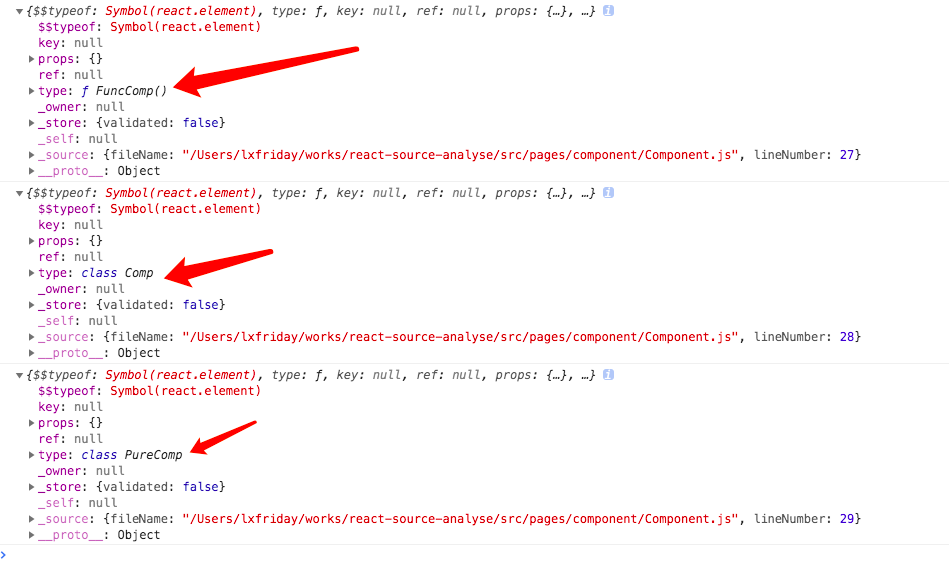
type 是刚才定义的 function 或者 class
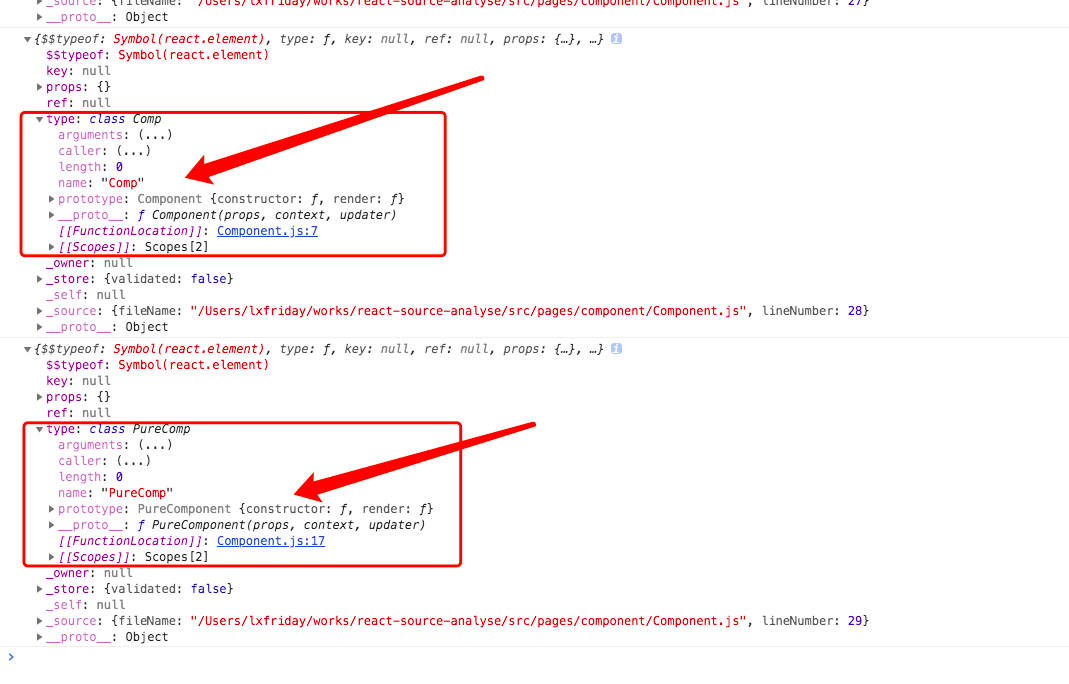
__proto__ 和 prototype 看不懂可以看下这篇文章 www.zhihu.com/question/34… js 中 __proto__ 和 prototype 的区别和关系
Component
/**
 * Base class helpers for the updating state of a component.
 */
function Component(props, context, updater) {
  this.props = props;
  this.context = context;
  // If a component has string refs, we will assign a different object later.
  // ref 有好几个方式创建,字符串的不讲了,一般都是通过传入一个函数来给一个变量赋值 ref 的
  // ref={el => this.el = el} 这种方式最推荐
  // 当然还有种方式是通过 React.createRef 创建一个 ref 变量,然后这样使用
  // this.el = React.createRef()
  // ref={this.el}
  // 关于 React.createRef 就阅读 ReactCreateRef.js 文件了
  this.refs = emptyObject;
  // We initialize the default updater but the real one gets injected by the
  // renderer.
  // 如果你在组件中打印 this 的话,可能看到过 updater 这个属性
  // 有兴趣可以去看看 ReactNoopUpdateQueue 中的内容,虽然没几个 API,并且也基本没啥用,都是用来报警告的
  this.updater = updater || ReactNoopUpdateQueue;
}

Component.prototype.isReactComponent = {};

/**
 * Sets a subset of the state. Always use this to mutate
 * state. You should treat `this.state` as immutable.
 *
 * There is no guarantee that `this.state` will be immediately updated, so
 * accessing `this.state` after calling this method may return the old value.
 *
 * There is no guarantee that calls to `setState` will run synchronously,
 * as they may eventually be batched together.  You can provide an optional
 * callback that will be executed when the call to setState is actually
 * completed.
 *
 * When a function is provided to setState, it will be called at some point in
 * the future (not synchronously). It will be called with the up to date
 * component arguments (state, props, context). These values can be different
 * from this.* because your function may be called after receiveProps but before
 * shouldComponentUpdate, and this new state, props, and context will not yet be
 * assigned to this.
 *
 * @param {object|function} partialState Next partial state or function to
 *        produce next partial state to be merged with current state.
 * @param {?function} callback Called after state is updated.
 * @final
 * @protected
 */
// 我们在组件中调用 setState 其实就是调用到这里了
// 用法不说了,如果不清楚的把上面的注释和相应的文档看一下就行
// 一开始以为 setState 一大堆逻辑,结果就是调用了 updater 里的方法
// 所以 updater 还是个蛮重要的东西
Component.prototype.setState = function (partialState, callback) {
  (function () {
    if (!(typeof partialState === 'object' || typeof partialState === 'function' || partialState == null)) {
      {
        throw ReactError('setState(...): takes an object of state variables to update or a function which returns an object of state variables.');
      }
    }
  })();
  this.updater.enqueueSetState(this, partialState, callback, 'setState');
};

/**
 * Forces an update. This should only be invoked when it is known with
 * certainty that we are **not** in a DOM transaction.
 *
 * You may want to call this when you know that some deeper aspect of the
 * component's state has changed but `setState` was not called.
 *
 * This will not invoke `shouldComponentUpdate`, but it will invoke
 * `componentWillUpdate` and `componentDidUpdate`.
 *
 * @param {?function} callback Called after update is complete.
 * @final
 * @protected
 */
Component.prototype.forceUpdate = function (callback) {
  this.updater.enqueueForceUpdate(this, callback, 'forceUpdate');
};

console.log('Component.prototype', Component.prototype);
PureComponent
// 以下做的都是继承功能,让 PureComponent 继承自 Component
function ComponentDummy() {}
ComponentDummy.prototype = Component.prototype;

/**
 * Convenience component with default shallow equality check for sCU.
 */
function PureComponent(props, context, updater) {
  this.props = props;
  this.context = context;
  // If a component has string refs, we will assign a different object later.
  this.refs = emptyObject;
  this.updater = updater || ReactNoopUpdateQueue;
}

// PureComponent 继承自 Component
var pureComponentPrototype = PureComponent.prototype = new ComponentDummy();

console.log('pureComponentPrototype1', pureComponentPrototype);

pureComponentPrototype.constructor = PureComponent;
// Avoid an extra prototype jump for these methods.
_assign(pureComponentPrototype, Component.prototype);
// 通过这个变量区别下普通的 Component
pureComponentPrototype.isPureReactComponent = true;

console.log('pureComponentPrototype2', pureComponentPrototype);
三次 log 打印的结果:
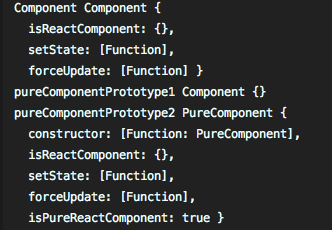
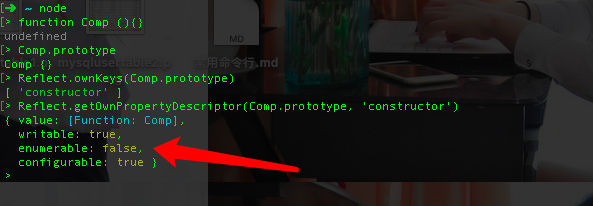
函数的 prototype 属性对象上的 constructor 是不可枚举的,所以下面两句
pureComponentPrototype.constructor = PureComponent;
// Avoid an extra prototype jump for these methods.
_assign(pureComponentPrototype, Component.prototype);
给 PureComponent 重新指向构造函数之后,_assign 复制对象属性时, Component 构造函数不会覆盖 PureComponent 构造函数,看下面的例子就明白了。
Component 和 PureComponeny 的构造函数定义是一样的,PureComponent 继承自 Component,同时把 Component 的原型方法复制了一份,并且声明了一个下面这句
pureComponentPrototype.isPureReactComponent = true;
表示是 PureReactComponent,这个标识起着非常关键的作用!!
React.createElement 生成元素流程
先看看为什么会用到 createElement

从 babel 编译后的 js 代码可以看到,jsx 代码变成了 React.createElement(type, props, children)
对 createElement 进行溯源
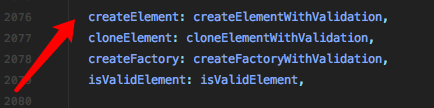
实际是导出了 createElementWithValidation,其简化之后的代码
function createElementWithValidation(type, props, children) {
  var validType = isValidElementType(type); // 是合法的 reactElement

  var element = createElement.apply(this, arguments); // 调用 createElement 生成

  // The result can be nullish if a mock or a custom function is used.
  // TODO: Drop this when these are no longer allowed as the type argument.
  if (element == null) {
    return element;
  }

  // 中间一堆验证的代码 ...
  return element;
}
createElement 简化后的代码
/**
 * Create and return a new ReactElement of the given type.
 * 根据 type 返回一个新的 ReactElement
 * See https://reactjs.org/docs/react-api.html#createelement
 */
  export function createElement(type, config, children) {
  let propName;

  // Reserved names are extracted
  const props = {};

  let key = null;
  let ref = null;
  let self = null;
  let source = null;
  // 判断是否传入配置,比如 <div className='11'></div> 中的 className 会被解析到配置中
  if (config != null) {
    // 验证 ref 和 key,只在开发环境下
    // key 和 ref 是从 props 单独拿出来的
    if (hasValidRef(config)) {
      ref = config.ref;
    }
    if (hasValidKey(config)) {
      key = '' + config.key;
    }
    // 赋值操作
    // self 呢就是为了以后正确获取 this
    // source 基本来说没啥用,内部有一些 filename, line number 这种
    self = config.__self === undefined ? null : config.__self;
    source = config.__source === undefined ? null : config.__source;
    // Remaining properties are added to a new props object
    // 遍历配置,把内建的几个属性剔除后丢到 props 中
      //var RESERVED_PROPS = {
    //   key: true,
    //   ref: true,
    //   __self: true,
    //   __source: true
    // };
    for (propName in config) {
      if (
        hasOwnProperty.call(config, propName) &&
        !RESERVED_PROPS.hasOwnProperty(propName)
      ) {
        props[propName] = config[propName];
      }
    }
  }

  // Children can be more than one argument, and those are transferred onto
  // the newly allocated props object.
  // children 只有一个,就直接赋值,是以多个参数的形式放在参数上的,则把他们都放到数组里面
  const childrenLength = arguments.length - 2;
  if (childrenLength === 1) {
    props.children = children;
  } else if (childrenLength > 1) {
    const childArray = Array(childrenLength);
    for (let i = 0; i < childrenLength; i++) {
      childArray[i] = arguments[i + 2];
    }
    if (__DEV__) {
      if (Object.freeze) {
        Object.freeze(childArray);
      }
    }
    props.children = childArray;
  }

  // Resolve default props
  // 判断是否有给组件设置 defaultProps,有的话判断是否有给 props 赋值,只有当值为
  // undefined 时,才会设置默认值
  if (type && type.defaultProps) {
    const defaultProps = type.defaultProps;
    for (propName in defaultProps) {
      if (props[propName] === undefined) {
        props[propName] = defaultProps[propName];
      }
    }
  }

  // ...一串warning,提醒不要从 props 直接访问 key 和 ref

  return ReactElement(
    type,
    key,
    ref,
    self,
    source,
    ReactCurrentOwner.current,
    props,
  );
}
ReactElement
/**
 * Factory method to create a new React element. This no longer adheres to
 * the class pattern, so do not use new to call it. Also, no instanceof check
 * will work. Instead test ?typeof field against Symbol.for('react.element') to check
 * if something is a React Element.
 *
 * @param {*} type
 * @param {*} key
 * @param {string|object} ref
 * @param {*} self A *temporary* helper to detect places where `this` is
 * different from the `owner` when React.createElement is called, so that we
 * can warn. We want to get rid of owner and replace string `ref`s with arrow
 * functions, and as long as `this` and owner are the same, there will be no
 * change in behavior.帮助检测 this
 * @param {*} source An annotation object (added by a transpiler or otherwise) 包含定义的文件和行号
 * indicating filename, line number, and/or other information.
 * @param {*} owner
 * @param {*} props
 * @internal
 */
// 这就是个工厂函数,帮助我们创建 React Element 的
// 内部代码很简单,无非多了一个 ?typeof 帮助我们标识
// 这是一个 React Element
var ReactElement = function (type, key, ref, self, source, owner, props) {
  var element = {
    // This tag allows us to uniquely identify this as a React Element
    ?typeof: REACT_ELEMENT_TYPE,

    // Built-in properties that belong on the element
    type: type,
    key: key,
    ref: ref,
    props: props,

    // Record the component responsible for creating this element.
    _owner: owner
  };

  {
    // The validation flag is currently mutative. We put it on
    // an external backing store so that we can freeze the whole object.
    // This can be replaced with a WeakMap once they are implemented in
    // commonly used development environments.
    element._store = {};

    // To make comparing ReactElements easier for testing purposes, we make
    // the validation flag non-enumerable (where possible, which should
    // include every environment we run tests in), so the test framework
    // ignores it.
    Object.defineProperty(element._store, 'validated', {
      configurable: false,
      enumerable: false,
      writable: true,
      value: false
    });
    // self and source are DEV only properties.
    Object.defineProperty(element, '_self', {
      configurable: false,
      enumerable: false,
      writable: false,
      value: self
    });
    // Two elements created in two different places should be considered
    // equal for testing purposes and therefore we hide it from enumeration.
    Object.defineProperty(element, '_source', {
      configurable: false,
      enumerable: false,
      writable: false,
      value: source
    });
    if (Object.freeze) {
      Object.freeze(element.props);
      Object.freeze(element);
    }
  }

  return element;
};
依靠 ReactElement 最终生成一个元素,所以我们看到最开始生成的元素只有 type不同, type 指向这个组件
 var element = {
    // This tag allows us to uniquely identify this as a React Element
    ?typeof: REACT_ELEMENT_TYPE,

    // Built-in properties that belong on the element
    type: type,
    key: key,
    ref: ref,
    props: props,

    // Record the component responsible for creating this element.
    _owner: owner
  };
执行的差异
在 react-dom.development.js 中,ctor.prototype.isPureReactComponent 判断有没有这个标识,有就是 PureComponent,只会对 props 和 state 进行浅比较
function checkShouldComponentUpdate(workInProgress, ctor, oldProps, newProps, oldState, newState, nextContext) {
  var instance = workInProgress.stateNode;
  if (typeof instance.shouldComponentUpdate === 'function') {
    startPhaseTimer(workInProgress, 'shouldComponentUpdate');
    var shouldUpdate = instance.shouldComponentUpdate(newProps, newState, nextContext);
    stopPhaseTimer();

    {
      !(shouldUpdate !== undefined) ? warningWithoutStack$1(false, '%s.shouldComponentUpdate(): Returned undefined instead of a ' + 'boolean value. Make sure to return true or false.', getComponentName(ctor) || 'Component') : void 0;
    }

    return shouldUpdate;
  }

  // 重点看这里
  // PureComponent.prototype.isPureReactComponent === true
  // PureComponent 只会对 props 和 state 进行浅比较,对对象只做引用比对
  if (ctor.prototype && ctor.prototype.isPureReactComponent) {
    return !shallowEqual(oldProps, newProps) || !shallowEqual(oldState, newState);
  }

  return true;
}
shallowEqual 做浅比较
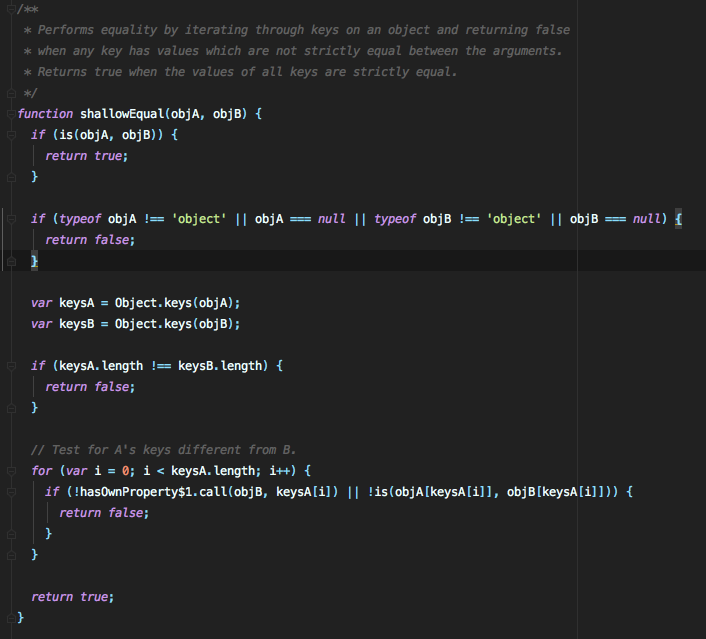
PureComponent 不起作用场景
import React, { PureComponent } from 'react';
class PureComp extends PureComponent {
  constructor(props) {
    super(props);
    this.state = {
      userInfo: {
        name: 'lxfriday',
        age: 24,
      },
      school: 'hzzz',
    };
  }
  handleChangeUserInfo = () => {
    const {
      userInfo,
    } = this.state;
    userInfo.sex = 'male';
    console.log('userInfo', userInfo);
    this.setState({ userInfo: userInfo });
  };
  handleChangeSchool = () => {
    this.setState({ school: 'zzzh' });
  };
  render() {
    const {
      userInfo,
      school,
    } = this.state;
    return (
      <div>
        <button onClick={this.handleChangeUserInfo}>change userInfo</button>
        <button onClick={this.handleChangeSchool}>change school</button>
        <br />
        {JSON.stringify(userInfo)}
        <br />
        {school}
      </div>
    );
  }
}
console.log(<PureComp />);
export default PureComp;
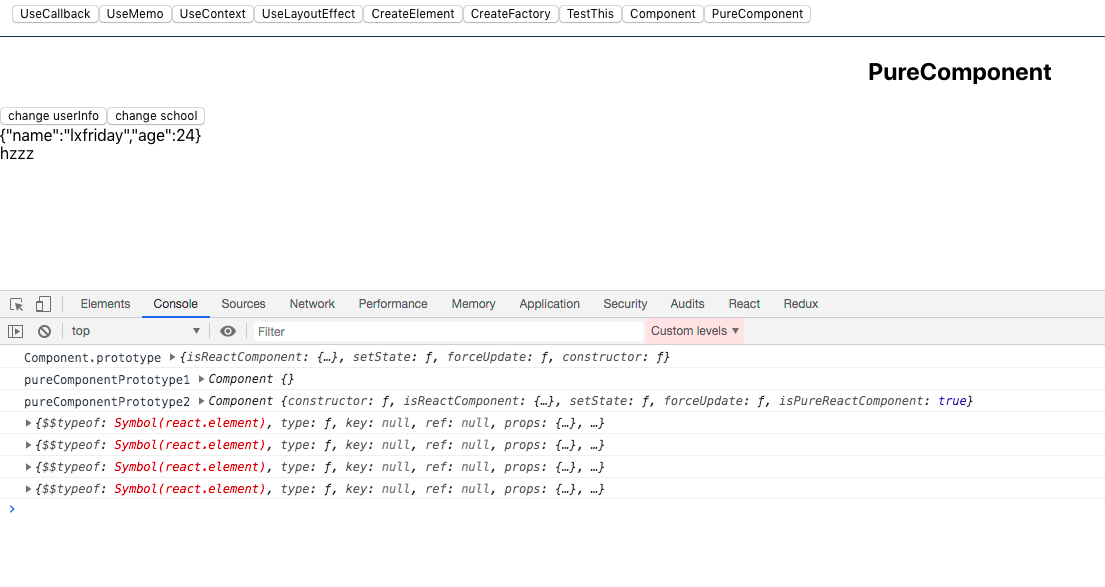
点击 change UserInfo 按钮,页面没有任何变化,但是 log 打印出了值,school 可正常变化
点击前
点击后
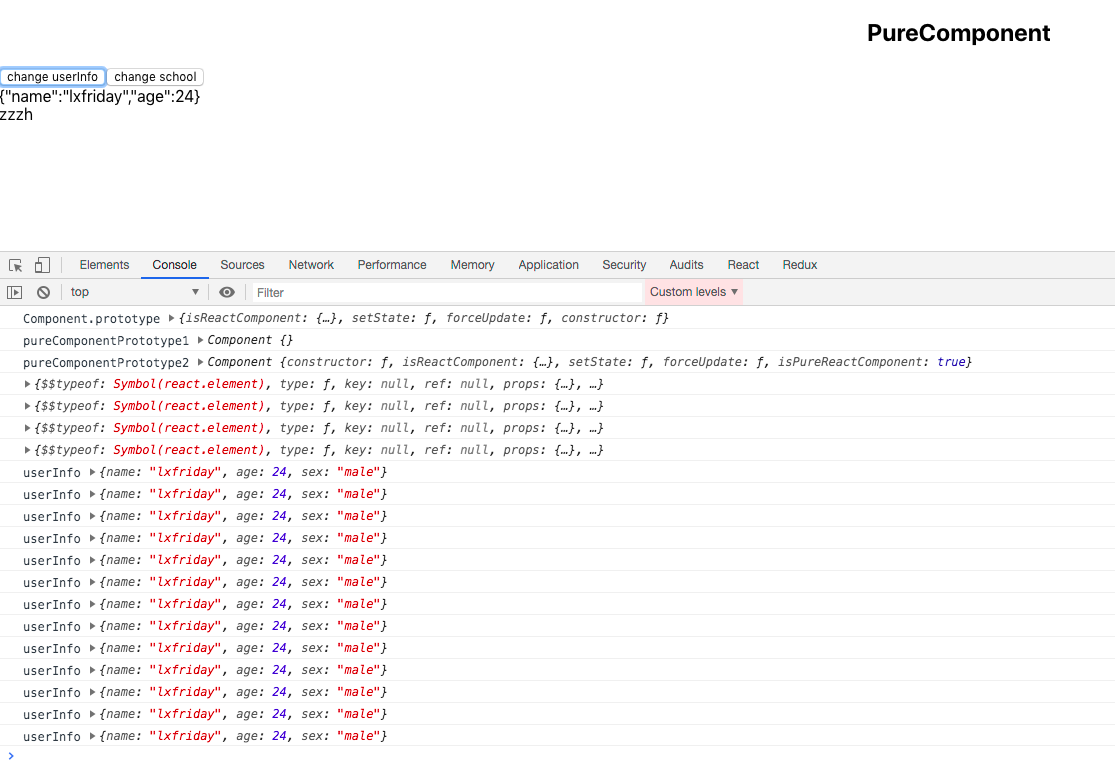
把 PureComponent 变成 Component,userInfo 可正常变化。
这就是 PureComponent 浅比对的特点,不会管检测对象深层次是否相同,从性能上可以获得巨大提升,当然前提是你需要知道 setState 设置的属性确实只需要浅比对就可以实现预设功能!!!如果你在嵌套的对象内更改了属性,结果可能就会超出预期了!!!
广告时间
欢迎关注,每日进步!!!