环境是Maven管理
1.POM文件下引入插件:org.mybatis.generator
<?xml version="1.0" encoding="UTF-8"?>
<project xmlns="http://maven.apache.org/POM/4.0.0" xmlns:xsi="http://www.w3.org/2001/XMLSchema-instance"
	xsi:schemaLocation="http://maven.apache.org/POM/4.0.0 http://maven.apache.org/xsd/maven-4.0.0.xsd">
	<modelVersion>4.0.0</modelVersion>
	<parent>
		<groupId>org.springframework.boot</groupId>
		<artifactId>spring-boot-starter-parent</artifactId>
		<version>2.1.5.RELEASE</version>
		<relativePath/> <!-- lookup parent from repository -->
	</parent>
	<groupId>com.xjc</groupId>
	<artifactId>lombokdemo</artifactId>
	<version>0.0.1-SNAPSHOT</version>
	<name>lombokdemo</name>
	<description>Demo project for Spring Boot</description>

	<properties>
		<java.version>1.8</java.version>
		<!--  MyBatis Generator  -->
		<!--  Java接口和实体类  -->
		<targetJavaProject>${basedir}/src/main/java</targetJavaProject>
		<targetMapperPackage>com.xjc.lombokdemo.mapper</targetMapperPackage>
		<targetModelPackage>com.xjc.lombokdemo.model</targetModelPackage>
		<!--  XML生成路径  -->
		<targetResourcesProject>${basedir}/src/main/resources</targetResourcesProject>
		<targetXMLPackage>mapper</targetXMLPackage>

		<!--  依赖版本  -->
		<mybatis-generator.version>1.3.7</mybatis-generator.version>
		<mybatis.version>3.5.0</mybatis.version>
		<mybatis-spring.version>2.0.0</mybatis-spring.version>
		<mapper.version>4.1.4</mapper.version>
	</properties>

	<dependencies>
		<dependency>
			<groupId>org.springframework.boot</groupId>
			<artifactId>spring-boot-starter-web</artifactId>
		</dependency>

		<dependency>
			<groupId>org.springframework.boot</groupId>
			<artifactId>spring-boot-starter-test</artifactId>
			<scope>test</scope>
		</dependency>
		<dependency>
			<groupId>org.projectlombok</groupId>
			<artifactId>lombok</artifactId>
			<version>1.18.8</version>
		</dependency>
		<dependency>
			<groupId>org.apache.zookeeper</groupId>
			<artifactId>zookeeper</artifactId>
			<version>3.4.14</version>
		</dependency>
		<dependency>
			<groupId>io.springfox</groupId>
			<artifactId>springfox-swagger2</artifactId>
			<version>2.9.2</version>
		</dependency>
		<dependency>
			<groupId>io.springfox</groupId>
			<artifactId>springfox-swagger-ui</artifactId>
			<version>2.9.2</version>
		</dependency>
		<dependency>
			<groupId>org.springframework.boot</groupId>
			<artifactId>spring-boot-devtools</artifactId>
			<optional>true</optional>
		</dependency>
		<dependency>
			<groupId>redis.clients</groupId>
			<artifactId>jedis</artifactId>
			<version>3.0.0</version>
		</dependency>
		<dependency>
			<groupId>org.codehaus.jackson</groupId>
			<artifactId>jackson-mapper-asl</artifactId>
			<version>1.9.13</version>
		</dependency>
        <dependency>
            <groupId>tk.mybatis</groupId>
            <artifactId>mapper</artifactId>
            <version>${mapper.version}</version>
        </dependency>
	</dependencies>

	<profiles>
		<profile>
			<id>local</id>
			<properties>
				<env>local</env>
			</properties>
			<!--默认选择环境-->
			<activation>
				<activeByDefault>true</activeByDefault>
			</activation>
		</profile>
		<profile>
			<id>dev</id>
			<properties>
				<env>dev</env>
			</properties>
		</profile>
		<profile>
			<id>beta</id>
			<properties>
				<env>beta</env>
			</properties>
		</profile>
		<profile>
			<id>prod</id>
			<properties>
				<env>prod</env>
			</properties>
		</profile>
	</profiles>

	<build>
		<filters>
			<filter>src/main/resources/profiles/${env}/application.properties</filter>
		</filters>
		<resources>
			<!--先不加载profiles文件下的配置文件-->
			<resource>
				<directory>src/main/resources</directory>
				<filtering>true</filtering>
				<excludes>
					<exclude>profiles/**</exclude>
					<exclude>*.jsp</exclude>
				</excludes>
			</resource>
			<!--单独再加载选择的环境配置文件-->
			<resource>
				<directory>src/main/resources</directory>
				<filtering>true</filtering>
				<includes>
					<include>profiles/${env}/**</include>
				</includes>
			</resource>
		</resources>
		<plugins>
			<plugin>
				<groupId>org.springframework.boot</groupId>
				<artifactId>spring-boot-maven-plugin</artifactId>
			</plugin>
			<!--mybatis逆向工程-->
			<plugin>
				<groupId>org.mybatis.generator</groupId>
				<artifactId>mybatis-generator-maven-plugin</artifactId>
				<version>${mybatis-generator.version}</version>
				<configuration>
					<configurationFile>${basedir}/src/main/resources/generator.xml</configurationFile>
					<overwrite>true</overwrite>
					<verbose>true</verbose>
				</configuration>
				<dependencies>
					<dependency>
						<groupId>mysql</groupId>
						<artifactId>mysql-connector-java</artifactId>
						<version>5.1.6</version>
					</dependency>
					<dependency>
						<groupId>tk.mybatis</groupId>
						<artifactId>mapper</artifactId>
						<version>${mapper.version}</version>
					</dependency>
				</dependencies>
			</plugin>
		</plugins>
	</build>

</project>
2.resources下新增配置文件generator.xml,具体配置如下:
<?xml version="1.0" encoding="UTF-8"?>
<!DOCTYPE generatorConfiguration
        PUBLIC "-//mybatis.org//DTD MyBatis Generator Configuration 1.0//EN"
        "http://mybatis.org/dtd/mybatis-generator-config_1_0.dtd">

<generatorConfiguration>
    <properties resource="jdbc-generator.properties"/>

    <context id="Mysql" targetRuntime="MyBatis3Simple" defaultModelType="flat">
        <property name="beginningDelimiter" value="`"/>
        <property name="endingDelimiter" value="`"/>
        <property name="javaFileEncoding" value="UTF-8"/>
        <plugin type="${mapper.plugin}">
            <property name="mappers" value="${mapper.Mapper}"/>
        </plugin>

        <jdbcConnection driverClass="${jdbc.driverClass}"
                        connectionURL="${jdbc.url}"
                        userId="${jdbc.user}"
                        password="${jdbc.password}">
        </jdbcConnection>

        <javaModelGenerator targetPackage="${targetModelPackage}" targetProject="${targetJavaProject}"/>

        <sqlMapGenerator targetPackage="${targetXMLPackage}" targetProject="${targetResourcesProject}"/>

        <javaClientGenerator targetPackage="${targetMapperPackage}" targetProject="${targetJavaProject}"
                             type="XMLMAPPER"/>
        <!--生成该数据库全部表-->
        <table tableName="%" >
            <generatedKey column="id" sqlStatement="Mysql" identity="true"/>
        </table>
        <!--<table tableName="proceeds_log">-->
            <!--<generatedKey column="id" sqlStatement="Mysql" identity="true"/>-->
        <!--</table>-->
    </context>
</generatorConfiguration>
3.resources下新增配置文件jdbc-generator.properties,具体配置如下:
# 数据库配置
jdbc.driverClass=com.mysql.jdbc.Driver
jdbc.url=jdbc:mysql://localhost:3306/taotao?useUnicode=true&characterEncoding=utf-8&autoReconnect=true&allowMultiQueries=true&serverTimezone=GMT%2B8&useSSL=false
jdbc.user=root
jdbc.password=123456
# 通用Mapper配置
mapper.plugin=tk.mybatis.mapper.generator.MapperPlugin
mapper.Mapper=tk.mybatis.mapper.common.Mapper
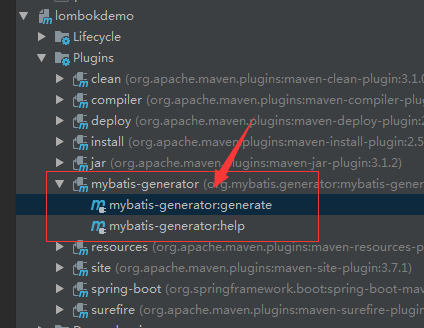
4.最后可以看到maven管理界面的插件目录下有如下,点击第一个即可使用: