1、基本结构
import 'package:flutter/cupertino.dart';
import 'package:flutter/material.dart';
import 'package:flutter/painting.dart';
void main() => runApp(MyApp());
class MyApp extends StatelessWidget{
@override
Widget build(BuildContext context){
return MaterialApp(
title: "组件学习",
home: Scaffold(
body: Center(
child: Container(
child: new Text(
"Hello Container 组件",
style: TextStyle(
fontSize: 40.0,
),
),
alignment: Alignment.topLeft,
width: 500.0,
height: 400.0,
padding:const EdgeInsets.fromLTRB(20, 0, 0, 0),
margin: const EdgeInsets.fromLTRB(30,0,0,0),
decoration: new BoxDecoration(
               gradient: const  LinearGradient(
                 colors: [Colors.lightGreen,Colors.orangeAccent,Colors.pink]//渐变背景色

               ),
border: Border.all(width: 5.0,color:Colors.orange)
),
),
),
),
);
}
}
2、效果展示
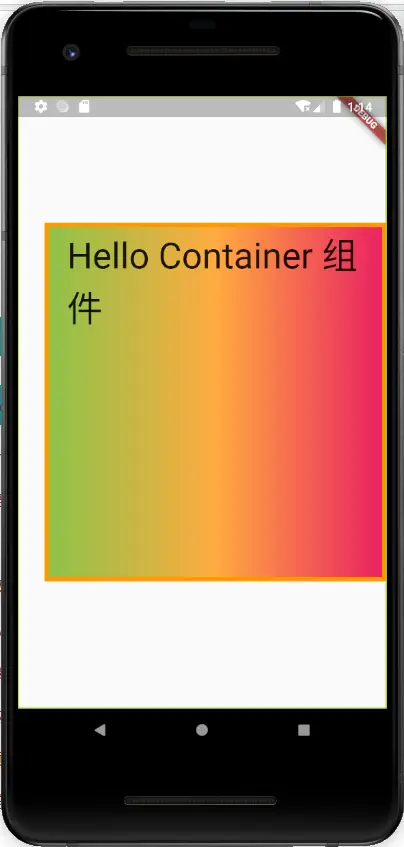
3、属性解释
| 1 padding: const EdgeInsets.all():内边距,上下左右一个值 |
| 2、padding:const EdgeInsets.fromLTRB(20, 0, 0, 0): 内边距,根据提示填入想要的值 |
decoration: new BoxDecoration(
gradient: const LinearGradient(
colors: [Colors.lightGreen,Colors.orangeAccent,Colors.pink]//渐变背景色
),
border: Border.all(width: 5.0,color:Colors.orange)