1、基本结构
import 'package:flutter/cupertino.dart';
import 'package:flutter/material.dart';
import 'package:flutter/painting.dart';

void main() => runApp(MyApp());

class MyApp extends StatelessWidget{
  @override
  Widget build(BuildContext context){
    return MaterialApp(
      title: "组件学习",
      home: Scaffold(
        body: Center(
            child: Container(
              child: new Text(
                "Hello Container 组件",
                style: TextStyle(
                  fontSize: 40.0,
                ),
              ),
              alignment: Alignment.center,//对齐方式
              width: 500.0,
              height: 400.0,
              color: Colors.lightBlue,
            ),

        ),
           ),
    );
  }
}
2、效果展示
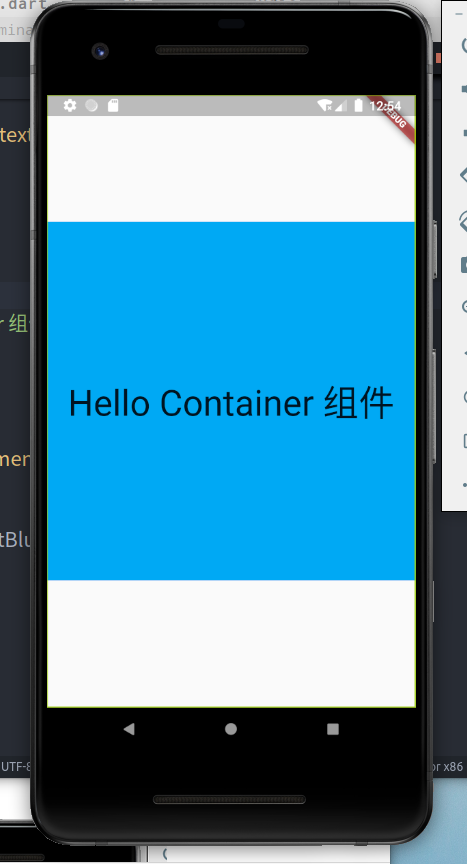
3、属性解释
| 1、Container():相当于我们HTML里的div标签 |
| 2、alignment: Alignment.center: 对齐方式 |
-
bottomCenter:下部居中对齐。
-
botomLeft: 下部左对齐。
-
bottomRight:下部右对齐。
-
center:纵横双向居中对齐。
-
centerLeft:纵向居中横向居左对齐。
-
centerRight:纵向居中横向居右对齐。
-
topLeft:顶部左侧对齐。
-
topCenter:顶部居中对齐。
-
topRight: 顶部居左对齐。
| 3、 color: Colors.lightBlue: 设置容器背景颜色。 |
| 4、 width height 设置容器的宽度高度。 |