完整的LAMP搭建,直接复制命令敲Enter就好了
第一阶段:LINUX下安装PHP环境
-
获得最近的软件包的列表
要用apt-get这种方式安装LAMP时,最好先运行下面在命令升级自己的系统这样是为了更新源,而如果你找的源不好,可能安装LMAP失败。
sudo apt-get update -
安装上Apache2
sudo apt-get install apache2 -
安装MySQ
中途会让你输入一次root用户密码
sudo apt-get install mysql-server mysql-client -
安装PHP 7.0
sudo apt-get install php7.0 -
安装PHP Apache模块
sudo apt-get install libapache2-mod-php -
安装PHP扩展
有些扩展可能因为源的问题安装失败,可以切换源来解决。
sudo apt-get install php7.0-mysql sudo apt-get install php7.0-curl sudo apt-get install php7.0-gd sudo apt-get install php7.0-mbstring sudo apt-get install php7.0-mcrypt sudo apt-get install php7.0-xml sudo apt-get install php7.0-zip -
安装 下载工具 wget
sudo apt-get install -y wget -
安装composer
切换到 /usr/local/bin
cd /usr/local/bin使用wget安装composer
wget https://getcomposer.org/download/1.4.1/composer.phar重命名文件composer.phar 为 composer
mv composer.phar composer
chmod +x composer
第二阶段:配置虚拟主机 OR 开启路由重写模块
-
VI打开000-default.conf文件
vi /etc/apache2/sites-availabe/000-default.conf修改代码如下
<VirtualHost *:80> ServerAdmin webmaster@localhost DocumentRoot /var/www/html/laravel/public ServerName www.shxdledu.cn ErrorLog ${APACHE_LOG_DIR}/error.log CustomLog ${APACHE_LOG_DIR}/access.log combined </VirtualHost> -
重启Apache
sudo service apache2 restart -
开启路由重写模块
Ubuntu下apache2的rewrite模块默认是不加载的,只要运行了一下这个命令,就可以启用rewrite模块了。
a2enmod rewrite -
修改apahce2.conf文件
修改etc目录下的apache2.conf文件,把这段代码前面的#注释去掉。
重启apache 即可去掉index.php访问
#<Directory /var/www/>
#       Options Indexes FollowSymLinks
#       AllowOverride All
#       Require all granted
#</Directory>
第三阶段:配置MySQL数据库
-
修改mysqld.cnf文件
将 bind-address = 127.0.0.1 改为 bind-address = 0.0.0.0
vim /etc/mysql/mysql.conf.d/mysqld.cnf -
登陆MySQL
登陆之后更改数据库为所有人都可访问
mysql -u root -p注意:username是用户名,password是要自己填写的一个密码,例如:
grant all on *.* to root@'%' identified by '1234567890';grant all on *.* to username@'%' identified by 'password'; -
刷新MySQL
flush privileges;
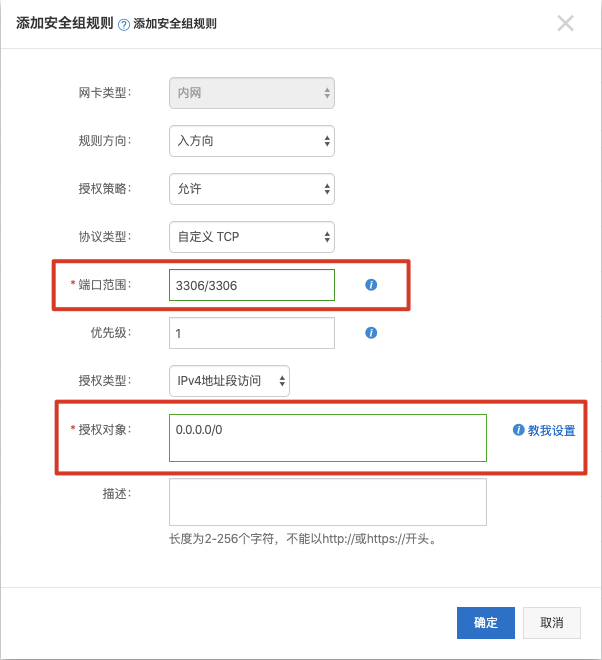
如果还不可以远程登录 MySQL 的话可能是你的云服务器未配置3306端口的安全组规则,或者是防火墙端口为开启。开启完成后重启服务器就好了。
阿里云安全组配置
- 选择实例点击管理
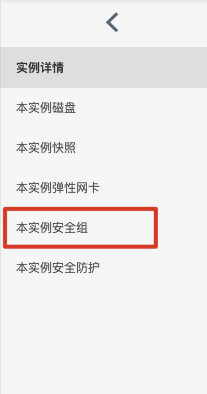
- 选择右侧的本实例安全组先配置规则,如果本实例没有安全组先加入一个安全组
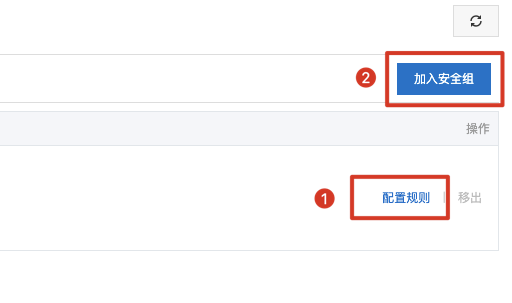
- 添加安全组规则只需要添加入方向的安全组,端口范围规则为「22/22」,授权对象为「0.0.0.0/0」,如下图就是一个3306的端口安全组