

前言
学生党前几天前尝试了一下用vue+ts+Ant构建一个企业级后台管理(ps:就是抄花裤衩的)。敲到登陆页时总觉得只有账号密码太low,就尝试了一下极验的服务(ps:经常参加极验的线下沙龙,对极验感观很好),但网上找的资源,完全完全看不懂!!!于是从简发现ts实现登陆框滑动解锁似乎没有,就网上找了个原生实现的demo,稍微改动了一下语法。
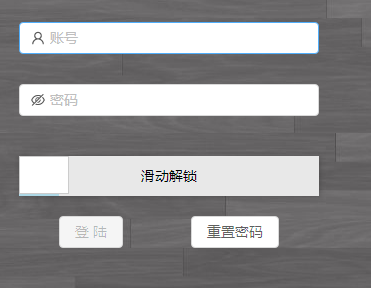
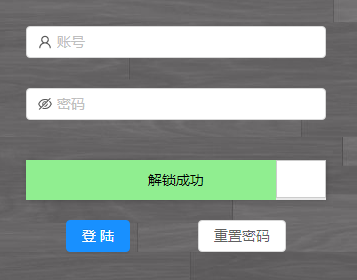
图片示例
未滑动
已滑动
代码
<!--  -->
<template>
<div class='check'>
    <div id="box" onselectstart="return false;" ref="box">
        <div class="bgColor" ref="bgColor"></div>
        <div class="txt" ref="txt">滑动解锁</div>
        <!--给i标签添加上相应字体图标的类名即可-->
        <div class="slider" ref="slider"><i class="iconfont icon-double-right" ref="i"></i></div>
    </div>
</div>
</template>

<script lang="ts">
import { Component, Vue } from 'vue-property-decorator';

@Component({
  components: {},
})
export default class Check extends Vue {

    public box: any;
    public bgColor: any;
    public txt: any;
    public slider: any;
    public icon: any;
    public successMoveDistance: number = 0;
    public downX: number = 0;
    public isSuccess: boolean = false;

    public mounted() {
        // 获取到需要用到的DOM元素
        this.box =  this.$refs.box, // 容器
        this.bgColor = this.$refs.bgColor, // 背景色
        this.txt = this.$refs.txt, // 文本
        this.slider = this.$refs.slider, // 滑块
        this.icon = this.$refs.i,
        this.successMoveDistance = this.box.offsetWidth - this.slider.offsetWidth, // 解锁需要滑动的距离
         // 给滑块添加鼠标按下事件
        this.slider.onmousedown = this.mousedownHandler;
    }

    // 鼠标按下事件的方法实现
    public mousedownHandler(e: any) {
            this.bgColor.style.transition = '';
            this.slider.style.transition = '';
            const ev = e || window.event || e.which;
            this.downX = ev.clientX;
            // 在鼠标按下时,分别给鼠标添加移动和松开事件
            document.onmousemove = this.mousemoveHandler;
            document.onmouseup = this.mouseupHandler;
    }

    // 定义一个获取鼠标当前需要移动多少距离的方法
    public getOffsetX(offset: number , min: number , max: number) {
        if (offset < min) {
            offset = min;
        } else if (offset > max) {
            offset = max;
        }
        return offset;
    }

    // 鼠标移动事件的方法实现
    public mousemoveHandler(e: any) {
        const ev = e || window.event || e.which;
        const moveX = ev.clientX;
        const offsetX = this.getOffsetX(moveX - this.downX , 0 , this.successMoveDistance);
        this.bgColor.style.width = offsetX + 'px';
        this.slider.style.left = offsetX + 'px';

        if (offsetX === this.successMoveDistance) {
            this.success();
        }
        // 如果不设置滑块滑动时会出现问题(目前还不知道为什么)
        ev.preventDefault();
    }

    // 鼠标松开事件的方法实现
    public mouseupHandler(e: any) {
        if (!this.isSuccess) {
            this.bgColor.style.width = 0 + 'px';
            this.slider.style.left = 0 + 'px';
            this.bgColor.style.transition = 'width 0.8s linear';
            this.slider.style.transition = 'left 0.8s linear';
        }
        document.onmousemove = null;
        document.onmouseup = null;
    }

    public success() {
        this.isSuccess = true;
        this.txt.innerHTML = '解锁成功';
        this.bgColor.style.backgroundColor = 'lightgreen';
        this.slider.className = 'slider active';
        this.icon.className = 'iconfont icon-xuanzhong';
        this.$emit('childNotify', this.isSuccess);
        // 滑动成功时,移除鼠标按下事件和鼠标移动事件
        this.slider.onmousedown = null;
        document.onmousemove = null;
    }
}
</script>
<style lang='scss' scoped>
#box{
    position: relative;
    width: 300px;
    height: 40px;
    margin: 0 auto;
    margin-top: 10px;
    background-color: #e8e8e8;
    box-shadow: 1px 1px 5px rgba(0,0,0,0.2);
}
.bgColor{
    position: absolute;
    left:0;
    top:0;
    width:40px;
    height: 40px;
    background-color: lightblue;
}
.txt{
    position: absolute;
    width: 100%;
    height: 40px;
    line-height: 40px;
    font-size: 14px;
    color: #000;
    text-align: center;
}
.slider{
    position: absolute;
    left:0;
    top:0;
    width: 50px;
    height: 38px;
    border: 1px solid #ccc;
    background: #fff;
    text-align: center;
    cursor: move;
    i{
        position: absolute;
        top:50%;
        left:50%;
        transform: translate(-50%,-50%);
    }
}

.slider.active>i{
    color:green;
}

</style>
总结
- ts强无敌!!
- 因为封装成了组件 子组件:this.$emit('childNotify', this.isSuccess) 父组件可以调用 @childNotify="childNotify" 获取isSuccess 用来判断是否解锁
- 想不到了--。

