前期准备
1. superagent的使用
详细介绍click。这里只给出一个例子
//index.js
import Superagent from 'superagent'
(async ()=>{
try{
    let res = await Superagent.get('https://github.com/wangxiaoxaio')  //向github发起一个get方法的请求,返回服务器端的响应
    console.log(res.text)  //打印出html字符串
} catch(e){
    console.error(e)
}
})()
2. cheerios的使用
cheerio的使用与jquery极其相似。详细介绍click。这里同样给出一个例子
import cheerio from 'cheerio'

let str = `<ul id="fruits">
<li class="apple">Apple</li>
<li class="orange">Orange</li>
<li class="pear">Pear</li>
</ul>`
const $ = cheerio.load(str)   //加载html字符串
console.log($('ul li').first().text())   //获取选取的第一个元素的文本
console.log($('ul li').filter('.orange').text())  //筛选符合条件的元素
console.log($('ul li').filter('.orange').attr('class'))  //获取属性值
一句话:cheerio的api与jquery极其相似,可以参考jquery的api
3. nodeMailer的使用
nodeMailer可以让我们使用node发送邮件。详细介绍click。这里同样给出一个例子
async function sendMail(result) {
//result为邮件信息
  let transporter = nodeMailer.createTransport({
    host: "smtp.qq.com",     //这里使用的是qq邮箱,可以使用其他邮箱
    port: 587,              //默认端口
    secure: false,          // 为true时使用465端口,为false时使用其他端口
    //认证信息
    auth: {
      user: user_data["Semail"],
      pass: "**********" //使用你自己生成的授权码,授权码的生成方式下面会给出
    }
  });
  //配置信息
  let mailOptions = {
    from: user_data["Semail"],  //发送方
    to: user_data["Remail"],    //接收方
    subject: `${result.name}更新通知`,   //邮件主题
    //邮件内容
    html: `<p>您追的小说<span style="color:red">
                ${result.name}</span>已经于<span style="color:yellow">
                    ${
                      result.time
                    }</span>更新,更新章节名为<span style="color:blue">${
      result.title
    }</span>`
  };
  try {
    let res = await transporter.sendMail(mailOptions);   //发送邮件
    console.log(`Message send:${res.messageId}`)
  } catch(e){
      console.error(`sendMail error:${e}`)
  }
}
下面是qq邮箱开启smtp服务的方式
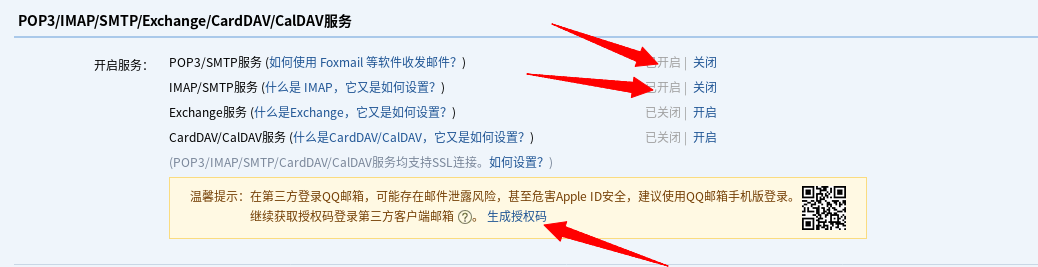
一个demo
最近在追剑来和大道朝天,想着可以利用node,在平台上(某纵,某起)上的小说更新时,会通过邮件通知你。通知时为小说更新1分钟前。使用的包即为以上三个,superagent用于爬取页面,cheerio用于提取信息,nodeMailer用于通过邮件通知你,由于需要在命令行里进行交互,所以还需要readline。
直接贴出主要的功能函数,完整的内容和配置参建github(跪求点个fork或者star)。
// 爬取页面并返回解析后的页面数据
async function agentAndCheerio(url) {
  try {
    let res = await Superagent.get(url);
    let $ = Cheerio.load(res.text);
    return $;
  } catch (e) {
    return console.log("agentAndCheerio error" + e);
  }
}

// 发送邮件
async function sendMail(result) {
  let transporter = nodeMailer.createTransport({
    host: "smtp.qq.com",
    port: 587,
    secure: false,
    auth: {
      user: user_data["Semail"],
      pass: "*********" //使用你自己生成的授权码
    }
  });
  let mailOptions = {
    from: user_data["Semail"],
    to: user_data["Remail"],
    subject: `${result.name}更新通知`,
    html: `<p>您追的小说<span style="color:red">
                ${result.name}</span>已经于<span style="color:yellow">
                    ${
                      result.time
                    }</span>更新,更新章节名为<span style="color:blue">${
      result.title
    }</span>`
  };
  try {
    let res = await transporter.sendMail(mailOptions);
    console.log(`Message send:${res.messageId}`)
    return true
  } catch(e){
      console.error(`sendMail error:${e}`)
      return false
  }
}

// 起点和纵横获取相关信息的方法稍有不同,抽象成两个函数
async function qidian() {
  let baseUrl = map["2"];
  let keyword = encodeURIComponent(user_data["title"]);
  let searchUrl = `https://www.qidian.com/search?kw=${keyword}`;
  try {
    let $ = await agentAndCheerio(searchUrl);
    let uid = $(".res-book-item[data-rid=1]").attr("data-bid"); //提取小说对应的id信息
    let url = `${baseUrl}/info/${uid}`;
    $ = await agentAndCheerio(url);
    let result = {};
    let time = $(".time").text();
    let title = $("li.update p.cf .blue").text();
    result["time"] = time;
    result["title"] = title;
    result["name"] = user_data["title"];
    if (result["time"] === "1分钟前") {
      await sendMail(result);
      console.log(result);
    }
  } catch (e) {
    console.error(`qidian error:${e}`);
  }
}

async function zongheng() {
  let baseUrl = map["1"];
  let kw = encodeURIComponent(user_data["title"]);
  let searchUrl = `http://search.zongheng.com/s?keyword=${kw}`;
  try {
    let $ = await agentAndCheerio(searchUrl);
    let uid = JSON.parse($(".btn .bkinfo").first().attr('data-sa-d'))['book_id']
    let url = `${baseUrl}/book/${uid}.html`;
    $ = await agentAndCheerio(url);
    let result = {};
    let title = $(".book-new-chapter .tit a").text();
    let time = $(".time")
      .text()
      .replace(/\s+/g, "")
      .match(/^\xb7([\w\u4E00-\u9FA5\uF900-\uFA2D]+)\xb7/)[1];
    result["time"] = time;
    result["title"] = title;
    result["name"] = user_data["title"];
    console.log(result);
    if (result["time"] === "1分钟前") {
      await sendMail(result);
      console.log(result);
    }
  } catch (e) {
    console.error(`zongheng error:${e}`);
  }
}
交互界面如下: