最近学习了React context,由于自己刚入门React,此文仅为context的简单记录尝试,不作对context与redux进行比较。
Context的应用场景
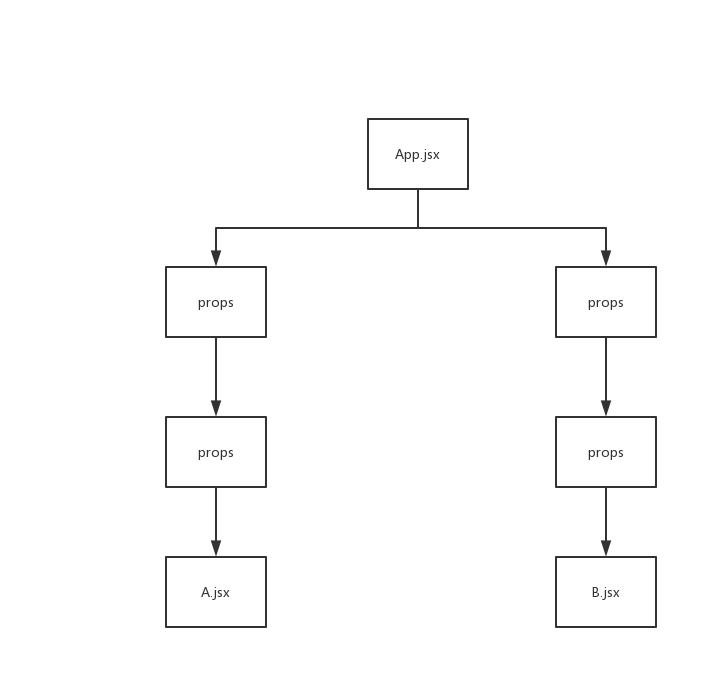
如果App.jsx中有一个共同的值要传给A.jsx组件与B.jsx组件,就得通过中间其他组件,即使中间的组件并不需要他们渲染UI,在更加复杂的应用之中,这使得代码非常的混乱与复杂。
以前有Redux,在React 16.3时推出了新的Context API。
Context用于在React树组件中共享数据,比如用户信息、主题等等,这样子就不用通过props在层层组件中传递信息,使得代码太过混乱。
React Context的API
学习自原官网英文文档,有哪里理解不正确请大佬指出
主要有React.createContext,Context.Provider,Context.Consumer,Class.contextType
React.createContext(defaultValue): 创建
Context对象,并且设置默认值。当有组件订阅(subscrie)Context对象时,会从相距最近的Context.Provider取得值。订阅了Provider的子组件的更新不会受限于shouldComponentUpdate。同时,默认值只有在子组件没有匹配的Provider时才会使用。const MyContext = React.createContext('context默认值');
Context.Provider: 每一个Context对象包含一个
Provider组件,允许消费者组件(consuming component)订阅,同时他们接受value属性,改变传递下去的值<MyContext.Provider value={'Provider修改默认值'}>//Provider是一个组件 </MyContext.Provider>
Context.Consumer: 是一个可以订阅Context值改变的
组件,内部之中让我们以函数组件的方式订阅Context<MyContext.Consumer> //Consumer是一个组件 {value => /* 使用传递过来的value */} </MyContext.Consumer>
Class.contextType: 可在组件Class中赋值Context对象,使得在组件中可以直接使用对应Context的值;但需要订阅多个Context时此方法不可用,此方法只能订阅一个Context。
class Example extends React.Component{
      constructor(props) {
          super(props);
          const value = this.context//直接访问
      }
}
Example.contextType = MyContext;
实践
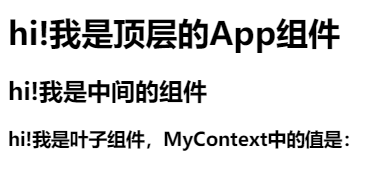
这是基础模板,会在基础模板上进行如下实践:使用Context.Consumer订阅单个Context、 使用Context.contextType订阅单个Context、使用Class.Consumer订阅多个组件
使用Context.Consumer订阅单个Context
使用默认值
如果子组件没有匹配到Provider,会直接使用Context中的默认值
const MyContext = React.createContext('context默认值');
class Leaf extends React.Component{
    constructor(props) {
        super(props);
    }
    render(){
        return(
            <MyContext.Consumer>
            {
                (value) =>{
                    return (
                      <h3>
                         hi!我是叶子组件,MyContext中的值是:'{value}'
                      </h3>
                    );
                }
            }
            </MyContext.Consumer>
        );
    }
}
class App extends React.Component{
    constructor(props) {
        super(props);
    }
    render(){
        return (
            <div>
              <h1>
                  hi!我是顶层的App组件
              </h1>
              <Middle />
              <Leaf />
            </div>
        )
    }
}
CodePen打开
因为Leaf组件外没有<MyContext.Provider>组件包裹,所以匹配到了Context的默认值
效果如下

使用Context.Provider提供的value
在子组件的父组件上嵌套MyContext.Provider,设置value属性,即可对应修改值
class App extends React.Component{
    constructor(props) {
        super(props);
    }
    render(){
        return (
            <div>
              <MyContext.Provider value={'修改默认值'}>
                <h1>
                    hi!我是顶层的App组件
                </h1>
                <Middle />
                <Leaf />
              </MyContext.Provider>
            </div>
        )
    }
}

使用Class.contextType订阅单个Context
通过这种方式订阅可以更方便地在生命周期或者构造函数中使用Context的值
class Leaf extends React.Component{
    constructor(props) {
        super(props);
        console.log(this.context);//直接通过this.context访问
    }
    render(){
        return(<h3>hi!我是叶子组件,MyContext中的值是:'{this.context}' </h3>);
    }
}
class App extends React.Component{
    constructor(props) {
        super(props);
    }
    render(){
        return (
            <div>
                <h1>
                    hi!我是顶层的App组件
                </h1>
                <Middle />
                <Leaf />
            </div>
        )
    }
}
Leaf.contextType = MyContext;//在此订阅
CodePen打开
不然的话可能要这么写:
class App extends React.Component{
    constructor(props) {
        super(props);
    }
    render(){
        return (
            <div>
              <MyContext.Provider value={'修改默认值'}>
                <h1>
                    hi!我是顶层的App组件
                </h1>
                <Middle />
                <MyContext.Consumer>
                    {(value)=>{
                        return <Leaf test={value} />;//传给Leaf在生命周期或构造函数中访问
                    }}
                </MyContext.Consumer>
              </MyContext.Provider>
            </div>
        )
    }
}
使用Context.Consumer订阅多个组件
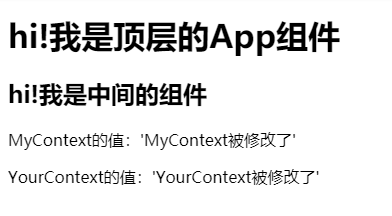
本质是通过多个组件嵌套传值,比如下面的例子,MyContext.Consumer传给YourContext.Consumer
const MyContext = React.createContext('MyContext默认值');
const YourContext = React.createContext('YourContext默认值');
class Leaf extends React.Component{
    constructor(props) {
        super(props);
    }
    render(){
        return(
            <MyContext.Consumer>
            {mine=>(
                <YourContext.Consumer>
                  {
                      yours=>(
                          <div>
                            <p>MyContext的值:'{mine}'</p>
                            <p>YourContext的值:'{yours}'</p>
                          </div>
                          )}
                 </YourContext.Consumer>
            )}
            </MyContext.Consumer>
        );
    }
}
class App extends React.Component{
    constructor(props) {
        super(props);
    }
    render(){
        return (
            <div>
              <MyContext.Provider value={'MyContext被修改了'}>
                <YourContext.Provider value={'YourContext被修改了'}>
                  <h1>
                    hi!我是顶层的App组件
                  </h1>
                  <Middle />
                  <Leaf />
                </YourContext.Provider>
              </MyContext.Provider>
            </div>
        )
    }
}
结语
本文内容基本上是对官网原英文文档的实践,有不正确的大佬们指出。
参考资料
React官网:Context
React's Context API explained: Provider and Consumer