更多文章请查看 lutter从入门 到精通
Flutter Progress
1 条形无固定值进度条

        //LinearProgressIndicator不具备设置高度的选项,可以使用SizedBox来设置高度与宽度
        SizedBox(
          child: LinearProgressIndicator(),
          height: 8.0,
          width: 200,
        ),
2 圆形无固定值进度条

        SizedBox(
          child: CircularProgressIndicator(),
          height: 44.0,
          width: 44.0,
        ),
3 条形固定值进度条
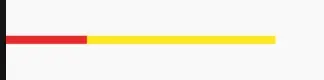
        new SizedBox(
          //限制进度条的高度
          height: 6.0,
          //限制进度条的宽度
          width: 200,
          child: new LinearProgressIndicator(
              //0~1的浮点数,用来表示进度多少;如果 value 为 null 或空,则显示一个动画,否则显示一个定值
              value: 0.3,
              //背景颜色
              backgroundColor: Colors.yellow,
              //进度颜色
              valueColor: new AlwaysStoppedAnimation<Color>(Colors.red)),
        ),
4 圆形固定值进度条
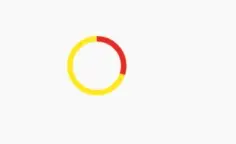
        //CircularProgressIndicator不具备设置高度的选项,可以使用SizedBox来设置高度与宽度
        new SizedBox(
          //限制进度条的高度
          height: 40.0,
          //限制进度条的宽度
          width: 40,
          child: new CircularProgressIndicator(
            //0~1的浮点数,用来表示进度多少;如果 value 为 null 或空,则显示一个动画,否则显示一个定值
              value: 0.3,
              //背景颜色
              backgroundColor: Colors.yellow,
              //进度颜色
              valueColor: new AlwaysStoppedAnimation<Color>(Colors.red)),
        ),