

#编译时间优化
参考资料:
提示: 本文大部分内容与上述文章重复,只是增加了替换@import脚本儿
随着我们项目越来越大,全量编译动辄十分钟起步,相当影响开发时候的思路和时间,所以我们准备引入CCache
- Xcode 编译缓存
- archive 模式会忽略缓存
- DerivedData 目录经常出问题
- CCache
- archive 不会忽略缓存
- 命中率基本稳定
使用 CCache 大体上可以提升70%的编译时间。
安装CCache
使用方法: 手动调用 chmod -R 777 setup.command && ./setup.command给脚本权限并执行
脚本名称:setup.command
脚本内容:
if command -v ccache >/dev/null 2>&1; then
    echo "CCache 已经安装"
else
    if command -v brew >/dev/null 2>&1; then
        echo "HomeBrew已经安装,开始安装ccache"
        brew install ccache
    else
        echo "HomeBrew没有安装,安装之后开始安装ccache"
        ruby_path=`which ruby`
        echo $ruby_path
        $ruby_path -e "$(curl -fsSL https://raw.githubusercontent.com/Homebrew/install/master/install)"
        brew install ccache
    fi
fi
Xcode设置
电脑我们已经安装好了 CCache,接下来我们要做的就是项目设置
-
项目关闭 Enable Module
-
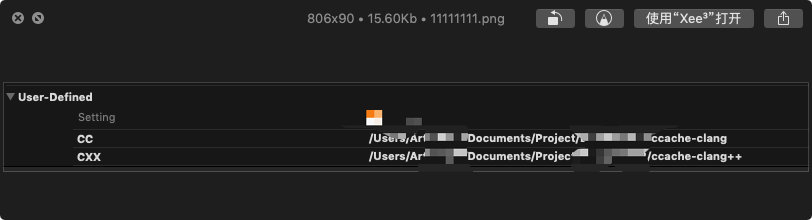
新建 Macro CC 这个配置就是让 Xcode 自动运行CCache脚本
-
替换@import脚本
关闭了 Enable Module之后 我们要删除工程里面用到的所有 @import的代码并换成 #import <> 这一步的难点在于Pod库中的@import,改动代码之后,下次Pod更新再次回滚 怎么能每次编译之前,把第三方里面的 @import替换掉。我第一想到是用脚本
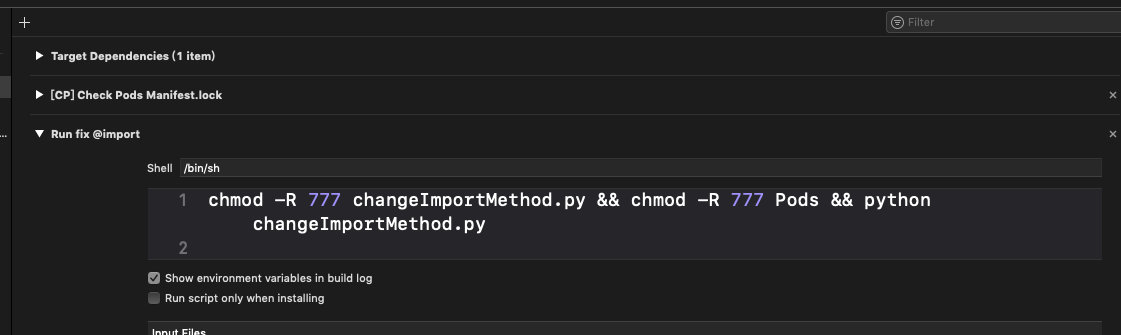
使用方法: chmod -R 777 changeImportMethod.py && chmod -R 777 Pods && python changeImportMethod.py
脚本名称:changeImportMethod.py
脚本内容:
# coding=utf-8

import os
# python2 就可以执行 不需要依赖别的库
# 该脚本需要执行chmod 777 赋予读写权限 同时也要在Pod文件夹那里执行一次 确保允许读写
project_path = os.getcwd() + "/Pods" #项目根目录
print(project_path)

suf_set = ('.h', '.m')

# 准备被覆盖的
preparationSet = {
    "@import Foundation;":"#import <Foundation/Foundation.h>",
    "@import UIKit;":"#import <UIKit/UIKit.h>",
    "@import Security;":"#import <Security/Security.h>",
    "@import PassKit;":"#import <PassKit/PassKit.h>",
    "@import Contacts;":"#import <Contacts/Contacts.h>",
    "@import QuartzCore;":"#import <QuartzCore/QuartzCore.h>",
    "@import CoreLocation;":"#import <CoreLocation/CoreLocation.h>",
    "@import CoreGraphics;":"#import <CoreGraphics/CoreGraphics.h>"
    }

# 遍历文件,符合规则的进行重命名
for (root, dirs, files) in os.walk(project_path):
    for file_name in files:
        if file_name.endswith(suf_set):
            # print('-----fileName-------' + file_name)
            with open(os.path.join(root, file_name), 'r+') as f:
                s0 = f.read()
                f.close()
                for key in preparationSet:
                    if key in s0:
                        print('========needChange========' + root +"/"+ file_name)
                        with open(os.path.join(root, file_name), 'r+') as f4:
                            s1 = f4.read().replace(key, preparationSet[key])
                            print(key + ' ------> ' + preparationSet[key])
                            f4.seek(0)
                            f4.write(s1)
                            f4.truncate()
                            f4.close()
脚本写完,接入就很简单了,我们需要在编译工程源代码之前运行我们的脚本修复。 于是新增一个Run Scripts
- CocoaPods配置 在podfile中修改
post_install do |installer_representation|
  installer_representation.pods_project.targets.each do |target|
    target.build_configurations.each do |config|
      if target.name != '你要忽略的库名' && target.name != '你要忽略的库名'
        config.build_settings['CLANG_ENABLE_MODULES'] = 'NO'
        config.build_settings['CC'] = '$(SRCROOT)/../ccache-clang'
        config.build_settings['CXX'] = '$(SRCROOT)/../ccache-clang++'
      end
    end
  end
  system 'chmod -R 777 setup.command &&  ./setup.command'
end
准备做什么
- 提升缓存命中率
通过命令 ccache -s 可以查看 CCache 的整体缓存命中率。要使 CCache 真正能减少编译时间,命中率大约要达到 90% 。前文已经提过,频繁地缓存 miss 会比不使用 CCache 还慢,因此在集成 CCache 后需要保证90%的缓存命中率,才能确实地提高构建速度,如果发现缓存命中率过低,则需要分析日志排查原因。我们项目目前试过的几次缓存命中能到50%,还有很大优化余地.
- 移除 Precompiled Prefix Header
使用了 PCH 文件是最常见的导致缓存命中率过低的原因。很多项目都会为了方便,把一些常用的类在 PCH 中 import 一次,而在编译时 PCH 的内容会附加在每个文件之前,PCH 内容的改变会导致整个编译对象的全部文件的内容改变,也就导致全部 CCache 缓存失效。如果你遇到过明明只修改了一两个源文件,运行项目却会全量编译的情况,看看是不是PCH里面import了太多依赖,如果暂时无法移除 PCH 则尽量减少里面 import 的文件。
- 清理废弃代码
没有代码的编译速度能快得过「没有代码」,这是很浅显的道理,不过实现起来可能工作量较大。在公司业务快速迭代和更新时很容易就会产生一些不再使用的模块,定期清理既能减少项目的构建时间也能减小安装包的体积,一举两得。如果觉得这些代码以后还会用得上,可以只移除 Xcode 项目的引用而保留下来文件以作参考。
