1. 默认使用方式
// 默认使用 Generator 方式
 function* getReservation(){
    console.log('y0')
    let reslut={};
    yield reslut;
    return 'ending'
}
let a=getReservation();

let re2 =a.next();
let re3 =a.next();
console.log(re2,re3)
结果:

2 async配合Generator 使用方式
// api.getReservation 函数为 请求接口的异步promise
async function* getReservation(){
    console.log('y0')
    let reslut=await api.getReservation();
    yield reslut;
    return 'ending'
}
let a=getReservation();

let re2 =a.next();
let re3 =a.next();
console.log(re2,re3)
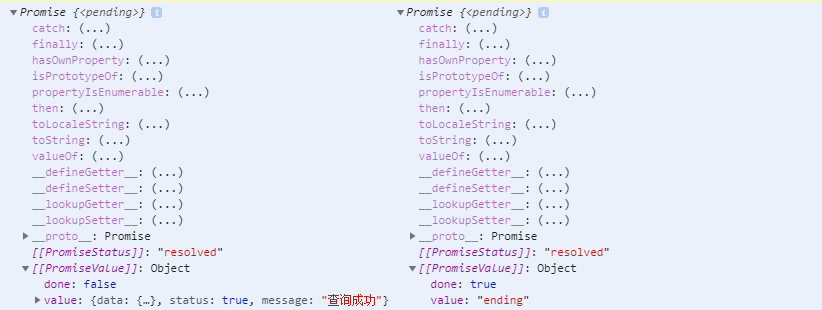
//此时返回值将不在是Object ,将返回Promise;
输出结果:
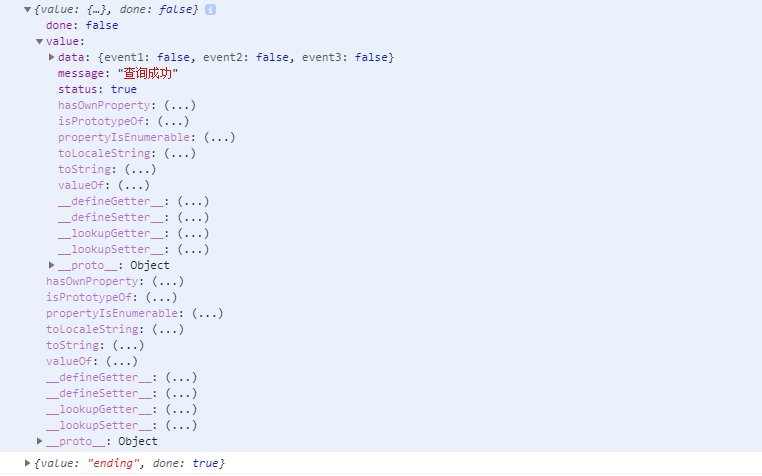
//使用方式应符合promise方式
re2.then(res=>{
    console.log(res)
});
re3.then(res=>{
    console.log(res)
});
3 使用这种方式的用途
因业务需求需要部分接口在未跳转到使用页时提前请求数据,在使用时直接拿取数据,提升页面的流畅度,才采用此方式调用部分接口;
在自己小程序中使用 landing 页请求数据并缓存,在跳入bespeak页时直接使用,提升页面跳转流畅度
// landing页
onLoad: function (options) {
    let getReservation=this.getReservation();
    getReservation.next();
    this.setData({getReservation});
},
async *getReservation(){

    let reslut=await api.getReservation();
    yield '请求启动';
    yield reslut;
    return 'ending'
}
// bespeak页

/***
 * landing 跳转过来后读取接口预请求数据
*/
async getReservation(){
   let currentPages =  getCurrentPages();

   //从 landing页 中跳转过来则 通过next()函数读取已请求完成数据
   let bespeakPage = currentPages.filter(res=>res.__route__=='pages/landing/index');
   if(bespeakPage.length>0){
      let reslute = await bespeakPage[bespeakPage.length-1].data.getReservation.next();
      return reslute.value;
   }
   // 从扫码状态中直接进入则直接请求接口读取数据
  return await  api.getReservation()
}