前期介绍
-
使用门槛低,开发周期短,上线快
-
性能好,查询快,实时展示结果
-
扩容方便,快速支撑迅猛增长的数据[GB->TB->PB]
-
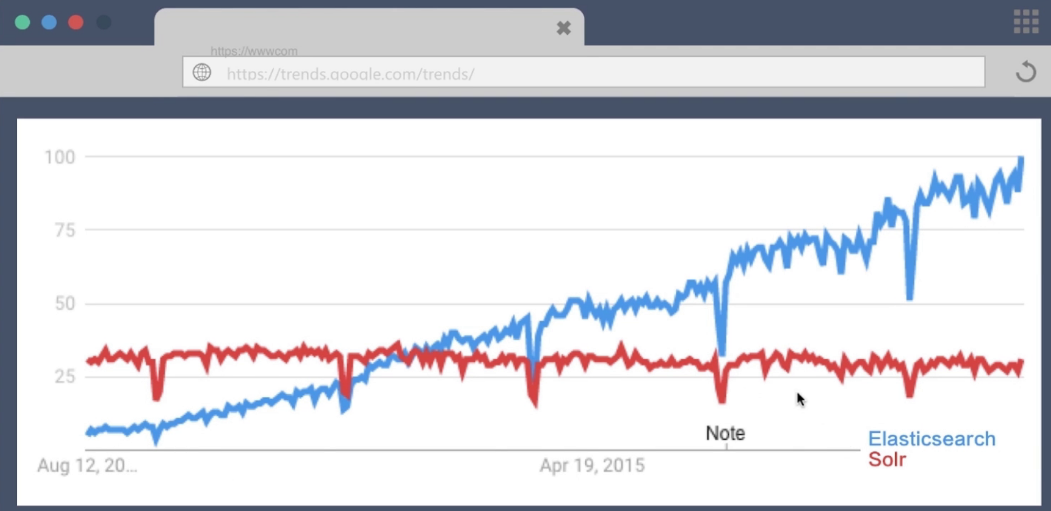
ES的增长趋势如下图:
-
ES现在使用的公司:

-
国内的公司:

-
学习知识储备: 不要求有编程知识,但是最好有数据库的知识,理解起来比较容易
PS:学习任何技术都是内外兼修(常见的API和内部的底层机制)
-
学会使用官方文档
1. 常见术语
-
文档 Document
用户存储在ES中的数据文档。
-
索引 Index
由具有相同字段的文档列表组成。
-
节点 Node
一个ElsaticSearch的运行实例,是集群的构成单元。
-
集群 Cluster
由一个或者多个节点组成,对外提供服务。
-
Document
Json Object,由字段组成,常见的数据类型如下:
| 类型 | 说明 |
|---|---|
| 字符串 | text,keyword |
| 数值型 | long,integer,short,byte,double,float,half_float,scaled_float |
| 布尔型 | boolean |
| 日 期 | date |
| 二进制 | binary |
| 范围类型 | integer_range,float_range,long_range,double_range,date_range |
每个文档有唯一的 id 标识
| 自行指定 | 和 | ES自动生成 |
|---|
Document MetaData
元数据:用于标注文档的相关信息
| 元素 | 说明 |
|---|---|
| _index | 文档所在的索引名 |
| _type | 文档所在的类型名 |
| _id | 文档的唯一ID |
| _uid | 组合id,由_id和_type组成(6.x _type不起作用的,淡化type这个字段) |
| _source | 文档的原始json数据,可以从这里获取每个字段的数据 |
| _all | 整合所有字段内容到该字段,默认禁用 |
Index
索引中存储具有相同结构的文档(Document)
每个索引都有自己的 mapping 定义,用于定义字段名和类型。
一个集群可以有多个索引
2. API
Rest API
ElasticSearch集群对外提供RESTful API
- REST - REpresentational State Transfer
- URI 指定资源,如Index,Document等
- Http Method 指明资源操作类型,如GET,POST,PUT,DELETE等。
索引 API
es有专门的Index API,用于创建,更新,删除索引配置等
- 查看现有索引
GET _cat/indices

yellow open contract                  AXROW_HSTsSGOd_FnkNFDQ  5 1        0    0   1.2kb   1.2kb
yellow open test_index                6kGc_VupQ1u3WBhU7FROcg  5 1        0    0   1.2kb   1.2kb
green  open risk_consulting           WUwzRrxmTymYYU1rtbBlCg 10 0     5208    1     5mb     5mb
yellow open risk_dimension            996aoG8WRIOB5OjnQnX2pw  5 1    35920 1519    29mb    29mb
yellow open risk_following_feed_event Hbvq5WfkSiSHP7cLl00MQw  5 1    10444    0     9mb     9mb
yellow open risk_following_feed_risk  V5iBfMFVQPOQYYXjqYWXpA  5 1     6359    0  45.2mb  45.2mb
yellow open cars                      pciMNyRGSl-Vdc6zsIgtDw  5 1        8    0  23.1kb  23.1kb
green  open ai_counsel                AtmNHkp6S4W8rG0tgPZoMQ 10 0 78131102    0   2.1gb   2.1gb
yellow open risk_following_feed       ZIEqNgCkTnqbP3apX0AR0w  5 1   106693    0 233.1mb 233.1mb
green  open .kibana                   syYhI3w9R8eomqOWou9UuA  1 0        1    0     4kb     4kb
- 创建索引 api 如下:
PUT /test_index

{
  "acknowledged": true,
  "shards_acknowledged": true,
  "index": "test_index"
}
- 删除索引 api 如下:
DELETE /test_index

{
  "acknowledged": true
}
- 创建文档 API
PUT /test_index/doc/1
{
  "username":"lisi",
  "age":1
}

{
  "_index": "test_index",
  "_type": "doc",
  "_id": "1",
  "_version": 1,
  "result": "created",
  "_shards": {
    "total": 2,
    "successful": 1,
    "failed": 0
  },
  "_seq_no": 0,
  "_primary_term": 1
}

注意: 创建文档时,如果索引不存在,es会自动创建对应的index和type
- 查询指定要查询的文档ID
GET /test_index/doc/1
- 查询所有的文档,用到 _search , 如下:
GET /test_index/_search
{
  "query": {
    "match_all": {}
  }
}

{
  "took": 0,
  "timed_out": false,
  "_shards": {
    "total": 5,
    "successful": 5,
    "skipped": 0,
    "failed": 0
  },
  "hits": {
    "total": 1,
    "max_score": 1,
    "hits": [
      {
        "_index": "test_index",
        "_type": "doc",
        "_id": "1",
        "_score": 1,
        "_source": {
          "username": "lisi",
          "age": 1
        }
      }
    ]
  }
}

注意: 以上是查询所有

GET /test_index/doc/_search
{
  "query": {
    "term": {
      "_id": {
        "value": "1"
      }
    }
  }
}

{
  "took": 0,
  "timed_out": false,
  "_shards": {
    "total": 5,
    "successful": 5,
    "skipped": 0,
    "failed": 0
  },
  "hits": {
    "total": 1,
    "max_score": 1,
    "hits": [
      {
        "_index": "test_index",
        "_type": "doc",
        "_id": "1",
        "_score": 1,
        "_source": {
          "username": "lisi",
          "age": 1
        }
      }
    ]
  }
}

注意: 这个是精确查找
- 批量创建文 API
POST _bulk
{"index":{"_index":"test_index","_type":"doc","_id":"2"}}
{"username":"tom","age":10}
{"index":{"_index":"test_index","_type":"doc","_id":"3"}}
{"username":"tim","age":20}
{"index":{"_index":"test_index","_type":"doc","_id":"4"}}
{"username":"him","age":30}

{
  "took": 4,
  "errors": false,
  "items": [
    {
      "index": {
        "_index": "test_index",
        "_type": "doc",
        "_id": "2",
        "_version": 1,
        "result": "created",
        "_shards": {
          "total": 2,
          "successful": 1,
          "failed": 0
        },
        "_seq_no": 0,
        "_primary_term": 1,
        "status": 201
      }
    },
    {
      "index": {
        "_index": "test_index",
        "_type": "doc",
        "_id": "3",
        "_version": 1,
        "result": "created",
        "_shards": {
          "total": 2,
          "successful": 1,
          "failed": 0
        },
        "_seq_no": 0,
        "_primary_term": 1,
        "status": 201
      }
    },
    {
      "index": {
        "_index": "test_index",
        "_type": "doc",
        "_id": "4",
        "_version": 1,
        "result": "created",
        "_shards": {
          "total": 2,
          "successful": 1,
          "failed": 0
        },
        "_seq_no": 1,
        "_primary_term": 1,
        "status": 201
      }
    }
  ]
}
注: es允许一次创建多个文档,从而减少网络传输开销,提升写入速率.
- 批量查询文档
GET /_mget
{
  "docs":[
    {
      "_index":"test_index",
      "_type":"doc",
      "_id":"1"
    },
    {
       "_index":"test_index",
      "_type":"doc",
      "_id":"2"
    }
  ]
}

{
  "docs": [
    {
      "_index": "test_index",
      "_type": "doc",
      "_id": "1",
      "_version": 1,
      "found": true,
      "_source": {
        "username": "lisi",
        "age": 1
      }
    },
    {
      "_index": "test_index",
      "_type": "doc",
      "_id": "2",
      "_version": 1,
      "found": true,
      "_source": {
        "username": "tom",
        "age": 10
      }
    }
  ]
}
3. 搜索引擎
-
正排索引
文档Id到文档内容,单词的关联关系。
| 文档ID | 文档内容 |
|---|---|
| 1 | elasticsearch 是最流行的搜索引擎 |
| 2 | php是世界上最好的语言 |
| 3 | 搜索引擎是如何诞生的 |
-
倒排索引
单词到文档Id的关联关系
| 单词 | 文档ID列表 |
|---|---|
| elasticsearch | 1 |
| 流行 | 1 |
| 搜索引擎 | 1,3 |
| php | 2 |
| 世界 | 2 |
| 最好 | 2 |
| 语言 | 2 |
| 如何 | 3 |
| 诞生 | 3 |
倒排索引 - 查询流程
通过倒排索引获得“搜索引擎”对应的文档 Id 有 1 和 3
通过正排索引查询1和3的完整内容
返回用户最终结果
倒排索引组成
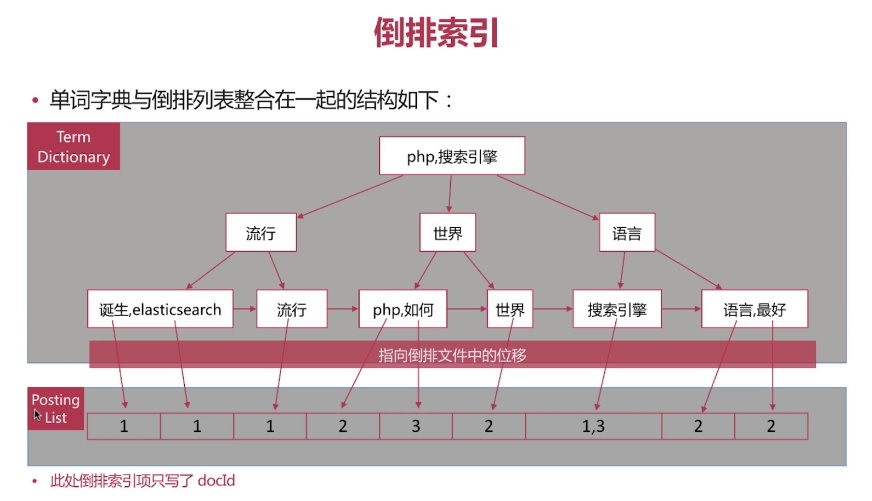
倒排索引是搜索引擎的核心,主要包含两部分:
单词词典(Term Dictionary)
倒排列表(Posting List)
倒排索引-单词词典
记录所有文档的单词,一般都比较大
记录单词到倒排索引列表的关联信息
倒排索引-单词词典
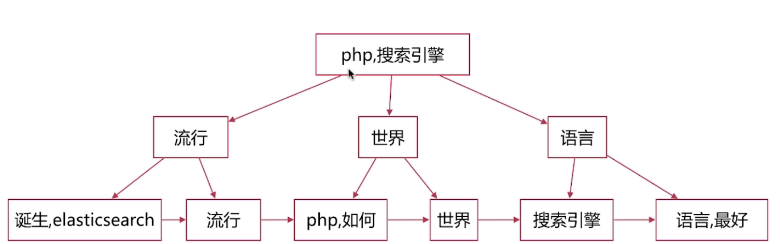
单词词典的实现一般是用B+Tree, 示例图如下:
倒排索引- 倒排列表
倒排列表(Posting List) 记录了单词对应的文档集合,有倒排索引项(Posting)组成.
倒排索引项(Posting) 主要包含如下信息:
| 因素 | 说明 |
|---|---|
| 文档ID | 获取原始数据 |
| 单词频率(TF) | 记录该单词在该文档中出现的次数(主要用于相关性的打分) |
| 位置 | 记录单词在文档中的分词位置(用于做词语搜索) |
| 偏移 | 记录单词在文档的开始和结束的位置,用于高亮显示 |
例如:
| 文档ID | 文档内容 |
|---|---|
| 1 | elasticsearch是最流行的搜索引擎 |
| 2 | php是世界上最好的语言 |
| 3 | 搜索引擎是如何诞生的 |
| DocId | TF | Postion | Offset |
|---|---|---|---|
| 1 | 1 | 2 | <18,22> |
| 3 | 1 | 0 | <0,4> |