

1、授权位置
//wxml
<button bindtap='onAuthLocation' >授权位置</button>

//js
onAuthLocation() {
    wx.authorize({
      scope: 'scope.userLocation',
      success: (res) => {
        console.log('成功:', res)
      },
      fail: (res) => {
        console.log('失败:', res)
      },
    })
}

//app.json
"permission":{
    "scope.userLocation":{
      "desc":"您的位置信息将用于小程序位置接口的效果展示"
    }
}
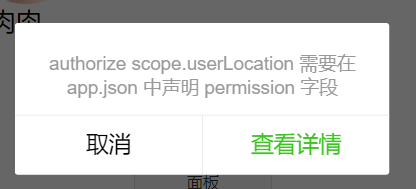
注:app.json文件中必须配置 permission,否则会报错,如下图:
2、用户拒绝位置授权
- 用户拒绝授权后,再次点击 授权位置 时,将不再展示授权弹窗。
- 可以通过更改设置,手动授权
// wxml
<button bindtap='gotoSetting' >打开授权信息面板</button>

//js
gotoSetting: function(){
    wx.openSetting({
      success: (res) => {
        console.log(res)
      }
    })
},
3、获取地理位置
地理位置授权成功后,才可以成功调用wx.getLocation接口;否则,报错:errMsg:"getLocation:fail auth deny"
//wxml
<button bindtap='getLocation'>获取地理位置</button>

//js
getLocation: function(){
    let _this =this;
    wx.getLocation({
      type: 'wgs84',
      success: function (res) {
        console.log(res)
        var latitude = res.latitude
        var longitude = res.longitude
      }
    })
 }
