四十六、1.webpack流程介绍
- webpack通过plugins实现各种功能。
- webpack流程:
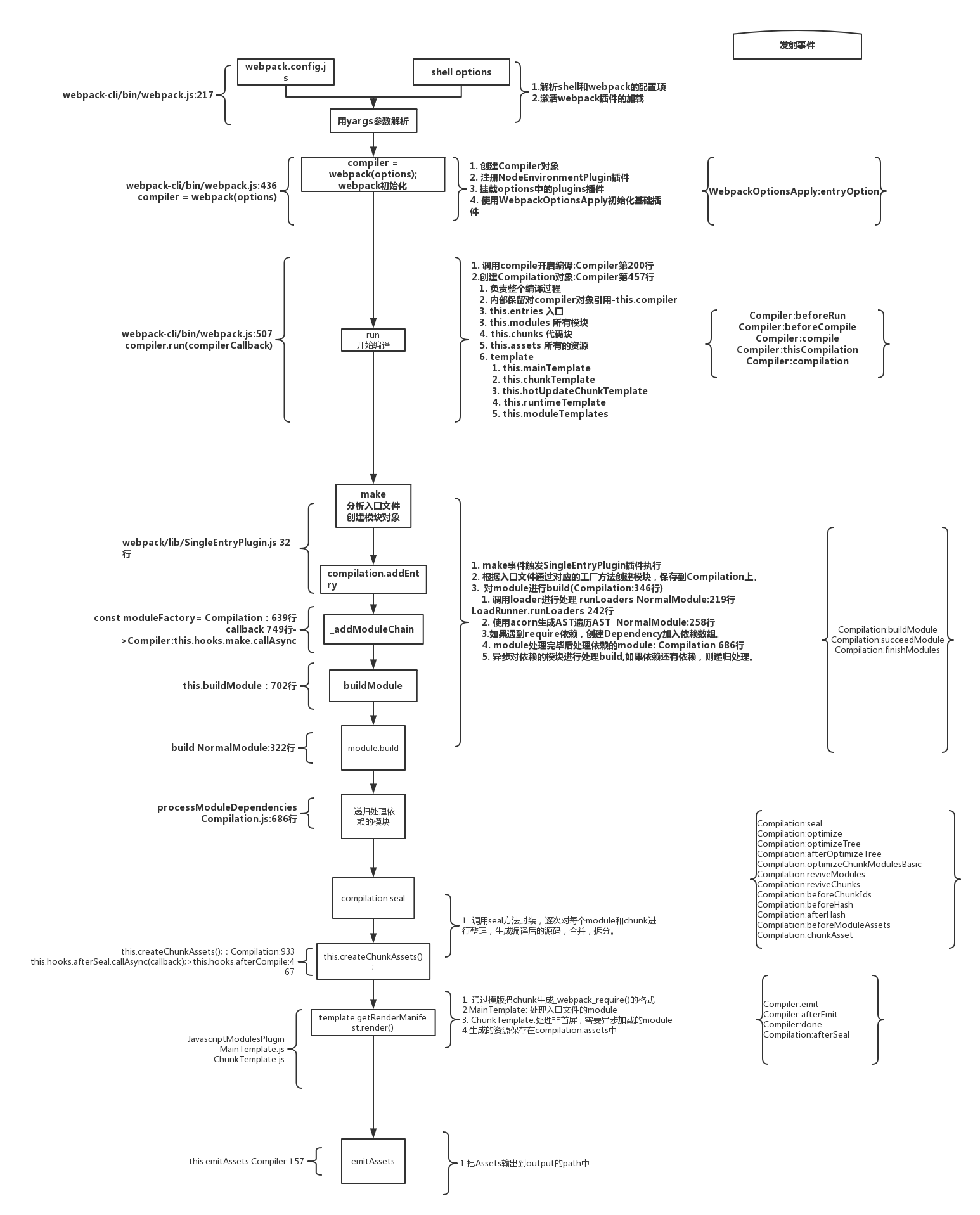
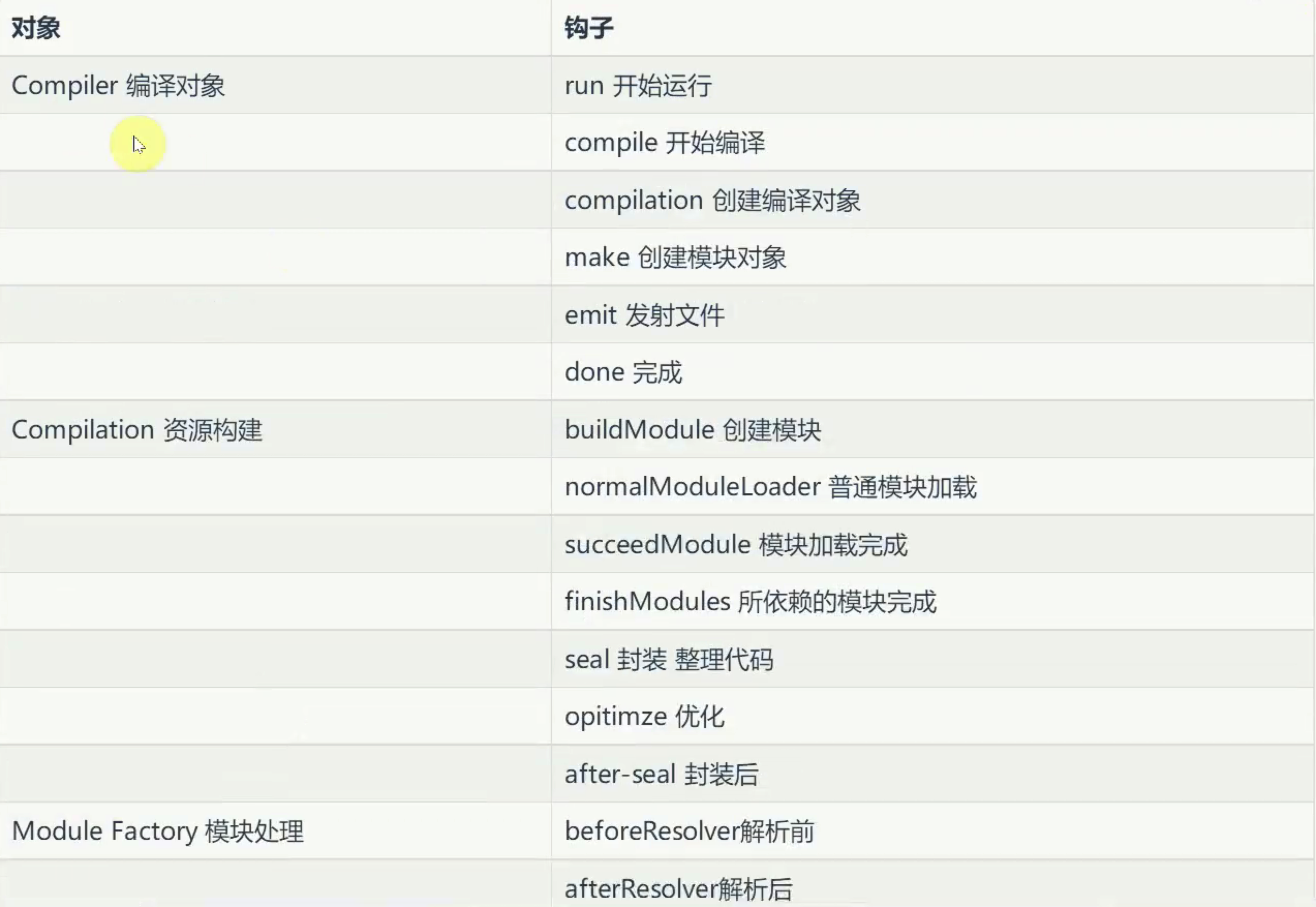
- 插件开发中最重要的两个资源:compiler和compilation对象。compiler对象代表了完整的webpack配置。compilation对象代表了一次资源版本构建
- 加载插件的对象:
四十七、2.webpack流程介绍
- webpack-plugin,安装包webpack webpack-cli ,新建src/index.js和webpack.config.js
- webpack.config.js
let path = require('path');
let DonePlugin = require('./plugins/DonePlugin');
let AsyncPlugin = require('./plugins/AsyncPlugin')
module.exports = {
  mode: 'development',
  entry: './src/index.js',
  output: {
    filename: 'bundle.js',
    path: path.resolve(__dirname, 'dist')
  },
  plugins: [
    new DonePlugin(),
    new AsyncPlugin()
  ]
}
- plugins/DonePlugin.js
class DonePlugin {
  apply(compiler) {
    // console.log(1);
    compiler.hooks.done.tap('DonePlugin', function (stat) {
      console.log('编译完成');
    })
  }
}
module.exports = DonePlugin;
- plugins/AsyncPlugin.js
class AsyncPlugin {
  apply(compiler) {
    // console.log(2);
    compiler.hooks.done.tapAsync('AsyncPlugin', function (compilation,cb) {
      setTimeout(()=>{
        console.log('cb 等一秒发射');
        cb();
      })
    })
    compiler.hooks.done.tapPromise('AsyncPlugin', function (compilation,cb) {
      return new Promise((resolve,reject)=>{
        setTimeout(()=>{
          console.log('Promise 等一秒发射');
          resolve();
        })
      })
    })
  }
}
module.exports = AsyncPlugin;
- webpack-plugin webpack webpack-cli src/index.js webpack.config.js entry output path filname path mode plugins [] DonePlugin plugins/DonePlugin.js class DonePlugin apply compiler hooks done tap stat '编译完成' module导出 AsyncPlugin.js apply compiler tapAsync compilation cb setTimeout 'cb等一秒发射' cb tapPromise 'Promise等一秒发射'
四十八、3. 文件列表插件
- 安装包 html-webpack-plugin ,使用插件
- 文件列表
- bundle.js 3882
- index.html 182
- 设置FileListPlugin
let path = require('path');
let HtmlWebpackPlugin = require('html-webpack-plugin');
let FileListPlugin = require('./plugins/FileListPlugin')
module.exports = {
  mode: 'development',
  entry: './src/index.js',
  output: {
    filename: 'bundle.js',
    path: path.resolve(__dirname, 'dist')
  },
  plugins: [
    new HtmlWebpackPlugin({
      filename: 'index.html'
    }),
    new FileListPlugin({
      filename: 'list.md'
    })
  ]
}
- plugins/FileListPlugin.js
class FileListPlugin {
constructor({ filename }) {
this.filename = filename;
}
apply(compiler) {
// 文件准备好了,进行发射 emit
compiler.hooks.emit.tap('FileListPlugin', (compilation) => {
// compilation.assets 所有的资源文件
// console.log(compilation.assets); // { 'bundle.js':CachedSource {...},'index.html': { source: [Function: source], size: [Function: size] } }
//
// - bundle.js 23
let assets = compilation.assets;
let content = `
// [ [bundle.js,{}], [index.html,{}] ]
console.log(assets);
Object.entries(assets).forEach(([filename, statObj]) => {
content += `- ${filename} ${statObj.size()}\r\n`;
})
assets[this.filename] = {
source() {
return content;
},
size() {
return content.length;
}
}
})
}
}
module.exports = FileListPlugin;
- html-webpack-plugin FileListPlugin new filename list.md class apply 文件准备好发射 emit hooks.emit.tapAsync compilation .assets source和size组成 constructor filename ##文件名 资源大小 \r\n content [bundle.js,'24'] Object.entries assets forEach [filename,statObj] filename statObj.size return content return content.length 资源对象
四十九、4. 内联webpack插件:把外联的标签变成内联的标签
- 安装包 mini-css-extract-plugin html-webpack-plugin
- webpack.config.js
let path = require('path');
let HtmlWebpackPlugin = require('html-webpack-plugin');
let FileListPlugin = require('./plugins/FileListPlugin');
let MiniCssExtractPlugin = require('mini-css-extract-plugin');
let InlineSourcePlugin = require('./plugins/InlineSourcePlugin')
module.exports = {
  mode: 'development',
  entry: './src/index.js',
  output: {
    filename: 'bundle.js',
    path: path.resolve(__dirname, 'dist')
  },
  module: {
    rules: [
      {
        test: /\.css$/,
        use: [MiniCssExtractPlugin.loader, 'css-loader']
      }
    ]
  },
  plugins: [
    new MiniCssExtractPlugin({
      filename: 'main.css'
    }),
    new HtmlWebpackPlugin({
      filename: 'index.html'
    }),
    new FileListPlugin({
      filename: 'list.md'
    }),
    new InlineSourcePlugin({
      match: /\.(js|css)/
    })
  ]
}
- plugins/InlineSourcePlugin.js
const HtmlWebpackPlugin = require('html-webpack-plugin');
class InlineSourcePlugin { // 把外联的标签变成内联的标签
constructor({ match }) {
this.reg = match;
}
processTag(tag, compilation) { //
// console.log(tag);
let newTag, url;
if (tag.tagName === 'link' && this.reg.test(tag.attributes.href)) {
newTag = {
tagName: 'style',
attributes: { type: 'text/css' }
}
url = tag.attributes.href;
}
if (tag.tagName === 'script' && this.reg.test(tag.attributes.src)) {
newTag = {
tagName: 'script',
attributes: { type: 'application/javascript' }
}
url = tag.attributes.src;
}
if (url) {
newTag.innerHTML = compilation.assets[url].source(); // 文件内容放到innerHTML属性上
delete compilation.assets[url]; // 删除掉原有应该生成的资源
return newTag;
}
return tag;
}
processTags(data, compilation) { //
let headTags = [];
let bodyTags = [];
data.headTags.forEach(headTag => {
headTags.push(this.processTag(headTag, compilation));
});
data.bodyTags.forEach(bodyTag => {
bodyTags.push(this.processTag(bodyTag, compilation));
});
return { ...data, headTags, bodyTags } //
}
apply(compiler) {
//
compiler.hooks.compilation.tap('InlineSourcePlugin', (compilation) => {
HtmlWebpackPlugin.getHooks(compilation).alterAssetTagGroups.tapAsync('alterPlugin', (data, cb) => {
// console.log(data); {headTags: [], body: [],...} //
data = this.processTags(data, compilation) // compilation.assets
cb(null, data);
})
})
}
}
module.exports = InlineSourcePlugin;
- index.css import css-loader mini-css-extract-plugin module rules .js user MiniCssExtractPlugin .loader new 'css-loader' InlineSourcePlugin 把外联的标签变成内联的标签 InlineSourcePlugin new match .(js|css) contructor match apply 要通过webpackPlugin来实现功能 html-webpack-plugin compilation data cb getHooks processTags data compilation processTags处理引入标签的数据 HeadTag [] bodyTag [] forEach push processTag return ...data headTags bodyTags processTag 处理某一标签 tag.tagName link tag attributes href script src newTag style script url href src url innerHTML compilation assets url source return attributes type text/css type application/javascript return newTag delete compilation.assets[url]
五十、5. 打包后自动发布:qiniu上传
- 安装包 qiniu
- webpack.config.js
let UploadPlugin = require('./plugins/UploadPlugin')

    new UploadPlugin({
      bucket: 'kftstatic',/*用户名*/
      domain: 'fantengkong.com',/*域名*/
      accessKey: '333333',/*AK秘钥*/
      secretKey: '333333'/*SK秘钥*/
    })
- plugins/UploadPlugin.js
let path = require('path');
let qiniu = require('qiniu');
class UploadPlugin {
  constructor(options) {
    let { bucket = '', domain = '', accessKey = '', secretKey = '' } = options;
    let mac = new qiniu.auth.digest.Mac(accessKey, secretKey);
    let putPolicy = new qiniu.rs.PutPolicy({ scope: bucket });
    this.uploadToken = putPolicy.uploadToken(mac);
    let config = new qiniu.conf.Config();
    this.formUploader = new qiniu.form_up.FormUploader(config);
    this.putExtra = new qiniu.form_up.PutExtra();
  }
  apply(compiler) {
    compiler.hooks.afterEmit.tapPromise('UploadPlugin', (compilation) => {
      let assets = compilation.assets;
      let promises = [];
      Object.keys(assets).forEach(filename => {
        promises.push(this.upload(filename));
      })
      return Promise.all(promises);
    })
  }
  upload(filename) {
    return new Promise((resolve, reject) => {
      let localFile = path.resolve(__dirname, '../dist', filename);
      this.formUploader.putFile(this.uploadToken, filename, localFile, this.putExtra, function (respErr, respBody, respInfo) {
        if (respErr) {
          reject(respErr);
        }else{
          if (respInfo.statusCode == 200) {
            resolve(respBody);
          }
        }
      })
    })
  }
}
module.exports = UploadPlugin;
- 自动上传插件 UploadPlugin 七牛网 上传到七牛云 对象存储 {bucket: '',/用户名/ domain: '',/域名/ accessKey: '',/AK秘钥/ secretKey: ''/SK秘钥/} class constructor 03:55 apply compiler afterEmit tapPromise compilation assets Keys filename Promise.all promises this.upload push upload filename new Promise this.formUploader... qiniu包 localFile publicPath
webpack.config.js
let path = require('path');
let DonePlugin = require('./plugins/DonePlugin');
let AsyncPlugin = require('./plugins/AsyncPlugin');
let HtmlWebpackPlugin = require('html-webpack-plugin');
let FileListPlugin = require('./plugins/FileListPlugin');
let MiniCssExtractPlugin = require('mini-css-extract-plugin');
let InlineSourcePlugin = require('./plugins/InlineSourcePlugin');
let UploadPlugin = require('./plugins/UploadPlugin')
module.exports = {
  mode: 'development',
  entry: './src/index.js',
  output: {
    filename: 'bundle.js',
    path: path.resolve(__dirname, 'dist')
  },
  module: {
    rules: [
      {
        test: /\.css$/,
        use: [MiniCssExtractPlugin.loader, 'css-loader']
      }
    ]
  },
  plugins: [
    new MiniCssExtractPlugin({
      filename: 'main.css'
    }),
    new HtmlWebpackPlugin({
      filename: 'index.html'
    }),
    new FileListPlugin({
      filename: 'list.md'
    }),
    // new InlineSourcePlugin({
    //   match: /\.(js|css)/
    // })
    new UploadPlugin({
      bucket: 'kftstatic',/*用户名*/
      domain: 'fantengkong.com',/*域名*/
      accessKey: '333333',/*AK秘钥*/
      secretKey: '333333'/*SK秘钥*/
    })
    // new DonePlugin(),
    // new AsyncPlugin()
  ]
}
package.js
{
  "name": "webpack-plugin",
  "version": "1.0.0",
  "main": "index.js",
  "license": "MIT",
  "devDependencies": {
    "css-loader": "^3.0.0",
    "html-webpack-plugin": "^4.0.0-beta.5",
    "mini-css-extract-plugin": "^0.7.0",
    "qiniu": "^7.2.2",
    "webpack": "^4.35.2",
    "webpack-cli": "^3.3.5"
  }
}