类似这种
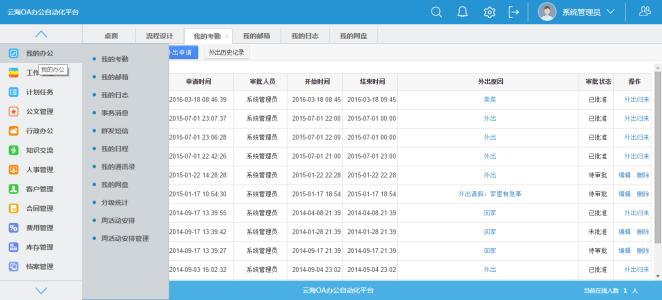
这里我们得需要 Vuex 并且搭载持久化插件
目录 src/stroe/view.js(用这个处理store来处理tab页逻辑)
import router from '@/router.js'
let state = {
    routeTagViewArr: []
}

let mutations = {
    addTagView(state, route) {
        let flag = false;  // 默认没有这个
        state.routeTagViewArr.forEach((element, index) => {
            element.is = false;
            if (element.path === route.path) {
                flag = true; // 有
                element.is = true;
            }
        });
        if (flag) {

        } else {
            let name = '';
            if (route.query.name) { // 如果  参数带了名称
                name = route.query.name;
            } else {
                name = route.meta.title;
            }
            state.routeTagViewArr.push({ title: name, path: route.path, is: true, compname: route.name ,query: route.query })
        }

    },
    removeTagVie(state, item) {
        state.routeTagViewArr.forEach((element, index) => {
            if (element.path === item.path) {
                if (item.is) {
                    router.push(state.routeTagViewArr[index - 1].path)
                }
                state.routeTagViewArr.splice(index, 1)
            }
        });
    },
    setTagViews(state, tags) {
        state.routeTagViewArr = tags;
    },
}
let actions = {}
export default {
    state, mutations, actions, getters,
    namespaced: true
};
然后我们拥有一个这样的组件 src/components/public/tagsview/tagsview.vue
<template>
  <div style="position:relative;">
    <div class="tags-view-wrapper">
      <div style="float:right;padding:3px;z-index:999;">
        <el-button type="primary" size="small" icon="el-icon-refresh" @click="reload"></el-button>
      </div>
      <div
        class="tags-item"
        :class="{'tag-active':item.is}"
        v-for="(item , index) in $store.state.view.routeTagViewArr"
        :key="item.path"
        @click="target(item,$event)"
      >
        {{item.title}}
        <span class="el-icon-close" v-show="index > 0 " @click="closeView(item)"></span>
      </div>
      <div class="clearfix"></div>
    </div>
  </div>
</template>

<script>
let vm = {};
export default {
  name: "tagsview",
  mounted() {
    vm = this;
  },
  methods: {
    target(item, event) {
      if (event.srcElement.nodeName.toLowerCase() === "span") {
        // 关闭
      } else {
        this.$router.push({ path: item.path  , query : item.query});
      }
    },
    closeView(item) {
      this.$store.commit("view/removeTagVie", item);
    },
    reload() {
      window.location.reload();
    }
  }
};
</script>

<style scoped>
.tags-view-wrapper {
  height: 40px;
  overflow: hidden;
  width:100%;
}
.tags-view-wrapper .tags-item {
  color: #666;
  height: 100%;
  min-width: 120px;
  box-sizing: border-box;
  line-height: 37px;
  text-align: center;
  font-size: 12px;
  margin: 0px;
  display: inline-block;
  float: left;
  border: solid 1px #efefef;
}
.tags-view-wrapper .tags-item:hover {
  cursor: pointer;
}
.tags-view-wrapper .tags-item .el-icon-close {
  margin-left: 13px;
}
.tags-view-wrapper .tags-item .el-icon-close:hover {
  background-color: #ccc;
  color: white;
  border-radius: 50%;
}
.tag-active {
  background-color: #ffffff;
  position: relative;
}
.tag-active::after{
  content:"" ;
  width:100%;
  height:2px;
  position:absolute ;
  bottom:1px;
  background-color: #36BCB0;
  left:0px;
}
</style>
还有一件非常重要的事 .... (在哪里添加这个标签页呢)
src/router.js
router.afterEach((to, from) => {
    store.commit("view/addTagView", to);
});
原理其实很简单
- 让vue-router 的路由守卫去监听路由跳转
- 跳转之后再通过store 添加这条路由信息
- 在tagsview.vue 中循环遍历vuex 中的路由信息
- 以及用户点击了关闭按钮 就删除vuex中这条路由信息
这个 小功能就实现了